

Trip.com Travel Insurance: Coverage, Costs & Claims

By Trip.com
November 23, 2026

Planning a trip from the Philippines? Trip.com offers insurance and booking protection options for selected travel products. Whether you're booking flights, hotels, or rental cars, it's important to understand what's included. This guide explains the available options, how to check coverage, and what to do if you need to file a claim.
What Is Trip.com Travel Insurance?

Trip.com travel insurance refers to insurance products offered through Trip.com and its participating insurance providers. Depending on the booking, eligible travelers may find insurance options that help protect against certain travel-related risks.
For Filipino travelers, available protection may include flight-related insurance and car rental insurance. Trip.com also offers flexible booking features, such as Air Flexibility and hotel free cancellation, which are different from travel insurance.
However, insurance is not automatically included in every Trip.com booking. Availability, coverage, and pricing depend on the selected product, provider, and booking details.
Trip.com Insurance and Protection Options
- Flight Insurance: Insurance may be available for selected flights, with benefits and exclusions determined by the provider.
- Car Rental Insurance: Eligible rental packages may include protection against certain vehicle damage, theft, or liability.
- Air Flexibility: An optional feature for eligible flights that provides change or cancellation benefits under specific conditions.
- Hotel Free Cancellation: Allows travelers to cancel eligible hotel bookings without a hotel cancellation penalty before the stated deadline.
For questions about available protection or insurance claims, visit the Trip.com Help Center.
📝 Important: Insurance options and booking protection features are not the same. Always check the terms, coverage, exclusions, and eligibility before purchasing.

Types of Trip.com Travel Insurance and Protection
Trip.com provides several insurance and booking protection options. The available features depend on the type of travel product you book.
1. Trip.com Flight Insurance
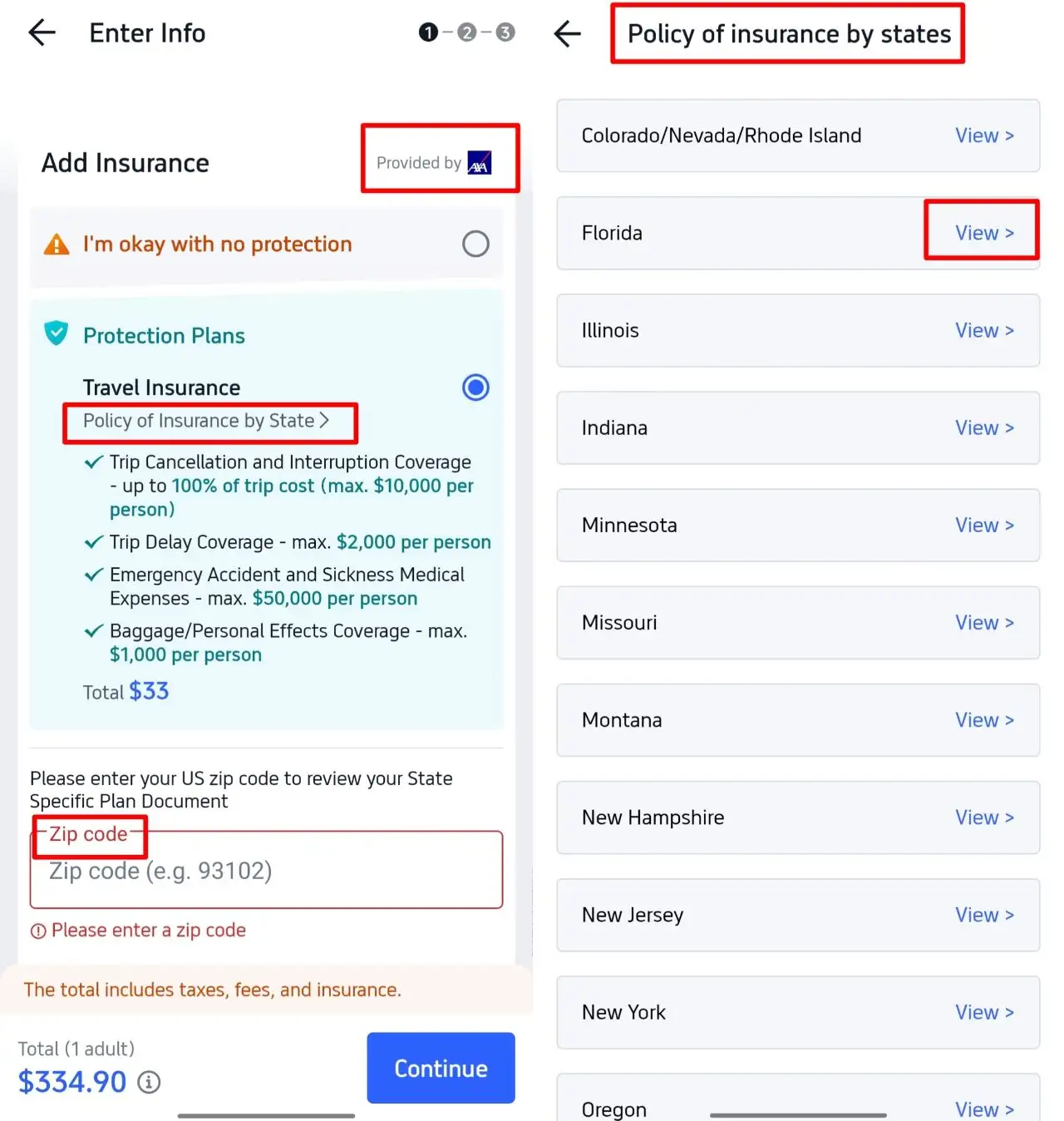
Flight insurance may be available through participating airlines or insurance providers when booking eligible flights on Trip.com.
Depending on the actual policy, coverage may include selected flight-related incidents. However, not every flight booking offers an insurance option.
How to check flight insurance on Trip.com:
- Visit Trip.com Flights.
- Enter your departure city, destination, and travel dates.
- Choose your preferred flight.
- Review the available services and add-ons during checkout.
- If insurance is offered, read the policy details before purchasing.
Check the insurer's name, coverage period, compensation limits, and exclusions.
If no insurance option appears during booking, do not assume that your ticket includes insurance.
2. Trip.com Air Flexibility
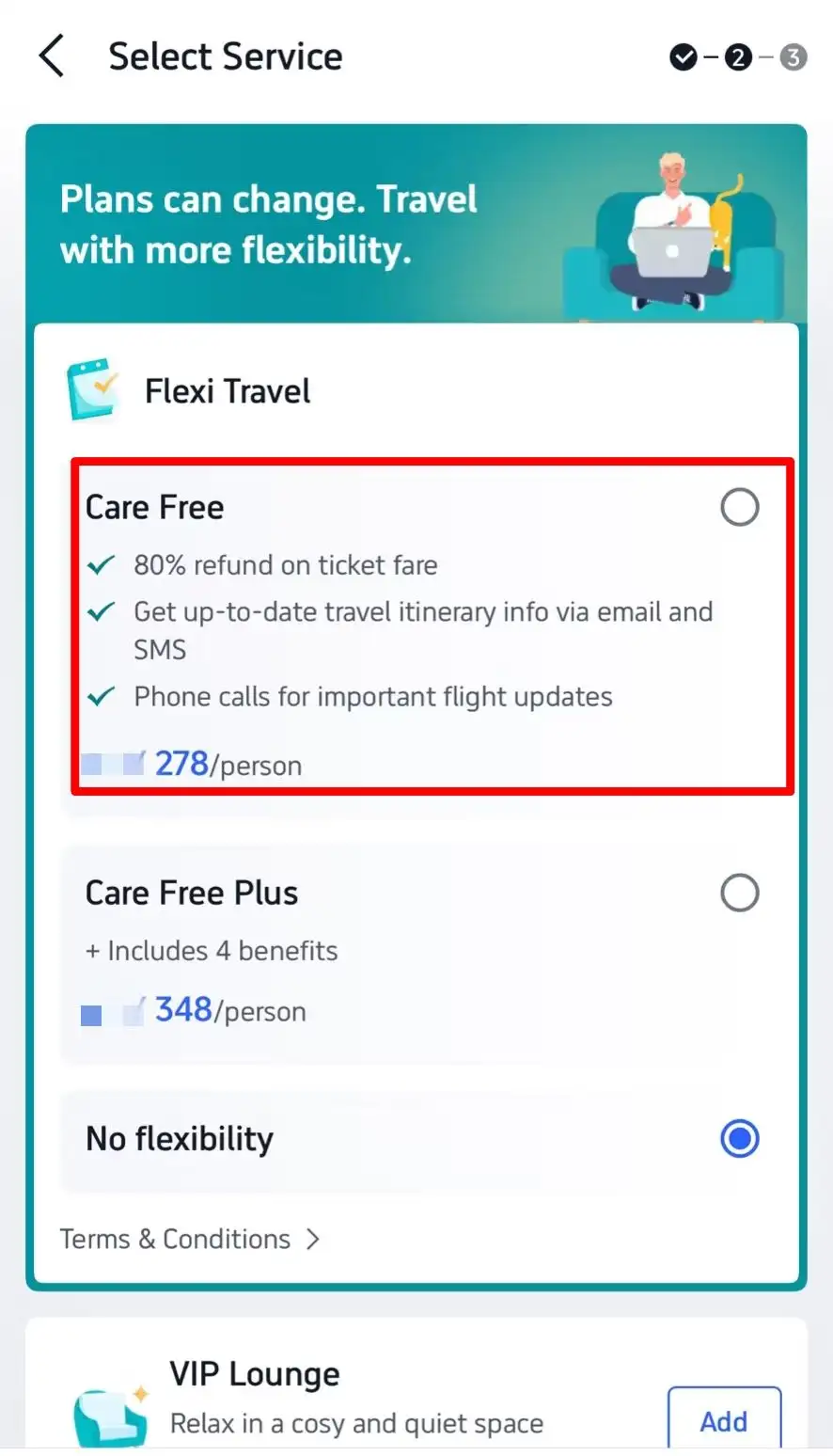
Air Flexibility is an optional booking service available for selected flights.
It provides additional flexibility when travelers need to change or cancel eligible flight bookings.
Depending on the specific service terms, benefits may include:
- An eligible flight change.
- An eligible flight cancellation and refund.
- Reduced change or cancellation costs under the add-on's conditions.
Air Flexibility generally provides a choice of benefits rather than unlimited changes or cancellations.
The service fee is normally non-refundable, and fare differences or additional charges may still apply.
How to add Air Flexibility:
- Search for flights on Trip.com.
- Select an eligible flight.
- Check whether Air Flexibility is offered.
- Review the service fee and conditions.
- Add the service before completing your booking.
⚠️ Important: Air Flexibility is not travel insurance. It is a separate booking service, and its benefits apply only under the stated conditions.
3. Trip.com Hotel Cancellation Protection
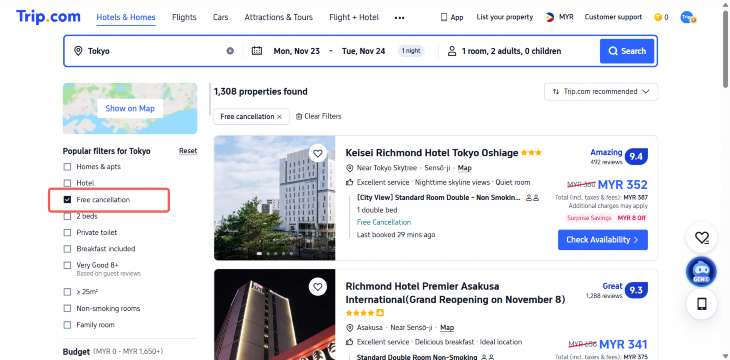
Trip.com allows travelers to search for hotels with flexible cancellation policies.
Although this can help protect your travel budget, free hotel cancellation is not a traditional travel insurance product.
For example, an eligible room may allow you to cancel without a hotel cancellation penalty before a specified deadline.
However, another room at the same property may be non-refundable.
How to find hotels with free cancellation:
- Visit Trip.com Hotels.
- Enter your destination, check-in date, and check-out date.
- Look for the Free Cancellation filter.
- Compare available hotels and room types.
- Check the cancellation deadline before booking.
If you cancel after the deadline, the hotel may charge a cancellation fee based on the selected room's policy.
4. Trip.com Car Rental Insurance
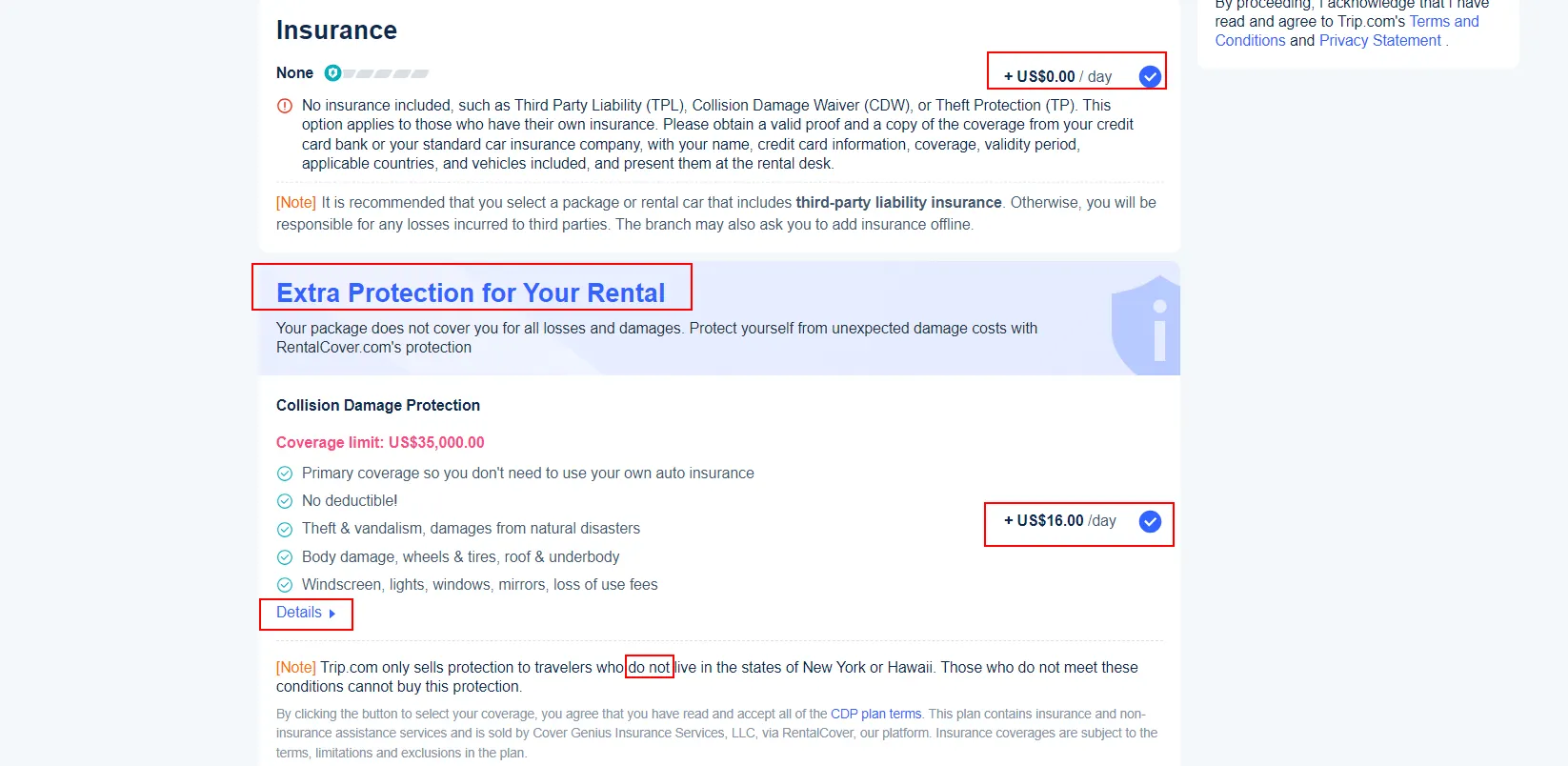
Travelers booking rental cars on Trip.com can review the insurance and protection included with eligible rental packages.
Depending on the supplier and selected package, protection may include:
- Collision Damage Waiver (CDW): May limit your financial responsibility for certain vehicle damage.
- Theft Protection (TP): May reduce your responsibility if the rental vehicle is stolen.
- Third-Party Liability (TPL): Provides liability protection according to the rental agreement and applicable rules.
- Additional Protection: Optional coverage may be available for certain risks not included in the basic rental package.
Insurance availability and coverage limits vary by destination, rental company, and vehicle.
Some packages also include a deductible or excess, which is the amount you may need to pay when a covered incident occurs.
How to check car rental insurance:
- Visit Trip.com Car Rentals.
- Enter your pickup location and rental dates.
- Select a rental vehicle.
- Review the insurance included in the rental package.
- Compare any additional protection options.
- Check the coverage limits and excess before confirming.
What Does Trip.com Travel Insurance Cover?
Coverage depends on the insurance product and provider. There is no single insurance policy that applies to every Trip.com booking.
The following examples explain how different insurance and booking protection options work.
| Product or Feature | Possible Benefit |
|---|---|
Flight insurance | Coverage for incidents specifically listed in an eligible policy |
Car rental collision protection | Protection against qualifying vehicle damage |
Car rental theft protection | Protection against eligible theft-related losses |
Third-party liability coverage | Liability protection according to the rental agreement |
Air Flexibility | Eligible flight changes or cancellations |
Hotel free cancellation | Cancellation without a hotel penalty before the deadline |
Note: Air Flexibility and hotel free cancellation are not insurance products. The actual benefits of insurance policies must be checked separately.
What Is Not Covered?
Insurance products and booking protection features have limitations.
Depending on the policy or service, exclusions may include:
- Incidents not listed as covered events.
- Losses that occurred before the coverage started.
- Claims exceeding the policy's compensation limit.
- Damage caused by prohibited activities or violations of rental terms.
- Claims submitted without required supporting documents.
- Flight changes or cancellations outside the applicable service conditions.
- Hotel cancellations made after the free cancellation deadline.
Read the relevant policy or booking terms to understand what is excluded.
⚠️ Important: Purchasing insurance or booking protection does not guarantee compensation for every cancellation, delay, or unexpected expense.
How to Claim Trip.com Travel Insurance
If you purchased an eligible insurance policy and need to file a claim, follow the instructions provided by the insurance company.
The exact procedure depends on your policy and the type of incident.
Step 1: Check Your Insurance Documents
Find your insurance confirmation and review the policy.
Check the insurance provider, policy number, covered events, and reporting deadlines.
Step 2: Report the Incident
Contact the relevant insurance provider as soon as possible.
For car rental incidents, also follow the rental company's reporting instructions.
For flight-related incidents, obtain written confirmation from the airline when required.
Step 3: Prepare Supporting Documents
Depending on your claim, you may need:
- Insurance policy or certificate.
- Trip.com booking confirmation.
- Passport or identification.
- Flight delay or cancellation notice.
- Relevant receipts or payment records.
- Car rental agreement.
- Vehicle damage report or photographs.
- Police report, if required for a rental vehicle incident.
The provider may request additional documents.
Step 4: Submit Your Claim
Follow the insurance provider's official claim instructions.
You may need to complete an online claim form, provide a description of the incident, and upload supporting documents.
Do not assume that all insurance claims can be submitted directly through Trip.com.
Step 5: Wait for the Claim Review
The insurance company will assess your claim according to the policy.
It may request further details or additional documentation.
Processing times vary depending on the provider and complexity of the claim.
Step 6: Receive the Claim Decision
If approved, compensation will be provided according to the insurance policy.
The final amount may be affected by coverage limits, deductibles, and other conditions.
📝 Pro Tip: Save digital copies of your insurance documents, booking confirmation, and receipts. Keep the insurer's contact details available in case you need assistance during your trip.
 NO.1










































































How Long Does a Trip.com Insurance Claim Take?
Insurance claim processing times depend on the provider and type of claim.
There is no guaranteed processing period for every insurance product available through Trip.com.
Factors affecting processing time may include:
- The type of incident.
- The insurance provider.
- Whether the submitted documents are complete.
- The need for additional verification.
- The complexity of the claim.
For the most accurate estimate, contact the insurer or review the claims information included with your policy.
Trip.com Travel Insurance vs. Air Flexibility vs. Free Cancellation
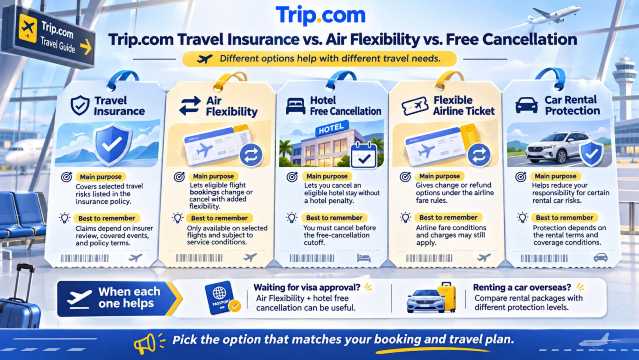
Although these options can help reduce certain travel-related financial risks, they serve different purposes.
| Feature | Main Purpose | Important Condition |
|---|---|---|
Travel insurance | Covers specific risks listed in the policy | Subject to insurer approval and policy conditions |
Air Flexibility | Provides eligible flight change or cancellation benefits | Available for selected flight bookings |
Hotel free cancellation | Allows cancellation without a hotel penalty | Must cancel before the stated deadline |
Flexible airline ticket | Provides changes or refunds under airline fare rules | Fare conditions and charges may apply |
Car rental protection | Limits responsibility for specified rental vehicle risks | Subject to rental agreement and coverage conditions |
For example, a traveler waiting for visa approval may prefer an eligible flight with Air Flexibility and a hotel room with free cancellation.
Someone renting a car abroad may want to compare packages with different levels of vehicle protection.
Choose the option that matches your booking and travel plans.







Is Trip.com Travel Insurance Worth It for Filipinos?
Whether insurance or additional booking protection is worth purchasing depends on your travel arrangements.
For Filipino travelers, these options may be useful in several situations.
When Additional Protection May Be Useful
- Flights with uncertain travel dates: Air Flexibility may help when your departure date could change.
- Trips requiring visa approval: Flexible flights and hotels may be useful while waiting for a visa decision.
- Car rentals abroad: Additional vehicle protection may help reduce certain financial risks.
- Advance hotel reservations: Free cancellation can make changing accommodation plans easier.
- Family vacations: Flexible booking conditions may be useful when coordinating several travelers.
- Trips during typhoon season: Reviewing cancellation and change conditions can help you prepare for possible disruptions.
Before paying for additional protection, compare the cost with the actual benefits.
Check whether your ticket, rental package, or hotel reservation already includes the flexibility you need.
Important Tips Before Buying Trip.com Travel Insurance
Before purchasing insurance or additional booking protection, consider the following:
- Check availability: Not every flight or car rental offers the same insurance options.
- Read the terms: Review coverage limits, conditions, and exclusions.
- Check the provider: Identify the insurance company responsible for your policy.
- Compare prices: Look at the total cost of the booking and optional protection.
- Understand the excess: For rental cars, check how much you may need to pay after an incident.
- Review cancellation deadlines: Confirm when hotel or flight cancellation benefits expire.
- Keep your documents: Save all booking confirmations and insurance certificates.
Choosing suitable protection can help you avoid unnecessary expenses and confusion during your trip.
FAQs About Trip.com Travel Insurance
-
Does Trip.com Offer Travel Insurance in the Philippines?
-
Is Trip.com Travel Insurance Automatically Included?
-
Is Trip.com Air Flexibility the Same as Travel Insurance?<br><br>
-
Can I Buy Trip.com Travel Insurance After Booking?
-
How Do I Claim Trip.com Travel Insurance?
Trending Searches
-
Popular Picks
-
Top Flight Links
-
Popular Hotels
-
Popular Things to Do
-
Featured guides
-
Trip.com links
- Trip.com E-Ticket
- Trip.com Payment Methods
- Trip.com Passport Change
- Trip.com Customer Service
- Trip.com Flight Cancellation
- Trip.com VIP Lounge Access
- Trip.com Phone Number
- Trip.com Check In
- Payment Sale
- Trip Coins
- Trip.com Hotel Refund
- Trip.com Cancellation Policy
- Trip.com Ticket Issued Status
- Trip.com Flight Ticket
- Trip.com Membership
- Trip.com E-Receipt
- Trip.com Seat Selection
- Trip.com Baggage Allowance
- Trip.com Flight Change
- Trip.com Reviews
- Flights from Manila to Hong Kong
- Flights from Manila to General Santos
- Flights from Manila to Iloilo City
- Flights from Manila to Bacolod
- Flights from Bacolod to Manila
- Flights from Manila to Tokyo
- Flights from Manila to Tagbilaran
- Flights from Manila to Cebu
- EK2521 Flight Status
- RX874 Flight Status
- 5J187 Flight Status
- KN5896 Flight Status
- 5J995 Flight Status
- MH709 Flight Status
- 5J582 Flight Status
- Hotels near Mactan–Cebu International Airport - CEB
- Hotels near Greenland Xindu East Coast Times Square South Area
- Hotels near Taoyuan HSR Subway Station
- Hotels near Bureau of Immigration Head Office
- Hotels near Manila Central University
- Shiji Qingteng Capsule Hotel (T3 Terminal)
- De Mani Hotel
- Alta Vista de Boracay
- Shangri-La Hongqiao Airport, Shanghai
- Yitel (Beijing TiananmenWangfujing Subway Station)
- Hotels in Boracay Island
- Hotels in Davao City
- Hotels in North Jakarta
- Hotels in Sapa
- Hotels in Hanoi
- Philippines 5G eSIM | Dual Network • All AI & TikTok | Day Pass/Total Data Package | 24-Hour Billing | 1-30 Days | QR Code
- Private Mutianyu Great Wall Trip With English-speaking Driver
- Vietnam 5G eSIM | Supports Google Maps/Chat GPT | Daily package/Data package | 24-hour billing | 1-30 days | QR code
- Taoyuan International Airport | Terminal 2 VIP Lounge Service | Oriental Club Lounge
- Philippines 4G/5G eSIM | Daily/Total Data Package | 1–30 Days | 24-Hour Billing | QR Code
- Iwappara Ski Resort: 3-Hour Private Ski or Snowboard Lesson for 1-4 People
- Sofitel Macau at Ponte 16 Buffet | Mistral Restaurant Lunch/Dinner Buffet
- Huanglongjiuzhai Railway Station - Jiuzhaigou National Park shuttle bus · private charter optional
- Walking Tour through Basel Old Town
- London: Grand London Bike Tour
- Douro Valley: Small Group Wine Tour from Porto
- Wine Lovers: Winery Tour w/ Tasting & Tapas
- Traditional Chinese Mural Experience in Xi'an
- Heavenly Spa at The Westin Resort Ubud
- Hawaii O‘ahu: Dolphin watching cruise on O‘ahu + snorkeling activity + transfer and lunch
- Mothers Day Gifts
- eSIM
- Hong Kong International Airport
- International Driving Permit
- Toronto Pearson International Airport
- Universal Studios Singapore
- Great Wall of China
- UK ETA
- Narita International Airport
- China Currency
- Changi Airport
- Schengen Visa
- Singapore MRT Map
- France Visa
- Ninoy Aquino International Airport