Trip.com Cancellation Policy: For Flights, Hotels

By Trip.com
June 26, 2026

As the saying goes, "Expect the unexpected," and that also applies with travel plans. You may plan all you want, but unforeseen circumstances can always change what you have initially mapped out. If you were not able to dodge this unexpected situation and you need to cancel the flight or hotel booking you made on Trip.com, you may be wondering about Trip.com's Cancellation Policy. In this article, you will find a detailed guide on how to cancel your flight, hotel, and train reservations!
How to Cancel a Flight on Trip.com
Step 1: Enter the Trip.com Appgg
- Sign in to your Trip.com account on your phone.
- Tap on the "Flight" section, then go to "My Trips" to view all of your flight bookings.
Step 2: Find the Flight You Booked
- Once you have signed in, go to "My Trips" then "All Bookings" or find "All Bookings" under your "Account" in the Trip.com app.
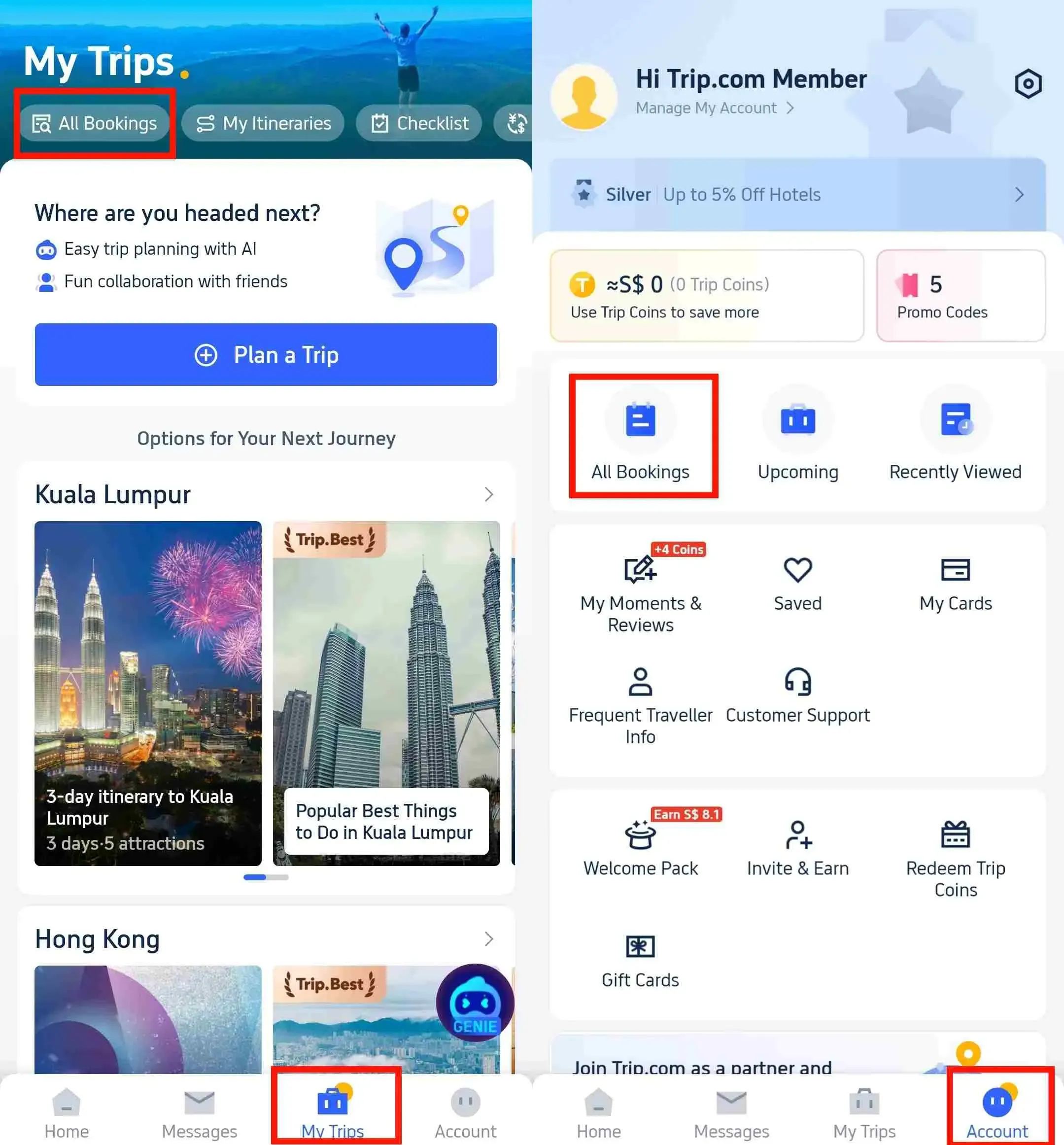
Step 3: Request Trip.com for Flight Cancellation
- Click "Manage My Booking", then tap "Cancel Booking" to cancel your flight. Remember, canceling flights at Trip.com may tag along with service and cancellation charges.
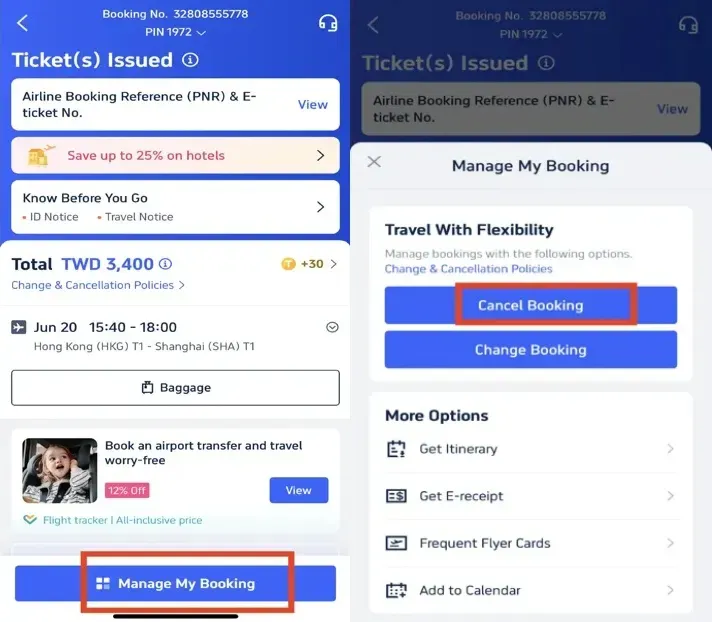
Step 4: Confirm Flight Cancellation
- Review the refund details, confirm any processing fees for canceling the flight, and then click "Next" to continue.
Step 5: Submit the Request to Trip.com
- Review your refund details and tap "Submit" to finish the cancellation process.
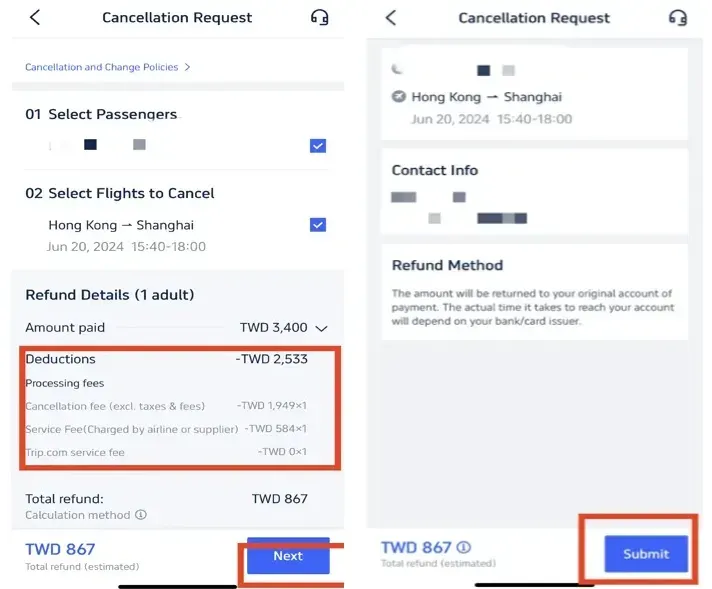
Flight Refunds vs Flight Compensation
Flight refunds and flight compensation are different. A refund depends on your airline’s fare rules, ticket type, and cancellation policy.
For flight delay, cancellation, or disruption-related compensation claims, please use AirHelp+. Trip.com can help with booking-related support, such as checking your flight details, refund status, cancellation rules, and airline policies. However, compensation claims should be handled through AirHelp+, not directly through Trip.com.
How to Cancel a Hotel Booking at Trip.com
Step 1: Enter the Trip.com App to Cancel the Booking
- Log in to your Trip.com application (Install it on your mobile device if not).
Step 2: Find the Hotel Booking
- Find your hotel booking by going to "My Trips" then "All Bookings" or find "All Bookings" under your "Account" in the Trip.com app.
Step 3: Request the Trip.com hotel refund
- Tap "Cancel Booking" to cancel the hotel reservation. Some hotels may have non-refundable policies, while others may offer full or partial refunds if you cancel by a certain date.
Step 4: Provide a resaon for cancellation
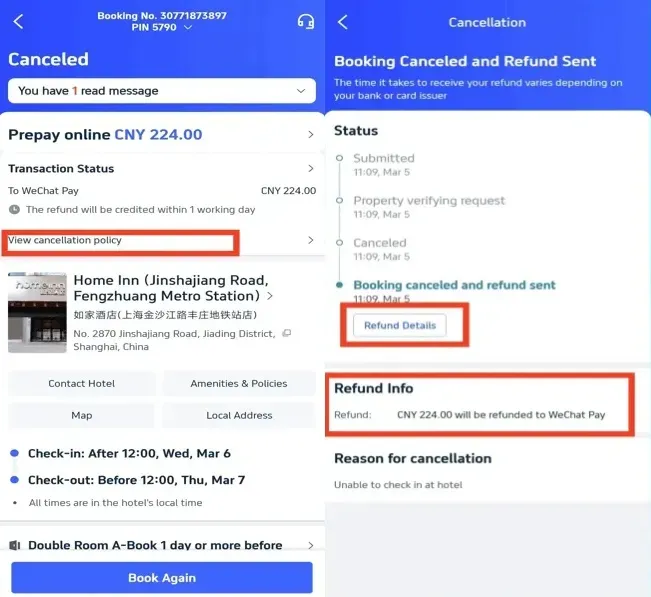
- Give the reason why you need to cancel the hotel booking and click on the button "Submit" to confirm your cancellation.
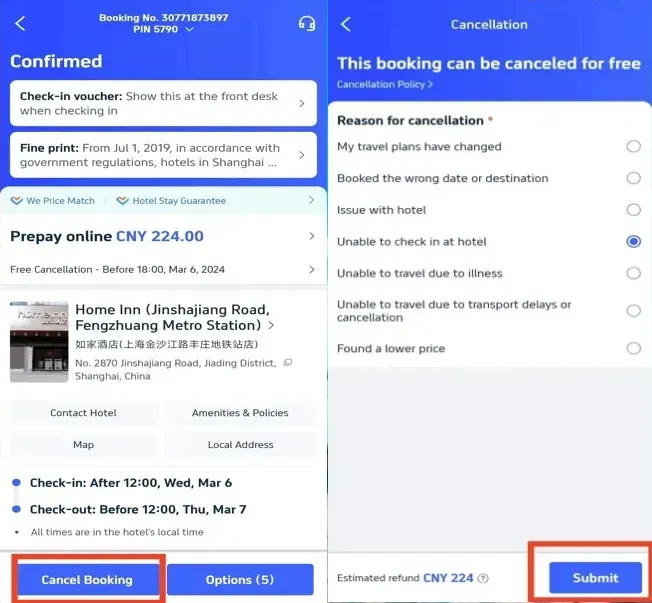
Step 5: Confirm the Trip.com hotel refund
- Once you have submitted your request, click "View cancellation policy" to check the details of your refund.
Step 6: Check the status of your Trip.com hotel refund
- Check the details and information of your refund to complete the process.
How to Cancel the Train at Trip.com
Step 1: Enter the Trip.com App to Cancel the Booking
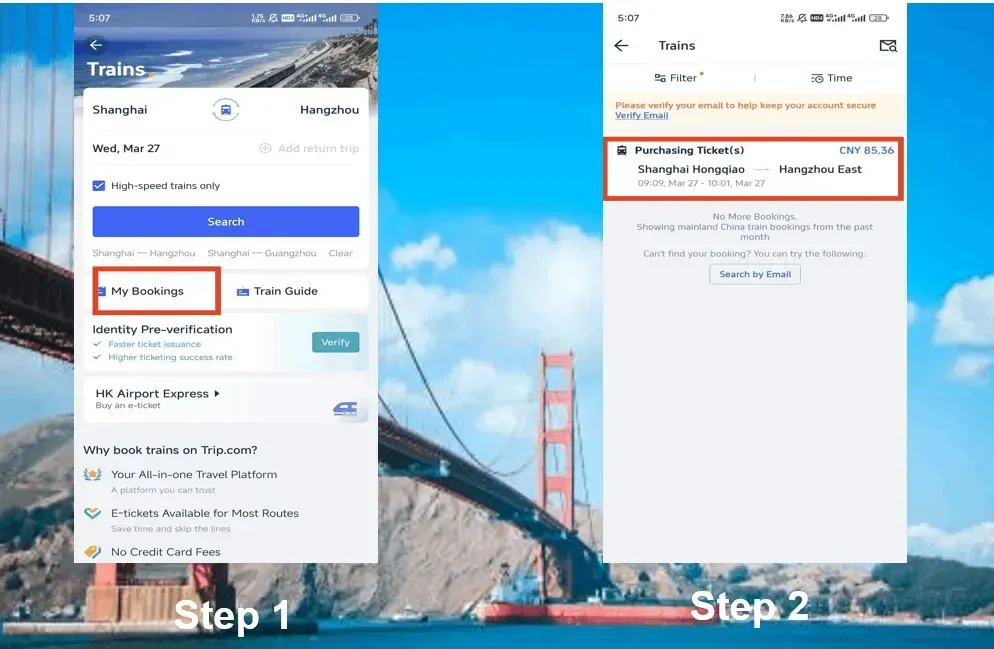
- Log in to the Trip.com account, click on "Train" section, then go to "My Bookings" to cancel the train booking.
Step 2: Select the Train You Want to Cancel
- Choose the China High-Speed train booking that you want to cancel and click on it to go to its booking page.
Step 3: Request for a Trip.com Train Booking Cancellation
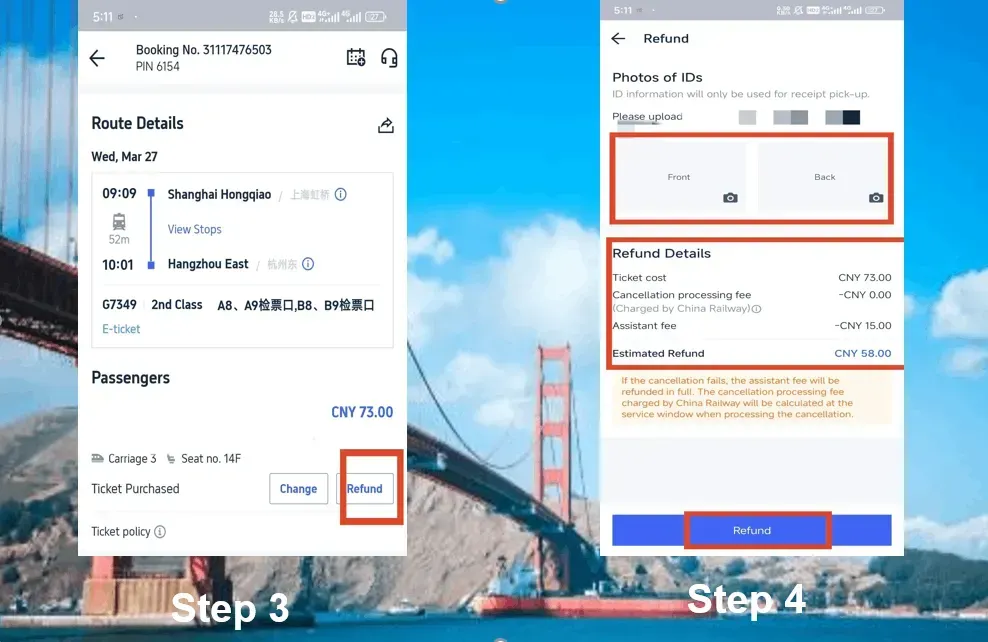
- Click "Refund" to cancel the China bullet train booking. Please note that doing so will charge an assistance fee for processing the refund.
Step 4: Complete the Trip.com Train Cancellation
- Upload photos of the front and back of your ID and check the refund details. Click "Refund" to complete the process.
China Bullet Train Refund Fee
A specific refund fee corresponds to when you cancel your booking. If you cancel your booking days ahead of the train’s departure, you will not be charged any refund fees. Here is an overview of the refund fee:
Refund Time | Refund Fee |
More than 8 days | No fee |
48 hours-7 days | 5% of the ticket fare |
24 hours-48 hours | 10% of the ticket fare |
Less than 24 hours | 20% of the ticket fare |
Start Your Journey with Trip.com
Trip.com is a global online travel agency that offers 24/7 customer service in multiple languages. It offers convenient booking services for flights, hotels, and tours and activities. Trip.com members can enjoy different benefits depending on their membership tier. Higher-tier members may get perks such as more Trip Coins, hotel discounts, reduced train refund fees, and selected airport lounge access. Always check your current Trip.com membership level to see which benefits apply.
Need Help?
📱 Enjoy app-only deals and a new user package with special offers on hotels, trains, attractions, and airport transfers.
Trending Searches
-
Popular Content
-
Top Flight Links
-
Popular Hotels
-
Popular Things to Do
-
Featured guides
-
Trip.com links
- Trip.com E-Ticket
- Trip.com Payment Methods
- Trip.com Passport Change
- Trip.com Customer Service
- Trip.com Flight Cancellation
- Trip.com VIP Lounge Access
- Trip.com Phone Number
- Trip.com Check In
- Payment Sale
- Trip Coins
- Trip.com Hotel Refund
- Trip.com Cancellation Policy
- Trip.com Ticket Issued Status
- Trip.com Flight Ticket
- Trip.com Membership
- Trip.com E-Receipt
- Trip.com Seat Selection
- Trip.com Baggage Allowance
- Trip.com Flight Change
- Trip.com Reviews
- Cheap flights from Manila to Hong Kong
- Cheap tickets from Manila to Tagbilaran
- Cheap flights from Manila to Cebu
- Cheap flights from Manila to Iloilo City
- Plane tickets from Manila to General Santos
- Plane tickets from Cebu to Manila
- Plane tickets from Bacolod to Manila
- Plane tickets from Manila to Tacloban
- CA986 Flight Status
- 5J187 Flight Status
- PR431 Flight Status
- PR741 Flight Status
- MH709 Flight Status
- EK2521 Flight Status
- 5J582 Flight Status
- Hotels near 72 wonder tower
- Hotels near Mactan–Cebu International Airport
- Hotels near Fenghuang Ancient Town
- Hotels near Greenland Xindu East Coast Times Square South Area
- Hotels near Changbai Mountain Beauty Pine International Sculpture Park
- Shiji Qingteng Capsule Hotel (T3 Terminal)
- Bangkok-Pratunam Hotel
- Shangri-La Resort
- De Mani Hotel
- Fan Yu Gaming Center
- Hotels in Fenghuang County
- Hotels in Davao City
- Hotels in North Jakarta
- Hotels in Moscow
- Hotels in Kuala Lumpur
- Philippines 5G eSIM | Dual Network • All AI & TikTok | Day Pass/Total Data Package | 24-Hour Billing | 1-30 Days | QR Code
- Private Mutianyu Great Wall Trip With English-speaking Driver
- Chengdu Departure - Bipenggou Shuttle Bus
- Vietnam | 4G/5G eSIM | Daily/Data Plan | 24-hour Billing | 1-30 Days | QR code
- Vietnam Airport VIP Fast Track Service
- Bangladesh Dhaka DAC Hazrat Shahjalal International Airport T1 terminal international departure IBalaka Executive Lounge international departure lounge experience
- Huanglongjiuzhai Railway Station - Jiuzhaigou National Park shuttle bus · private charter optional
- Lantau Island Ngong Ping 360 round-trip cable car admission ticket with priority boarding + one-way urban area transfer
- Clearwater Beach: Tiki Boat Experience
- Tallinn TV Tower Ticket
- Salalah by Night: City Lights, Souks & Mall Shopping
- Basilica San Clemente: Underground Guided Tour
- Private Bora Bora Lagoon Experience
- Liangzhu Museum + 2.5-hour Private Tour with Live Guide
- Sharm El Sheikh: 6-in-1 Quad, Camel, Dinner & Stargazing
- Mothers Day Gifts
- eSIM
- Hong Kong International Airport
- International Driving Permit
- Toronto Pearson International Airport
- Universal Studios Singapore
- Great Wall of China
- UK ETA
- Narita International Airport
- China Currency
- Changi Airport
- Schengen Visa
- Singapore MRT Map
- France Visa
- Ninoy Aquino International Airport