Finding Trip.com Phone Number: Step-by-Step Guide

By Trip.com
July 2, 2026

When you are planning your next holiday or need help with bookings, cancellations, or general questions, Trip.com is here to help. This guide provides simple steps on how to contact Trip.com customer service and find Trip.com phone numbers through the Trip.com app or website.
How to Find Trip.com Customer Service on Trip.com App
Step 1: Enter the Trip.com App to Find Trip.com Customer Support
- Log in to your Trip.com account and go to "Account" section. Then click on the "Customer Support" button to enter the detail page.
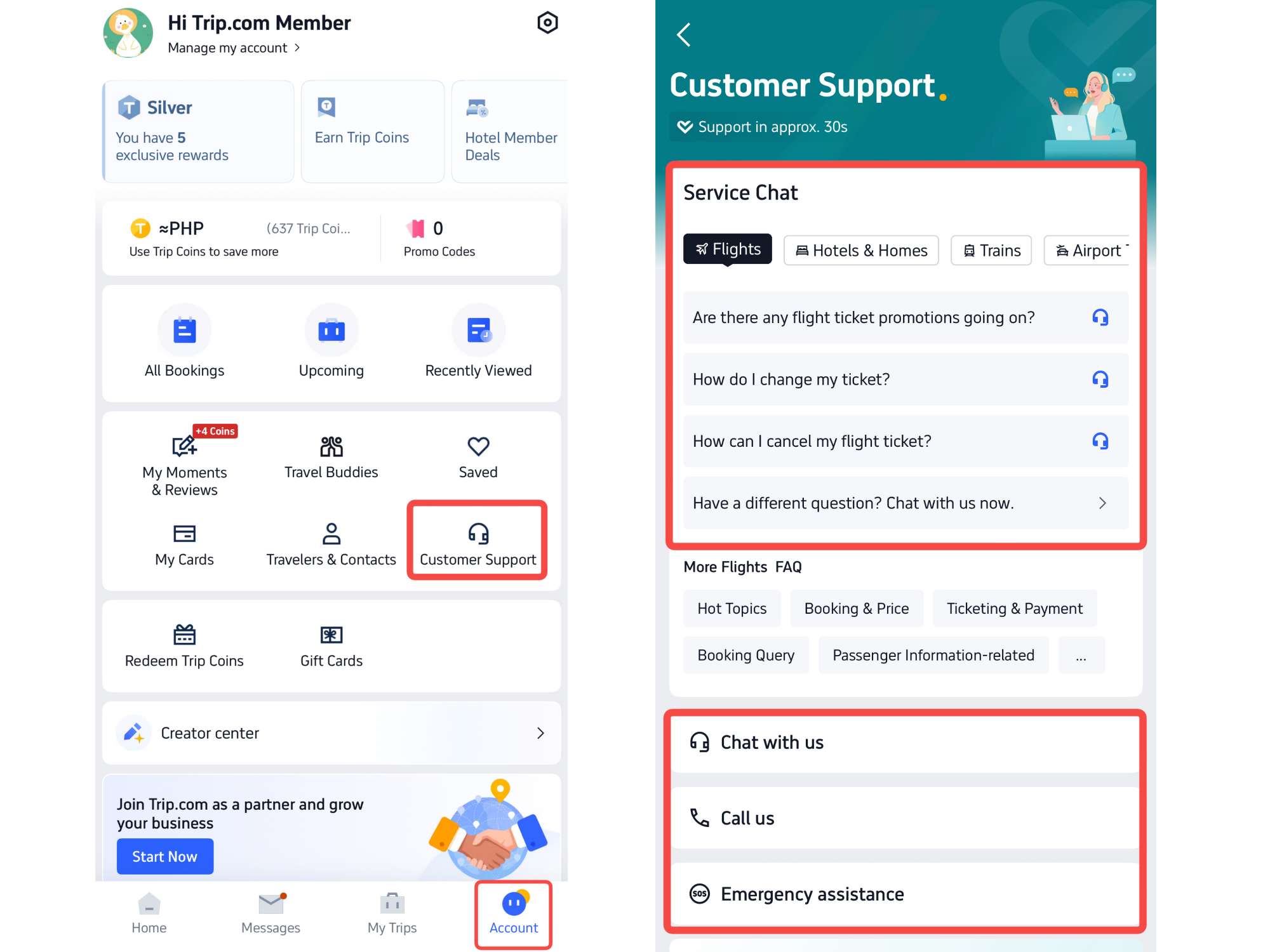
Step 2: Choose Trip.com Call Service to Find Trip.com Customer Service
- Trip.com offers various customer services, including chat service, call service, and emergency assistance. For Call service, click on "Call Us" to enter the Trip.com Customer Service page. Customers can choose Internet call or Global call based on their specific need.
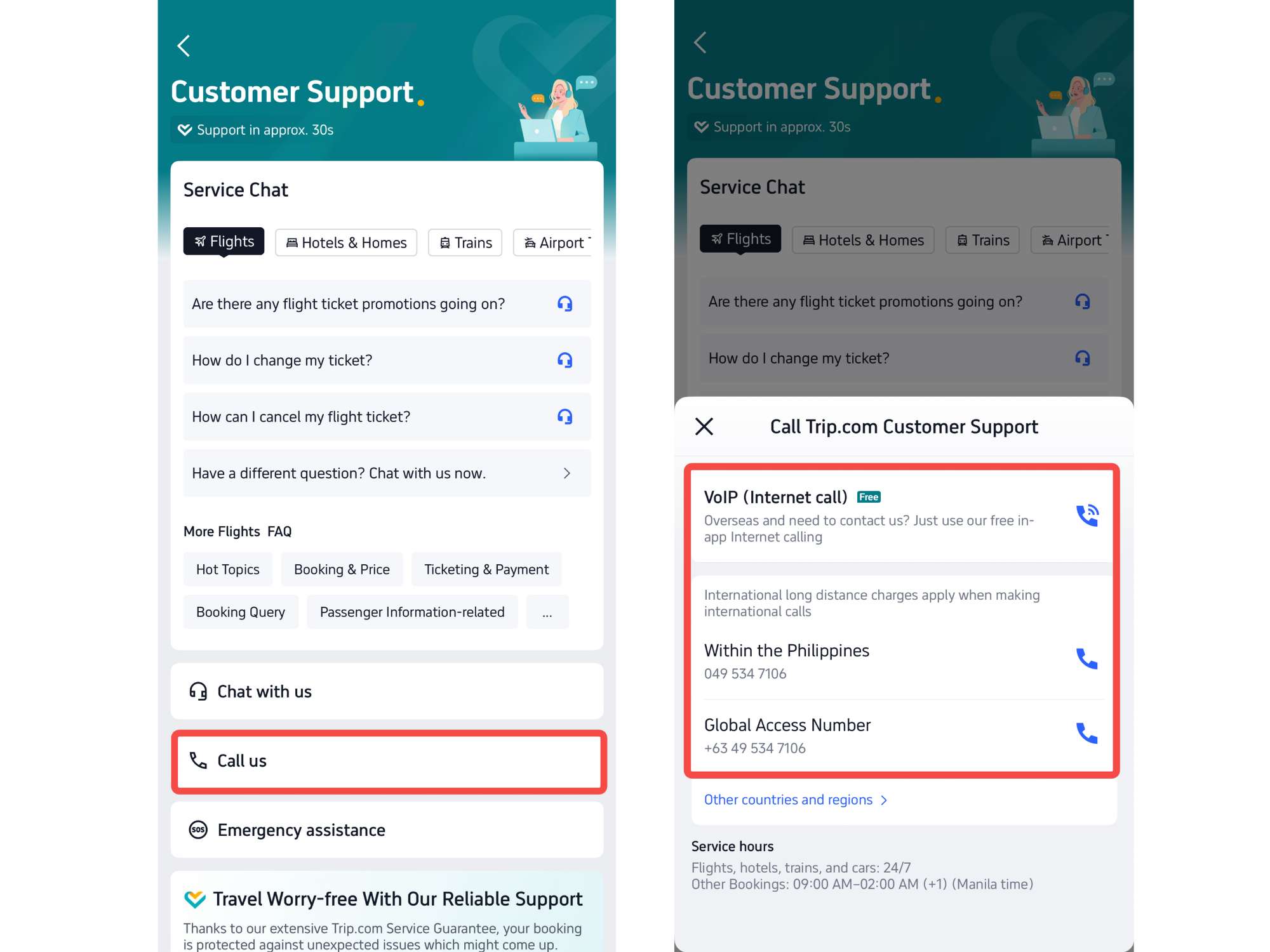
Step 3: Find Trip.com Customer Service of Other Countries & Regions
If customers need to find Trip.com Customer Service from other countries and regions, click on the button "Other countries and regions" to find the customer service numbers.
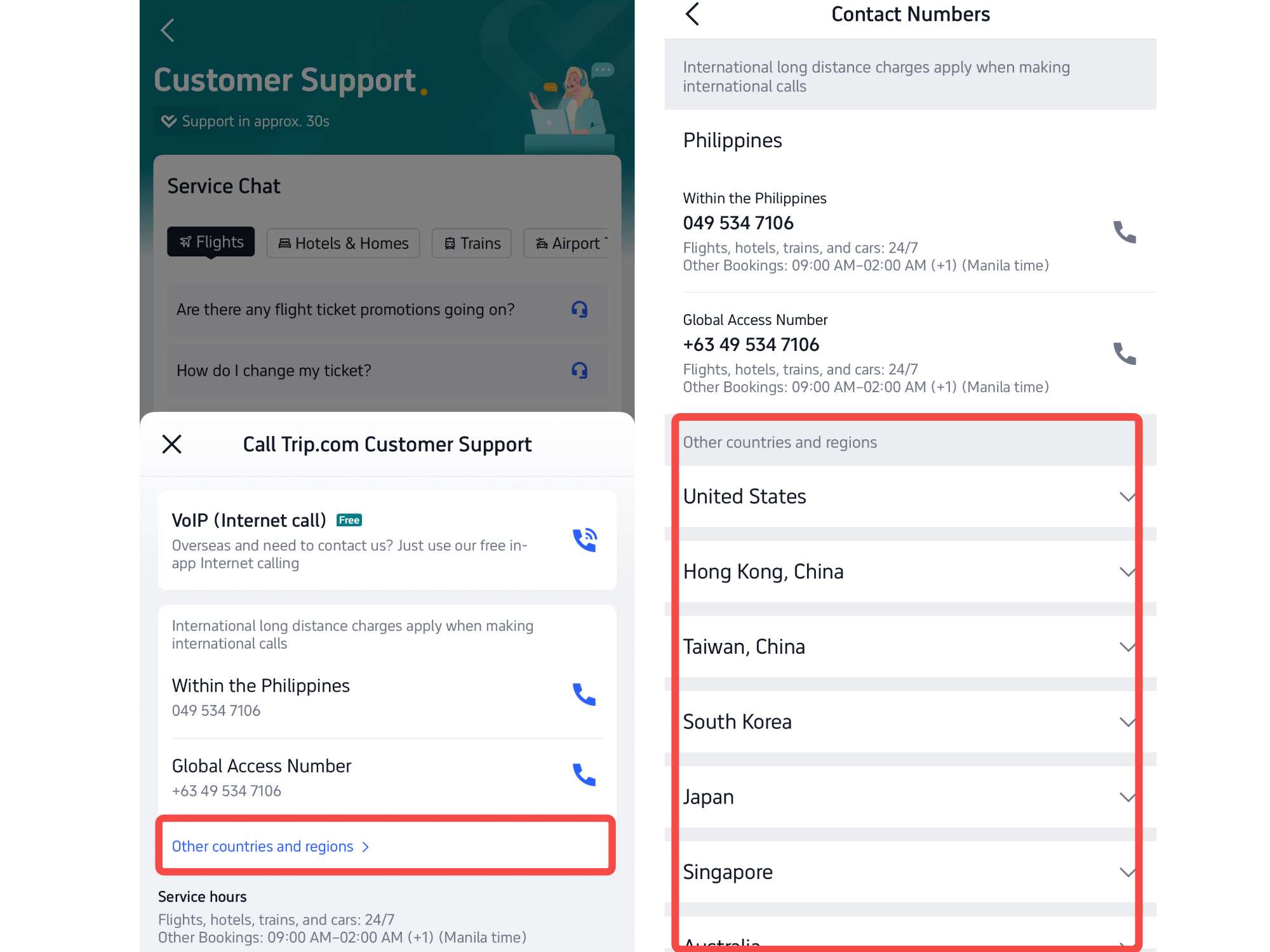
*The screenshots are only for reference.
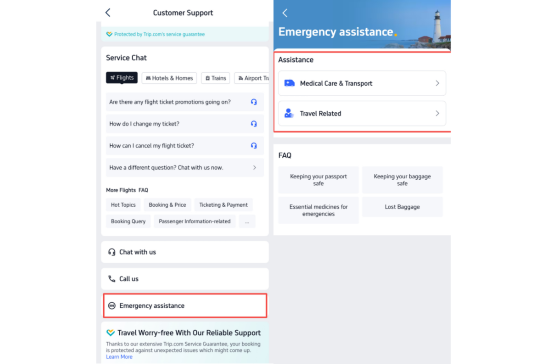
Step 4: Contact Trip.com Customer Support for Emergency Assistance
If you need urgent help during your trip, open the “Emergency Assistance” section in the app or website. You can find support for medical emergencies, translation help, emergency medical transport, and other urgent travel issues. The support team is available anytime to assist you when something unexpected happens.
Trip.com Customer Service Contact Number for Other Countries
Important Note: Trip.com’s customer service team is available anytime, day or night. In most cases, you can get connected to an agent in around 30 seconds, so help is quick when you need it.
Trending Searches
-
Popular Content
-
Top Flight Links
-
Popular Hotels
-
Popular Things to Do
-
Featured guides
-
Trip.com links
- Trip.com E-Ticket
- Trip.com Payment Methods
- Trip.com Passport Change
- Trip.com Customer Service
- Trip.com Flight Cancellation
- Trip.com VIP Lounge Access
- Trip.com Phone Number
- Trip.com Check In
- Payment Sale
- Trip Coins
- Trip.com Hotel Refund
- Trip.com Cancellation Policy
- Trip.com Ticket Issued Status
- Trip.com Flight Ticket
- Trip.com Membership
- Trip.com E-Receipt
- Trip.com Seat Selection
- Trip.com Baggage Allowance
- Trip.com Flight Change
- Trip.com Reviews
- Cheap flights from Manila to Hong Kong
- Cheap tickets from Manila to Tagbilaran
- Cheap flights from Manila to Cebu
- Cheap flights from Manila to Iloilo City
- Plane tickets from Manila to General Santos
- Plane tickets from Cebu to Manila
- Plane tickets from Bacolod to Manila
- Plane tickets from Manila to Tacloban
- CA986 Flight Status
- 5J187 Flight Status
- PR431 Flight Status
- PR741 Flight Status
- MH709 Flight Status
- EK2521 Flight Status
- 5J582 Flight Status
- Hotels near 72 wonder tower
- Hotels near Mactan–Cebu International Airport
- Hotels near Fenghuang Ancient Town
- Hotels near Greenland Xindu East Coast Times Square South Area
- Hotels near Changbai Mountain Beauty Pine International Sculpture Park
- Shiji Qingteng Capsule Hotel (T3 Terminal)
- Bangkok-Pratunam Hotel
- Shangri-La Resort
- De Mani Hotel
- Fan Yu Gaming Center
- Hotels in Fenghuang County
- Hotels in Davao City
- Hotels in North Jakarta
- Hotels in Moscow
- Hotels in Kuala Lumpur
- Philippines 5G eSIM | Dual Network • All AI & TikTok | Day Pass/Total Data Package | 24-Hour Billing | 1-30 Days | QR Code
- Private Mutianyu Great Wall Trip With English-speaking Driver
- Chengdu Departure - Bipenggou Shuttle Bus
- Vietnam | 4G/5G eSIM | Daily/Data Plan | 24-hour Billing | 1-30 Days | QR code
- Vietnam Airport VIP Fast Track Service
- Bangladesh Dhaka DAC Hazrat Shahjalal International Airport T1 terminal international departure IBalaka Executive Lounge international departure lounge experience
- Huanglongjiuzhai Railway Station - Jiuzhaigou National Park shuttle bus · private charter optional
- Lantau Island Ngong Ping 360 round-trip cable car admission ticket with priority boarding + one-way urban area transfer
- Bangkok Bangsaen Beach Instagrammable Japanese Street Day Tour
- ArtCava: Vineyards and Winery Tour
- Zagreb Small-Group Walking Tour with WW2 Tunnels & Funicular
- Chongqing Travel: Ciqikou, Hongya Cave, and People's Auditorium
- Private Scuba Diving Adventure in the Red Sea of Aqaba
- Hard Rock Miami Dining Experience
- Xiaoyi Trip Moments
- Mothers Day Gifts
- eSIM
- Hong Kong International Airport
- International Driving Permit
- Toronto Pearson International Airport
- Universal Studios Singapore
- Great Wall of China
- UK ETA
- Narita International Airport
- China Currency
- Changi Airport
- Schengen Visa
- Singapore MRT Map
- France Visa
- Ninoy Aquino International Airport