

How to Add Baggage in Cebu Pacific: Step-by-Step Guide


Need extra space for clothes, pasalubong, or other travel essentials? You can add checked baggage to your Cebu Pacific booking through the airline's website or mobile app. Cebu Pacific lets passengers purchase additional baggage or increase their existing baggage allowance through Manage Booking, even after the flight has already been booked.
Cebu Pacific Baggage Allowance
Before adding baggage, check what is already included in your Cebu Pacific fare.
Fare Bundle | Hand Carry | Checked Baggage |
|---|---|---|
GO Basic | Up to 7kg | Not included |
GO Easy | Up to 7kg | 1 piece, 20kg |
GO Flexi | Up to 7kg | 1 piece, 20kg |
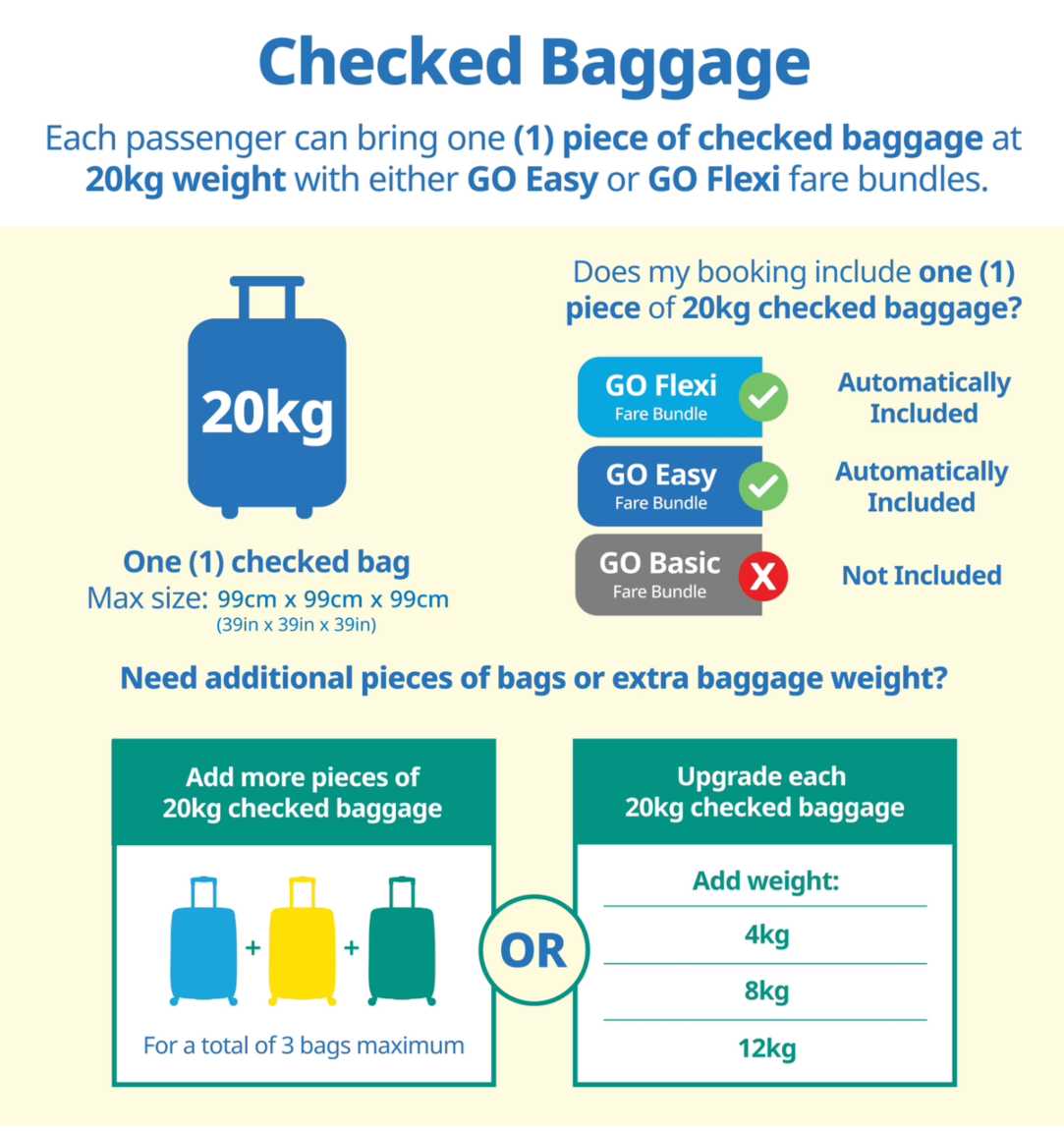
For checked baggage, every 20kg prepaid baggage allowance gives you one checked baggage piece. GO Basic passengers who need checked luggage can purchase it separately as an add-on.
- One way
- Round-trip
- direct cheapest
 MNL9:50 PM1h 25mNonstopBCD11:15 PMManila - Bacolod|Fri, Oct 2|Cebu PacificTWD 880TWD 4,12879% offSearch79% offTWD 4,128TWD 880
 - MNL5:25 PM1h 15mNonstopKLO6:40 PMManila - Kalibo|Fri, Oct 2|Cebu PacificTWD 970TWD 4,12877% offSearch77% offTWD 4,128TWD 970
- MNL5:25 PM1h 15mNonstopKLO6:40 PMManila - Kalibo|Sun, Oct 25|Cebu PacificTWD 970TWD 4,12877% offSearch77% offTWD 4,128TWD 970
 MNL13:001h 15mNonstopBCD14:00Manila - City|Mon, Sep 6|Normal AirlineFind more flightsFind more flights
How to Add Baggage in Cebu Pacific After Booking
Already booked your flight without enough baggage? You can add it through Manage Booking.
Step 1: Open Cebu Pacific Manage Booking
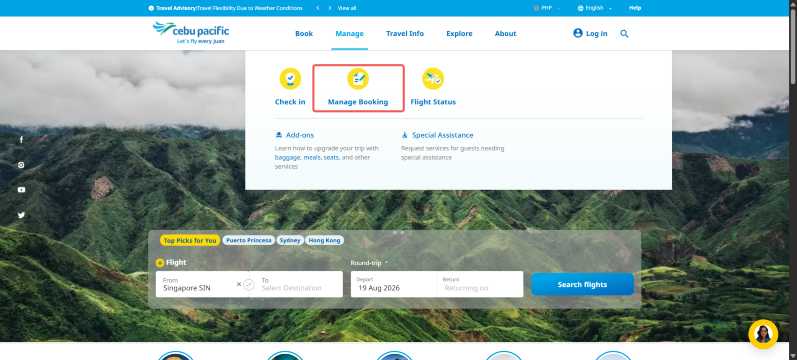
Go to the Cebu Pacific website or open the Cebu Pacific mobile app.
Select Manage Booking and log in to your MyCebuPacific account.
A MyCebuPacific account is required if you want to make changes to an existing booking.
Step 2: Find Your Booking
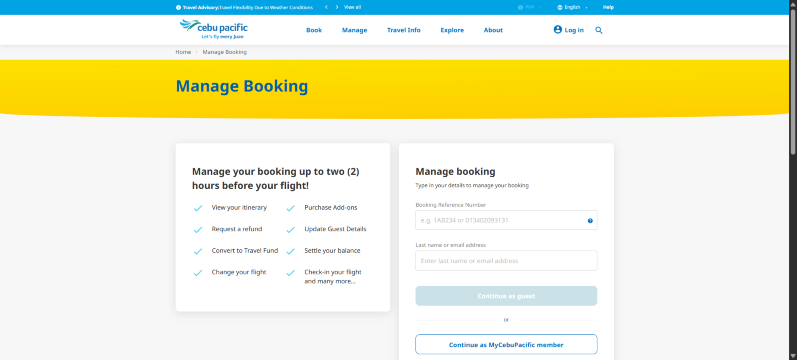
Select the booking you want to manage.
You may need your:
- Booking reference number
- Last name or email address registered in the booking
These details are used to access or link your reservation.
Step 3: Open Your Add-ons
Select Manage for your flight and look for the option to manage your add-ons.
Choose the baggage option for the flight where you need additional checked luggage. Cebu Pacific's app may display this under Manage add-ons.
Step 4: Choose Your Baggage
You can add a checked baggage piece with a base allowance of 20kg.
Cebu Pacific allows passengers to purchase up to three checked baggage pieces through its website or mobile app.
If you already have a 20kg checked baggage allowance but need more weight, you can increase it by:
- 4kg, for a total of 24kg
- 8kg, for a total of 28kg
- 12kg, for a total of 32kg
Adding extra weight increases the allowance for that baggage piece. It does not give you another checked bag.
Step 5: Review and Pay
Check the baggage allowance you selected and review the amount shown before payment.
Complete the payment using one of the available payment methods. Once successful, check your updated booking details to make sure the baggage add-on appears correctly.
How to Add Baggage While Booking a Cebu Pacific Flight
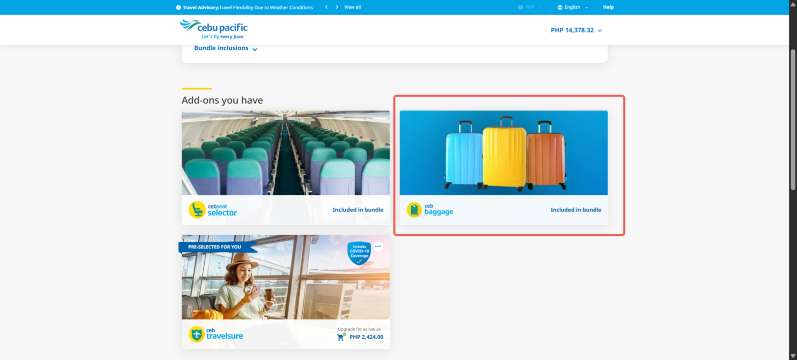
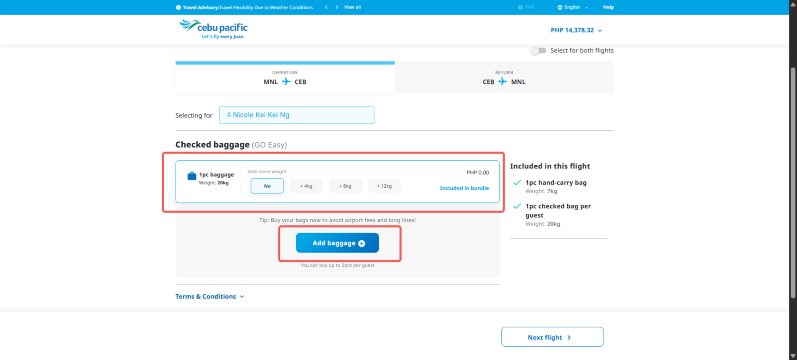
You can also purchase baggage when making a new Cebu Pacific reservation.
When you reach the add-ons section during booking:
- Select CEB Baggage
- Choose the flight that needs baggage
- Select your baggage allowance
- Add extra weight if needed
- Review the details
- Complete your booking and payment
Buying baggage before arriving at the airport can also help you avoid higher airport baggage charges. Cebu Pacific recommends purchasing the correct baggage allowance in advance.
Can You Add Baggage After Online Check-in?
Yes. Cebu Pacific states that passengers may still add or upgrade baggage even after checking in online.
However, you need to complete the baggage purchase through Manage Booking at least two hours before your scheduled flight.
📌 Important: Do not wait until the last minute. Cebu Pacific's Manage Booking feature is only available for booking changes up to two hours before departure.
How Much Baggage Can You Add on Cebu Pacific?
Sources: www.cebupacificair.com
For regular checked baggage:
- Each baggage piece starts at 20kg
- You can purchase up to 3 checked baggage pieces online
- Each 20kg piece can be upgraded by 4kg, 8kg, or 12kg
- A baggage piece can therefore have an allowance of up to 32kg
- Extra baggage beyond three pieces may be purchased at the airport, subject to fees
Cebu Pacific also states that increasing the weight of a baggage allowance does not increase the number of bags you are allowed to check in.
Cebu Pacific Checked Baggage Size Limit
For regular prepaid checked baggage, Cebu Pacific lists a maximum size of:
- Height: 99cm or 39in
- Length: 99cm or 39in
- Width: 99cm or 39in
Bags or items outside the regular baggage limits may require special baggage handling or additional fees.


Cebu Pacific Hand Carry Allowance
Sources: www.cebupacificair.com
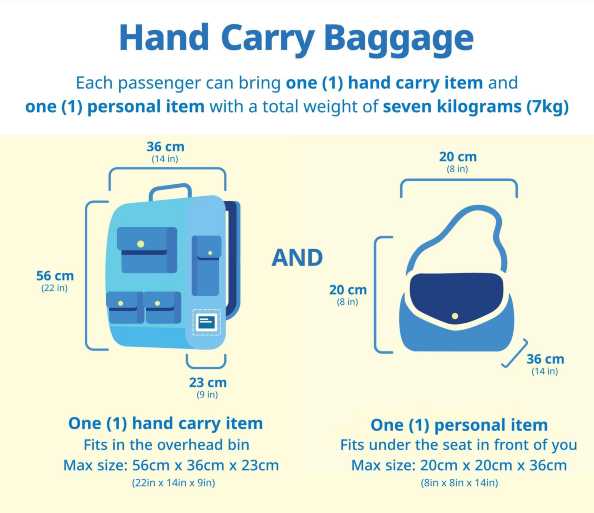
All Cebu Pacific passengers receive a 7kg hand carry allowance.
You may bring:
- 1 hand carry bag for the overhead compartment, up to 56cm x 36cm x 23cm
- 1 personal item that fits under the seat, up to 20cm x 20cm x 36cm
The maximum is two hand carry pieces with a combined weight of 7kg.
💡 Tip: If your bags are heavier than the free hand carry allowance, consider purchasing checked baggage before your flight instead of relying on airport baggage options.
 NO.1
NO.1




















How to Add Baggage If You Booked Through a Travel Agency
Cebu Pacific also provides instructions for passengers whose flights were booked through an online travel agency.
According to Cebu Pacific, you can use its mobile app to manage baggage for eligible travel agency bookings:
- Open the Cebu Pacific app
- Access your booking
- Tap Manage add-ons under Modify my flight
- Choose the flight where you want baggage
- Select Add baggage
- Add your preferred baggage piece or weight upgrade
- Review the details and complete payment
For these bookings, each regular baggage piece starts at 20kg, and passengers can add up to three pieces and upgrade individual baggage allowances when available.
What Is Cebu Pacific Special Baggage?
Regular checked baggage may not be suitable for larger or specialized items.
Cebu Pacific offers CEB Special Baggage for certain items such as:
- Sports equipment
- Surfboards
- Musical instruments
- Religious items
- Oversized baggage
CEB Special Baggage is available through the Cebu Pacific mobile app and can generally be added up to two hours before departure. Each passenger is allowed one CEB Special Baggage item with a 20kg allowance, subject to the airline's conditions and availability.
Tips Before Adding Cebu Pacific Baggage
- Check your fare first. GO Easy and GO Flexi already include one 20kg checked baggage piece.
- Estimate your luggage weight before purchasing. Choose an allowance that gives you enough room without paying for unnecessary weight.
- Buy baggage online early. Cebu Pacific recommends purchasing baggage before reaching the airport.
- Remember the three-piece limit. You can purchase a maximum of three regular checked baggage pieces through the app or website.
- Complete changes at least two hours before departure. After that, Manage Booking may no longer be available for baggage changes.
- Check special items separately. Sports equipment, surfboards, instruments, and oversized baggage may need CEB Special Baggage instead of regular baggage.
FAQs: How to Add Baggage in Cebu Pacific
-
Can I add baggage after booking Cebu Pacific?
-
Can I add baggage after checking in online?
-
How many checked bags can I add on Cebu Pacific?
-
Can I upgrade my Cebu Pacific baggage from 20kg?
-
Does Cebu Pacific GO Basic include checked baggage?
Trending Searches
-
Popular Content
-
Top Flight Links
-
Popular Hotels
-
Popular Things to Do
-
Featured guides
-
Trip.com links
- Trip.com E-Ticket
- Trip.com Payment Methods
- Trip.com Passport Change
- Trip.com Customer Service
- Trip.com Flight Cancellation
- Trip.com VIP Lounge Access
- Trip.com Phone Number
- Trip.com Check In
- Payment Sale
- Trip Coins
- Trip.com Hotel Refund
- Trip.com Cancellation Policy
- Trip.com Ticket Issued Status
- Trip.com Flight Ticket
- Trip.com Membership
- Trip.com E-Receipt
- Trip.com Seat Selection
- Trip.com Baggage Allowance
- Trip.com Flight Change
- Trip.com Reviews
- Plane tickets from Manila to Cebu
- Cheap tickets from Manila to Hong Kong
- Cheap flights from Manila to General Santos
- Cheap flights from Manila to Iloilo City
- Cheap tickets from Bacolod to Manila
- Plane tickets from Manila to Tagbilaran
- Cheap tickets from Manila to Bangkok
- Cheap tickets from Manila to Tacloban
- PR2149 Flight Status
- TG624 Flight Status
- FM9341 Flight Status
- 5J187 Flight Status
- PR431 Flight Status
- PR741 Flight Status
- AC076 Flight Status
- Hotels near SM City Dasmarinas
- Hotels near 72 wonder tower
- Hotels near Fenghuang Ancient Town
- Hotels near Greenland Xindu East Coast Times Square South Area
- Hotels near Changbai Mountain Beauty Pine International Sculpture Park
- Shiji Qingteng Capsule Hotel (T3 Terminal)
- Bangkok-Pratunam Hotel
- Shangri-La Resort
- HanTing Hotel (Benxi Huanren Central Street)
- Central Station Room – Steps from Central, Explore Everywhere
- Hotels in Fenghuang County
- Hotels in Davao City
- Hotels in North Jakarta
- Hotels in Pasig
- Hotels in Makati
- Philippines 5G eSIM | TikTok & ChatGPT Available | Day Pass/Total Data Package | 24-Hour Billing | 1-30 Days | QR Code
- Explore Guilin with Ease: Premium Private Car Service
- Chengdu Departure - Bipenggou Shuttle Bus
- Vietnam | 4G/5G eSIM | Daily/Data Plan | 24-hour Billing | 1-30 Days | QR code
- Bangladesh Dhaka DAC Hazrat Shahjalal International Airport T1 terminal international departure IBalaka Executive Lounge international departure lounge experience
- Huanglongjiuzhai Railway Station - Jiuzhaigou National Park shuttle bus · private charter optional
- Vietnam Airport VIP Fast Track Service
- Lantau Island Ngong Ping 360 round-trip cable car admission ticket with priority boarding + one-way urban area transfer
- Granada: Historical City Center Guided Segway Tour
- From Paracas: Ballestas Islands & Paracas National Reserve
- Vanuatu: Blue Lagoon, Eden, and Buggy Adventure
- Glasgow: Haggis Tasting with a Dram of Scottish Whisky
- Shenzhen future technology private tour
- Haifeng Trip Moments
- Sydney Yogurt Lab
- Mothers Day Gifts
- eSIM
- Hong Kong International Airport
- International Driving Permit
- Toronto Pearson International Airport
- Universal Studios Singapore
- Great Wall of China
- UK ETA
- Narita International Airport
- China Currency
- Changi Airport
- Schengen Visa
- Singapore MRT Map
- France Visa
- Ninoy Aquino International Airport