
Japan eSIM Guide: Best Plans, Setup and Travel Tips

Arriving in Japan can be tricky for Filipino travelers, especially with limited access to apps and costly roaming. Instead of queuing for a SIM card, an eSIM lets you get online instantly. Just activate before your trip and enjoy easy access to apps like Google Maps, LINE, and Uber Japan for smooth travel around the country.
What is eSIM?
An eSIM is an electronic SIM card that allows you to connect to a local network in Japan without the hassle of physically swapping your SIM card. It’s essentially a virtual SIM card that you can activate directly on your phone with just a few taps. With a Japan eSIM, you can enjoy seamless connectivity, just like at home, without worrying about expensive roaming charges or the time-consuming process of finding and setting up a local SIM card. Stay connected with ease while traveling in Japan!
eSIM vs SIM Card vs Roaming: Which One Should You Choose?
Not sure which option is better for your trip to Japan? Here’s a simple comparison to help you decide.
Feature | eSIM | Physical SIM | Roaming |
|---|---|---|---|
Setup | Scan QR code, quick and easy | Insert SIM manually | Works automatically |
Cost | Usually cheaper for data plans | Slightly higher depending on plan | Most expensive, charged daily |
Speed | Fast 4G or 5G on local networks | Fast 4G or 5G on local networks | Can be slower or limited |
Best For | Most travelers, easy setup | Older phones or need local number | Short trips or backup use |
Availability | Buy online anytime | Buy at airport or stores | Provided by your home telco |
💡 Tip: If your phone supports eSIM, it’s usually the easiest and most cost-effective option for travel.
Must-Have Apps for Tourists in Japan

Traveling in Japan is easier with the right apps. Download them before your trip to help with transport, food, and payments, especially since Wi-Fi and English support can be limited.
| Category | Recommended Apps |
|---|---|
Payment Apps | PayPay, LINE Pay, Suica |
Transport Apps | Japan Travel by NAVITIME, Google Maps, Suica / PASMO |
Map / Navigation Apps | Google Maps, Japan Official Travel App |
Translation Apps | Google Translate, VoiceTra |
Food Delivery / Discovery | Uber Eats (Japan), Tabelog |
Attraction Booking | Trip.com |
Train Booking | Trip.com |
Other Useful Apps | Japan Wi-Fi Auto-Connect, XE Currency |
Unlock the Best Flights to Japan


How To Set Up Your Japan eSIM?

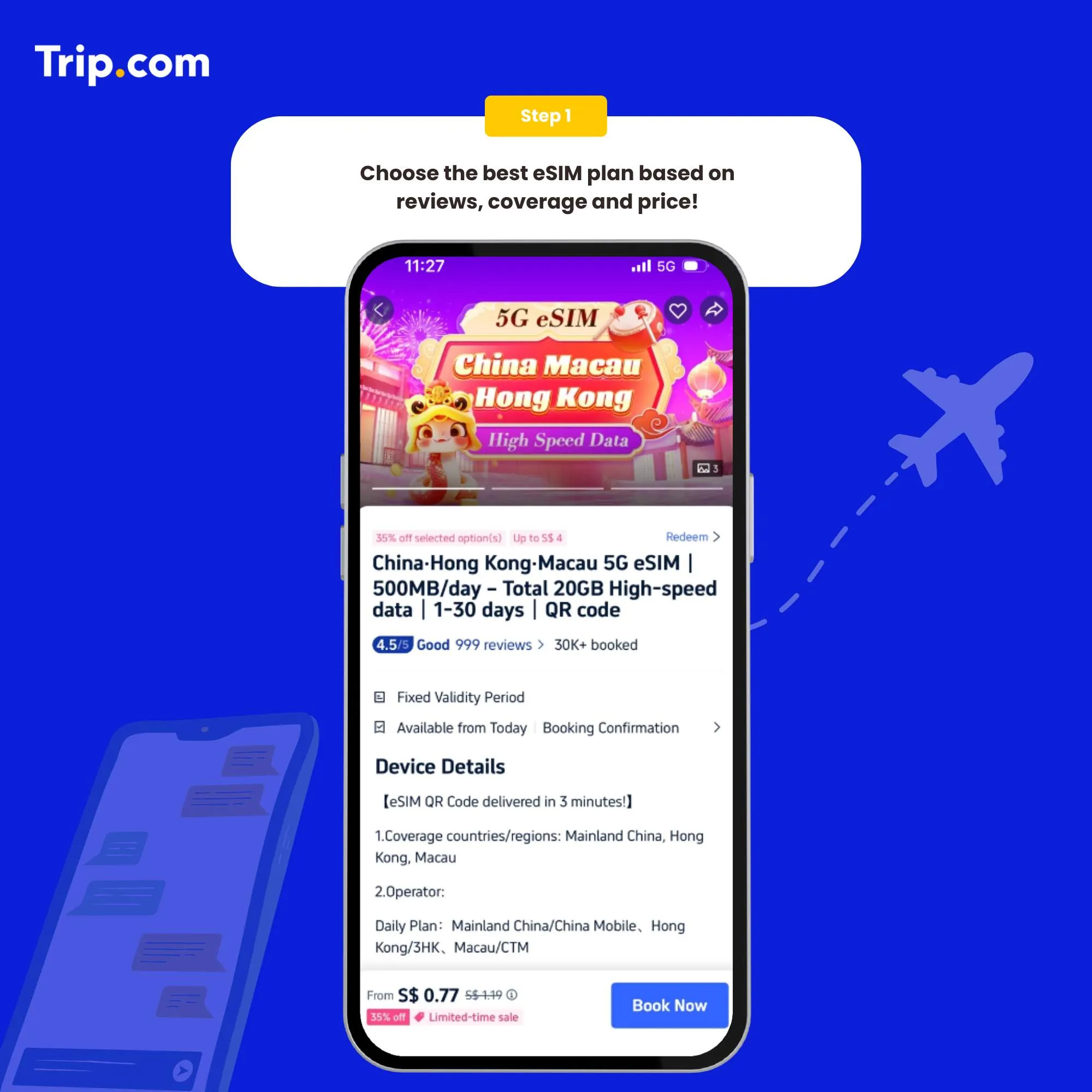
Step 1: Choose the best eSIM plan
There are several providers that offer Japan eSIMs. Choose the one that best suits your needs.
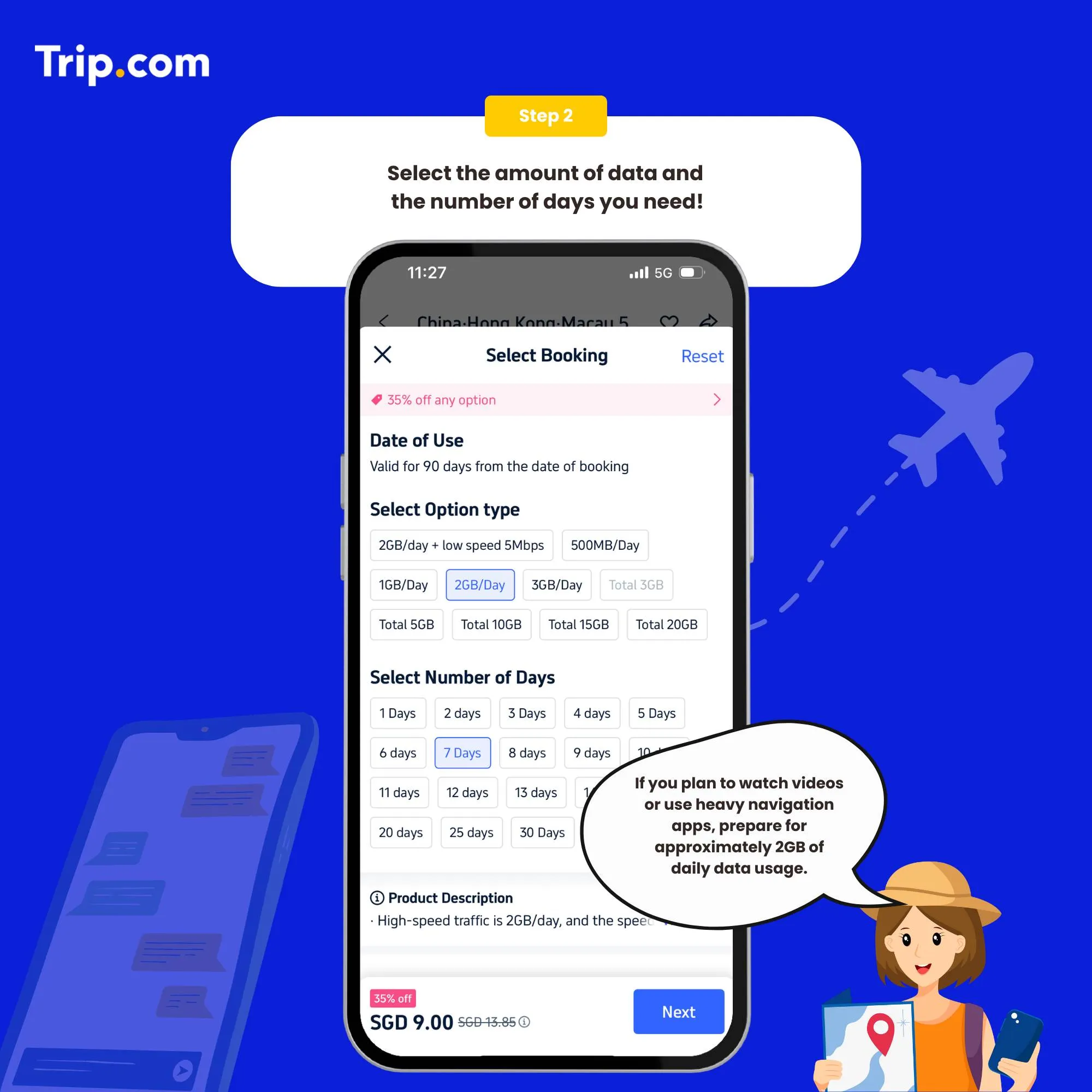
Step 2: Select the data package
Once you've chosen a provider, you'll need to purchase a data plan that suits your needs.
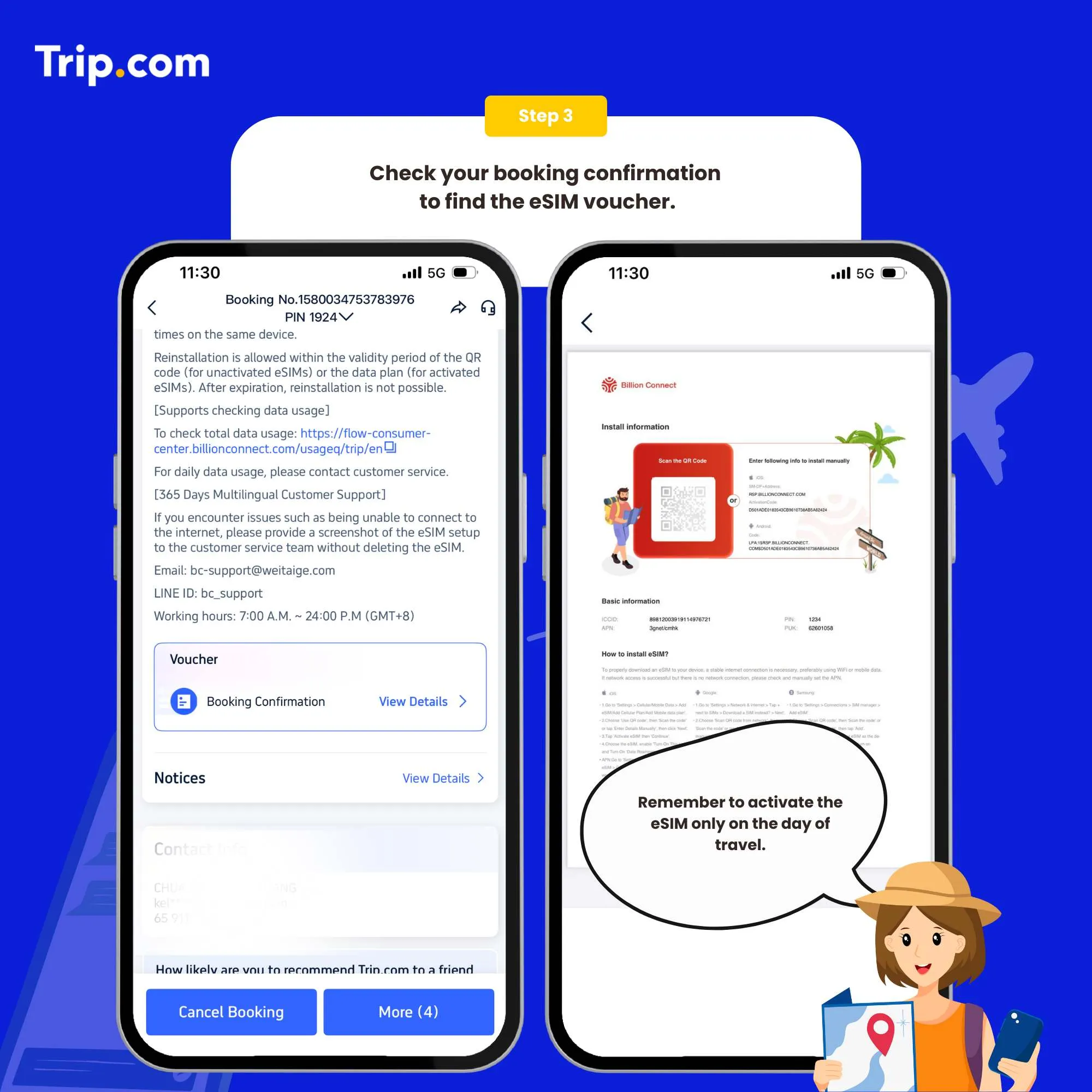
Step 3: Receive your ACTIVATION EMAIL
You will receive an email with installation instructions and a reminder of the latest installation time. Please make sure that there’s available WIFI or connected to networks before installation.
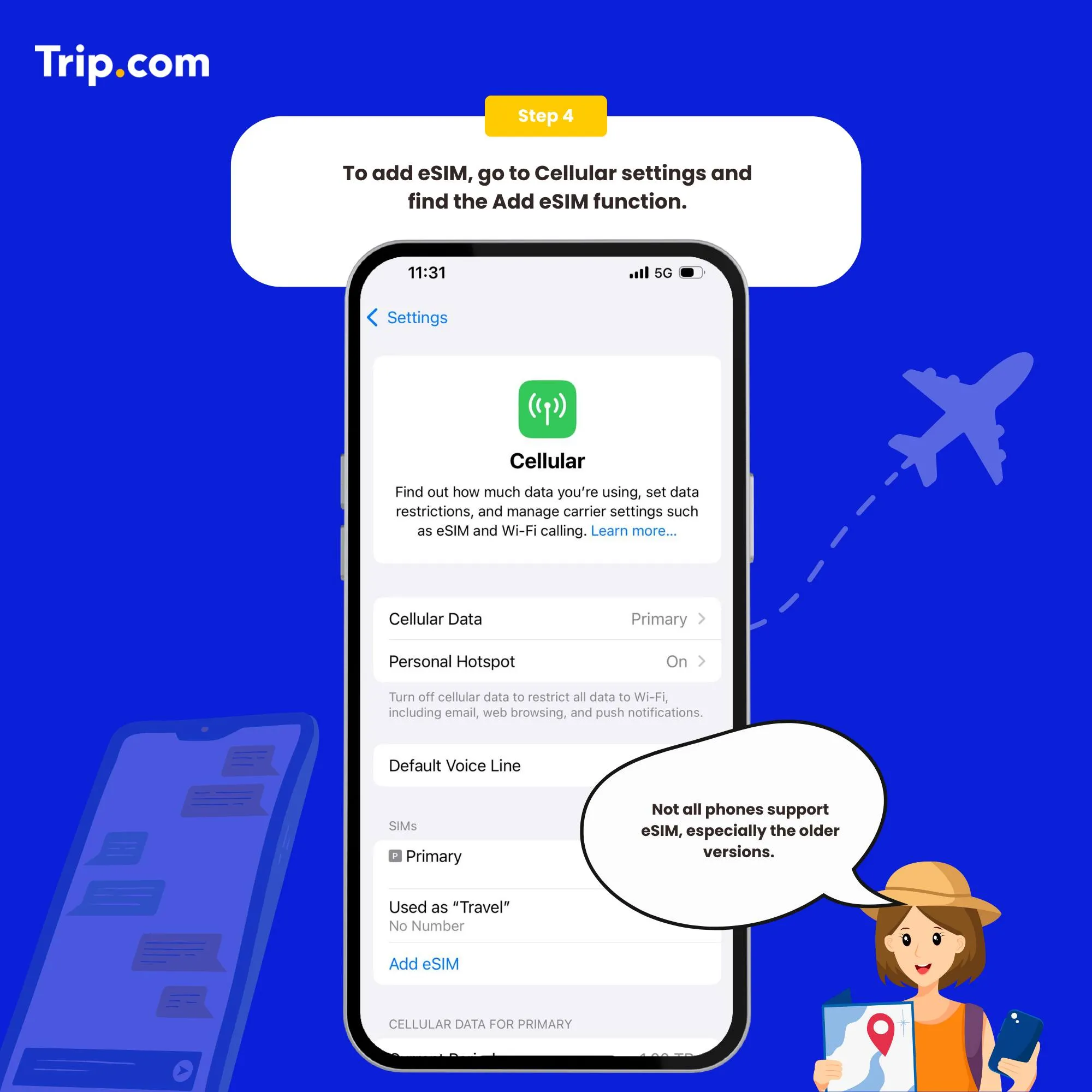
Step 4: Add your eSIM
To activate the eSIM, simply scan the QR code on your phone.
Set as the instructions:
- System - Settings - Cellular (iOS) / SIM Card Management (Andriod).
- Add a Cellular Plan (iOS) / SIM Card (Android).
- Agree to download Cellular Plan (iOS) or SIM Card (Android).
- Scan the QR code in the received email for activation (or enter SM-DP +Address and Activation Code manually).
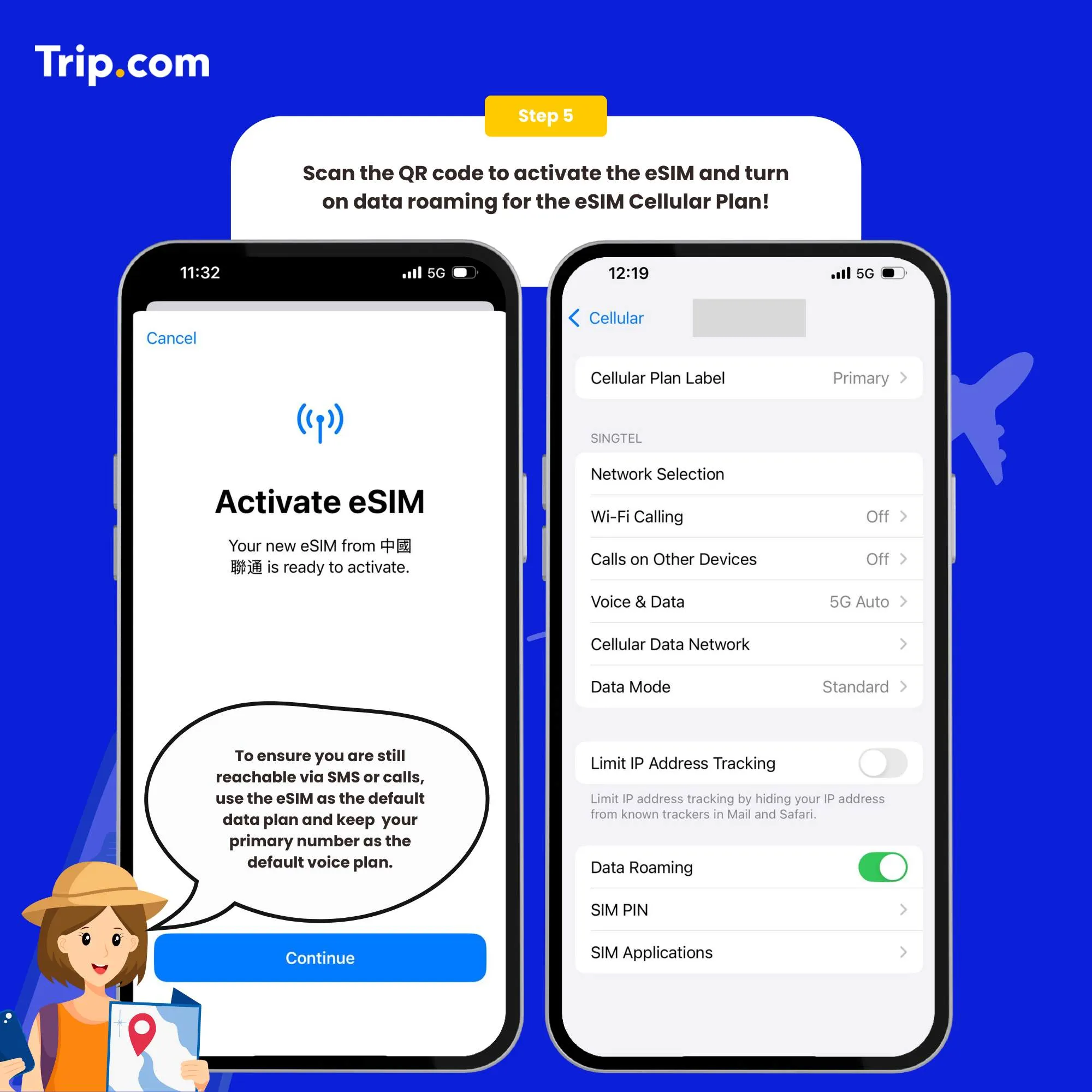
Step 5: Scan the QR code to activate your eSIM
- After the completion of the installation, we recommend that you disable eSIM until you reach your destination.
- After the download is successful, close the primary card if you already have one. Enable the Cellular Plan (iOS) or SIM Card (Android).
- After arriving at the destination, please open your eSIM, and turn on roaming. Then you can access the Internet.
You can now connect to the Internet and enjoy the convenience of Japan eSIM as per your selected plan.
How to close?
Open the open Cellular (iOS) or SIM Card Management (Android), and click to turn off the Cellular Plan (iOS) or SIM Card (Android) (the steps of enabling and disabling are the same).
Who Are The Main Telco Operators in Japan?
NTT Docomo: One of the biggest networks in Japan with very wide coverage, even in rural areas. Reliable choice if you’re traveling around different regions.
SoftBank: Known for fast speeds and strong coverage in cities. Works well in places like Tokyo and Osaka.
au by KDDI: Good overall coverage across Japan. Stable connection for both city and travel use.
Rakuten Mobile: More budget-friendly. Works best in cities, but coverage can be weaker outside.
Find the Best Hotels in Japan
 NO.1
NO.1














































How To Choose The Best Japan eSIM
Coverage: Make sure your eSIM works well in cities like Tokyo, Osaka, and Kyoto, and also in areas you plan to visit. Coverage is usually strong in cities, but can be weaker in rural spots.
Usage: If you only use maps, WhatsApp, or browsing, 1GB per day is enough. If you use navigation often or stream videos, go for 2GB per day or more.
Pricing: Choose a plan that fits your trip. No need to pay extra for data or days you won’t use.
Flexibility: Pick a plan that allows top-up or extension in case your plans change.
Services: Look for easy activation, good support, and options that work across multiple countries if you’re visiting more than one place.
Who Uses Japan eSIM?

Frequent Travelers: If you visit Japan often, eSIM is easier. No need to buy a SIM every trip. Just activate and use it when you arrive.
Business Travelers: Good for work on the go. You can check emails, join calls, and stay connected without high roaming costs.
Tourists: Once you land, you can use maps, translation apps, and message family right away. No need to look for a SIM card shop.
Students: Great for short stays or study trips. You can stay connected daily without dealing with long-term plans.
Find the Best Japan eSIM

Skip the hassle of buying a SIM card in Japan or paying high roaming fees. With a Japan eSIM, you can set it up in minutes and stay connected as soon as you arrive.
Just buy online, scan the QR code, and you’re ready to go. It’s a simple and easy way to use maps, translation apps, and stay in touch throughout your trip.
FAQs: Japan eSIM
-
How do I activate my Japan eSIM?
-
What are the benefits of using an eSIM?
-
What are the best providers for Japan eSIMs?
-
Can I use my existing phone with a Japan eSIM?
Trending Searches
-
Popular Content
-
Top Flight Links
-
Popular Hotels
-
Popular Things to Do
-
Featured guides
-
Trip.com links
- Trip.com E-Ticket
- Trip.com Payment Methods
- Trip.com Passport Change
- Trip.com Customer Service
- Trip.com Flight Cancellation
- Trip.com VIP Lounge Access
- Trip.com Phone Number
- Trip.com Check In
- Payment Sale
- Trip Coins
- Trip.com Hotel Refund
- Trip.com Cancellation Policy
- Trip.com Ticket Issued Status
- Trip.com Flight Ticket
- Trip.com Membership
- Trip.com E-Receipt
- Trip.com Seat Selection
- Trip.com Baggage Allowance
- Trip.com Flight Change
- Trip.com Reviews
- Cheap flights from Manila to Hong Kong
- Cheap tickets from Manila to Tagbilaran
- Cheap flights from Manila to Cebu
- Cheap flights from Manila to Iloilo City
- Plane tickets from Manila to General Santos
- Plane tickets from Cebu to Manila
- Plane tickets from Bacolod to Manila
- Plane tickets from Manila to Tacloban
- CA986 Flight Status
- 5J187 Flight Status
- PR431 Flight Status
- PR741 Flight Status
- MH709 Flight Status
- EK2521 Flight Status
- 5J582 Flight Status
- Hotels near 72 wonder tower
- Hotels near Mactan–Cebu International Airport
- Hotels near Fenghuang Ancient Town
- Hotels near Greenland Xindu East Coast Times Square South Area
- Hotels near Changbai Mountain Beauty Pine International Sculpture Park
- Shiji Qingteng Capsule Hotel (T3 Terminal)
- Bangkok-Pratunam Hotel
- Shangri-La Resort
- De Mani Hotel
- Fan Yu Gaming Center
- Hotels in Fenghuang County
- Hotels in Davao City
- Hotels in North Jakarta
- Hotels in Moscow
- Hotels in Kuala Lumpur
- Philippines 5G eSIM | Dual Network • All AI & TikTok | Day Pass/Total Data Package | 24-Hour Billing | 1-30 Days | QR Code
- Private Mutianyu Great Wall Trip With English-speaking Driver
- Chengdu Departure - Bipenggou Shuttle Bus
- Vietnam | 4G/5G eSIM | Daily/Data Plan | 24-hour Billing | 1-30 Days | QR code
- Vietnam Airport VIP Fast Track Service
- Bangladesh Dhaka DAC Hazrat Shahjalal International Airport T1 terminal international departure IBalaka Executive Lounge international departure lounge experience
- Huanglongjiuzhai Railway Station - Jiuzhaigou National Park shuttle bus · private charter optional
- Lantau Island Ngong Ping 360 round-trip cable car admission ticket with priority boarding + one-way urban area transfer
- Old Quebec City: Grand Walking Tour with Private Option
- Half-day tour to Provence wineries in France including visits and wine tasting at two wineries
- Cu Chi Tunnels Day Tour
- Split Segway Tour
- Suzhou Chinese|English|multilingual guide|1-day Humble Administrator's Garden + Hanshan Temple + Lingering Garden + Shantang Street
- Oldenburg Highlights Audio Tour: Royal Palaces
- Learn to cook Sichuan cuisine at the Chengdu Sichuan Cuisine Museum
- Mothers Day Gifts
- eSIM
- Hong Kong International Airport
- International Driving Permit
- Toronto Pearson International Airport
- Universal Studios Singapore
- Great Wall of China
- UK ETA
- Narita International Airport
- China Currency
- Changi Airport
- Schengen Visa
- Singapore MRT Map
- France Visa
- Ninoy Aquino International Airport