Trip.com Buy Now, Pay Later for Hotels: How It Works

By Trip.com
August 5, 2026

Planning a trip but not ready to pay for your hotel yet? Trip.com Buy Now, Pay Later lets you reserve selected hotel rooms without making the full payment immediately. Depending on the hotel’s terms, you may pay closer to your check-in date or directly at the property, giving you more flexibility when organizing your trip.
What Is Trip.com Buy Now, Pay Later?
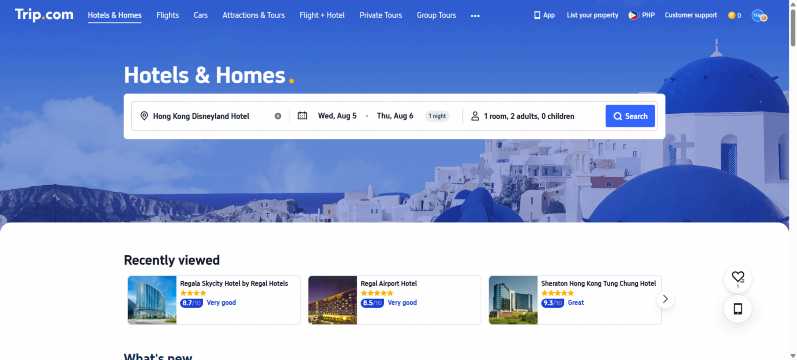
Trip.com Buy Now, Pay Later is also known as Deferred Payment. It allows you to reserve an eligible hotel room first and settle the payment later.
Depending on the room policy, you may:
- Pay at the hotel during check-in
- Have your card charged a few days before your stay
- Pay on the date shown in your booking details
- Cancel without a charge before the free cancellation deadline
This option is not available for every hotel or room. Even when one room offers Pay Later, another room at the same hotel may require immediate payment. Always review the payment and cancellation terms before confirming your booking.
| Feature | What It Means |
|---|---|
Book Now, Pay Later | Reserve an eligible hotel room without paying immediately |
Pay at Property | Settle the payment directly with the hotel |
Future Payment Date | Your payment method may be charged on the date shown |
Free Cancellation | Cancel without a charge before the stated deadline |
Selected Rooms Only | Availability depends on the hotel and room policy |
 NO.1
NO.1





















































How Does Trip.com Buy Now, Pay Later Work?
When searching for hotels on Trip.com, you may see different payment conditions for each room.
Some rooms require payment immediately, while others may display:
- Free Cancellation
- Pay Later
- Pay at Property
- No prepayment needed
- Payment on a specified date
Rooms with Free Cancellation are commonly used for Deferred Payment bookings. However, Free Cancellation and Pay Later are not exactly the same.
Free Cancellation explains when you can cancel without paying a cancellation fee. Pay Later explains when the hotel payment will be collected. Check that your chosen room displays the correct payment condition before booking.
How to Find Trip.com Buy Now, Pay Later Hotels
Step 1: Search for a Hotel
Follow these steps to search for eligible Pay Later hotel rooms.
Step 1: Open Trip.com
Open the Trip.com app or visit the Trip.com website. Sign in to your account so you can manage your reservation more easily later.
Step 2: Search for a Hotel
Enter the following details:
- Your destination
- Check-in date
- Check-out date
- Number of rooms
- Number of guests
Select Search to view the available hotels.
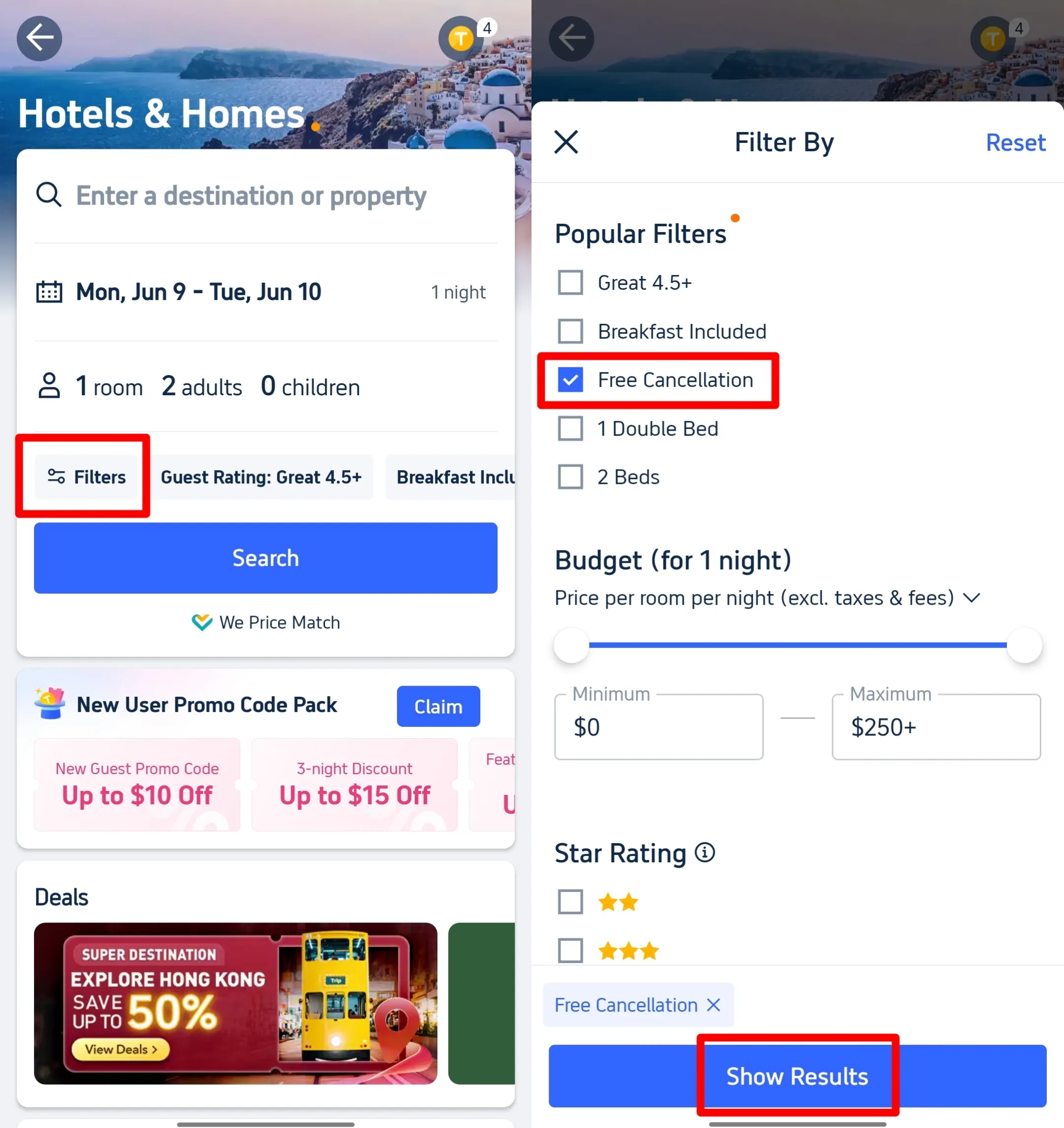
Step 3: Open the Filters
On the hotel results page, select Filter to view the available search options.
Look for the Cancellation Policy section and select Free Cancellation. Apply the filter to narrow the results.
This filter can help you find more flexible rooms, but you should still check each room’s payment terms.
Step 4: Select a Hotel
Open the hotel you want to book and review the available room types.
Do not assume that all rooms at the same hotel follow the same policy. One room may be prepaid and non-refundable, while another may offer Free Cancellation and Pay Later.
Step 5: Look for the Payment Labels
Choose a room that clearly shows:
- Free Cancellation
- Pay Later
- Pay at Property
- A future payment date
- The exact cancellation deadline
When these labels do not appear, the room may require immediate payment.
Step 6: Read the Full Room Policy
Open the room details and check:
- When payment will be collected
- Whether you will pay Trip.com or the hotel
- Whether a card is required
- The free cancellation deadline
- Charges for late cancellation
- Taxes or fees payable at the property
The terms shown for your selected room are the conditions that will apply to your reservation.


How to Book a Hotel Now and Pay Later on Trip.com
Once you have found an eligible room, follow these steps to complete your reservation.
1. Choose the Right Room
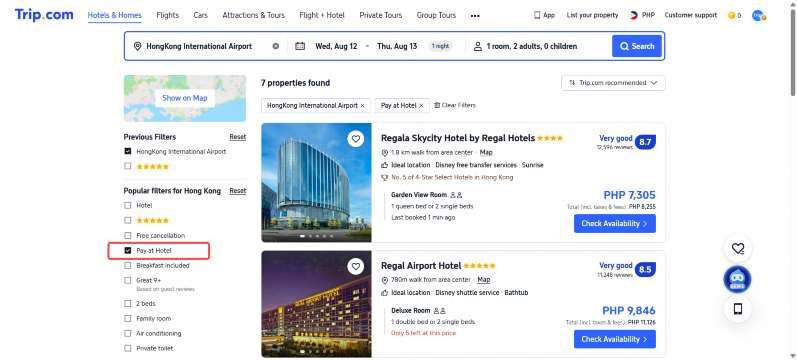
Select a room that clearly displays Pay Later, Pay at Property, or another delayed payment condition.
Compare several room options before booking. The cheapest room may require immediate payment or have a non-refundable policy.
2. Check the Cancellation Deadline
Review the exact date and time when free cancellation ends.
For example, the room may state:
“Free cancellation before 18:00 on 15 September.”
Cancelling after the stated deadline may result in a charge. The amount depends on the hotel and room policy.
3. Check When You Need to Pay
The booking page should explain how payment will be collected.
You may see one of these conditions:
- Pay at the property
- Pay on a specified date
- Your card will be charged before check-in
- A card is required to guarantee the booking
Do not confirm your reservation until you understand when and how you will pay.
4. Enter the Guest Details
Provide the main guest’s complete name and contact information.
For international hotel bookings, enter the name exactly as it appears on the guest’s passport. This can help prevent check-in problems.
5. Add Payment Details When Required
Some Pay Later rooms may require a valid credit or debit card to guarantee the booking. Providing your card details does not always mean that the payment will be collected immediately.
Trip.com states that some eligible hotels may request a card guarantee while delaying the actual charge. Always check the payment terms before confirming.
6. Review Your Booking
Before selecting the final booking button, check:
- Hotel name and address
- Check-in and check-out dates
- Guest name
- Number of guests
- Room and bed type
- Breakfast inclusion
- Total price
- Payment date
- Cancellation deadline
- Taxes and property fees
- Applied promo codes
- Trip Coins used
This is your final chance to correct any mistakes.
7. Confirm Your Reservation
Select Book or Reserve to complete the reservation.
After confirmation, check your Trip.com account and email. Your booking details should show the reservation number, guest information, stay dates, total cost, payment details, and cancellation policy.
- One way
- Round-trip
- direct cheapest
 MNL5:15 AM1h 25mNonstopBCD6:40 AMManila - Bacolod|Fri, Nov 6|Cebu PacificDKK 260DKK 43140% offSearch40% offDKK 431DKK 260
 - MNL6:20 AM1h 25mNonstopBCD7:45 AMManila - Bacolod|Sun, Nov 8|Cebu PacificDKK 323DKK 43125% offSearch25% offDKK 431DKK 323
- MNL5:55 PM1h 25mNonstopBCD7:20 PMManila - Bacolod|Tue, Oct 27|Cebu PacificDKK 349DKK 43119% offSearch19% offDKK 431DKK 349
 MNL13:001h 25mNonstopBCD14:00Manila - City|Mon, Sep 6|Normal AirlineFind more flightsFind more flights
When Will Trip.com Collect the Payment?
There is no single payment date for every Pay Later hotel. The payment schedule depends on the policy of your selected room.
Payment Before Check-in
Trip.com or the hotel may charge your card several days before your arrival. The exact payment date should appear before you complete the booking.
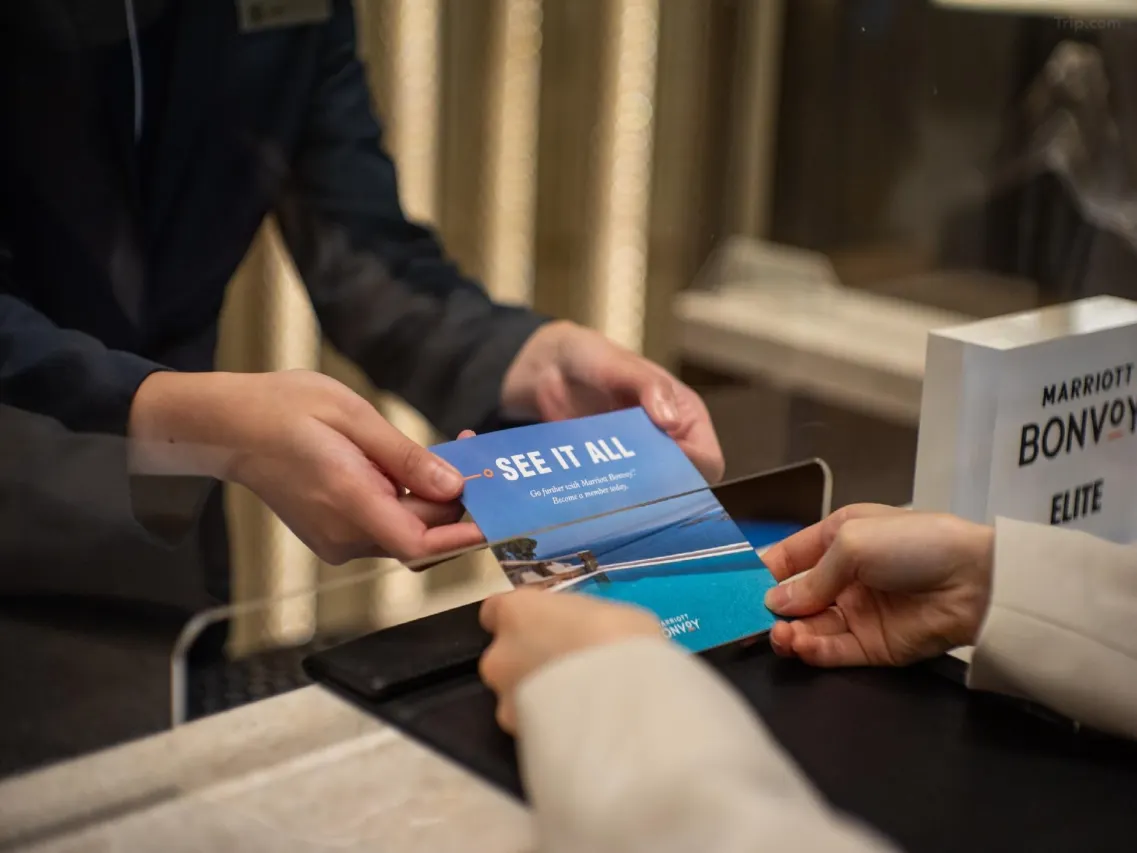
Payment During Check-in
For rooms marked Pay at Property, you may need to pay when you arrive at the hotel.
The hotel may ask for:
- A credit or debit card
- Cash in the local currency
- A refundable security deposit
- A valid passport or identification document
Accepted methods and deposit requirements depend on the hotel.
Payment During Check-out
Some hotels may collect payment when you check out. Follow the payment terms shown in your reservation instead of assuming that every Pay at Property booking follows the same process.
Do You Need a Credit Card for Trip.com Pay Later?
A credit card is not required for every Pay Later booking, but some hotels may request a valid card to guarantee the reservation.
A card may be required when:
- The hotel needs to secure your room
- Payment will be collected before check-in
- A late cancellation charge may apply
- A no-show charge may apply
Check the room policy to see whether the card will be charged immediately or only on the stated payment date.
Available payment methods on Trip.com may include credit cards, debit cards, GCash, PayPal, Google Pay, Apple Pay, Trip Coins, and gift cards. The options shown can vary depending on your device, booking type, currency, and payment page.
Is Trip.com Buy Now, Pay Later an Installment Plan?
No. Trip.com Hotel Buy Now, Pay Later is generally a delayed payment option, not a monthly installment or credit plan.
You reserve the room now and pay the full required amount later based on the hotel’s payment terms. The total cost is not automatically divided into smaller monthly payments.
Trip.com Hotel Pay Later | Installment Payment |
|---|---|
Delays the full payment | Divides the cost into several payments |
Based on the hotel’s room policy | Based on the payment provider’s terms |
Usually has no monthly payment schedule | Requires scheduled repayments |
May require a card guarantee | May require credit approval |
Payment is normally due before or during the stay | Repayments may continue after booking |
Trip.com Pay Later vs GCash GGives
Trip.com Pay Later and GCash GGives are different payment options.
Trip.com Pay Later delays when you pay for an eligible hotel room. GCash GGives lets eligible users divide selected Trip.com purchases into installments, subject to GCash approval, available credit, interest, fees, and repayment terms.
Trip.com Pay Later | Feature | GCash GGives |
|---|---|---|
Deferred hotel payment | Type | Installment credit service |
Full amount paid later | Payment | Cost divided into repayments |
Depends on the room policy | Eligibility | Depends on the user’s GGives eligibility |
Not normally an installment loan | Interest | Interest or fees may apply |
Selected hotel rooms | Availability | Selected Trip.com bookings |
Trip.com or the hotel | Payment Provider | GCash GGives |
A Pay at Property hotel may not show GCash during checkout because no online payment is being collected at that stage. Travelers who prefer installments should select an eligible prepaid booking and check whether GCash and GGives appear on the payment page.
Can You Cancel a Trip.com Pay Later Booking?
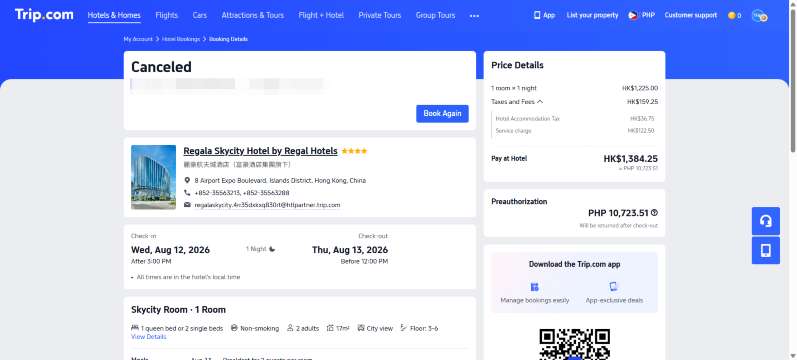
You can cancel a Pay Later hotel booking when cancellation is allowed under the selected room’s policy.
However, Pay Later does not automatically mean that cancellation is always free.
Cancelling Before the Deadline
When your room includes Free Cancellation, you can normally cancel without a cancellation charge before the stated deadline.
Always check the date, time, and applicable time zone.
Cancelling After the Deadline
When you cancel after the free cancellation period, the hotel may charge:
- The first night
- Part of the total booking
- The full booking amount
The exact charge depends on the hotel and room policy.
Cancelling a Non-refundable Room
Non-refundable rooms usually do not provide free cancellation. A cancellation charge may apply even when you cancel shortly after booking.
Trip.com explains that some hotels offer full or partial refunds when cancellation is completed by a certain date, while other hotels follow non-refundable policies.
How to Cancel a Trip.com Hotel Booking
Follow these steps in the Trip.com app:
- Sign in to your Trip.com account.
- Open My Trips or My Bookings.
- Select your hotel reservation.
- Tap Cancel Booking.
- Choose the cancellation reason.
- Review the cancellation policy and possible fee.
- Submit the cancellation request.
- Check the refund status in your booking details.
Approved hotel refunds may be processed by Trip.com within one to three working days, but the time needed for the money to reach your account can depend on the payment method, card issuer, or bank.
Benefits of Trip.com Buy Now, Pay Later
Reserve Your Hotel Earlier
You can secure an eligible room before making the full payment. This may be useful when hotel availability is limited.
More Time to Prepare Your Budget
Paying closer to your stay gives you additional time to prepare your hotel expenses.
Flexibility While Finalizing Plans
A flexible booking may be helpful when you are waiting for leave approval, coordinating with other travelers, or confirming your transportation.
Free Cancellation on Selected Rooms
Eligible rooms may allow you to cancel without a fee before the stated deadline.
More Room Choices
Booking earlier may give you more choices for room type, bed type, location, and included services.







Important Things to Check Before Booking
Payment Date
Check the exact date when payment will be collected. Save it in your calendar so you do not forget.
Cancellation Deadline
Read the date and time carefully. The hotel’s local time may be used.
Total Price
Check whether the displayed amount includes:
- Taxes
- Service charges
- Resort fees
- City taxes
- Property fees
Some fees may need to be paid separately at the hotel.
Payment Currency
A Pay at Property hotel may collect payment in the local currency. Your bank or card provider may use its own exchange rate and may apply a foreign transaction fee.
Deposit Requirements
Some hotels ask for a refundable deposit during check-in. Check the hotel policy and prepare the required payment method.
No-show Policy
A no-show happens when you do not arrive and do not cancel the booking. The hotel may charge part or all of the reservation according to its policy.
Room-specific Conditions
Payment and cancellation rules can be different for each room. Read the policy of the exact room you plan to book.
Trip.com Pay Later Booking Tips
- Compare several rooms before choosing one.
- Look for both Free Cancellation and Pay Later labels.
- Read the complete room policy.
- Check the payment and cancellation dates.
- Save a screenshot of the booking conditions.
- Use the guest’s passport name for international stays.
- Keep enough funds available before the payment date.
- Check whether property fees or deposits apply.
- Save your Trip.com booking confirmation.
- Contact Trip.com Customer Support when the terms are unclear.
❤️ Pro Tip: Before confirming your hotel, compare the Pay Later room with the prepaid rate. Choose the option that gives you the right balance between price and flexibility.
FAQs About Trip.com Buy Now, Pay Later
-
What is Trip.com Buy Now, Pay Later?
-
Is Trip.com Buy Now, Pay Later available for every hotel?
-
Does Free Cancellation mean I can pay later?
-
Will Trip.com charge my card immediately?
-
Can I use GCash for Trip.com Pay Later?
Trending Searches
-
Popular Content
-
Top Flight Links
-
Popular Hotels
-
Popular Things to Do
-
Featured guides
-
Trip.com links
- Trip.com E-Ticket
- Trip.com Payment Methods
- Trip.com Passport Change
- Trip.com Customer Service
- Trip.com Flight Cancellation
- Trip.com VIP Lounge Access
- Trip.com Phone Number
- Trip.com Check In
- Payment Sale
- Trip Coins
- Trip.com Hotel Refund
- Trip.com Cancellation Policy
- Trip.com Ticket Issued Status
- Trip.com Flight Ticket
- Trip.com Membership
- Trip.com E-Receipt
- Trip.com Seat Selection
- Trip.com Baggage Allowance
- Trip.com Flight Change
- Trip.com Reviews
- Cheap flights from Manila to Hong Kong
- Cheap tickets from Manila to Tagbilaran
- Cheap flights from Manila to Cebu
- Cheap flights from Manila to Iloilo City
- Plane tickets from Manila to General Santos
- Plane tickets from Cebu to Manila
- Plane tickets from Bacolod to Manila
- Plane tickets from Manila to Tacloban
- CA986 Flight Status
- 5J187 Flight Status
- PR431 Flight Status
- PR741 Flight Status
- MH709 Flight Status
- EK2521 Flight Status
- 5J582 Flight Status
- Hotels near 72 wonder tower
- Hotels near Mactan–Cebu International Airport
- Hotels near Fenghuang Ancient Town
- Hotels near Greenland Xindu East Coast Times Square South Area
- Hotels near Changbai Mountain Beauty Pine International Sculpture Park
- Shiji Qingteng Capsule Hotel (T3 Terminal)
- Bangkok-Pratunam Hotel
- Shangri-La Resort
- De Mani Hotel
- Fan Yu Gaming Center
- Hotels in Fenghuang County
- Hotels in Davao City
- Hotels in North Jakarta
- Hotels in Moscow
- Hotels in Kuala Lumpur
- Philippines 5G eSIM | Dual Network • All AI & TikTok | Day Pass/Total Data Package | 24-Hour Billing | 1-30 Days | QR Code
- Private Mutianyu Great Wall Trip With English-speaking Driver
- Chengdu Departure - Bipenggou Shuttle Bus
- Vietnam | 4G/5G eSIM | Daily/Data Plan | 24-hour Billing | 1-30 Days | QR code
- Vietnam Airport VIP Fast Track Service
- Bangladesh Dhaka DAC Hazrat Shahjalal International Airport T1 terminal international departure IBalaka Executive Lounge international departure lounge experience
- Huanglongjiuzhai Railway Station - Jiuzhaigou National Park shuttle bus · private charter optional
- Lantau Island Ngong Ping 360 round-trip cable car admission ticket with priority boarding + one-way urban area transfer
- Phuket City Pass
- Horseback Riding in Tamarindo Beach
- From Venice: Dolomites, Lake Misurina, and Cortina Day Trip
- Nazca Lines Day Tour from Lima, Peru
- Lucerne travel pass
- Northeast La Palma tour with Charco Azul and rum tasting
- Jet Skiing around La famille ship and smaller pristine cays 2hr
- Mothers Day Gifts
- eSIM
- Hong Kong International Airport
- International Driving Permit
- Toronto Pearson International Airport
- Universal Studios Singapore
- Great Wall of China
- UK ETA
- Narita International Airport
- China Currency
- Changi Airport
- Schengen Visa
- Singapore MRT Map
- France Visa
- Ninoy Aquino International Airport