

Trip.com App in ChatGPT: Search Flights, Hotels, Trains & More

By Trip.com
August 28, 2026

Planning a trip often means switching between different websites to compare flights, hotels, train schedules, attractions, prices, and travel times. With the Trip.com app in ChatGPT, you can start planning in one conversation. Just tell ChatGPT where you want to go, when you plan to travel, and what you are looking for.
You can search and compare flights, hotels, trains, attractions, and tours, then narrow down the results based on your budget, schedule, location, or travel preferences.
A faster way to plan travel with Trip.com in ChatGPT

The Trip.com app in ChatGPT lets you search for different parts of your trip without repeatedly filling in separate search forms. You can describe your travel plans in everyday language, and ChatGPT can use Trip.com travel information to help you explore suitable options.
For example, you can search for a morning flight, find a hotel near a train station, compare high-speed trains between two cities, or look for attraction tickets and local tours.
You can also continue the same conversation when your budget, dates, or preferences change.
What is the Trip.com app in ChatGPT?
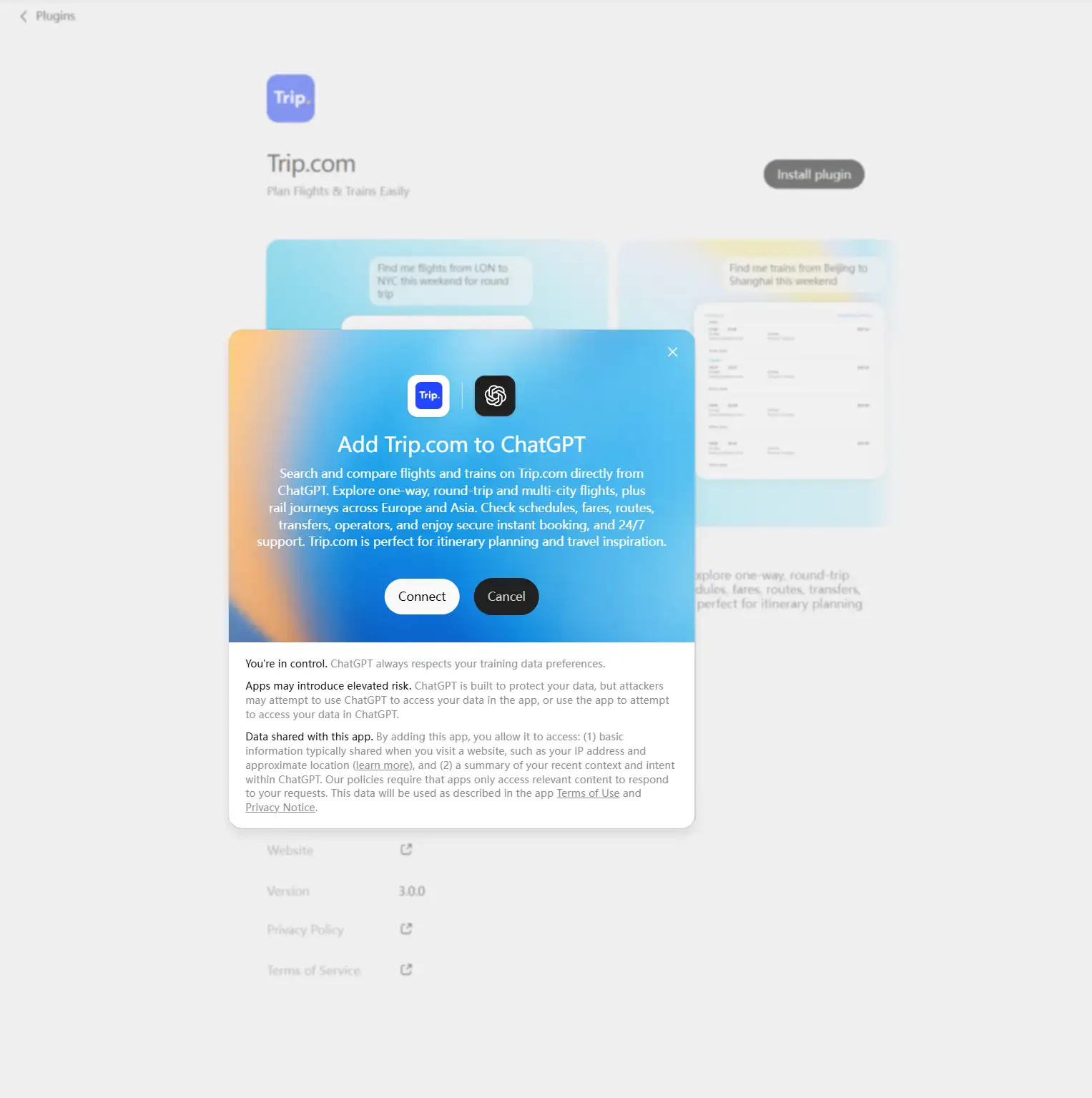
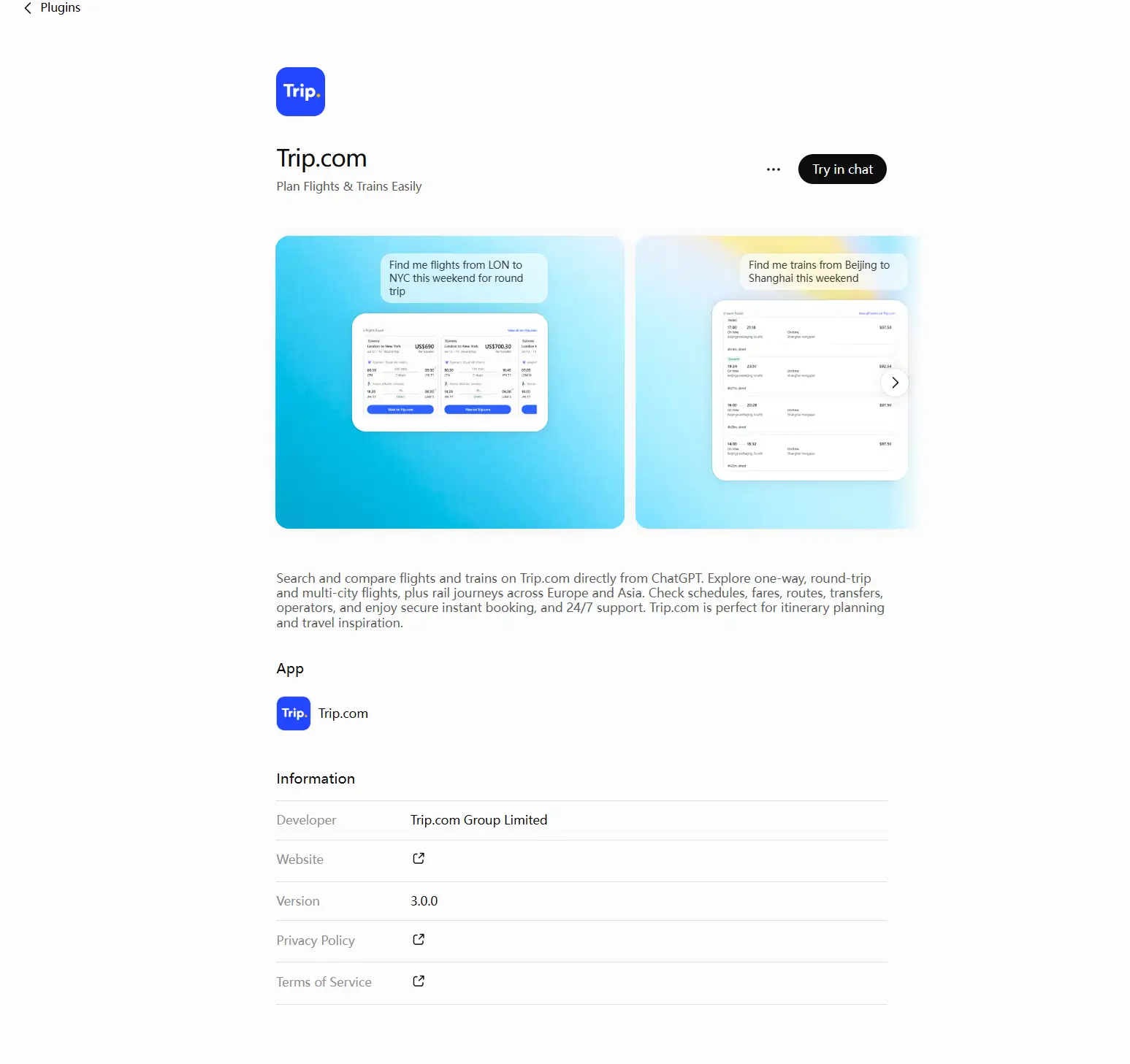
The Trip.com app in ChatGPT is a travel search integration that connects ChatGPT's conversational experience with Trip.com's travel services.
Instead of selecting every filter manually, you can explain what you need.
| Travel Need | Example Prompt |
|---|---|
Flights | "Find flights from New York to London next month." |
Hotels | "Show hotels near Shinjuku Station." |
Trains | "Find the fastest train from Shanghai to Beijing." |
Attractions & Tours | "Show attractions and tours in Singapore this weekend." |
The Trip.com app can then help you explore relevant travel options based on your request.
You do not always need to know airport codes, station names, train numbers, or exact product names before starting. Begin with a general request and add more details as you continue the conversation.
The app is mainly useful for searching and comparing travel options. When you choose an option, you will normally continue to Trip.com to check the latest details and complete your booking.
Can I use the Trip.com app in ChatGPT right now?
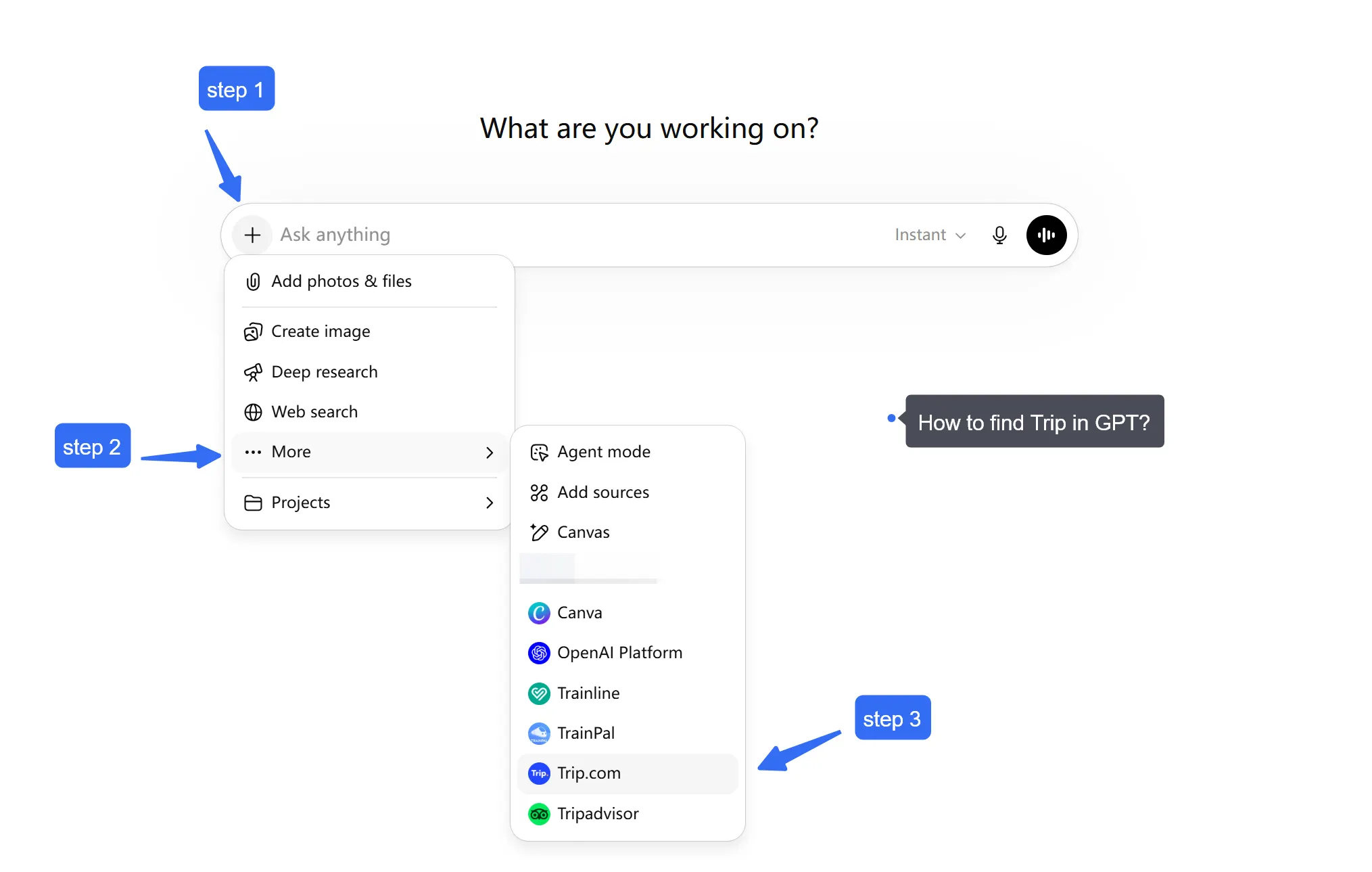
Access to Trip.com in ChatGPT may depend on your ChatGPT account, location, subscription, and workspace settings.
Sign in to ChatGPT and check the available apps or plugins for Trip.com. Follow the instructions shown in your account to connect or enable it.
If you use a work or organization account, access to third-party apps may depend on settings controlled by your workspace administrator.
The location of these settings may change as ChatGPT updates its interface. If you cannot find Trip.com immediately, check your available apps, plugins, or account settings.
Once Trip.com is available, start a conversation and describe the travel product you want to search for.


What Can You Search with Trip.com in ChatGPT?
The Trip.com app in ChatGPT can help you search and compare flights, hotels, trains, attractions, and tours through conversation.
You can start with one part of your trip, then continue adding other travel needs without starting a completely new search.
Search flights
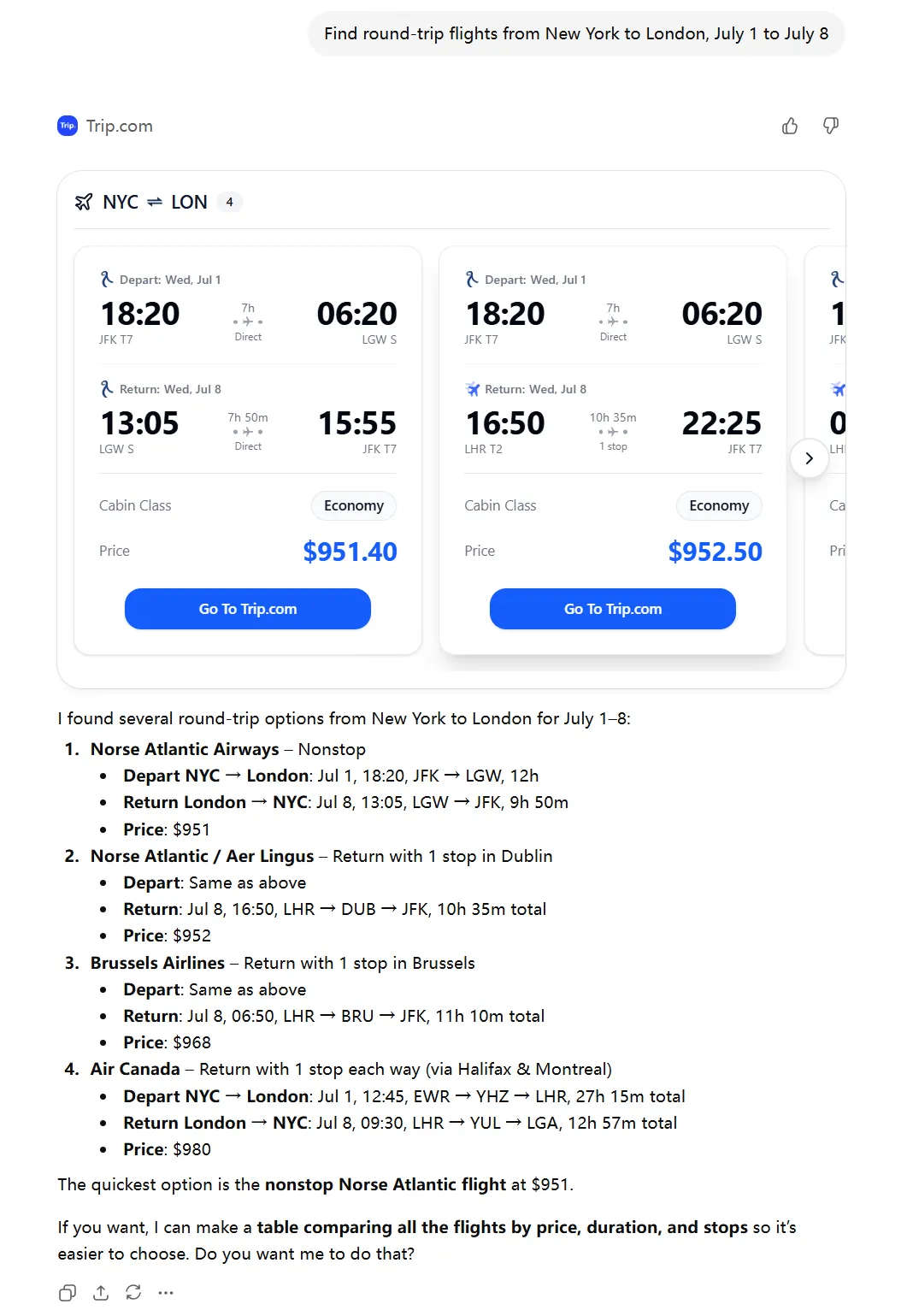
You can use Trip.com in ChatGPT to:
- Find one-way, round-trip, and multi-city flights
- Compare airlines and available fares
- Check departure and arrival times
- Compare flight duration and number of stops
- Look for direct or nonstop flights
- Explore different travel dates or nearby airports
- Search for morning, evening, or other preferred departure times
Find hotels
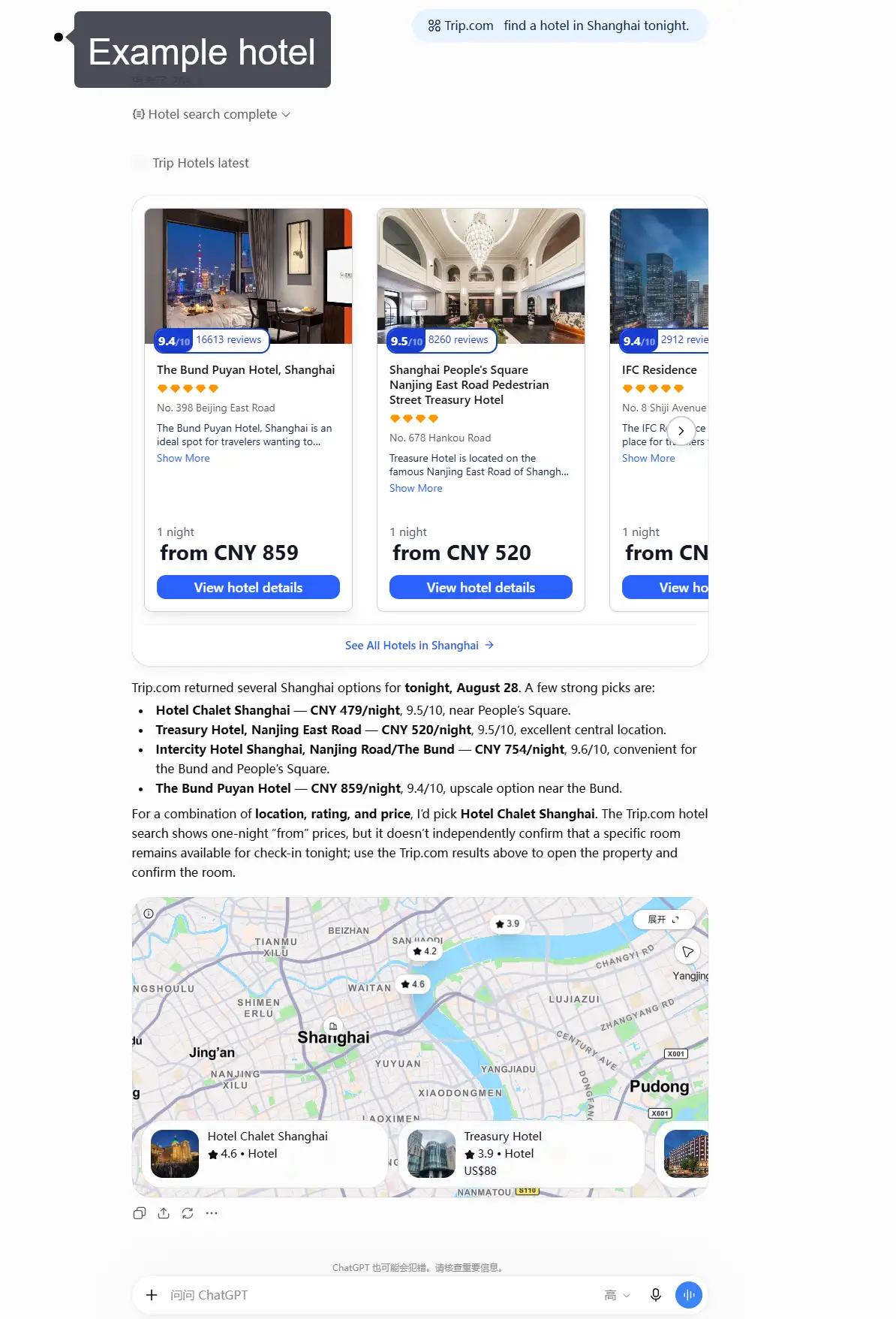
You can also search for hotels based on:
- Destination and travel dates
- Number of guests
- Location or neighbourhood
- Nearby stations or attractions
- Budget
- Star rating
- Guest ratings
- Room types
- Breakfast options
- Facilities such as a pool, parking, or Wi-Fi
For example:
"Find four-star hotels near Shinjuku Station with breakfast."
You can then ask ChatGPT to compare the available options based on location, price, room type, guest ratings, or facilities.
Search trains
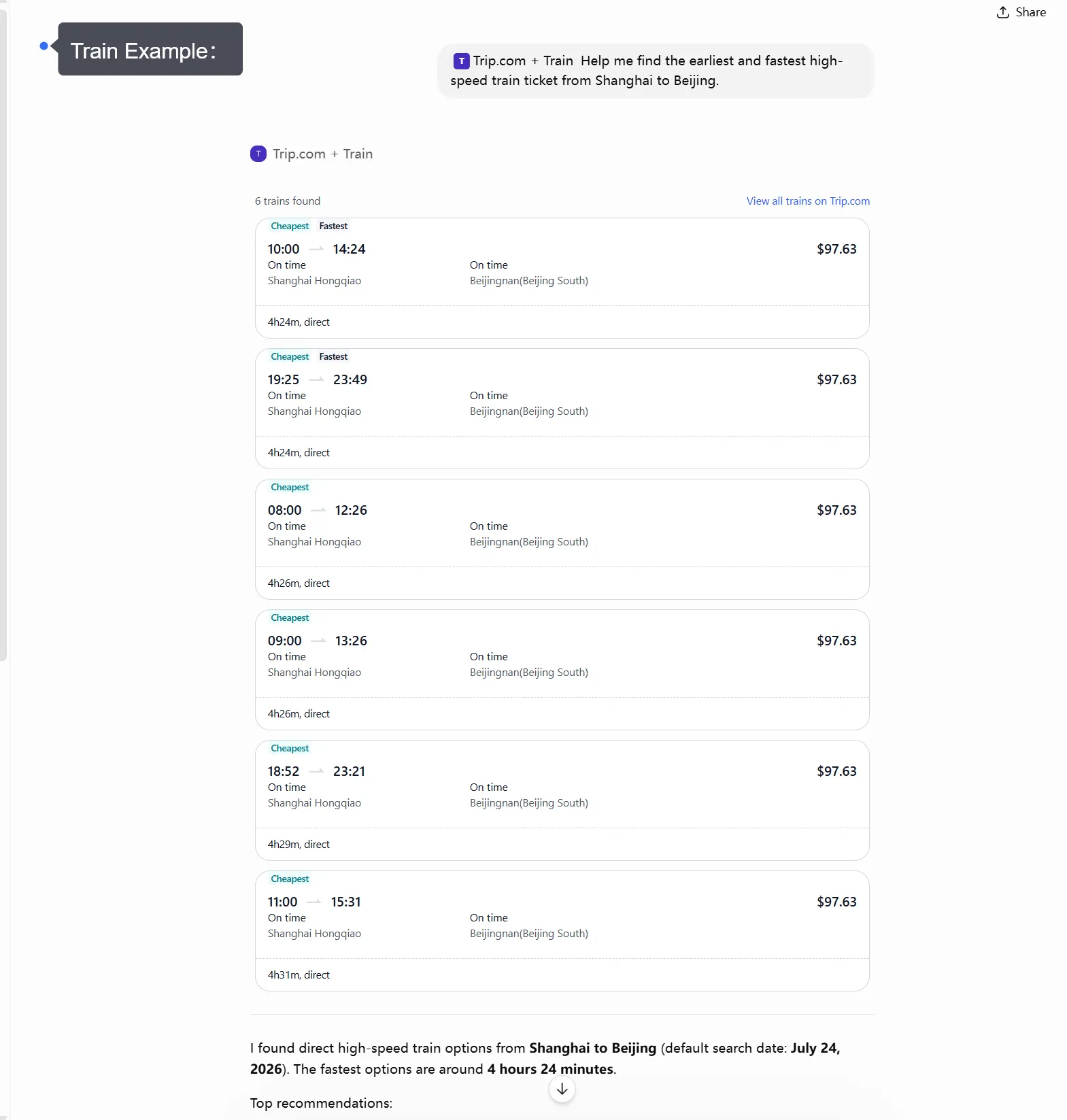
For supported train routes, you can:
- Search train schedules between cities
- Compare departure and arrival times
- Check total journey duration
- Review transfers when applicable
- Compare train types and seat classes when available
- Check available fares
- Explore high-speed, intercity, and cross-border rail options
Discover attractions and tours
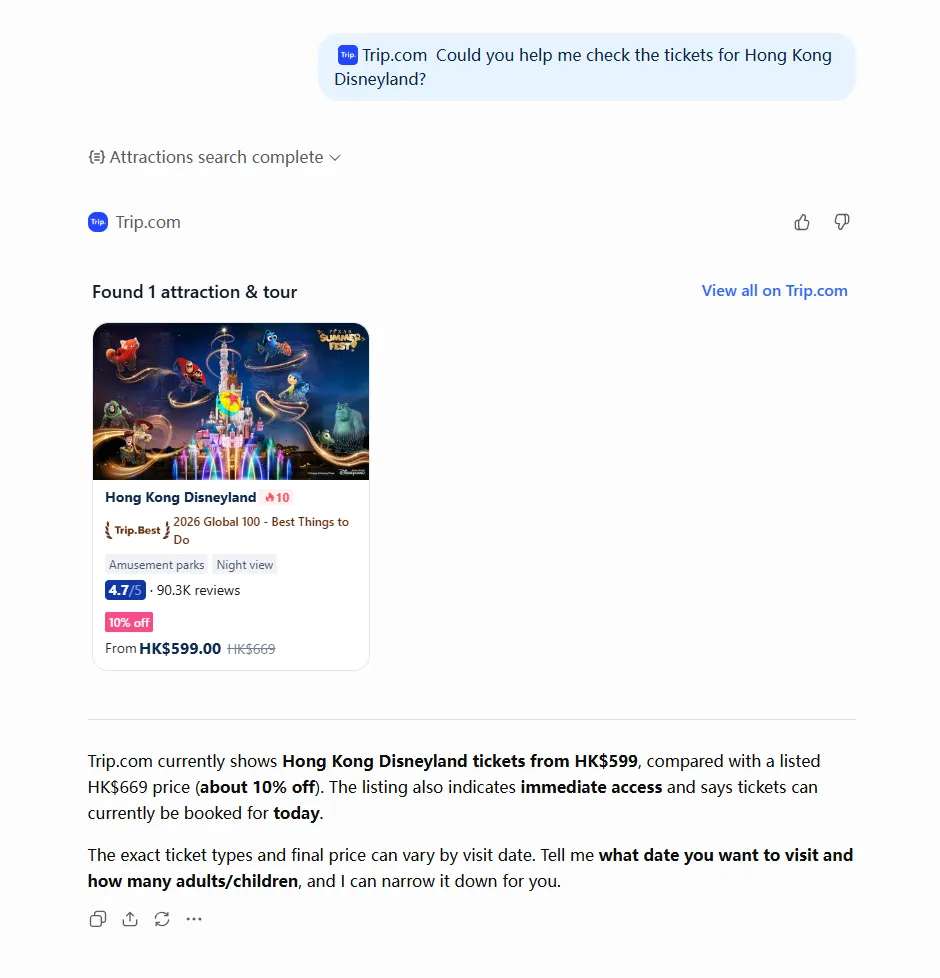
Trip.com in ChatGPT can also help you explore things to do at your destination.
You can search for:
- Popular attractions
- Theme parks
- Museums
- Observation decks
- Cultural experiences
- Day tours
- Sightseeing tours
- Family-friendly activities
Depending on the product, you may also be able to compare ticket options, opening times, visitor ratings, tour duration, language, pickup arrangements, and cancellation conditions.
For example:
"Show family-friendly attractions in Singapore for this weekend."
"Find an English-speaking day tour from Bangkok with hotel pickup."
Plan Different Parts of Your Trip Together
You do not have to search for each travel product separately.
For example, you can start by finding a flight to Tokyo, then search for a hotel near Shinjuku, check a train from Tokyo to Osaka, and look for attractions in both cities.
If your dates or plans change, continue the conversation and update the relevant searches.
How do I search with Trip.com in ChatGPT?
Start by telling ChatGPT what you need and include the travel information you already know.
You do not need to use airport codes, station codes, or exact product names.
For example:
- "Find round-trip flights from Manila to Tokyo from December 10 to December 15."
- "Show hotels near Shinjuku Station for two adults."
- "Find the fastest high-speed train from Shanghai to Beijing tomorrow."
- "Show family-friendly attractions in Singapore."
- "Find a day tour from Bangkok with hotel pickup."
- "Help me plan a seven-day Japan trip with flights, hotels, trains, and activities."
You can also include your preferences in the same request.
For example:
"Find direct flights from Singapore to Tokyo next Friday leaving in the morning."
Or:
"Find a four-star hotel near Shinjuku Station with breakfast and free Wi-Fi."
After receiving the first results, continue the conversation instead of starting over.
You can ask:
- "Only show direct flights."
- "Which option is cheapest?"
- "Find a cheaper hotel."
- "Show hotels closer to the station."
- "Show me departures after 9 AM."
- "Are there faster train options?"
- "Show indoor attractions instead."
- "Are there cheaper dates?"
This makes it easier to narrow down your choices step by step.
 NO.1
NO.1






























































What should I type to get better travel results?
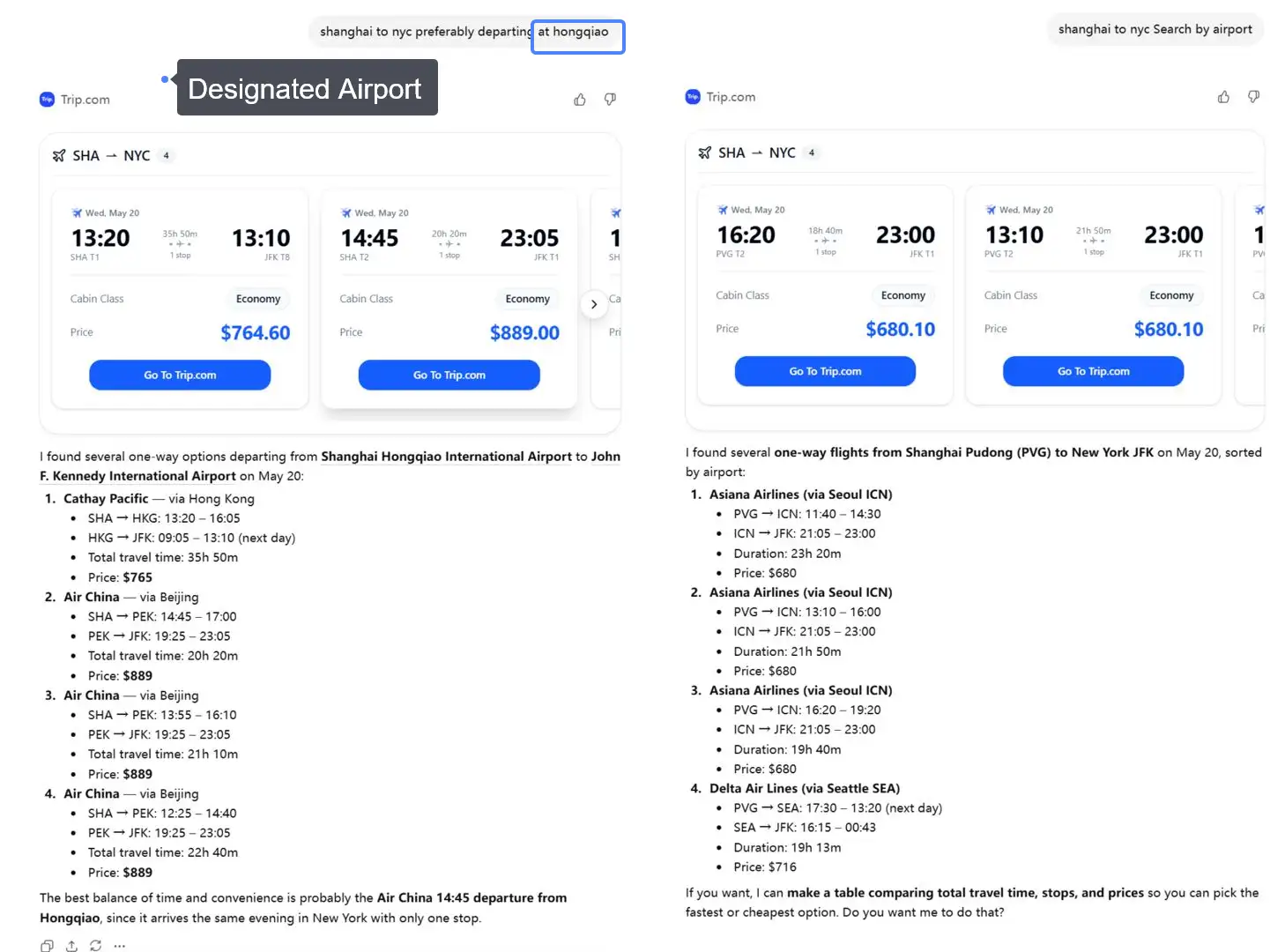
The more useful information you provide, the easier it is to find travel options that match your plans.
Travel Product | Useful Details to Include |
|---|---|
Flights | Departure, destination, dates, travelers, departure time, cabin class, direct flight preference, budget |
Hotels | Destination, dates, guests, rooms, neighbourhood, budget, star rating, breakfast, facilities |
Trains | Departure city, arrival city, date, departure time, seat class |
Attractions | Destination, date, travelers, type of activity, duration |
Tours | Destination, date, travelers, tour type, language, pickup requirements |
Better prompt examples
Travel Goal | Better Prompt Example |
|---|---|
Find a basic round trip | "Find round-trip flights from New York to London from July 1 to July 8." |
Search by airport | "Find flights from JFK to London, preferably arriving at Heathrow." |
Avoid long layovers | "Show flights with no layovers longer than three hours." |
Find cheaper options | "Can you check cheaper dates or nearby airports?" |
Find a hotel | "Show four-star hotels near Shinjuku Station with breakfast." |
Find a train | "Show high-speed trains from Beijing to Shanghai tomorrow morning." |
Find attractions | "Show family-friendly attractions in Singapore that take less than half a day." |
Find a tour | "Find an English-speaking day tour from Bangkok with hotel pickup." |
Compare transport | "Should I fly or take the train from Tokyo to Osaka?" |
You can also start with a broad destination.
For example, if you simply enter "London" instead of selecting a specific airport or neighbourhood, you can review the first results and narrow your search later.
How do I compare travel options after the first search?
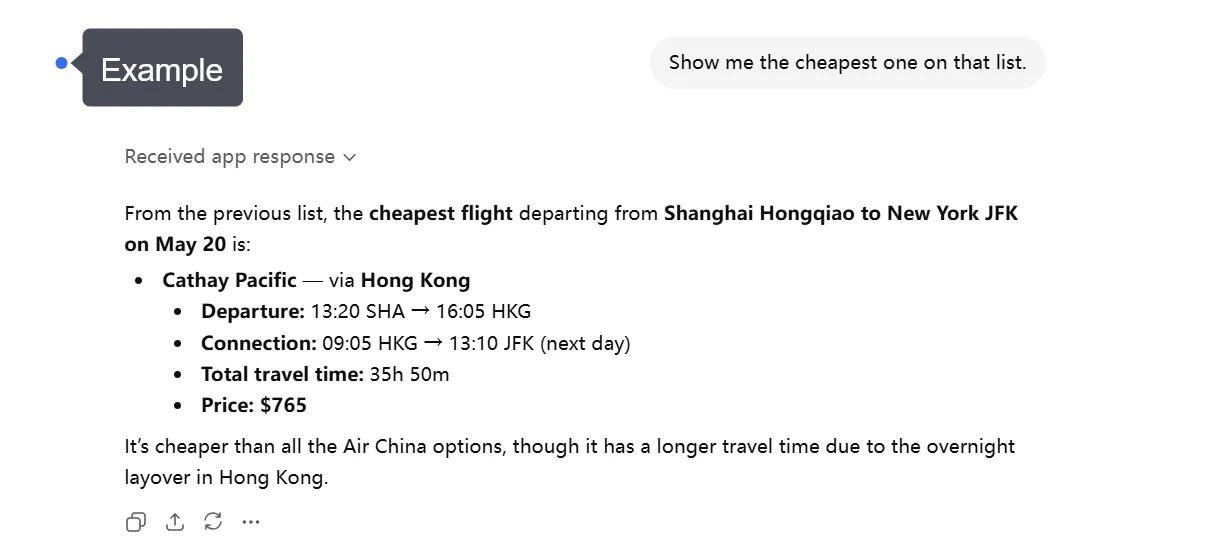
After your first search, continue the conversation and tell ChatGPT what matters most to you.
Travel Product | What to Compare |
|---|---|
Flights | Price, airports, times, journey duration, stops, airline, baggage |
Hotels | Location, price, guest rating, room type, breakfast, facilities, cancellation policy |
Trains | Stations, times, journey duration, transfers, train type, seat class, fare |
Attractions | Price, opening time, time slot, duration, age requirements, cancellation policy |
Tours | Price, duration, meeting point, language, inclusions, pickup, cancellation policy |
You can also ask follow-up questions such as:
- "Which one arrives earliest?"
- "Show me the cheapest option."
- "Which flight has the shortest travel time?"
- "Which hotel is closest to the station?"
- "Are there any direct trains?"
- "Only show flights leaving after 10 AM."
- "Which attraction is better for children?"
You can also compare different types of transport. For example, ask whether flying or taking a train is more practical between two cities.
Choose the option that best matches your schedule, budget, and travel plans.
What should I check before booking?
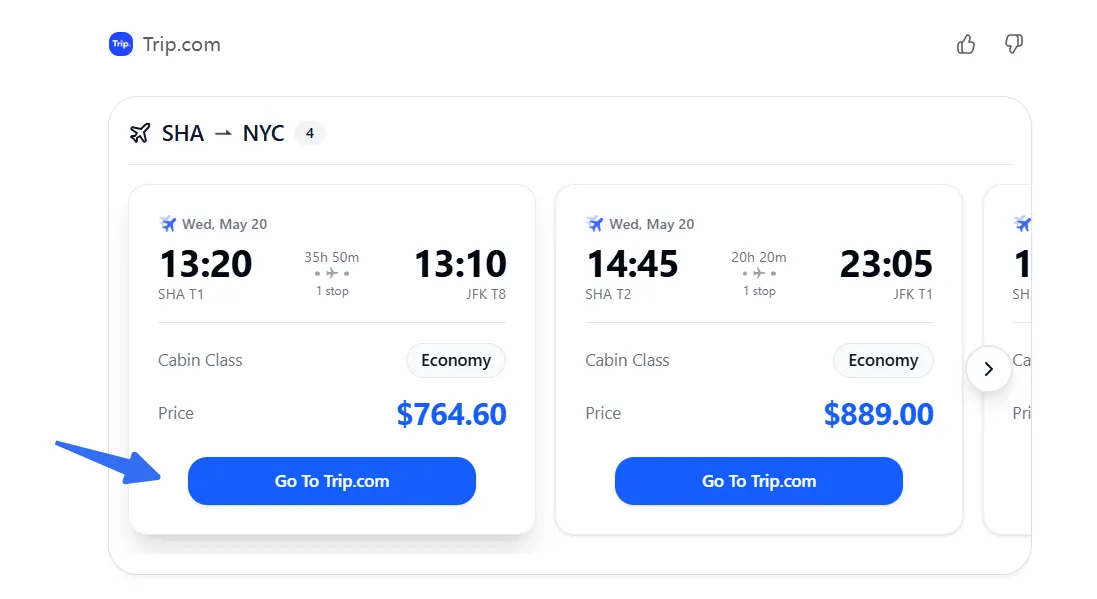
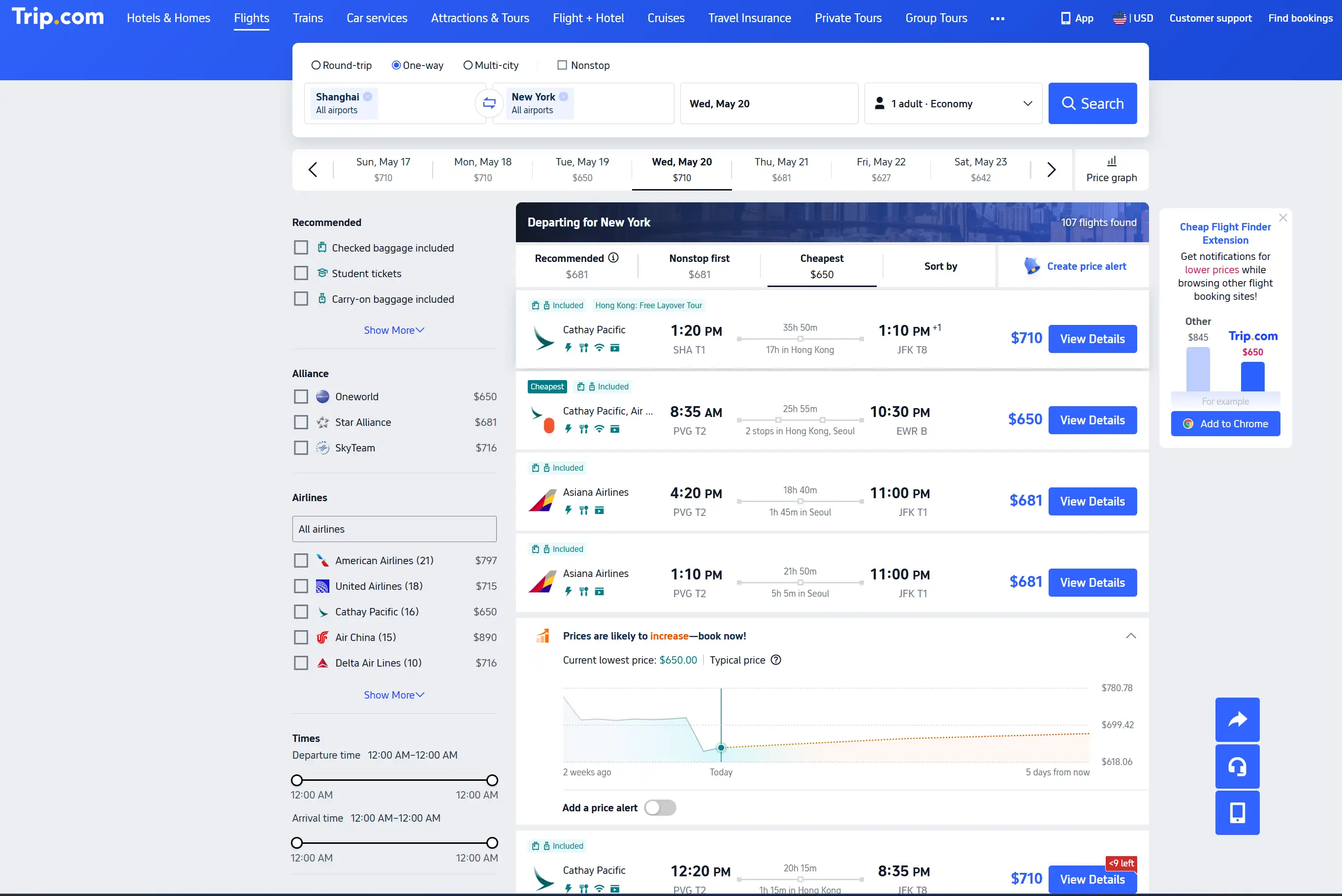
Always review the latest details on the final Trip.com product page before completing a booking.
Travel Product | Important Details to Check |
|---|---|
Flights | Passenger names, dates, airports, times, stops, baggage, fare rules, cancellation, final price |
Hotels | Hotel address, dates, room type, guests, taxes, breakfast, check-in rules, cancellation, final price |
Trains | Stations, date, train number, time, transfers, seat class, boarding requirements, final price |
Attractions | Visit date, time slot, ticket type, age or height rules, inclusions, cancellation, final price |
Tours | Date, meeting point, duration, language, inclusions, pickup details, cancellation, final price |
Prices and availability can change between your ChatGPT search and the final booking.
Always use the final Trip.com product or booking page to confirm the information that applies to your purchase.







Plan more of your trip in one conversation
Trip.com in ChatGPT can help connect different parts of your journey instead of treating every travel search separately.
For example:
Step | What You Can Search |
|---|---|
Flights | Find a flight to your destination |
Hotels | Find a hotel that suits your arrival time and itinerary |
Trains | Check transport to your next city |
Attractions | Find things to do near your hotel |
Tours | Add day trips or local experiences |
For a multi-city trip, you might ask:
"Help me plan a seven-day Japan trip with flights, hotels, trains, and activities."
You can then refine each part based on your travel dates, budget, schedule, location, and preferences.
If one part of your trip changes, continue the conversation and update the related searches.
Available Trip.com functions inside ChatGPT may vary depending on your account, location, destination, and current product availability.
Conclusion: Start with one simple travel request
You do not need a perfectly planned itinerary before using the Trip.com app in ChatGPT.
Start with a simple request:
"Help me plan a five-day trip to Tokyo."
Then add your travel dates, budget, number of travelers, and preferences.
You can search flights, compare hotels, check train journeys, and discover attractions or tours as you build your trip.
Continue the conversation to narrow down the options that best match your schedule and budget.
Once you find an option you like, continue to Trip.com to review the latest price, availability, booking conditions, and other important details before completing your purchase.
FAQs About Trip.com App in ChatGPT
-
Is the Trip.com app in ChatGPT the same as the Trip.com mobile app?
-
Can I search for cheap flights with Trip.com in ChatGPT?
-
Can I book directly inside ChatGPT?
-
Can I change my flight search after seeing results?
-
Does Trip.com in ChatGPT show real-time flight prices?
-
What information should I include in my prompt?
-
What should I double-check before booking?
Trending Searches
-
Popular Content
-
Top Flight Links
-
Popular Hotels
-
Popular Things to Do
-
Featured guides
-
Trip.com links
- Trip.com E-Ticket
- Trip.com Payment Methods
- Trip.com Passport Change
- Trip.com Customer Service
- Trip.com Flight Cancellation
- Trip.com VIP Lounge Access
- Trip.com Phone Number
- Trip.com Check In
- Payment Sale
- Trip Coins
- Trip.com Hotel Refund
- Trip.com Cancellation Policy
- Trip.com Ticket Issued Status
- Trip.com Flight Ticket
- Trip.com Membership
- Trip.com E-Receipt
- Trip.com Seat Selection
- Trip.com Baggage Allowance
- Trip.com Flight Change
- Trip.com Reviews
- Flights from Manila to Hong Kong
- Flights from Manila to Cebu
- Flights from Manila to Iloilo City
- Flights from Manila to Tagbilaran
- Flights from Manila to General Santos
- Flights from Cebu to Manila
- Flights from Bacolod to Manila
- Flights from Manila to Tokyo
- CA986 Flight Status
- EK2521 Flight Status
- 5J187 Flight Status
- PR431 Flight Status
- PR741 Flight Status
- MH709 Flight Status
- 5J582 Flight Status
- Hotels near 72 wonder tower
- Hotels near Mactan–Cebu International Airport
- Hotels near Fenghuang Ancient Town
- Hotels near Greenland Xindu East Coast Times Square South Area
- Hotels near Changbai Mountain Beauty Pine International Sculpture Park
- Shiji Qingteng Capsule Hotel (T3 Terminal)
- Bangkok-Pratunam Hotel
- Alta Vista de Boracay
- Orange Hotel (Wangfujing, Wenhua Road, Baotou)
- De Mani Hotel
- Hotels in Fenghuang County
- Hotels in Hong Kong
- Hotels in Davao City
- Hotels in North Jakarta
- Hotels in Moscow
- Philippines 5G eSIM | Dual Network • All AI & TikTok | Day Pass/Total Data Package | 24-Hour Billing | 1-30 Days | QR Code
- Private Mutianyu Great Wall Trip With English-speaking Driver
- Vietnam Airport VIP Fast Track Service
- Vietnam | 4G/5G eSIM | Daily/Data Plan | 24-hour Billing | 1-30 Days | QR code
- Mainland China/Hong Kong/Macau 5G eSIM | 5 Carriers · All AI | Day Pass/Total Data Package | 24-Hour Billing | QR Code
- Huanglongjiuzhai Railway Station - Jiuzhaigou National Park shuttle bus · private charter optional
- Lantau Island Ngong Ping 360 round-trip cable car admission ticket with priority boarding + one-way urban area transfer
- European universal 5G/4G eSIM | Multi-network support, supports All AI & TikTok | 500MB/day - 50GB total | 1-90 days | 24-hour billing | QR code
- 1-day tour to Emperor Qinshihuang's Mausoleum Site Museum with Chinese/English guide and The Romantic Show of Xi'An performance
- Koh Samui: Introduction Group Class Muay Thai Boxing for Beginners
- Madeira: Wine & Tapas, Cabo Girão Skywalk 4x4 Jeep Adventure
- Verona: Winery Visit & Wine Tasting near the City Center
- 1.5 hr art tour at New York University, US
- Wageningen Audio Tour: Triumphs, Towers, and Timeless Treasures
- Singapore Analogue viral restaurant reservation service
- Hong Kong Airport Express
- Bangkok Airport Rail Link
- Louis Vuitton Ship in Shanghai
- Narita Express
- Where to Stay in Kyoto
- Hong Kong Night View
- AREX
- What to Buy in Shanghai
- Child Seat on Plane
- Tokyo Weather in December
- Dubai Metro Map
- Keikyu Line
- Bus Singapore to Kuala Lumpur
- Hotels near Jeju International Airport
- Hotels near "Bergen Airport, Flesland", "Bergen Airport