
What Is eSIM? How It Works, Benefits & Travel Tips

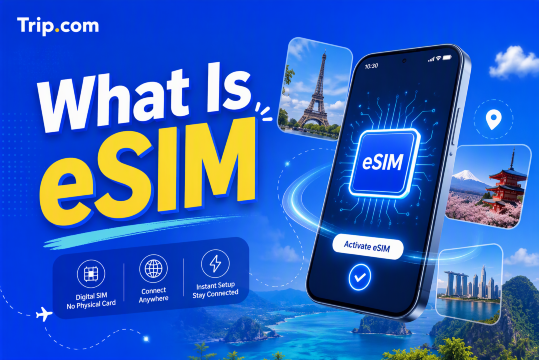
An eSIM is a convenient way to stay connected without changing a physical SIM card, especially when travelling abroad. You can download a mobile plan directly to a compatible phone and use it for data, calls, or messages depending on the plan.
This guide explains what an eSIM is, how it works, eSIM benefits, how to buy and install one, and what to check before using an eSIM for travel.
What Is eSIM?
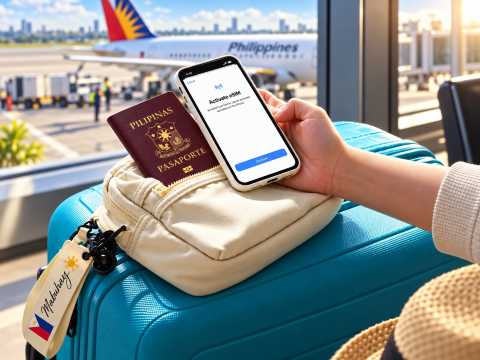
eSIM stands for embedded SIM. It is a digital SIM built into a compatible phone, tablet, smartwatch, or other device.
Like a physical SIM card, an eSIM allows your device to connect to a mobile network. The main difference is that you do not need to insert or remove a physical card.
Apple describes an eSIM as a digital SIM that lets you activate a cellular plan without using a physical nano-SIM. Google also describes eSIM as a digital SIM that can activate a cellular network on compatible devices.


How Does an eSIM Work?
An eSIM works by downloading a mobile network profile directly to your compatible device.
The process usually works like this:
- Choose an eSIM plan from a mobile carrier or travel eSIM provider.
- Install the eSIM using a QR code, carrier app, activation link, manual details, or supported in-app installation.
- Follow the setup instructions on your device.
- Select the eSIM for mobile data, calls, or messages depending on your plan.
- Connect to the supported mobile network.
The exact setup method depends on your device, carrier, and eSIM provider.
📱 Pro Tip: Before buying an eSIM, check whether your phone supports eSIM and whether it is unlocked for use with another mobile provider.
eSIM vs Physical SIM
eSIM | Feature | Physical SIM |
|---|---|---|
Built into the device | Format | Removable SIM card |
Installed digitally | Installation | Inserted into a SIM tray |
Can be managed digitally when supported | Switching plans | Usually requires changing SIM cards |
Many devices can store several profiles | Multiple profiles | Depends on available SIM slots |
No physical card to lose | Risk of losing SIM | SIM card can be lost or damaged |
Easy to add another travel plan | Travel use | Usually requires buying and changing SIM cards |
Requires an eSIM-compatible device | Compatibility | Works with devices that have a SIM slot |
Both options allow your device to connect to a mobile network. The biggest difference is how the mobile plan is stored and activated.
What Are the Benefits of eSIM?
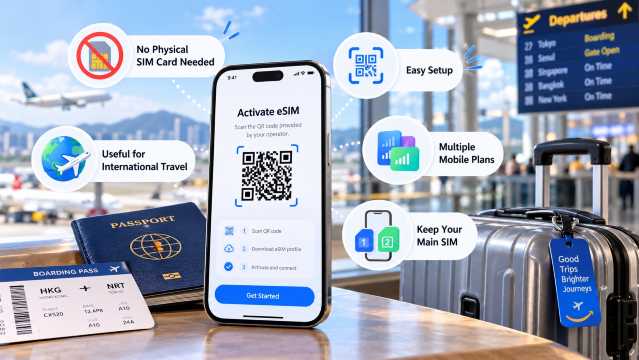
1. No Physical SIM Card Needed
You do not need to open your SIM tray or carry several SIM cards when travelling. Your mobile plan can be installed digitally.
2. Easy Setup
Many eSIM plans can be installed by scanning a QR code or following the provider's digital installation process.
3. Useful for International Travel
You can purchase a travel eSIM before your trip and prepare your mobile data without searching for a SIM shop after arrival.
4. Multiple Mobile Plans
Many compatible phones can store multiple eSIM profiles.
The number of profiles that can be stored or active at the same time depends on the phone model and carrier. For example, supported Google Pixel models can use two eSIM profiles at once when the carrier supports the feature.
5. Keep Your Main SIM
On compatible Dual SIM phones, you may be able to keep your regular SIM active while using a travel eSIM for mobile data.
This can be useful if you still want access to your regular phone number while travelling.
Is eSIM Good for International Travel?
An eSIM can be particularly useful for international travel because you can arrange your mobile data before reaching your destination.
Instead of looking for a physical SIM card after landing, you can prepare a compatible travel eSIM and follow the provider's instructions to connect when needed.
Travel eSIM plans may offer:
- Local mobile data
- Regional coverage across several destinations
- Different data allowances
- Different validity periods
- 4G or 5G access depending on the plan and local network
- Hotspot or tethering support on selected plans
However, not every travel eSIM includes a local phone number, voice calls, or SMS.
Many travel eSIM plans are data-only, so always check the inclusions before purchasing.
 NO.1
NO.1






























































eSIM vs International Roaming
Both eSIM and international roaming can keep you connected overseas, but they work differently.
With international roaming, you continue using your regular mobile carrier while travelling. Your carrier determines the available roaming network, data allowance, coverage, and charges.
With a travel eSIM, you add another mobile plan to your phone specifically for the destination or region you are visiting.
Travel eSIM | Feature | International Roaming |
|---|---|---|
Separate travel plan | Mobile plan | Existing mobile plan |
Install another eSIM | Setup | Usually activate roaming |
Can often remain active separately | Main number | Keeps using your regular number |
Depends on purchased eSIM | Data allowance | Depends on carrier roaming package |
Depends on eSIM provider | Coverage | Depends on your home carrier's roaming partners |
Depends on destination and package | Price | Depends on your carrier's roaming rates |
Before travelling, compare the data allowance, validity period, destination coverage, calls and SMS, and roaming charges from your regular carrier.
If you use an eSIM for travel data, check your SIM settings carefully to avoid accidentally using roaming data from your main SIM.
What to Check Before Buying an eSIM
Before purchasing an eSIM, check these important details:
- Device compatibility: Your phone must support eSIM.
- Carrier lock: Your phone may need to be unlocked to use another provider's eSIM.
- Destination coverage: Make sure the country or region you are visiting is covered.
- Data allowance: Check how much mobile data is included.
- Validity: Check when the plan starts and how long it remains valid.
- Network: Check whether 4G, 5G, or another network is available.
- Calls and SMS: Check whether the plan includes calls and messages or is data-only.
- Hotspot support: Check whether tethering or Personal Hotspot is supported.
- Activation rules: Find out when the plan's validity begins.
- Reinstallation rules: Some travel eSIMs cannot simply be installed again after deletion.
For Trip.com eSIM products, device compatibility and other plan conditions are shown on the relevant product page. Trip.com also advises users not to delete an eSIM after successful installation because some packages may become invalid.
🌏 Pro Tip: Traveling abroad soon? You can check available international eSIMs on Trip.com and choose a package based on your destination, trip length, and data needs.
How to Check If Your Phone Supports eSIM
The exact menu can be different depending on your phone model and software version.
iPhone
Go to:
Settings > Cellular or Mobile Data > Add eSIM
If the option is available, your device may support eSIM.
Apple also supports several eSIM setup methods, including carrier activation, eSIM Quick Transfer, and QR code installation on compatible devices and carriers.
Google Pixel
Go to:
Settings > Network & internet > SIMs > Add SIM > Set up an eSIM
Google notes that eSIM support and setup may depend on both the phone and mobile carrier.
Samsung Galaxy
On compatible Samsung devices, the menu is usually found under:
Settings > Connections > SIM manager > Add eSIM
You can then follow the available setup option, such as scanning an eSIM QR code.
💡Tip: Menu names can vary depending on your phone model, operating system, country, and carrier.
Buy an eSIM on Trip.com
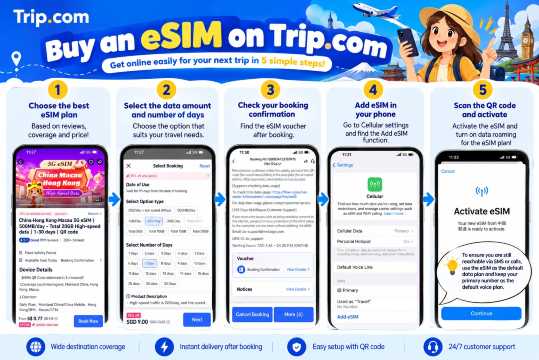
You can buy travel eSIM plans on Trip.com for many popular international destinations.
Available packages may vary by:
- Destination
- Data allowance
- Validity period
- Network
- Coverage
- Plan type
To buy an eSIM on Trip.com:
- Open the Trip.com app and search for eSIM.
- Choose your destination or regional eSIM plan.
- Check the data allowance, validity period, coverage, and device compatibility.
- Complete your booking.
- Go to My Orders and find your eSIM booking.
- Follow the installation instructions shown for your plan.
For supported products, Trip.com also provides In-App Installation, allowing the eSIM to be installed from the order without scanning a QR code.
When Should You Install and Activate an eSIM?
It is usually useful to prepare your travel eSIM before departure, especially if you may not have reliable internet access immediately after arrival.
However, installing and activating an eSIM are not always the same thing.
Depending on the plan, validity may begin when the eSIM connects to a supported network, at activation, or according to another condition set by the provider.
Before your trip:
- Read the activation instructions.
- Check when the validity period begins.
- Install the eSIM before departure if recommended.
- Keep your main SIM selected until you need the travel eSIM.
- Activate the travel plan according to your provider's instructions.
For Trip.com eSIMs, follow the activation details shown for your specific product because conditions can vary between plans.
How to Install an eSIM
Installation depends on your phone and provider, but QR code installation commonly follows these steps:
- Purchase your eSIM plan.
- Connect your phone to Wi-Fi or another internet connection if required.
- Open your phone's SIM or mobile network settings.
- Select Add eSIM or a similar option.
- Scan the QR code or use the installation method provided.
- Download the eSIM profile.
- Choose the eSIM for mobile data if required.
- Follow the provider's activation instructions.
Trip.com also supports QR code, manual, and in-app installation methods for selected products.
- One way
- Round-trip
- Cheapest nonstop
 MNL5:55 PM1h 25mNonstopBCD7:20 PMManila - Bacolod|Tue, Dec 1|Cebu Pacific€32€6148% offSearch48% off€61€32
 - MNL6:20 AM1h 25mNonstopBCD7:45 AMManila - Bacolod|Wed, Dec 2|Cebu Pacific€33€6146% offSearch46% off€61€33
- MNL6:20 AM1h 25mNonstopBCD7:45 AMManila - Bacolod|Sun, Nov 8|Cebu Pacific€54€6111% offSearch11% off€61€54
 MNL13:001h 25mNonstopBCD14:00Manila - City|Mon, Sep 6|Normal AirlineFind more flightsFind more flights
What to Do If Your eSIM Is Not Working
If your eSIM has been installed but you cannot connect, check your settings before deleting it.
Try these steps:
- Make sure the eSIM line is turned on.
- Check that the correct eSIM is selected for mobile data.
- Turn on Data Roaming if your travel eSIM provider requires it.
- Check whether your destination is covered by the plan.
- Confirm that your plan is already active.
- Restart your phone.
- Turn Airplane Mode on and off.
- Check the network selection settings.
- Check whether you still have available data.
- Connect to Wi-Fi and review the provider's installation instructions.
Google recommends contacting your mobile carrier if eSIM setup issues continue.
Important: Do not immediately delete the eSIM when troubleshooting. Some travel eSIM profiles cannot be installed again using the same activation information.
Can You Transfer an eSIM to a New Phone?
It depends on your phone, mobile carrier, and eSIM provider.
Some carrier eSIMs support direct transfer between compatible phones. Apple, for example, supports eSIM Quick Transfer with participating carriers, while Google provides transfer options for supported Pixel phones and carriers.
Travel eSIMs may have different rules. Some plans are linked to the device where they were first installed.
Before changing phones:
- Check whether your eSIM provider supports transfers.
- Do not delete the eSIM from your old device immediately.
- Check whether a new QR code is required.
- Review the reinstallation conditions.
- Contact your provider if you are unsure.
eSIM in the Philippines
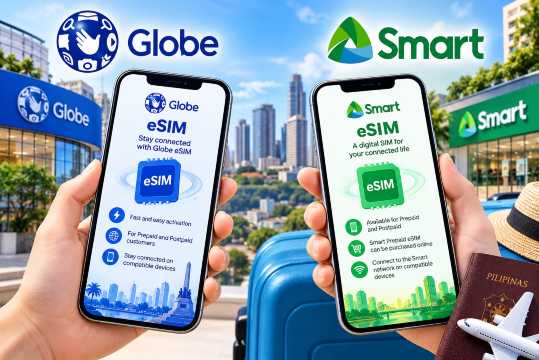
eSIM services are available from major Philippine mobile providers, including Globe and Smart.
Globe eSIM
Globe currently offers eSIM services for eligible Globe Prepaid and Postpaid customers.
Globe states that its eSIM is built into the device and allows compatible phones to activate a Globe mobile plan without using a removable nano-SIM.
Smart eSIM
Smart also offers eSIM options for Prepaid and Postpaid users.
Smart describes its eSIM as a digital SIM that connects compatible devices to the Smart network. Smart Prepaid eSIMs can also be purchased online, with the QR code delivered digitally.
Availability, prices, supported devices, and activation requirements can change, so check the latest information from the mobile provider before purchasing.
Tips for Using an eSIM When Travelling
Keep these tips in mind when travelling with an eSIM:
- Check whether your phone supports eSIM before buying.
- Make sure your phone is unlocked if required.
- Read the activation conditions carefully.
- Install the eSIM before departure when recommended.
- Do not activate it too early if the validity starts at activation.
- Keep your QR code or installation information somewhere safe.
- Select your travel eSIM as the mobile data line.
- Turn on Data Roaming if your provider requires it.
- Turn off cellular data switching if you want to avoid using your main SIM's roaming data.
- Monitor your remaining data during your trip.
- Keep your main SIM available if you need to receive important messages.
- Do not delete your travel eSIM until you are finished with the plan.
What Happens When a Travel eSIM Expires?
When the validity period ends or the included data has been used, the eSIM may stop providing mobile data.
What happens next depends on the provider and plan.
Some plans may allow you to:
- Add more data
- Extend the validity period
- Purchase another package
- Reuse the existing eSIM profile
Other plans may require you to purchase a new eSIM.
Before deleting an expired eSIM, check whether it supports top-ups or future use.
Deleting an eSIM removes the profile from your device, but it does not necessarily cancel the associated service or subscription. Reinstallation also depends on the provider.
FAQs About What Is eSIM
-
What does eSIM stand for?
-
Can I use eSIM and a physical SIM at the same time?
-
Do I need Wi-Fi to install an eSIM?
-
Does a travel eSIM include calls and SMS?
-
Can I use hotspot with an eSIM?

Popular Content
-
Popular Content
-
Top Flight Links
-
Popular Hotels
-
Popular Things to Do
-
Featured guides
-
Trip.com links
- Trip.com E-Ticket
- Trip.com Payment Methods
- Trip.com Passport Change
- Trip.com Customer Service
- Trip.com Flight Cancellation
- Trip.com VIP Lounge Access
- Trip.com Phone Number
- Trip.com Check In
- Payment Sale
- Trip Coins
- Trip.com Hotel Refund
- Trip.com Cancellation Policy
- Trip.com Ticket Issued Status
- Trip.com Flight Ticket
- Trip.com Membership
- Trip.com E-Receipt
- Trip.com Seat Selection
- Trip.com Baggage Allowance
- Trip.com Flight Change
- Trip.com Reviews
- Flights from Manila to Hong Kong
- Flights from Manila to Iloilo City
- Flights from Manila to Tagbilaran
- Flights from Manila to Cebu
- Flights from Bacolod to Manila
- Flights from Manila to General Santos
- Flights from Manila to Tokyo
- Flights from Cebu to Manila
- EK2521 Flight Status
- 5J187 Flight Status
- KN5896 Flight Status
- PR741 Flight Status
- MH709 Flight Status
- 5J582 Flight Status
- RX874 Flight Status
- Hotels near 72 wonder tower
- Hotels near Mactan–Cebu International Airport
- Hotels near Greenland Xindu East Coast Times Square South Area
- Hotels near Fenghuang Ancient Town
- Hotels near Taoyuan HSR Subway Station
- Shiji Qingteng Capsule Hotel (T3 Terminal)
- De Mani Hotel
- Alta Vista de Boracay
- Orange Hotel (Wangfujing, Wenhua Road, Baotou)
- Shangri-La Resort
- Hotels in Fenghuang County
- Hotels in Hong Kong
- Hotels in Davao City
- Hotels in North Jakarta
- Hotels in Moscow
- Philippines 5G eSIM | Dual Network • All AI & TikTok | Day Pass/Total Data Package | 24-Hour Billing | 1-30 Days | QR Code
- Private Mutianyu Great Wall Trip With English-speaking Driver
- Vietnam | 4G/5G eSIM | Daily/Data Plan | 24-hour Billing | 1-30 Days | QR code
- Taoyuan International Airport | Terminal 2 VIP Lounge Service | Oriental Club Lounge
- Philippines 4G/5G eSIM | Daily/Total Data Package | 1–30 Days | 24-Hour Billing | QR Code
- Sofitel Macau at Ponte 16 Buffet | Mistral Restaurant Lunch/Dinner Buffet
- Mainland China/Hong Kong/Macau 5G eSIM | 5 Carriers | Day Pass/Total Data Package | 24-Hour Billing | QR Code
- Huanglongjiuzhai Railway Station - Jiuzhaigou National Park shuttle bus · private charter optional
- Porto: 6 Bridges Cruise-Douro Wine-Sunset Option-Small Group
- Philadelphia: East Passyunk Food Tour
- Galle Day Tour in Sri Lanka
- Private Fengdu County Ghost City Day Tour from Chongqing
- Chongqing ancient rubbing intangible cultural heritage handicraft experience
- Xiaolin water sports club
- New York: World Trade Center - a journey from urban rebirth to the clouds
- Mothers Day Gifts
- eSIM
- Hong Kong International Airport
- International Driving Permit
- Toronto Pearson International Airport
- Universal Studios Singapore
- Great Wall of China
- UK ETA
- Narita International Airport
- China Currency
- Changi Airport
- Schengen Visa
- Singapore MRT Map
- France Visa
- Ninoy Aquino International Airport