



WeChat Pay, officially called Weixin Pay, is one of the most common mobile payment options in China. Filipino travelers can register WeChat with an international phone number, link a supported overseas bank card, and pay by scanning QR codes at restaurants, shops, hotels, taxis, and many other places during their trip.
What Is WeChat Pay?

WeChat Pay is the commonly used name for Weixin Pay, the payment service built into the WeChat app.
Instead of taking out cash or a physical bank card, you can use your phone to:
- Scan a merchant's QR code
- Show your payment code to a cashier
- Pay through supported WeChat Mini Programs
- Make supported in-app payments
- Pay at restaurants and shops
- Pay for some taxis, transportation, hotels, and other travel services
Tencent says international travelers who link supported cards can access tens of millions of merchants across the China Mainland.
Explore More Flights to China


Can Filipino Travelers Use WeChat Pay in China?
Yes. You do not need a China bank account just to make normal merchant payments with WeChat Pay.
Travelers can register WeChat using an international phone number and add supported international credit or debit cards. Tencent specifically states that overseas visitors can link international cards and use them for payments in China.
For travelers from the Philippines, this means you can try linking an eligible Philippine-issued card before your trip.
Your card issuer may still have its own rules for overseas transactions, foreign currency conversion, or security verification.
📌 Important: Set up WeChat Pay before your trip if possible. This gives you time to complete card verification or contact your bank if your card cannot be added.
How to Set Up WeChat Pay for Foreign Travelers
Setting up WeChat Pay is relatively simple, but you may need your passport, international phone number, and bank card.
1. Download WeChat
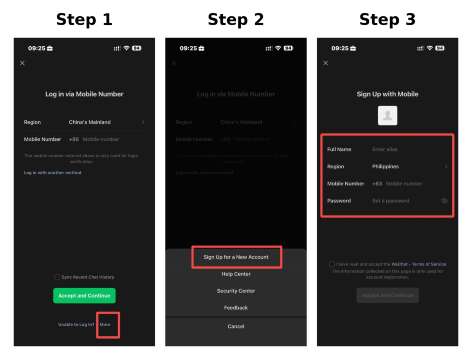
Download the official WeChat app:
- iPhone: Search "WeChat" in the App Store
- Android: Search "WeChat" in Google Play
Register using your international mobile number and complete the SMS verification.
Official guidance confirms that a China Mainland +86 phone number is not required. An international number that can receive verification messages can be used.
2. Open WeChat Pay
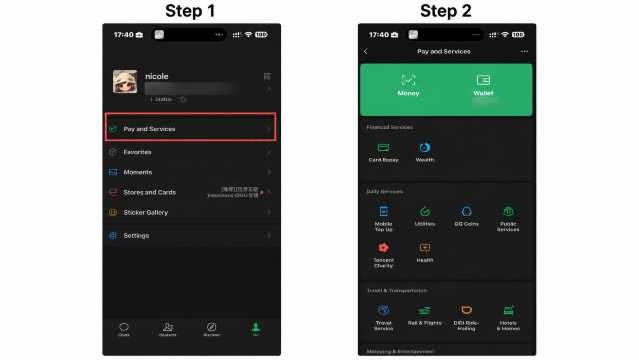
After signing in:
WeChat → Me → Pay and Services → Wallet
If you cannot see WeChat Pay, official guidance recommends checking:
Me → Settings → General → Tools → WeChat Pay
You can then enable the payment feature.
3. Complete Identity Verification
WeChat Pay may ask you to verify your identity before or while linking your card.
For international visitors, a passport can be used as an accepted identity document.
If you use your passport for verification, you may be asked to upload a copy of the passport and follow additional verification instructions in the app.
4. Add Your International Bank Card
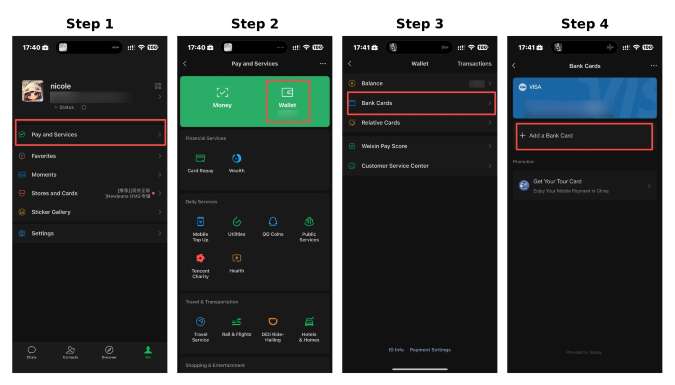
Go to:
Me → Pay and Services → Wallet → Add a Card
Enter the required bank card information and follow the verification steps shown in the app.
Make sure the name entered in your WeChat Pay account matches the name associated with your card and identity document.
5. Set Your Payment Password
You may be asked to create a payment password or complete other security verification.
Once your card is successfully linked, you can start using WeChat Pay at supported merchants.
Find the Best Hotels in China
 NO.1
NO.1






















































What International Cards Does WeChat Pay Accept?

Tencent's latest guidance says Weixin Pay supports international credit or debit cards from major payment networks including:
- Visa
- Mastercard
- JCB
- American Express
- Discover Global Network
- Diners Club
- UnionPay
Whether a particular card works can still depend on the issuing bank and the transaction.
💳 Tip: Before traveling, check that international or overseas transactions are enabled on your bank card.
How to Pay with WeChat Pay in China
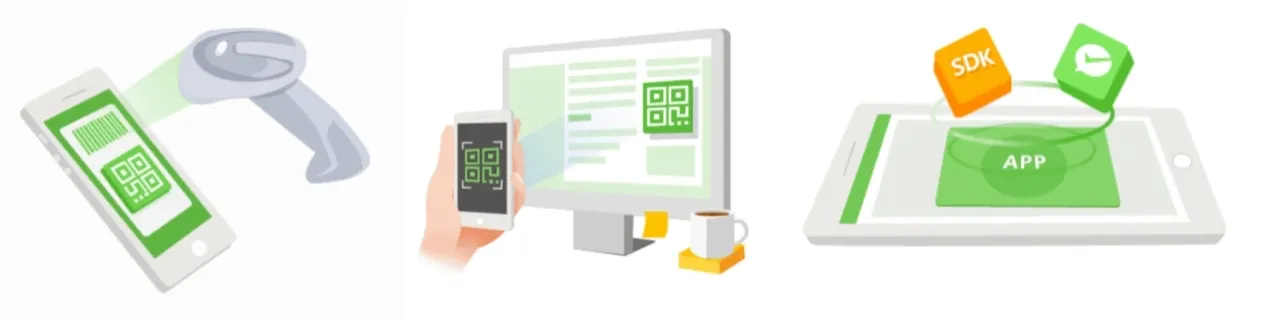
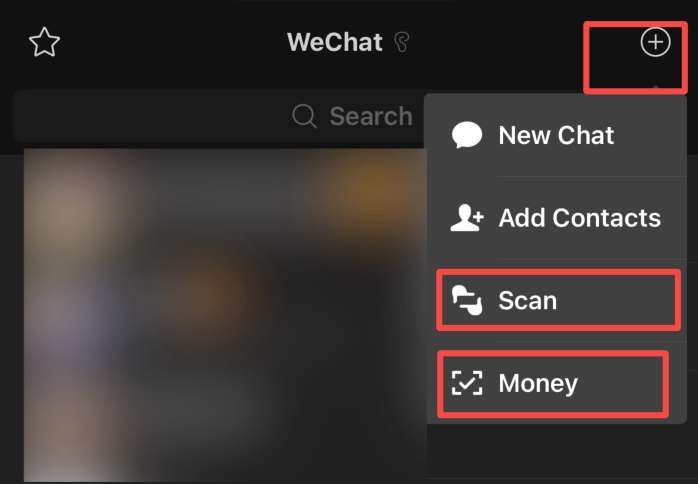
There are two common ways to make a payment.
Scan the Merchant's QR Code
When a restaurant, shop, or vendor displays a WeChat Pay QR code:
- Open WeChat
- Tap +
- Select Scan
- Scan the merchant's QR code
- Enter the payment amount if required
- Select your linked card
- Confirm the payment
This method is especially common at smaller shops and restaurants.
Show Your Payment Code
Some merchants will scan your payment code instead.
Official payment guidance gives the following path:
WeChat → Me → Pay and Services → Money → Payment Code
The cashier scans your code, and you confirm the transaction when required.
⚠️ Security Tip: Do not send screenshots of your live payment code to other people. Open the payment code only when you are ready to pay.
8. Nihao China: All-in-O
Where Can You Use WeChat Pay?
Tencent says international-card users can make payments across a wide range of merchant categories in the China Mainland, including:
- Restaurants
- Cafes
- Convenience stores
- Shopping malls
- Local shops
- Street vendors
- Hotels
- Taxis
- Transportation services
- Tourist-related services
- WeChat Mini Programs
- Supported online and in-app services
Acceptance can still vary by merchant and service.
Does WeChat Pay Charge a Fee for International Cards?
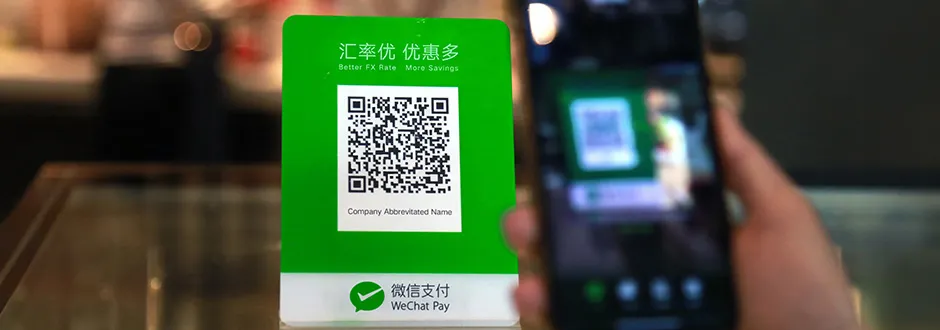
For international-card payments, transactions under CNY 200 are exempt from the standard 3% transaction fee according to official payment guidance.
For transactions above CNY 200, a 3% transaction fee may apply. The final fee should be shown on the payment page before you confirm the transaction.
For example:
Payment Amount | WeChat Pay Transaction Fee |
|---|---|
CNY 50 | No 3% transaction fee |
CNY 100 | No 3% transaction fee |
Under CNY 200 | No 3% transaction fee |
Above CNY 200 | 3% fee may apply |
Your own bank may separately charge foreign currency conversion or international transaction fees.
💡 Tip: Always check the final amount shown before confirming a large payment, especially when using an overseas bank card.
Recommended eSIMs Options for China


![[Mainland China] 5G | eSIM Internet Card | China Mobile CMLink | 3-15 days optional | Ready to use | Hotspot supported | QR Code](https://ak-d.tripcdn.com/images/0356l12000u7jp518BE61_C_568_320.jpg)
What Exchange Rate Does WeChat Pay Use?
When you use an international card, the payment is made in China yuan, or CNY/RMB.
The final conversion into Philippine pesos will depend on the applicable card network and your card-issuing bank.
Your bank may also add its own foreign transaction or currency conversion charges.
Because exchange rates can change, check your banking app or card statement for the final PHP amount.
WeChat Pay Transaction Limits for Foreign Travelers
China increased mobile payment limits for overseas visitors.
For verified international users, the limits were raised to:
- Up to US$5,000 for a single transaction
- Up to US$50,000 in cumulative transactions per year
These limits replaced the previous US$1,000 single-payment and US$10,000 annual limits.
Individual accounts, merchants, cards, or banks may still have additional limits.
- One way
- Round-trip
- Cheapest nonstop
 MNL2:20 AM2h 30mNonstopHKG4:50 AMManila - Hong Kong|Wed, Nov 25|HK ExpressTWD 2,005TWD 2,27512% offSearch12% offTWD 2,275TWD 2,005
 - MNL2:20 AM2h 30mNonstopHKG4:50 AMManila - Hong Kong|Wed, Nov 18|HK ExpressTWD 2,024TWD 2,27511% offSearch11% offTWD 2,275TWD 2,024
- MNL2:20 AM2h 30mNonstopHKG4:50 AMManila - Hong Kong|Tue, Nov 24|HK ExpressTWD 2,024TWD 2,27511% offSearch11% offTWD 2,275TWD 2,024
 MNL13:002h 30mNonstopHKG14:00Manila - City|Mon, Sep 6|Normal AirlineFind more flightsFind more flights
Can You Send Money to Friends with an International Card?
Do not assume that every WeChat Pay feature will work when your account is connected only to an international bank card.
Official guidance states that overseas cards can be used for normal merchant payments, but some functions are restricted.
Features that may not be available with a foreign card include:
- Person-to-person transfers
- Red Packets
- Some wallet balance functions
International-card support is mainly designed to help foreign visitors pay merchants while traveling in China.
Do You Need to Add Money to WeChat Pay?
For normal international-card payments, you generally do not need to preload money into a WeChat wallet.
After linking a supported card, eligible purchases can be charged directly to that card.
This makes WeChat Pay more convenient for short-term visitors who do not have a China bank account.
WeChat Pay vs Alipay: Which Is Better for Travelers?

Both WeChat Pay and Alipay are widely used mobile payment options in China. International visitors can link supported overseas bank cards to either app and use QR codes to pay at many shops, restaurants, hotels, and other merchants.
Here is a quick comparison:
WeChat Pay | Feature | Alipay |
|---|---|---|
Supports eligible overseas cards | International cards | Supports eligible overseas cards |
Yes | QR code payments | Yes |
No for supported international-card payments | China bank account required | No for supported international-card payments |
Payment is built into WeChat, which also has messaging and Mini Programs | Main advantage | Strong focus on payments and travel-related digital services |
Widely accepted | Small shops and restaurants | Widely accepted |
Available through supported services and Mini Programs | Transport services | Available in supported cities and services |
Generally no service fee for payments of CNY 200 or less* | Payment fee | Generally no service fee for payments of CNY 200 or less* |
Travelers who already use WeChat | Good for | Travelers who want a payment-focused app |
For international bank cards, official guidance states that both Alipay and WeChat Pay generally waive the additional service fee when a transaction is CNY 200 or less, while a 3% service fee may apply above CNY 200. Promotions and payment conditions can change, so always check the amount shown before confirming.
Should You Use WeChat Pay or Alipay?
You do not necessarily have to choose only one.
For a trip to China, it can be useful to set up both WeChat Pay and Alipay before departure. If one app or linked bank card does not work at a particular merchant, you will have another payment option ready.
- Choose WeChat Pay if you already use WeChat and want payments, messaging, and Mini Programs in the same app.
- Choose Alipay if you prefer a payment-focused app with access to various travel and everyday services.
- Set up both if you want an extra payment backup while traveling around China.
💡 Pro Tip: Add and verify your international bank cards before flying to China. You can then test both apps and decide which one feels easier to use during your trip.
WeChat Pay Not Working? Try These Tips
If your payment or card does not work, check the following:
- Check your card: Make sure it belongs to a supported card network.
- Check overseas payments: Enable international transactions through your bank if required.
- Check your name: Your account and card information should match.
- Complete verification: Follow any passport or identity verification requested by WeChat.
- Check your internet: QR payments require a working internet connection.
- Try another card: Some issuing banks may decline certain international transactions.
- Check the payment amount: Large transactions may require additional verification.
- Contact your bank: Your bank may have blocked the transaction as a security measure.
It is also useful to have another payment option available during your trip.
WeChat Pay Tips for Filipino Travelers
- Set it up before flying: Register WeChat and add your bank card while you still have easy access to your Philippine SIM.
- Bring your passport: You may need it for identity verification.
- Keep your Philippine SIM active: SMS verification may be needed when logging in or confirming certain actions.
- Enable overseas transactions: Check your bank settings before departure.
- Bring a backup card: One card may work even if another is declined.
- Keep some RMB cash: China supports cash payments, so having some cash is useful as a backup.
- Check fees before paying: This is especially important for purchases above CNY 200.
FAQs About WeChat Pay
-
Can foreigners use WeChat Pay in China?
-
Can I use WeChat Pay without a China bank account?
-
Can I register WeChat Pay with a Philippine phone number?
-
Does WeChat Pay accept Visa and Mastercard?
-
Does WeChat Pay charge international travelers a fee?