
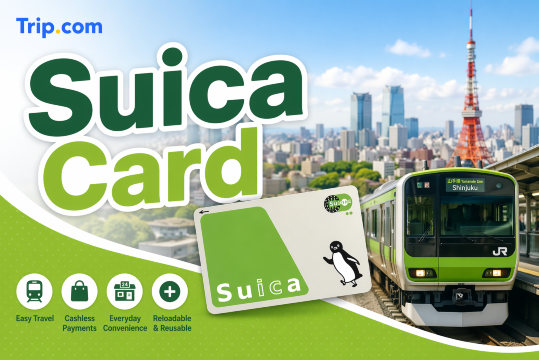
Japan travel becomes easier when you have a Suica Card. You can use it for trains, buses, convenience stores, and vending machines without always preparing cash. This guide compares Suica and Welcome Suica, shares useful Welcome Suica tips, and explains how to add Suica to Apple Wallet.
What Are Suica Card and Welcome Suica Card?
Suica Card and Welcome Suica Card are prepaid IC cards from JR East that make traveling around Japan easier. You can use them to tap in and out of train gates, ride buses, buy snacks, use vending machines, pay for coin lockers, and shop at places with the Suica or IC card logo.
- Suica Card: Good for repeat travelers. It has a 500 yen deposit and can be refunded at JR East stations.
- Welcome Suica: Good for short-term tourists. It has no deposit, but the physical card is valid for 28 days only and the balance is not refundable.
- Welcome Suica Mobile: Good for iPhone and Apple Watch users. It has an English interface and is valid for 180 days.
You can use Suica and Welcome Suica for:
- JR East trains, subways, buses, and the Tokyo Monorail
- Convenience stores like 7-Eleven, Lawson, and FamilyMart
- Vending machines, coin lockers, restaurants, shops, and some taxis
- Other Japan areas that accept IC cards like ICOCA, PASMO, Kitaca, TOICA, manaca, PiTaPa, SUGOCA, nimoca, and Hayakaken
Tip: For long-distance trips or travel between different IC card areas, you may still need a separate ticket.
Unlock the Best Flights to Japan


What Are the Differences Between Welcome Suica and Suica Card?
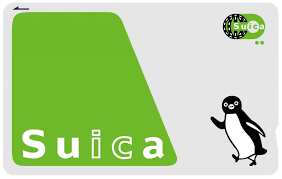

Welcome Suica and regular Suica are both prepaid IC cards from JR East. You can use them for trains, buses, vending machines, convenience stores, coin lockers, restaurants, and many shops in Japan.
Feature | Welcome Suica | Welcome Suica Mobile | Regular Suica |
|---|---|---|---|
Best for | Short-term tourists | iPhone and Apple Watch users | Repeat travelers |
Validity | 28 days | 180 days | Invalid if unused for 10 years |
Deposit | No deposit | No deposit | 500 yen deposit |
Refund | Not refundable | Not refundable | Refundable, 220 yen fee may apply |
Top-up limit | Up to 20,000 yen | Up to 20,000 yen | Up to 20,000 yen |
Lost card protection | No | No | Registered cards only |
Which one should you choose?
- Choose Welcome Suica for a short Japan trip. It is easy to use and has no deposit, but make sure to spend the balance before it expires.
- Choose Welcome Suica Mobile if you use iPhone or Apple Watch. You can issue and top up the card through the app.
- Choose Regular Suica if you visit Japan often. You can keep using it for future trips and request a refund when needed.
Tip: For most Filipino tourists on a short holiday, Welcome Suica or Welcome Suica Mobile is the easiest choice.
Where to Buy Suica Card and Welcome Suica Card
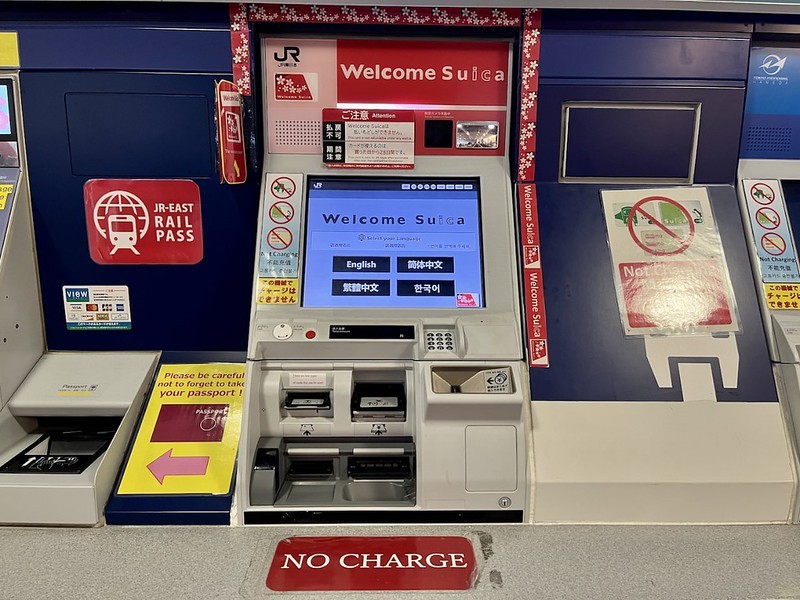
You can buy a regular Suica Card from JR East ticket machines or ticket offices. It includes a 500 yen deposit, which can be refunded when you return the card. This is a good choice if you plan to visit Japan again.
For short-term tourists, Welcome Suica is easier because it has no deposit. However, it is only sold at selected JR East locations, and each person can usually buy one card.
You can buy Welcome Suica at:
- Narita Airport Terminal 1
- Narita Airport Terminal 2 and 3 Station
- Haneda Airport Terminal 3 Station
- JR EAST Travel Service Centers at selected major stations
- JAPAN RAIL CAFÉ TOKYO
- TAKANAWA GATEWAY Travel Service Center
Some JR East stations may temporarily stop selling Welcome Suica, so it is better to buy it at the airport after landing if you want the easiest option.
Tip: If you use an iPhone or Apple Watch, you can use Welcome Suica Mobile or add Suica to Apple Wallet instead of buying a physical card.
Find the Best Hotels in Japan
 NO.1
NO.1






































How to Use a Welcome Suica Card?
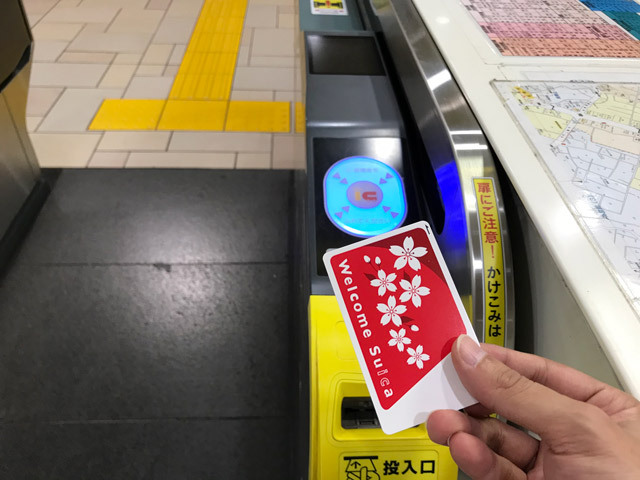
Using a Welcome Suica Card is simple and helpful when traveling around Japan. You do not need to buy paper tickets every time. Just top up the card, tap it at the gate, and go.
1. 1. Top Up the Card
Before your first ride, add money to your card.
- Physical Welcome Suica can be topped up at ticket vending machines, fare adjustment machines, or Seven Bank ATMs
- Only Japanese yen can be used for physical card top-ups
- Credit card top-up is not accepted for physical Welcome Suica
- Welcome Suica Mobile can be topped up through the app
- Maximum balance is 20,000 yen
2. Tap and Go
At train or subway gates, tap your Welcome Suica on the IC card reader. Do not insert it into the paper ticket slot. Tap again when you exit, and the fare will be deducted automatically.
For buses, tap when getting on or off, depending on the bus system.
3. Check Your Balance
The gate screen will show your fare and remaining balance after you tap. You can also check your balance at ticket machines, fare adjustment machines, or in the mobile app.
4. Use It for Shopping
Welcome Suica is not only for transport. You can use it at convenience stores, vending machines, coin lockers, restaurants, and shops with the Suica or IC card logo.
5. Watch the Expiry Date
A physical Welcome Suica is valid for 28 days from the purchase date. Welcome Suica Mobile is valid for 180 days from issue.
Tip: Welcome Suica balance is not refundable, so try to use the remaining amount before leaving Japan.
How to Use a Suica Card
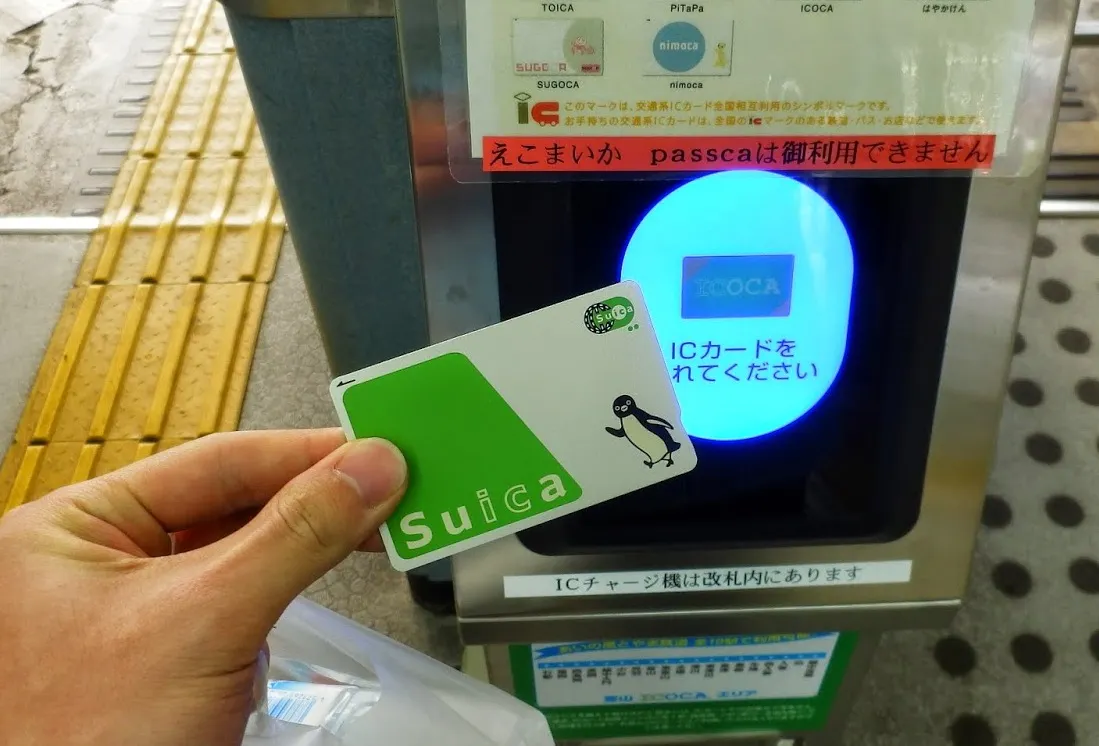
A Suica Card makes traveling around Japan easier. You can use it for trains, buses, shopping, vending machines, coin lockers, and some restaurants or taxis.
1. Top Up the Card
Before riding, make sure your card has enough balance.
- Top up at ticket machines or fare adjustment machines
- Physical Suica top-up is cash only
- Credit card top-up is not accepted for physical cards
- Maximum balance is 20,000 yen
- iPhone and Apple Watch users can add Suica to Apple Wallet
2. Tap and Go
Tap your Suica on the IC card reader when entering and exiting train gates. Do not insert it into the paper ticket slot. The fare will be deducted automatically.
For buses, tap when boarding or getting off, depending on the bus system.
3. Check Your Balance
The gate screen will show your fare and remaining balance after you tap out. You can also check at ticket machines or on your phone if using Mobile Suica.
4. Use It for Shopping
Suica is not only for transport. You can use it at convenience stores, vending machines, coin lockers, restaurants, shopping malls, and stores with the Suica or IC card logo.
5. Know When You Need a Separate Ticket
You may still need a separate ticket for limited express trains, Shinkansen, Green Cars, or trips between different IC card areas.
6. Keep or Refund It
If you plan to visit Japan again, keep your Suica Card for your next trip. If it is not used for 10 years, it becomes invalid, but the remaining balance can be transferred to a new card or refunded.
If you return the card at a JR East station, you can get back the 500 yen deposit and remaining balance. A 220 yen handling fee may be deducted from the remaining balance.
Recommended eSIMs Options for Japan




How to Add a Suica Card to Apple Wallet
Adding Suica to Apple Wallet is a convenient option for travelers who want to use their iPhone or Apple Watch instead of a physical card. You can tap through train gates, ride buses, and pay at convenience stores or vending machines that accept Suica.
Option 1: Add a New Suica Card
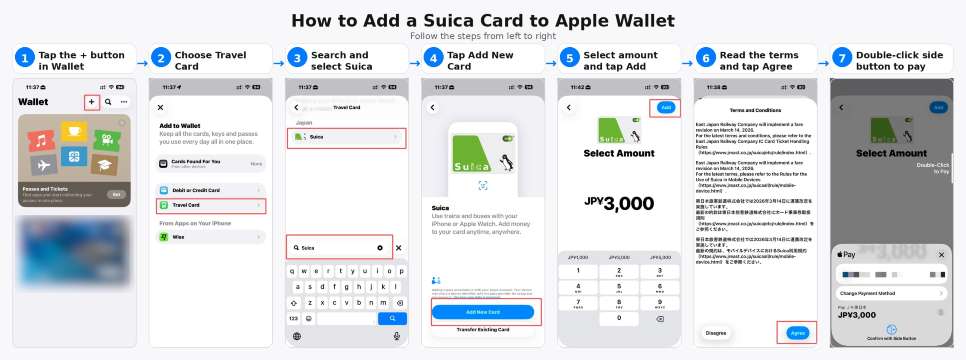
You do not need a physical card to start using Suica on your phone.
- Open the Wallet app on your iPhone.
- Tap the Add button.
- Select Travel Card.
- Search for Suica and select it.
- Tap Add New Card.
- Choose the amount you want to load.
- Pay using an eligible card in Apple Wallet.
- Once added, your Suica is ready to use.
Tip: Express Mode usually turns on automatically for your first transit card, so you can tap your iPhone or Apple Watch without opening the Wallet app.
Option 2: Transfer a Physical Suica Card
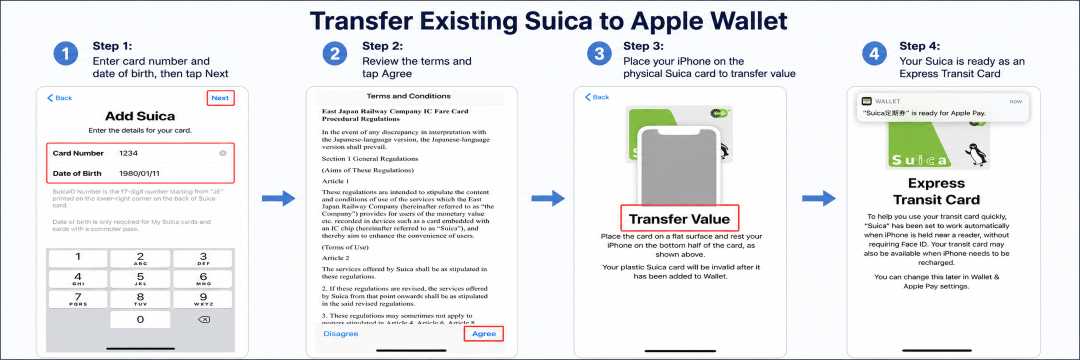
If you already have a regular physical Suica Card, you can move it to Apple Wallet.
- Open the Wallet app and tap the Add button.
- Select Travel Card.
- Search for Suica and select it.
- Tap Transfer Existing Card.
- Enter the last 4 digits of your physical Suica card number.
- If it is a personalized Suica, enter the same date of birth used when the card was registered.
- Place the card on a flat surface and hold the top of your iPhone over it until the transfer is complete.
After the transfer, the physical Suica card will no longer work. The 500 yen deposit will be added to your Apple Wallet Suica balance.
How to Top Up Suica in Apple Wallet
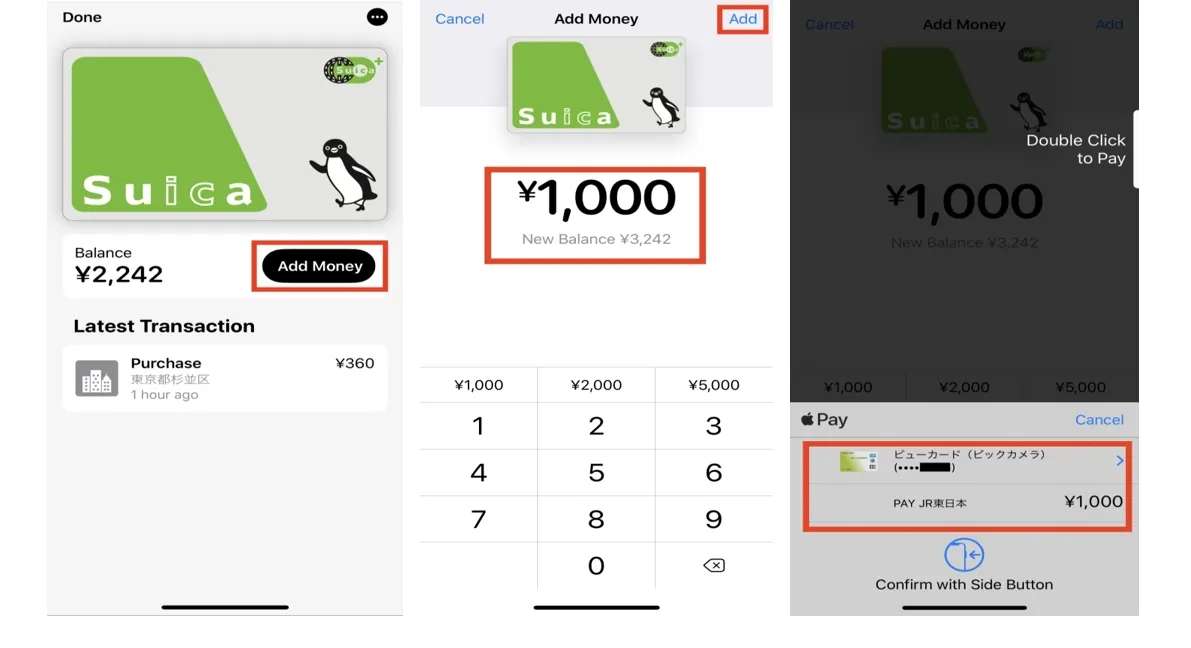
- Open the Wallet app.
- Tap your Suica card.
- Tap Add Money.
- Choose the amount.
- Confirm the payment with Face ID, Touch ID, or passcode.
Important Tip for Welcome Suica Users
A physical Welcome Suica card cannot be transferred to Apple Wallet. If you want a tourist-friendly mobile option, use Welcome Suica Mobile instead. It is made for iPhone and Apple Watch users, has an English interface, and is valid for 180 days from issue.
Tip for Filipino travelers: Add and test your Suica before your Japan trip if possible. Some cards may not work for Apple Wallet top-ups, so it is better to check early than struggle at the station.
Tips for Using Suica Card in Japan
Using a Suica Card in Japan is easy, but these tips can help you avoid small travel problems.
- Always check your balance before entering the train gate, especially during long travel days.
- Keep some Japanese yen cash because physical Suica and Welcome Suica top-ups usually need cash.
- Do not insert your Suica Card into the paper ticket slot. Just tap it on the IC card reader.
- Tap properly when entering and exiting the station. If you miss one tap, the card may show an error.
- Use your Suica for small payments at convenience stores, vending machines, coin lockers, and some restaurants.
- For Shinkansen, limited express trains, and some special routes, you may still need a separate ticket.
- Try not to leave too much balance on Welcome Suica because the remaining amount is not refundable.
- If you visit Japan often, keep your regular Suica Card for your next trip.
- If the gate shows an error, go to the station staff counter and they can help fix it.
FAQs About Suica Card
-
Can I use Suica outside Tokyo
-
Can I use Suica for Shinkansen?
-
Can I add Welcome Suica to Apple Wallet?
-
Can I use one Suica Card for two people?
-
What happens if my balance is not enough when I exit?