

Trip.com Deferred Payment: Book Now and Pay Later Guide

By Trip.com
March 2, 2026
Planning a trip but not ready to pay yet? Trip.com Deferred Payment can help. It lets you reserve your hotel now and settle the payment later, so you can secure your stay while still finalizing your travel plans. This is perfect if you are waiting for your leave approval, coordinating with family, or just want extra flexibility before committing to full payment.
What Exactly Is Trip.com Deferred Payment?
Trip.com Deferred Payment lets you book a hotel now and pay later when you choose a room with Free Cancellation. It’s perfect if your plans are not final, so you can secure your stay while keeping your money until you’re ready.
| Feature | Description |
|---|---|
Book Now, Pay Later | You reserve your hotel room online without paying upfront. |
Free Cancellation Period | You can cancel within the allowed time frame with no charge. Always check the exact deadline in your booking. |
Payment Timing | If you do not cancel, you either pay at the hotel during check in or your card is charged a few days before your stay, depending on the hotel policy. |
Not an Installment Plan | This is not a credit or monthly payment service. It is simply a pay later option based on hotel terms. |


How to Find Trip.com Deferred Payment Hotels on Trip.com
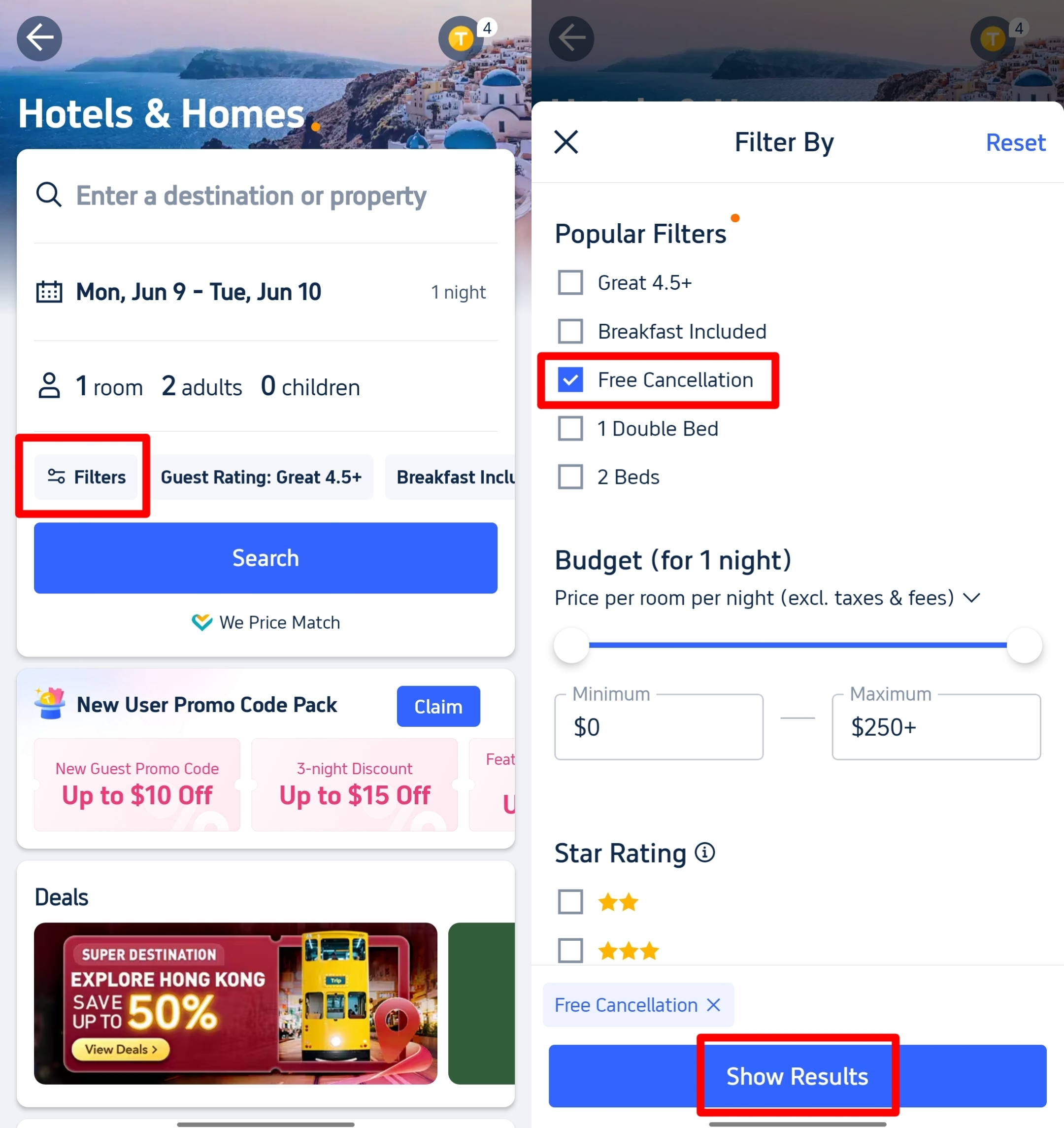
If you want to book now and pay later, just look for hotels with Free Cancellation. Here is how you can find them easily:
1. Search Your Hotel
Go to Trip.com. Enter your destination, travel dates, and number of guests. Then click "Search".
2. Open the Filter
On the hotel results page, find the “Filter” button near the top. Click it to see more options.
3. Choose Free Cancellation
Scroll down to the “Cancellation Policy” section. Tick the box for “Free Cancellation” under the popular filters.
4. Apply the Filter
Click “Show Results” or “Apply”. The list will now show hotels that allow free cancellation.
5. Check the Badge
Look for the “Free Cancellation” label on the hotel listing and inside the room details. These are usually the rooms that offer Deferred Payment, meaning you can reserve now and pay later based on the hotel policy.
How to Use Trip.com Deferred Payment for a Pay Later Room
Already found your hotel? Here is how you can reserve it without paying right away.
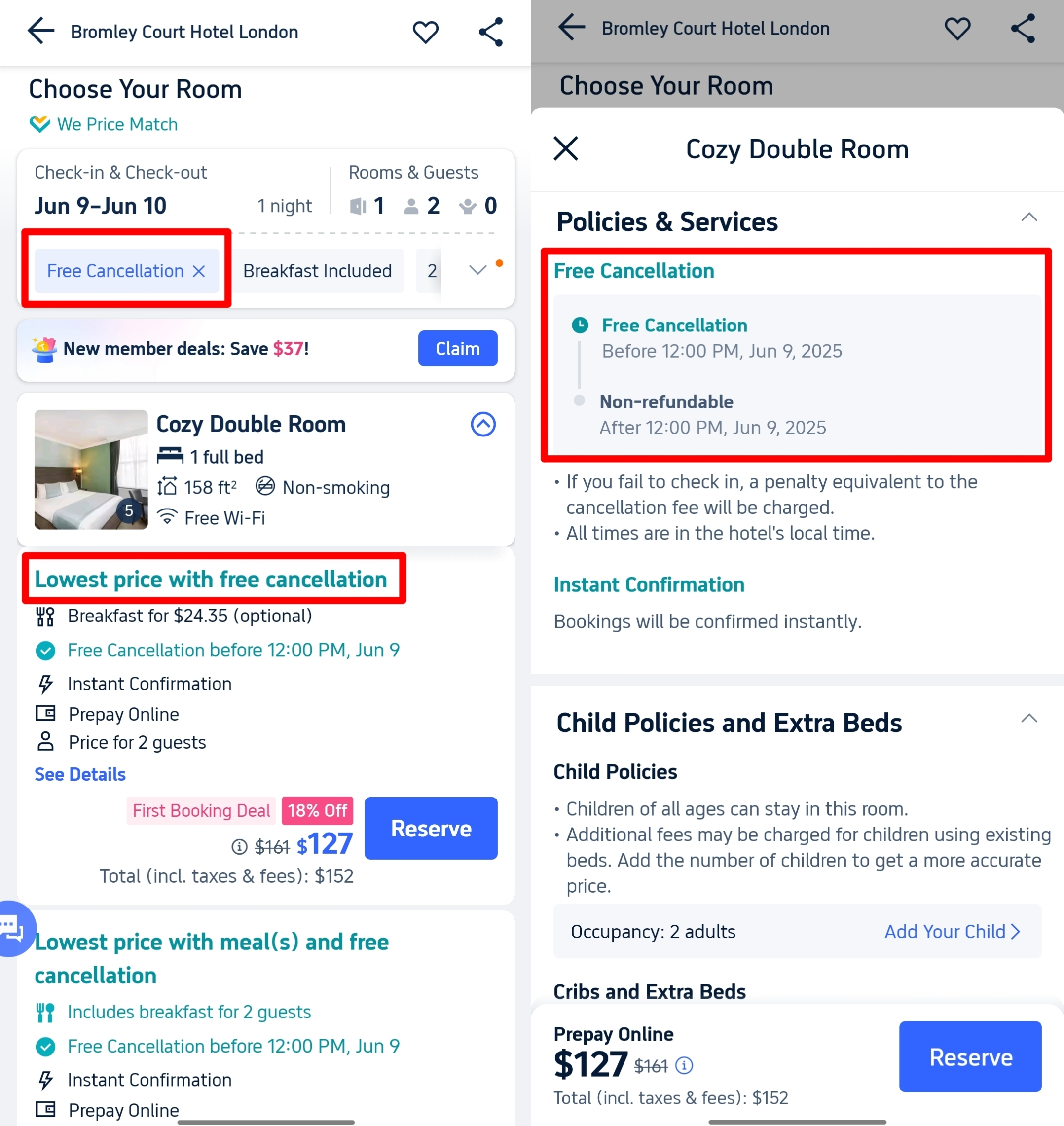
1. Choose the Right Room
This is very important. Not all rooms allow deferred payment.
Look for room options that clearly show:
- Free Cancellation
- Pay at Property or Pay Later
- The exact free cancellation deadline, like “Free cancellation before 15 January”
If you do not see these words, it is probably a prepaid room.
2. Check the Policies Carefully
Click the room to open the full details.
Go to the Policies and Services section. Read it properly. Do not skip this part.
Check:
- Until when you can cancel for free
- If you will pay at the hotel or through Trip.com later
- Any extra fees or taxes to be paid at the property
Take note of the cancellation date. I usually screenshot it so I will not forget.
3. Click Reserve
- Once you are sure, click the Reserve button.
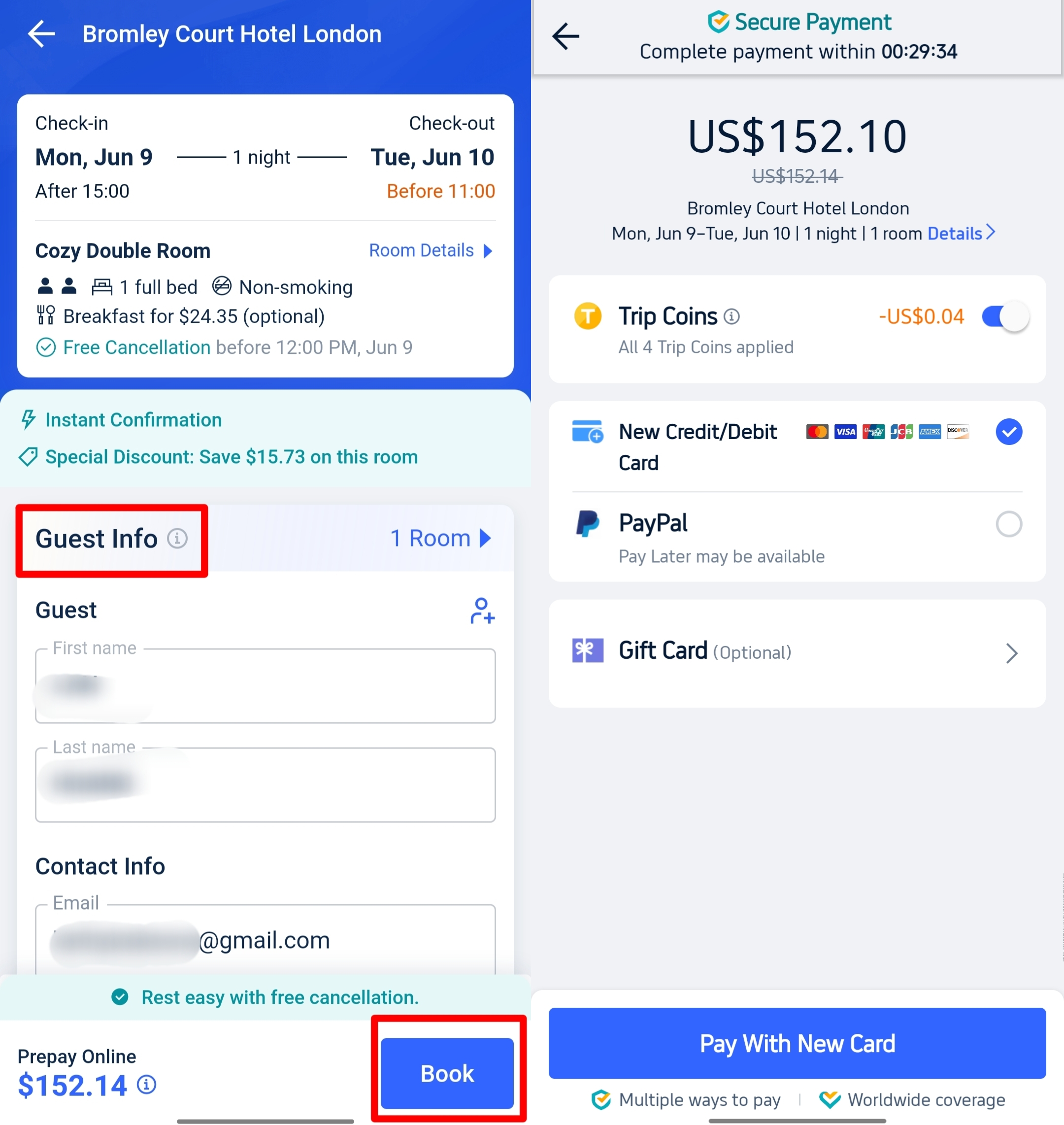
4. Enter Guest Details
Fill in the names correctly, especially the main guest. Make sure the spelling matches the ID or passport. This avoids problems during check in.
5. Review Everything
Before confirming, double check:
- Your check in and check out dates
- Room type
- Free cancellation deadline
- Total price
- If you used any promo code or Trip Coins
This is the last chance to fix mistakes.
6. Confirm Your Booking
- Click the final Book button.
- For Deferred Payment rooms, you usually do not need to pay right away.
7. Check Your Email
- You will receive a confirmation email from Trip.com.
- They may also send you a reminder before the free cancellation deadline so you can decide whether to keep or cancel your booking.
 NO.1
NO.1

































How Long Is the Trip.com Deferred Payment Period?
There is no fixed answer. The Deferred Payment or Free Cancellation period depends on the hotel you choose. Each hotel sets its own deadline, so always check the policy for your specific booking.
Here are common examples you might see:
| Free Cancellation Period | Notes |
|---|---|
Up to 1 day before check in | Common for short notice or flexible trips. |
Up to 3 days before check in | Gives you more time to confirm your plans. |
Up to 7 days before check in | Good for early planners who want extra flexibility. |
On the day of check in | Rare. Do not assume this is available. |
The only deadline that matters is the one shown in the Policies section of your selected room. Miss that date and you may be charged. Always double check the exact date and time before booking.
Your Next Adventure Starts from Manila
- One way
- Round-trip
- direct cheapest
 MNL6:15 PM1h 25mNonstopTAC7:40 PMManila - Tacloban|Mon, Nov 2|Cebu PacificRUB 2,170RUB 5,33859% offSearch59% offRUB 5,338RUB 2,170
 - MNL7:50 AM1h 30mNonstopTAC9:20 AMManila - Tacloban|Sun, Nov 8|Cebu PacificRUB 3,145RUB 5,33841% offSearch41% offRUB 5,338RUB 3,145
- MNL7:50 AM1h 30mNonstopTAC9:20 AMManila - Tacloban|Wed, Nov 4|Cebu PacificRUB 4,217RUB 5,33821% offSearch21% offRUB 5,338RUB 4,217
 MNL13:001h 30mNonstopTAC14:00Manila - City|Mon, Sep 6|Normal AirlineFind more flightsFind more flights
Need Help?
📱 Enjoy app-only deals and a new user package with special offers on hotels, trains, attractions, and airport transfers.
FAQs: Trip.com Deferred Payment
-
What is Trip.com Deferred Payment?
-
Is this the same as installment or buy now pay later?
-
Do I need to enter my card details?
-
What happens if I cancel?
-
How do I know if a hotel offers Deferred Payment?
Trending Searches
-
Popular Content
-
Top Flight Links
-
Popular Hotels
-
Popular Things to Do
-
Featured guides
-
Trip.com links
- Trip.com E-Ticket
- Trip.com Payment Methods
- Trip.com Passport Change
- Trip.com Customer Service
- Trip.com Flight Cancellation
- Trip.com VIP Lounge Access
- Trip.com Phone Number
- Trip.com Check In
- Payment Sale
- Trip Coins
- Trip.com Hotel Refund
- Trip.com Cancellation Policy
- Trip.com Ticket Issued Status
- Trip.com Flight Ticket
- Trip.com Membership
- Trip.com E-Receipt
- Trip.com Seat Selection
- Trip.com Baggage Allowance
- Trip.com Flight Change
- Trip.com Reviews
- Plane tickets from Manila to Hong Kong
- Cheap flights from Manila to Tagbilaran
- Plane tickets from Manila to Cebu
- Plane tickets from Manila to Iloilo City
- Cheap flights from Manila to General Santos
- Cheap tickets from Cebu to Manila
- Cheap flights from Bacolod to Manila
- Cheap tickets from Manila to Tacloban
- CA986 Flight Status
- EK2521 Flight Status
- 5J187 Flight Status
- PR431 Flight Status
- PR741 Flight Status
- MH709 Flight Status
- 5J582 Flight Status
- Hotels near 72 wonder tower
- Hotels near Mactan–Cebu International Airport
- Hotels near Fenghuang Ancient Town
- Hotels near Greenland Xindu East Coast Times Square South Area
- Hotels near Changbai Mountain Beauty Pine International Sculpture Park
- Shiji Qingteng Capsule Hotel (T3 Terminal)
- Bangkok-Pratunam Hotel
- Shangri-La Resort
- De Mani Hotel
- Fan Yu Gaming Center
- Hotels in Fenghuang County
- Hotels in Davao City
- Hotels in North Jakarta
- Hotels in Moscow
- Hotels in Baguio
- Philippines 5G eSIM | Dual Network • All AI & TikTok | Day Pass/Total Data Package | 24-Hour Billing | 1-30 Days | QR Code
- Private Mutianyu Great Wall Trip With English-speaking Driver
- Chengdu Departure - Bipenggou Shuttle Bus
- Vietnam | 4G/5G eSIM | Daily/Data Plan | 24-hour Billing | 1-30 Days | QR code
- Vietnam Airport VIP Fast Track Service
- Bangladesh Dhaka DAC Hazrat Shahjalal International Airport T1 terminal international departure IBalaka Executive Lounge international departure lounge experience
- Huanglongjiuzhai Railway Station - Jiuzhaigou National Park shuttle bus · private charter optional
- Lantau Island Ngong Ping 360 round-trip cable car admission ticket with priority boarding + one-way urban area transfer
- Private Essential Alhambra Experience: Tickets & Guided Tour
- Nagoya Magome + Tsumago-juku + Ena Ravine Large Bridge Observation Deck + Inuyama Castle 1-day tour
- Private Tour to Khor Virap with Mt Ararat View
- Noosa: River and Canals - Day Cruise
- Shangri-La Scenic Area Private Tour
- Fun Diving at Nha Trang Bay
- The Cozumel Turtle Sanctuary Snorkel Tour
- Mothers Day Gifts
- eSIM
- Hong Kong International Airport
- International Driving Permit
- Toronto Pearson International Airport
- Universal Studios Singapore
- Great Wall of China
- UK ETA
- Narita International Airport
- China Currency
- Changi Airport
- Schengen Visa
- Singapore MRT Map
- France Visa
- Ninoy Aquino International Airport