Nihao China App Guide: Payments, Transport & Travel Tips

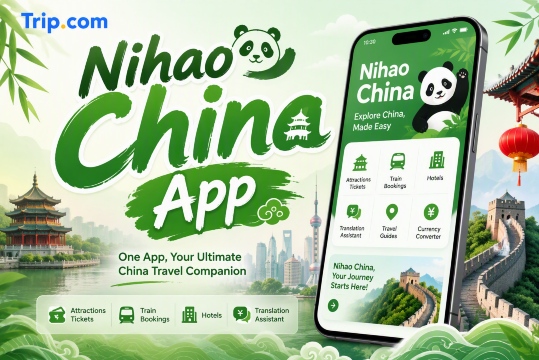
Mobile payments are widely used across China, from shops and restaurants to public transport. For international travelers, Nihao China (你好,China), an official China UnionPay app, makes everyday payments easier while also offering transport access, translation, currency conversion, tax refund information, and other useful travel tools for a smoother trip during your next visit to China.
What Is the Nihao China App?

Nihao China is a travel and payment app developed by China UnionPay for visitors traveling to mainland China.
The app can help travelers with:
- QR-code payments
- Metro and bus access
- Currency conversion
- Chinese-English translation
- Tourist tax refund services
- Travel information and mini-app services
- Access to selected online payment platforms
You can register using an international mobile number or email address, depending on the service you want to use.
📌 Travel Tip: Even if you plan to use Nihao China, it is still useful to set up another payment option such as Alipay or WeChat Pay before your trip.
Explore More Flights to China


Where to Download the Official Nihao China App
Nihao China is free to download from the official app stores.
- iPhone: Search for “Nihao China” in the Apple App Store and check that the developer is China UnionPay Co., Ltd.
- Android: Search for “Nihao China” in the Google Play Store and choose the official app published by China UnionPay.
⚠️ Security Tip: Only download Nihao China from trusted official app stores. Avoid unofficial APK files or modified versions from third-party websites, as payment apps may contain sensitive personal and banking information.
How to Register for Nihao China
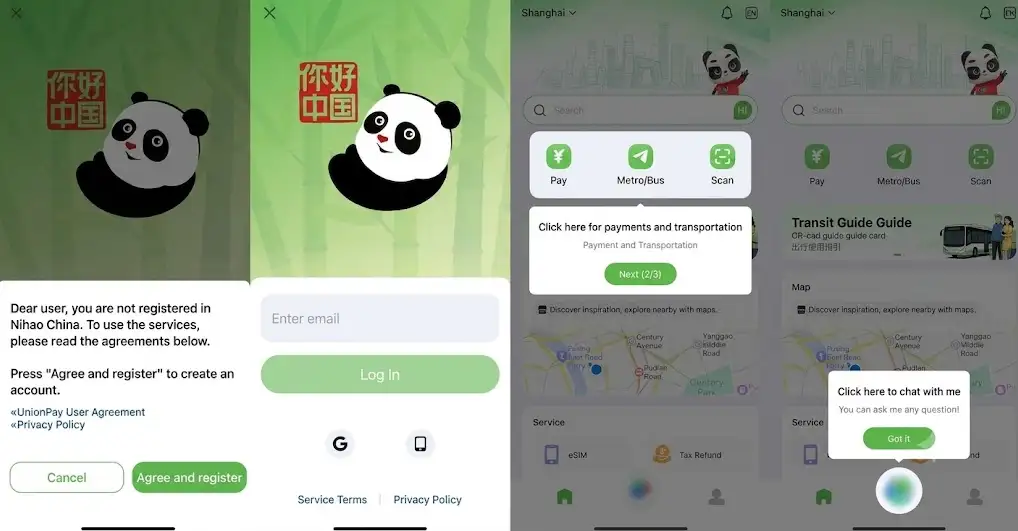
Setting up the app before traveling can make your arrival in China easier.
1. Download and Open the App
Install Nihao China from the official App Store or Google Play Store.
2. Choose Your Registration Method
Depending on the current app version, you may be able to register using:
- International mobile number
- Email address
- Other supported sign-in methods shown inside the app
For Filipino travelers, enter your mobile number using the +63 Philippines country code if you choose phone registration.
3. Complete Any Required Verification
Some payment or wallet services may require additional identity verification.
Follow the instructions shown inside the app and prepare your passport in case identity verification is required.
Requirements can differ depending on:
- Payment service
- Card type
- Wallet feature
- Transaction amount
- Current financial regulations
4. Set Up Your Payment Security
Create the payment PIN or security verification method requested by the app.
Do not share your payment PIN, SMS verification codes, or card verification details with anyone.
What If the SMS Verification Code Does Not Arrive?
If you are using a Philippine mobile number and cannot receive the verification code:
- Check that +63 and your mobile number are entered correctly
- Make sure your SIM can receive international SMS messages
- Check whether international roaming is active if you are already overseas
- Wait before requesting another verification code
- Try email registration if the app provides that option
Some wallet functions may still require mobile-number verification even if you initially register by email.
📱 Tip: Complete your account setup before flying whenever possible so you have time to solve verification problems.
 47780 booked
![Lijiang Yulong Snow Mountain grand cableway + Blue Moon Valley + Impression Lijiang + sunlit golden mountain 1-day tour [guaranteed ticket]](https://ak-d.tripcdn.com/images/0353f12000mv99k2m00B0_C_568_320.jpg)




![[Can include boat tour for groups of up to 8 people] Chongqing Wulong Natural Three Bridges + Longshuixia Gorge + Wujiang River Day Trip](https://ak-d.tripcdn.com/images/0352912000ll1hsh4F70B_C_568_320.jpg)

Which International Bank Cards Work with Nihao China?
Payment options depend on the card network and the specific Nihao China feature you are using.
Foreign-Issued UnionPay Cards
International UnionPay cards can generally be linked for supported UnionPay payment services.
These cards usually begin with the UnionPay network's card numbering system and must support overseas transactions.
Visa and Mastercard
International Visa and Mastercard cards may be supported for selected wallet recharge or payment functions.
Availability can depend on:
- Issuing bank
- Card country
- 3D Secure verification
- Online payment settings
- Overseas transaction settings
Before traveling, check that your Philippine-issued card is enabled for:
- Overseas transactions
- Online purchases
- OTP or banking app verification
💳 Payment Tip: Your Philippine bank may charge foreign-exchange or overseas transaction fees even when Nihao China itself does not charge an additional fee for a particular payment.
How to Link a Bank Card to Nihao China
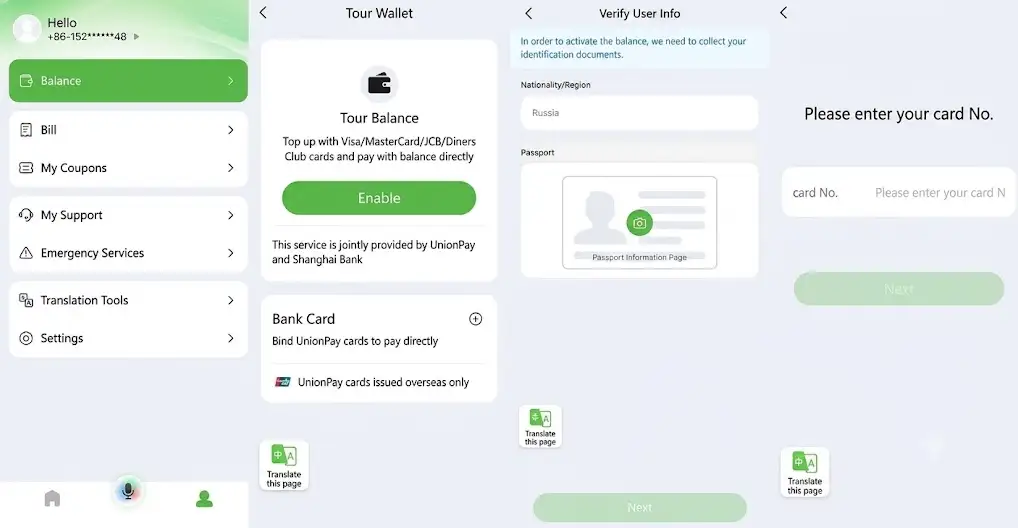
The exact menu names can change between app versions, but the general process is usually similar.
- Open Nihao China
- Go to your payment or wallet section
- Select Bank Card
- Tap Add Card
- Enter your card information
- Follow your bank's security verification instructions
- Wait for confirmation that the card has been successfully added
Your bank may require:
- SMS OTP
- Banking app approval
- 3D Secure verification
- Additional identity verification
Never save your banking information on a public or shared device.
How to Pay with Nihao China
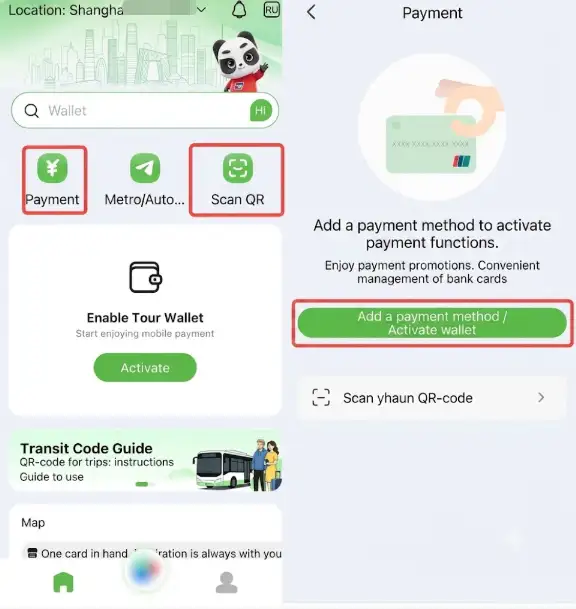
Nihao China supports two common QR payment methods.
1. Show Your Payment QR Code
Use this method when the merchant scans your phone.
Steps:
- Open Nihao China
- Tap Pay
- Show your payment QR code
- Let the merchant scan it
- Complete any payment verification requested
This method may be available at:
- Convenience stores
- Supermarkets
- Restaurants
- Shopping malls
- Hotels
- Other participating merchants
2. Scan the Merchant's QR Code
Use this method when the merchant displays a QR code.
Steps:
- Open Nihao China
- Tap Scan
- Scan the merchant's QR code
- Enter the payment amount if required
- Check the amount carefully
- Confirm the payment
This can be useful at smaller shops, restaurants, markets, and other merchants that display QR payment codes.
📌 Important: Always check the merchant name and payment amount before confirming a QR transaction.
Find the Best Hotels in China























































Can Nihao China Scan Alipay and WeChat Pay QR Codes?
Nihao China is designed to connect with China's major QR payment acceptance networks, including UnionPay and supported Alipay and WeChat Pay merchant scenarios.
However, compatibility can depend on the individual merchant and QR-code type.
You should not assume that every QR code will work.
For example:
- UnionPay merchant QR codes: Widely supported
- Supported Alipay merchant QR codes: May work through compatible payment acceptance
- Supported WeChat Pay merchant QR codes: May work through compatible payment acceptance
- Personal QR codes: May not support the same payment functions as merchant QR codes
For this reason, keeping Alipay or WeChat Pay as a backup can still be useful.
Does Nihao China Have a Travel Wallet?
Nihao China provides wallet-related services for international visitors.
Depending on the available service, travelers may be able to load money using supported international bank cards and then use the balance for eligible payments.
Before adding money, check the app carefully for:
- Supported card networks
- Top-up fee
- Maximum balance
- Transaction limit
- Refund rules
- Exchange rate
These conditions can change, so use the limits and fees displayed inside the app as the latest information.
Can You Get Unused Money Back?
If you use a prepaid travel wallet feature, check the refund option shown inside the app.
Refund rules may depend on:
- Original payment card
- Remaining balance
- Wallet provider
- Current terms and conditions
Avoid loading much more money than you expect to spend.
Can Nihao China Transfer Money to WeChat Pay?
Nihao China should mainly be treated as a merchant payment and travel service app, not as a general person-to-person transfer service.
Do not rely on unofficial methods claiming you can scan a personal WeChat receiving QR code and transfer wallet funds between the two apps.
If you need WeChat Pay during your trip, it is safer to set up WeChat Pay separately using the payment options currently supported by WeChat.
How to Use Nihao China for Metro and Bus Travel
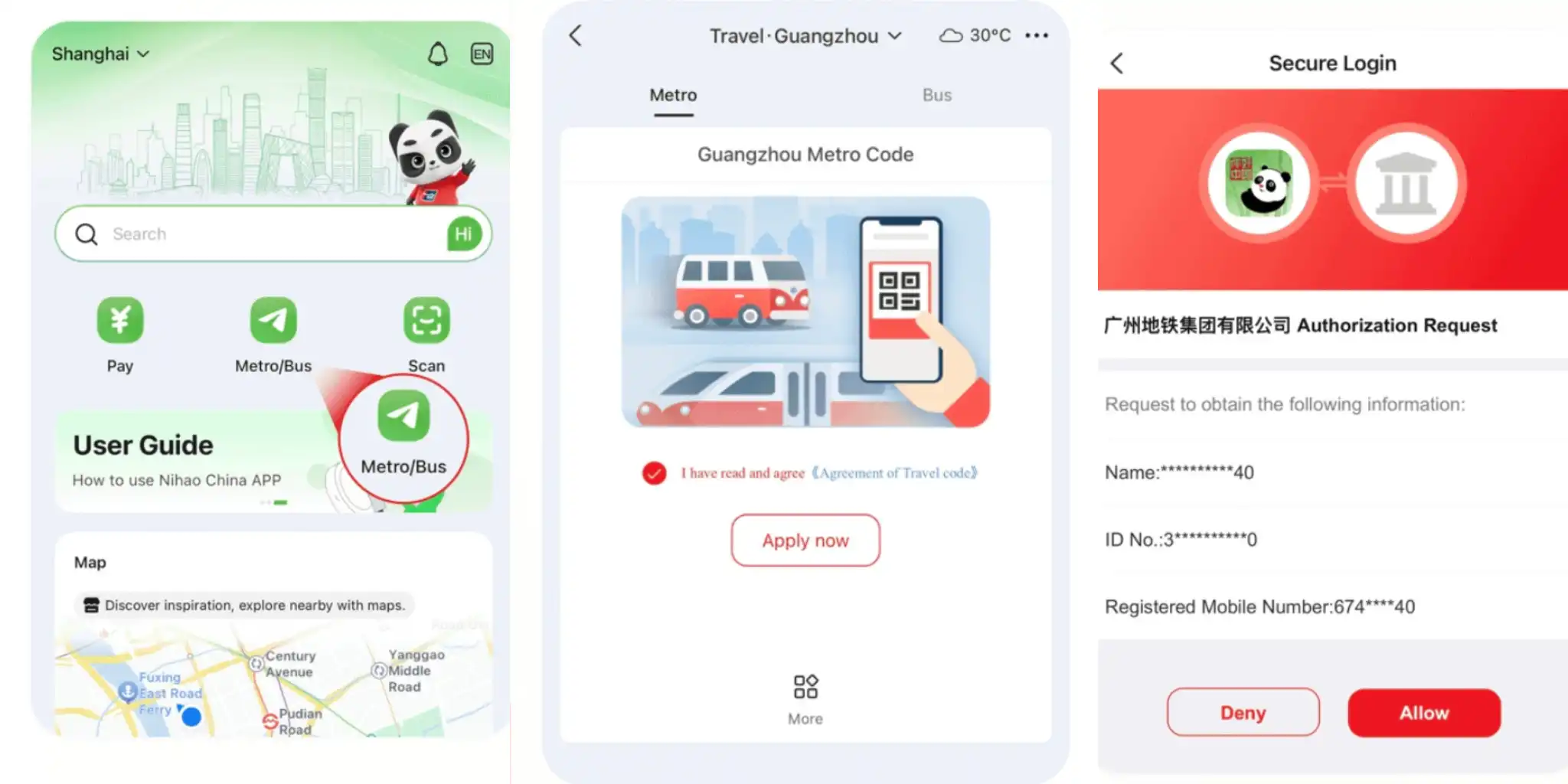
Public transport is one of Nihao China's most useful features for travelers.
UnionPay states that its transport services cover metro systems in dozens of major Chinese cities and bus networks across more than 1,700 county-level areas.
Coverage includes major destinations such as:
- Beijing
- Shanghai
- Guangzhou
- Shenzhen
- Xi'an
- Other participating cities
How to Use the Metro QR Code
- Open Nihao China
- Go to Transport
- Select your current city
- Activate the local transport QR service if required
- Display the QR code at the metro gate
- Scan according to the local system's instructions
Depending on the city, you may need to scan when entering and leaving the metro.
How to Use Nihao China on Buses
Open the city's transport QR code and scan it using the bus payment reader.
Bus rules differ between cities, so follow the instructions shown inside the app or on the local bus system.
🚇 Transport Tip: Activate your city's transport QR before reaching the station, especially during busy periods when mobile signal may be slower.
- One way
- Round-trip
- direct cheapest
 MNL8:40 PM2h 30mNonstopHKG11:10 PMManila - Hong Kong|Fri, Nov 6|HK ExpressMXN961MXN1,84848% offSearch48% offMXN1,848MXN961
 - MNL8:40 PM2h 30mNonstopHKG11:10 PMManila - Hong Kong|Thu, Nov 5|HK ExpressMXN969MXN1,84848% offSearch48% offMXN1,848MXN969
- MNL8:40 PM2h 30mNonstopHKG11:10 PMManila - Hong Kong|Wed, Nov 11|HK ExpressMXN1,185MXN1,84836% offSearch36% offMXN1,848MXN1,185
- MNL8:40 PM2h 30mNonstopHKG11:10 PMManila - Hong Kong|Thu, Nov 12|HK ExpressMXN1,301SearchMXN1,301
- MNL2:20 AM2h 10mNonstopHKG4:30 AMManila - Hong Kong|Sun, Oct 25|HK ExpressMXN1,536SearchMXN1,536
- MNL9:10 PM2h 20mNonstopHKG11:30 PMManila - Hong Kong|Fri, Oct 23|HK ExpressMXN1,589SearchMXN1,589
 MNL13:002h 20mNonstopHKG14:00Manila - City|Mon, Sep 6|Normal AirlineFind more flightsFind more flights
Other Useful Nihao China Features
Besides mobile payments and transport, Nihao China also includes several useful tools for travelers.
Currency Converter
The built-in currency converter supports more than 160 currencies, making it easy for Filipino travelers to check prices from Chinese Yuan (CNY) to Philippine Peso (PHP).
💱 Tip: Exchange rates are for reference only. Your bank or card provider may use a slightly different rate.
Translation
Nihao China includes translation tools that can help with everyday communication in China, such as:
- Ordering food at restaurants
- Talking with taxi drivers
- Asking hotel staff for help
- Shopping at local stores
- Asking for directions
Tourist Tax Refund
Eligible foreign visitors may use Nihao China to access tourist tax refund services for purchases made at participating stores.
Refund eligibility depends on the purchase amount, store, and current tax refund rules, so check the latest requirements before shopping.
Travel Services
Nihao China also connects travelers with selected local services, including:
- Train travel
- Shopping
- Restaurants
- Attractions
- Other travel services
📱 Note: Some external pages or mini-apps may still appear in Chinese.
Nihao China vs Alipay vs WeChat Pay
All three apps can be useful during a China trip, but they serve slightly different purposes.
Feature | Nihao China | Alipay | WeChat Pay |
|---|---|---|---|
Main Advantage | UnionPay payments and public transport | Large payment and travel ecosystem | Payments and WeChat mini-programs |
Foreign Traveler Focus | Strong | Strong | Strong |
QR Payments | Yes | Yes | Yes |
Metro/Bus Services | Strong built-in coverage | Available in many cities | Available in many cities |
Ride-Hailing | May connect to selected services | Strong DiDi integration | Mini-program access |
Translation Tools | Yes | Yes | Limited compared with dedicated travel functions |
Best Use | Transport and extra payment option | Main travel and payment app | Payments and mini-programs |
There is no need to choose only one app.
A practical setup for Filipino travelers is:
- Nihao China for UnionPay services and public transport
- Alipay as another major payment option
- WeChat Pay if you plan to use WeChat mini-programs or services
- Physical bank card as backup
- Some RMB cash for emergencies
Can You Use Nihao China for DiDi?
Nihao China is not primarily a ride-hailing app.
If you want to book a DiDi ride, using the DiDi app, Alipay, or WeChat may provide a more complete ride-hailing experience.
However, selected online payment or promotional connections between UnionPay and DiDi may be available, so it is better not to say that Nihao China can never be used for any DiDi-related payment.
🚕 China Travel Tip: Install your preferred ride-hailing app before your trip and complete the payment setup while you still have access to your Philippine mobile number.
What Nihao China Cannot Fully Replace
Nihao China is useful, but travelers should not depend on a single app for every situation.
Some possible limitations include:
- Not every merchant QR code may be compatible
- Some services may require additional verification
- Certain pages may still contain Chinese
- Payment success can depend on your Philippine bank
- Internet connection is required for many QR payments
- Some Chinese mini-programs work better through Alipay or WeChat
- Wallet fees and limits can change
A backup payment method is always recommended.
Recommended eSIMs Options for China

![[Mainland China] 5G | eSIM Internet Card | China Mobile CMLink | 3-15 days optional | Ready to use | Hotspot supported | QR Code](https://ak-d.tripcdn.com/images/0353d12000u5hpf4m680C_C_568_320.jpg)
Best Payment Setup for Filipino Travelers in China
Before leaving the Philippines, consider preparing these payment options:
- Nihao China: For QR payments and public transport
- Alipay: Useful for payments, transport, DiDi, and local services
- WeChat Pay: Useful for merchants and WeChat mini-programs
- International debit or credit card: For hotels and larger purchases
- RMB cash: For emergencies or places where digital payment is inconvenient
You do not need to carry a large amount of cash.
A small emergency cash reserve can still be useful if your phone loses power, your mobile data stops working, or a card transaction is declined.
💡 Payment Tip: Do not keep all your payment options on one phone. Carry at least one physical bank card separately as a backup.
Is Nihao China Worth Using?
Nihao China is a useful option for international travelers who want a simpler way to access China's payment and public transport systems.
Its biggest advantage is that several travel services are combined in one app, including:
- QR payments
- Metro and bus access
- Currency conversion
- Translation
- Tax refund information
- Travel services
For Filipino travelers, it works best as part of a multiple-payment setup rather than your only payment method.
Using Nihao China together with Alipay or WeChat Pay, a physical international bank card, and a small amount of RMB cash gives you more flexibility if one payment method does not work.
Tips for Filipino Travelers Using Nihao China
- Set it up before flying: Register and add your payment method while you are still in the Philippines.
- Check your Philippine bank: Make sure international and online transactions are enabled.
- Keep your Philippine SIM active: You may need OTP codes from your bank.
- Use a China eSIM or roaming plan: QR payments normally need an internet connection.
- Check the amount before paying: Make sure you understand whether the price is in CNY.
- Keep another payment app: Alipay or WeChat Pay can help when one QR method does not work.
- Carry some cash: Keep a small amount of RMB for emergencies.
- Download only the official app: Always verify that China UnionPay is the developer.
FAQs About Nihao China App
-
Is Nihao China an official app?
-
Can I use my Philippine Visa or Mastercard?
-
Can I use Nihao China on the Beijing and Shanghai Metro?
-
Do I still need cash in China?
-
Is Nihao China better than Alipay?
Popular Content
-
Popular Content
-
Top Flight Links
-
Popular Hotels
-
Popular Things to Do
-
Featured guides
-
Trip.com links
- Trip.com E-Ticket
- Trip.com Payment Methods
- Trip.com Passport Change
- Trip.com Customer Service
- Trip.com Flight Cancellation
- Trip.com VIP Lounge Access
- Trip.com Phone Number
- Trip.com Check In
- Payment Sale
- Trip Coins
- Trip.com Hotel Refund
- Trip.com Cancellation Policy
- Trip.com Ticket Issued Status
- Trip.com Flight Ticket
- Trip.com Membership
- Trip.com E-Receipt
- Trip.com Seat Selection
- Trip.com Baggage Allowance
- Trip.com Flight Change
- Trip.com Reviews
- Plane tickets from Manila to Hong Kong
- Cheap tickets from Manila to Tagbilaran
- Cheap flights from Manila to Cebu
- Cheap flights from Manila to Iloilo City
- Cheap flights from Manila to General Santos
- Cheap tickets from Cebu to Manila
- Cheap flights from Bacolod to Manila
- Cheap flights from Manila to Tacloban
- CA986 Flight Status
- 5J187 Flight Status
- PR431 Flight Status
- PR741 Flight Status
- MH709 Flight Status
- EK2521 Flight Status
- 5J582 Flight Status
- Hotels near 72 wonder tower
- Hotels near Mactan–Cebu International Airport
- Hotels near Fenghuang Ancient Town
- Hotels near Greenland Xindu East Coast Times Square South Area
- Hotels near Changbai Mountain Beauty Pine International Sculpture Park
- Shiji Qingteng Capsule Hotel (T3 Terminal)
- Bangkok-Pratunam Hotel
- Shangri-La Resort
- De Mani Hotel
- Fan Yu Gaming Center
- Hotels in Fenghuang County
- Hotels in Davao City
- Hotels in North Jakarta
- Hotels in Moscow
- Hotels in Seoul
- Philippines 5G eSIM | Dual Network • All AI & TikTok | Day Pass/Total Data Package | 24-Hour Billing | 1-30 Days | QR Code
- Private Mutianyu Great Wall Trip With English-speaking Driver
- Chengdu Departure - Bipenggou Shuttle Bus
- Vietnam | 4G/5G eSIM | Daily/Data Plan | 24-hour Billing | 1-30 Days | QR code
- Vietnam Airport VIP Fast Track Service
- Bangladesh Dhaka DAC Hazrat Shahjalal International Airport T1 terminal international departure IBalaka Executive Lounge international departure lounge experience
- Huanglongjiuzhai Railway Station - Jiuzhaigou National Park shuttle bus · private charter optional
- Lantau Island Ngong Ping 360 round-trip cable car admission ticket with priority boarding + one-way urban area transfer
- WWII Bombing of Darwin & Royal Flying Doctor Service
- Vietnam Group Tours
- DMZ Tour with Optional Suspension Bridge and Defector Museum
- Xochimilco & Coyoacán: Guided Day Tour + Frida Kahlo Museum Entry + Transfers
- Seoul: Traditional Mother-of-Pearl accessory Craft Workshop.
- Pinkafeld Audio Tour: Chapels, Castles, and Stories Untold
- NZONE: Skydive Up to 12,000ft
- Mothers Day Gifts
- eSIM
- Hong Kong International Airport
- International Driving Permit
- Toronto Pearson International Airport
- Universal Studios Singapore
- Great Wall of China
- UK ETA
- Narita International Airport
- China Currency
- Changi Airport
- Schengen Visa
- Singapore MRT Map
- France Visa
- Ninoy Aquino International Airport