
Getting around Osaka, Kyoto, Kobe and other Japanese cities is easier with an ICOCA Card. Instead of buying a ticket for every journey, simply tap the card when entering and leaving the station. You can also use the balance for buses, convenience stores, vending machines, restaurants and other small purchases.

What Is an ICOCA Card?
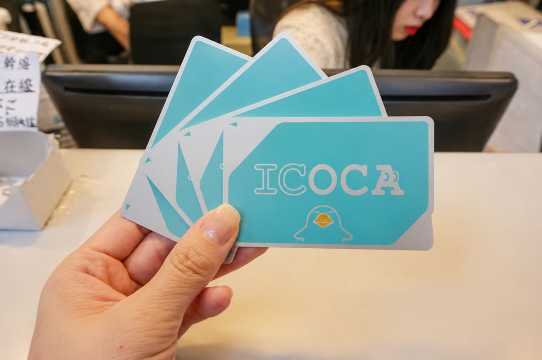
ICOCA is a rechargeable prepaid IC card issued by JR-West. Travelers can use it to ride participating trains, subways and buses without buying a paper ticket for every trip. The correct fare is automatically deducted after you tap the card when entering and leaving the station.
The stored balance can also be used as electronic money at participating stores displaying the ICOCA or nationwide transport IC card symbol.
You can commonly use ICOCA for:
- JR local trains
- Subways and private railway lines
- Local buses
- Convenience stores
- Vending machines
- Coin lockers
- Restaurants and cafés
- Shops displaying the ICOCA or IC card logo
ICOCA is especially useful for travelers visiting Osaka, Kyoto, Kobe and Nara, but it also works in many other major IC card areas across Japan.
Unlock the Best Flights to Japan


Types of ICOCA Cards
Regular ICOCA
The regular ICOCA is the standard rechargeable physical card. It is a good choice for travelers who prefer tapping a card instead of using a phone.
You can keep the card for another Japan trip or return it to an eligible JR-West ticket office to request a refund.
Original Design ICOCA for Foreign Visitors
JR-West also sells special original-design ICOCA cards for eligible international visitors at the JR Ticket Office in Kansai-airport Station.
Current purchase conditions include:
- You must have a passport issued outside Japan
- You must be visiting under Temporary Visitor status
- Only one card can be purchased per person
- The card costs ¥2,000
- The price includes a ¥500 deposit
Designs and availability may change, so check the latest information before your trip.
ICOCA on Apple Pay
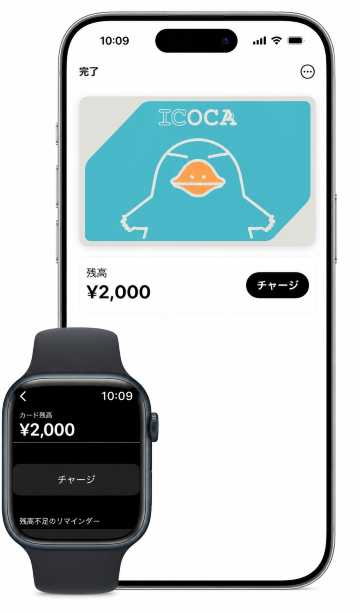
ICOCA can be added to supported iPhones and Apple Watches. It works like a physical ICOCA, allowing you to tap your device at station gates and participating shops.
ICOCA on Apple Pay generally requires:
- A compatible iPhone or Apple Watch
- A supported version of iOS or watchOS
- An Apple Account signed in to iCloud
- An eligible payment card added to Apple Wallet
Some foreign-issued cards may not work when adding money, so carrying Japanese yen as a backup is still helpful.
Which ICOCA Option Should You Choose?
ICOCA Option | Best For | Important Details |
|---|---|---|
Regular ICOCA | Travelers who prefer a physical card | Includes a ¥500 refundable deposit |
Original Design ICOCA | Short-term visitors arriving at Kansai Airport | Passport and Temporary Visitor status required |
ICOCA on Apple Pay | Supported iPhone and Apple Watch users | Can be topped up through Apple Wallet using an eligible card |
For most travelers arriving in Osaka, a regular ICOCA is the simplest option. Travelers using a compatible iPhone may find ICOCA on Apple Pay more convenient because they do not need to carry another physical card.
ICOCA Card Price and Where to Buy
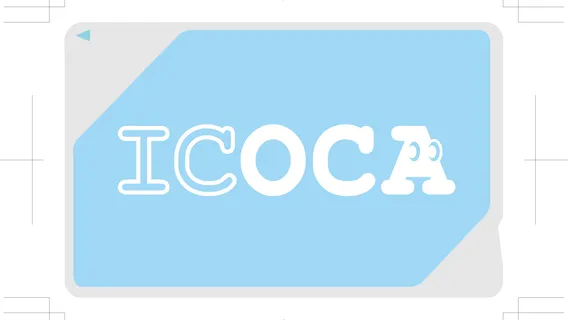
A regular ICOCA Card usually costs ¥2,000, which includes:
- ¥500 refundable deposit
- ¥1,500 usable balance
The ¥500 deposit cannot be used for train fares or shopping. It may be refunded when you return the physical card at an eligible JR-West ticket office.
You can top up the card after purchasing it, but the maximum stored balance is ¥20,000.
Where to Buy an ICOCA Card
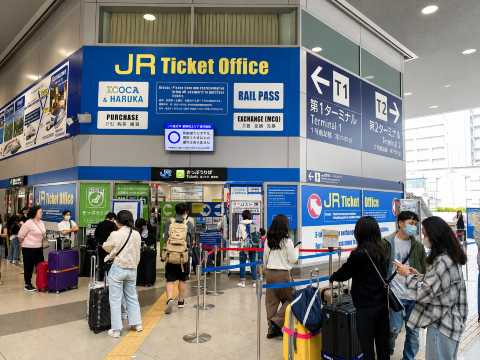
Regular ICOCA cards can be purchased from participating JR-West ticket machines and JR-West ticket offices in the ICOCA service area. Look for a machine displaying the ICOCA logo.
Common places to buy ICOCA include major JR stations in:
- Osaka
- Kyoto
- Kobe
- Nara
- Hiroshima
- Okayama
- Kansai International Airport
Not every machine or ticket office sells ICOCA, so check for the ICOCA logo or ask station staff.
Where to Buy ICOCA at Kansai International Airport
Travelers arriving at Kansai International Airport can purchase an ICOCA Card at Kansai-airport Station. The JR Ticket Office may also offer special-design ICOCA cards to eligible international visitors.
How to Buy ICOCA at a Ticket Machine
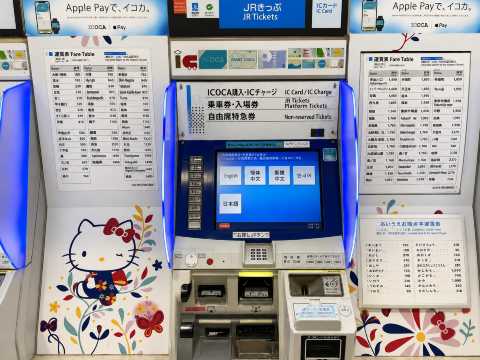
Follow these steps at a participating JR-West ticket machine:
- Change the screen language to English.
- Select Purchase ICOCA or Buy ICOCA.
- Choose the purchase amount.
- Insert Japanese yen cash.
- Collect the ICOCA Card.
- Take your receipt and any remaining change.
Regular physical ICOCA cards purchased from standard ticket machines normally require Japanese yen cash.
Can You Buy ICOCA with a Credit Card?
Regular physical ICOCA cards normally require Japanese yen cash when purchased or topped up at JR-West ticket machines.
Credit cards are generally not accepted for:
- Buying a regular ICOCA Card at standard ticket machines
- Topping up a physical ICOCA Card
- Adding money at fare adjustment machines
ICOCA on Apple Pay can be topped up using an eligible credit, debit, or prepaid card in Apple Wallet. However, some international cards may not be supported.
Where Can You Use ICOCA?
ICOCA can be used in the JR-West ICOCA area and in participating areas that accept Japan’s major transport IC cards, including:
- Suica
- PASMO
- Kitaca
- TOICA
- Manaca
- PiTaPa
- SUGOCA
- Nimoca
- Hayakaken
You can normally use ICOCA on participating local trains, subways, buses, shops, vending machines and coin lockers in cities such as Osaka, Kyoto, Tokyo, Nagoya, Sapporo and Fukuoka.
However, not every railway, bus or rural route accepts ICOCA.
Important ICOCA Area Restrictions
ICOCA cannot always be used for direct travel between two separate IC card areas. Even when both stations accept ICOCA, the full journey may not be covered as one IC card trip.
Long-distance journeys may also have restrictions. For longer trips, ask station staff or purchase the correct ticket before boarding.
How to Use ICOCA on Trains and Subways
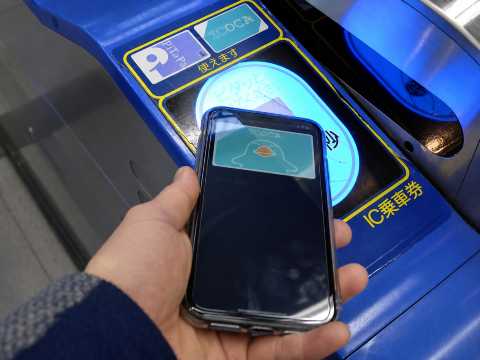
Using ICOCA on trains and subways is simple:
- Tap your ICOCA on the card reader when entering the station.
- Wait for the ticket gate to open.
- Take your train.
- Tap the same card again when leaving the destination station.
- The correct fare will be deducted automatically.
Keep the card on the reader until you hear the confirmation sound. Do not insert ICOCA into the paper ticket slot.
Each passenger must use a separate card. One ICOCA Card cannot be used for two passengers passing through the same gate.
How to Use ICOCA on Buses
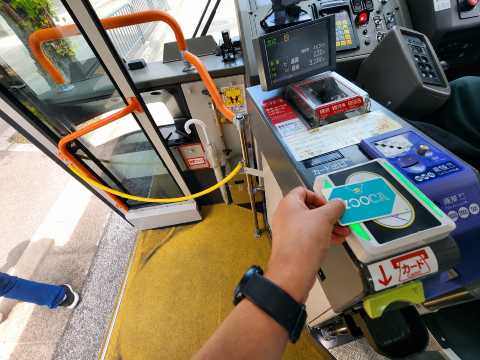
The tapping process depends on the bus operator. You may need to:
- Tap when boarding and again when leaving
- Tap only when leaving
- Collect a numbered ticket when boarding
Look for the IC card reader and follow the instructions inside the bus. Ask the driver when you are unsure where or when to tap.
How to Pay with ICOCA at Shops
ICOCA can be used at participating:
- Convenience stores
- Restaurants
- Vending machines
- Coin lockers
- Shops displaying the IC card payment logo
To pay at a staffed shop:
- Tell the staff you want to pay by ICOCA.
- Check the payment amount.
- Tap your card on the reader.
- Wait for the confirmation sound.
For vending machines, select your item and tap ICOCA on the card reader.
Some products, including certain gift cards, may not be payable with ICOCA. You may also be unable to combine ICOCA with another payment method for the same purchase.
Find the Best Hotels in Japan
 NO.1
NO.1



























How to Top Up an ICOCA Card
You can recharge a physical ICOCA at:
- JR ticket machines
- IC card recharge machines
- Fare adjustment machines
- Participating convenience stores
- Selected shops displaying the recharge symbol
Physical ICOCA top-ups normally require Japanese yen cash. The maximum balance that can be stored on the card is ¥20,000.
How to Top Up ICOCA at a Ticket Machine
- Select English on the machine.
- Choose Charge / Review History.
- Select Charge with Cash.
- Choose the amount you want to add.
- Place or insert your ICOCA as instructed.
- Insert Japanese yen cash.
- Wait for the confirmation sound.
- Collect your card and receipt.
Do not remove the card until the machine confirms that the top-up is complete.
How to Top Up ICOCA at a Convenience Store
Bring your ICOCA to the cashier and tell the staff you want to recharge it.
The cashier will ask how much you want to add. Pay in cash, then tap the card on the payment reader to complete the top-up. Recharge services may not be available at every branch.
💴 Travel Tip: Keep some Japanese yen with you because physical ICOCA purchases and top-ups often require cash.
How to Add ICOCA to Apple Wallet
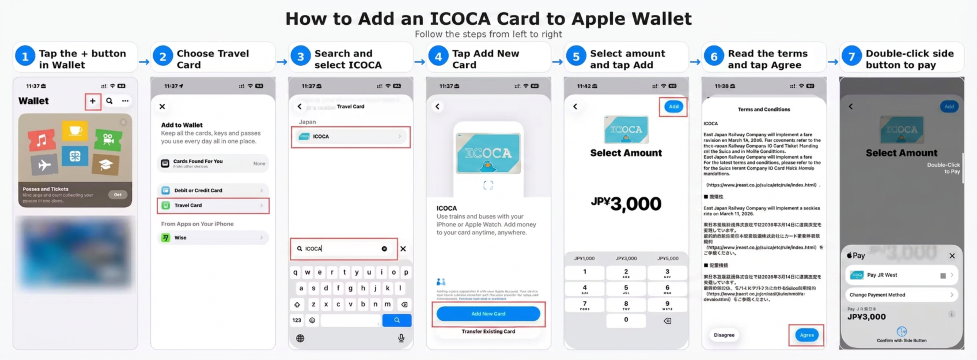
You can create a new ICOCA directly in Apple Wallet without first buying a physical card.
Add a New ICOCA
- Open the Wallet app.
- Tap the Add button.
- Select Travel Card or Transit Card.
- Search for ICOCA.
- Select the amount you want to add.
- Pay using an eligible card in Apple Wallet.
- Complete the setup instructions.
Set ICOCA as your Express Transit Card so you can tap through gates without opening Wallet or unlocking your phone.
Transfer a Physical ICOCA to Apple Wallet
Travelers who already have an eligible physical ICOCA may transfer its remaining balance and card information to Apple Wallet.
After the transfer is completed, the physical card can no longer be used. Check the on-screen instructions carefully before confirming the transfer.
How to Top Up ICOCA in Apple Wallet
- Open Apple Wallet.
- Select your ICOCA.
- Tap Add Money.
- Choose the amount.
- Select an eligible payment card.
- Confirm using Face ID, Touch ID or your passcode.
Some international cards may be declined even when they work for normal purchases. Try another eligible card or use cash to top up a physical ICOCA.
- One way
- Round-trip
- Cheapest nonstop
 MNL12:50 AM4h 20mNonstopNRT6:10 AMManila - Tokyo|Wed, Nov 18|Jetstar JapanPKR 64,257PKR 185,92165% offSearch65% offPKR 185,921PKR 64,257
 - MNL12:50 AM4h 20mNonstopNRT6:10 AMManila - Tokyo|Fri, Nov 13|Jetstar JapanPKR 88,540PKR 185,92152% offSearch52% offPKR 185,921PKR 88,540
- MNL2:40 AM3h 40mNonstopKIX7:20 AMManila - Osaka|Sat, Nov 7|Jetstar JapanPKR 150,596PKR 185,92119% offSearch19% offPKR 185,921PKR 150,596
 MNL13:003h 40mNonstopNRT14:00Manila - City|Mon, Sep 6|Normal AirlineFind more flightsFind more flights
ICOCA Card Refund
When you no longer need a regular physical ICOCA, return it to an eligible JR-West Ticket Office in the ICOCA area.
The refund normally includes:
- The ¥500 deposit
- Any remaining stored balance
- A deduction of up to ¥220 from the remaining balance
When the remaining balance is lower than the handling fee, the remaining balance may be deducted, but the ¥500 deposit will still be returned.
Refund procedures for mobile ICOCA are different from physical card refunds. Follow the instructions provided through Apple Wallet or the relevant ICOCA mobile service.
Tip: Spend most of your remaining ICOCA balance before requesting a refund. You can use small amounts at convenience stores, vending machines or participating shops.
Can ICOCA Be Used on the Shinkansen?
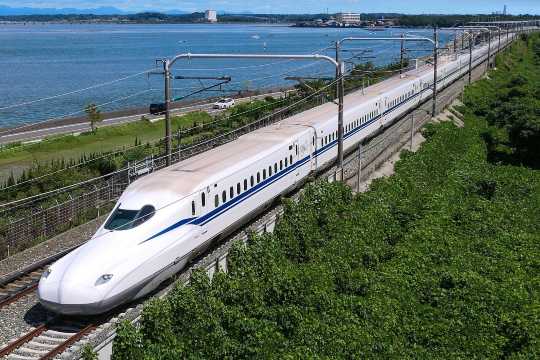
You cannot normally board a Shinkansen using only the stored balance on your ICOCA.
You will need:
- A separate Shinkansen ticket
- A reserved ticket linked through a supported booking service
- Another eligible rail pass or ticket
For limited express trains such as HARUKA, Thunderbird or Kuroshio, an additional limited express ticket may also be required. ICOCA alone does not cover the express charge.
ICOCA and HARUKA
The ICOCA and HARUKA option combines an ICOCA Card with a discounted HARUKA ticket for selected journeys from Kansai International Airport.
The package may include:
- A ¥2,000 ICOCA Card
- A ¥500 refundable deposit
- ¥1,500 usable ICOCA balance
- A discounted HARUKA ticket to selected destinations such as Tennoji, Shin-Osaka or Kyoto
Availability, eligible routes and purchase conditions may change, so check JR-West information before travelling.
ICOCA vs Suica vs PASMO
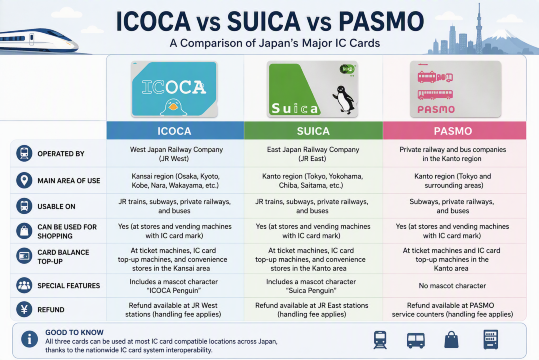
ICOCA, Suica and PASMO work almost the same for most travelers.
Card | Main Issuer Area | Best Place to Buy |
|---|---|---|
ICOCA | JR-West and Kansai | Osaka, Kyoto, Kobe and Kansai Airport |
Suica | JR East | Tokyo and JR East areas |
PASMO | Tokyo private railways and subways | Tokyo and participating PASMO operators |
All three cards can be used in many of Japan’s major compatible IC card areas. The main difference is where the card is easiest to buy and where a physical card can be returned for a refund.
For an Osaka or Kyoto trip, ICOCA is usually the easiest option. For a Tokyo trip, Suica or PASMO may be easier to purchase. You do not need to buy a new IC card each time you enter another compatible city.
Recommended eSIMs Options for Japan

KANSAI ONE PASS Update
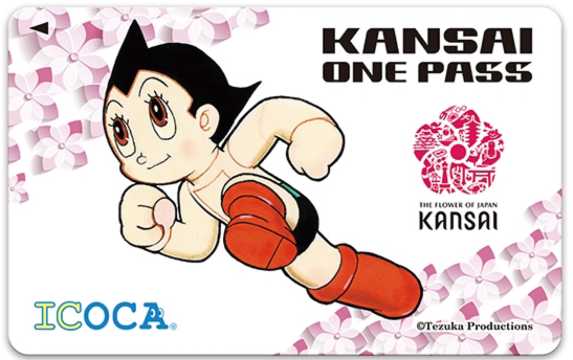
KANSAI ONE PASS is a tourist IC card based on ICOCA. Sales are gradually being discontinued as remaining stocks run out.
Tourist discounts connected to the card are also expected to end. Existing KANSAI ONE PASS cards can still be used as rechargeable transport IC cards after sales finish.
Travelers should not depend on finding KANSAI ONE PASS during their trip. A regular ICOCA or ICOCA on Apple Pay is the safer choice.
Tips for Using ICOCA in Japan
- Keep Japanese yen for physical card purchases and top-ups.
- Check your balance before entering a station.
- Use one ICOCA per passenger.
- Tap the same card when entering and leaving.
- Do not insert ICOCA into the paper ticket slot.
- Top up before taking a long journey.
- Ask station staff if the ticket gate shows an error.
- Buy a separate ticket for Shinkansen and limited express trains.
- Do not start a long trip that crosses separate IC card areas without checking.
- Use your remaining balance for shopping before requesting a refund.
FAQs About ICOCA Card
-
Can I use ICOCA in Tokyo?
-
Can I use ICOCA in Osaka and Kyoto?
-
What is the maximum ICOCA balance?
-
Can two people share one ICOCA?
-
Can children use ICOCA?