

Trip.com Refund: How to Request and Track Your Refund

By Trip.com
June 26, 2026
Plans can change anytime. If you booked on Trip.com, this quick guide helps you understand flight, hotel, and train refund rules, free cancellation options, and how to cancel step by step. You will also learn how to check your refund status and manage your booking easily with less stress.
Flight Refunds vs Flight Compensation
Flight refunds and flight compensation are different. A refund usually applies when you cancel a flight or when the airline allows a refund based on the ticket rules. Flight compensation may apply in certain cases, such as flight delays, cancellations, or disruptions.
If you want to make a flight compensation claim, please handle it through AirHelp+. Trip.com can help with booking-related support, such as checking refund status, cancellation rules, and airline policies, but compensation claims should not be submitted directly through Trip.com.
Trip.com Flight Refund Policy & Cancellation Steps
Trip.com Flight Refund Policy
If you need to cancel your flight, the refund depends on your ticket type, airline rules, and when you cancel. Always check your booking details first before making any changes.
Refundable Tickets
You may get a full or partial refund. But take note, airlines or Trip.com may deduct cancellation fees or service charges. The amount depends on the airline, fare type, and how close it is to your departure date.
Non Refundable Tickets
The ticket fare is usually not refundable. However, you might still get back airport taxes or some government fees. The amount depends on the airline and destination.
Promo or Discounted Fares
These are usually very strict. Most promo tickets cannot be refunded. In some cases, only small amounts like airport taxes can be returned. Flexibility is very limited.
24 Hour Free Cancellation
Some airlines allow free cancellation within 24 hours after booking. Not all tickets have this option, so always check the fare rules in your booking confirmation.
How to Cancel a Flight and Request a Refund
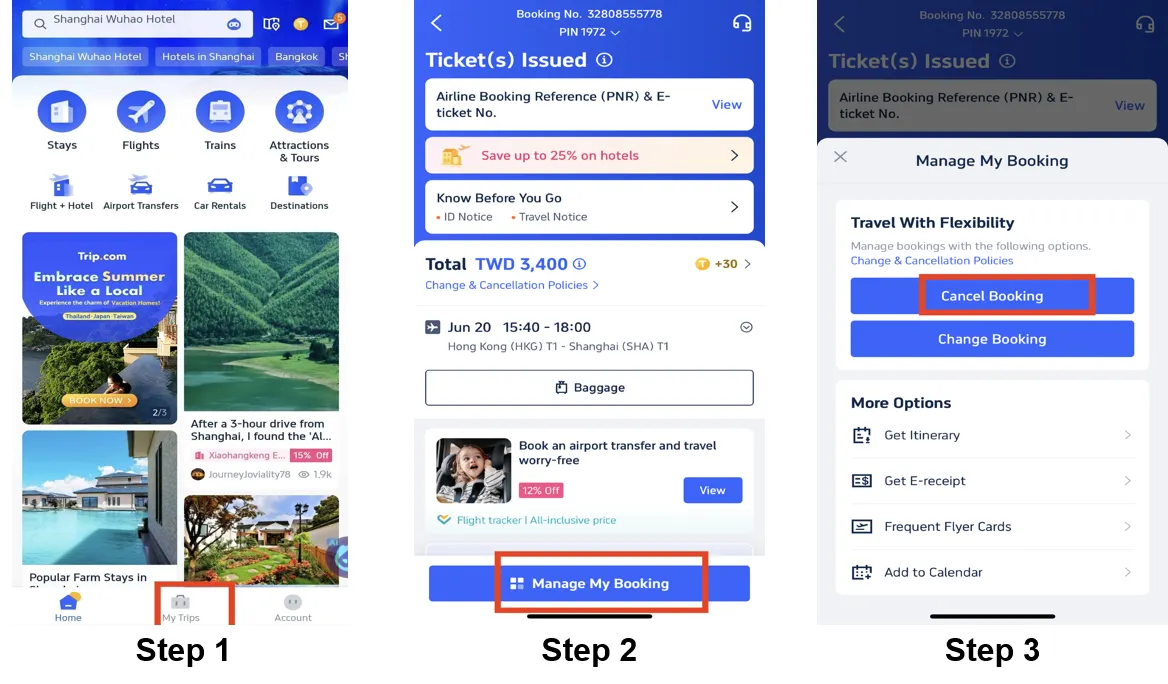
If you already decided to cancel, here’s what you can do:
- Log in to your Trip.com account using the Trip.com app or Trip.com website.
- Go to “My Trips” .
- Find your flight booking and click “Manage My Bookings”.
- Select Cancel Booking.
- Check the refund breakdown carefully so you can see any fees that will be deducted.
- Submit your request and wait for confirmation.
You may be asked to choose a reason for cancellation. Just select the correct one and confirm.
How Long Does a Flight Refund Take
Hotel refund time depends on the hotel’s approval and your payment method. Trip.com usually processes hotel refund requests within 1 to 3 working days after approval, but the money may take longer to arrive in your account.
For credit or debit cards, refunds may take around 7 to 15 business days. For e-wallets, it may take around 3 to 7 business days. For bank transfers, it can take up to 30 business days, depending on your bank or payment provider.


Trip.com Flight Flexible Add-on: Air Flexibility
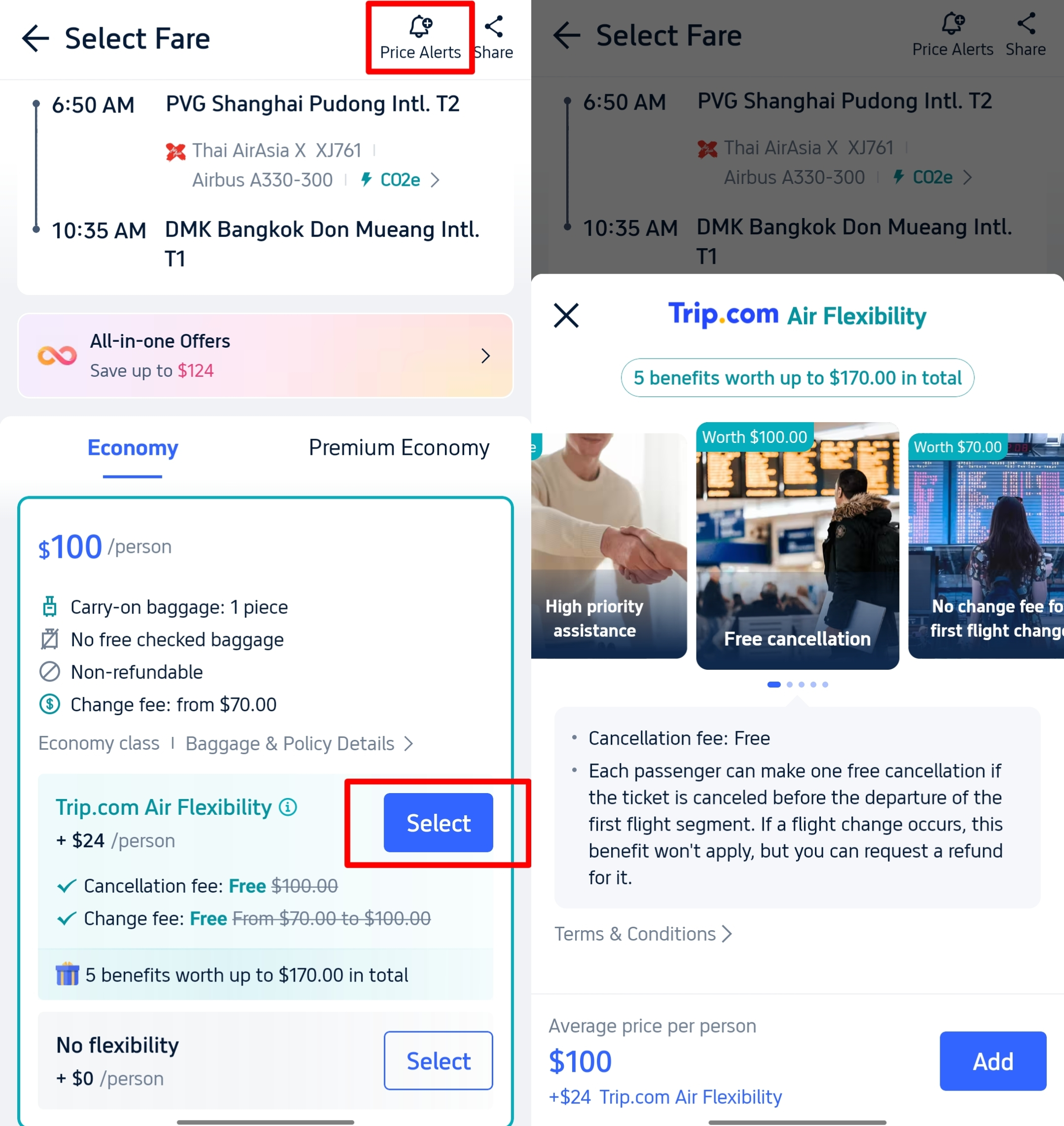
If your plans are not fully confirmed, you can add Trip.com Air Flexibility when booking selected flights. This add on can help reduce or waive cancellation fees, allow date changes with fewer charges, or give a higher refund if you cancel. Many Filipino travelers choose this when waiting for visa approval, leave confirmation, or final travel plans because it gives extra peace of mind.
Trip.com Hotel Refund Policy & Cancellation Steps
Trip.com Hotel Refund Policy
Hotel refunds usually depend on the cancellation deadline and room type you booked. Always check the cancellation policy before confirming your stay so you won’t be surprised later.
Free Cancellation Hotels
These are easy to spot because they have a Free Cancellation label on Trip.com. Most hotels allow you to cancel 24 to 48 hours before check in and still get a full refund. Some hotels even give a bit more time, but it depends on the property. Always double check the exact deadline in your booking.
Non Refundable Rooms
These are usually cheaper but very strict. Once booked, you cannot cancel or get a refund. If your plans change and you cannot stay, the full payment is usually not returned. Many travelers choose this only when their travel dates are already confirmed.
No Show Policy
If you do not check in and also forget to cancel before the deadline, the hotel will charge the full stay. There will be no refund, so it is better to cancel early if your plans change.
How to Cancel a Hotel Booking and Request a Refund
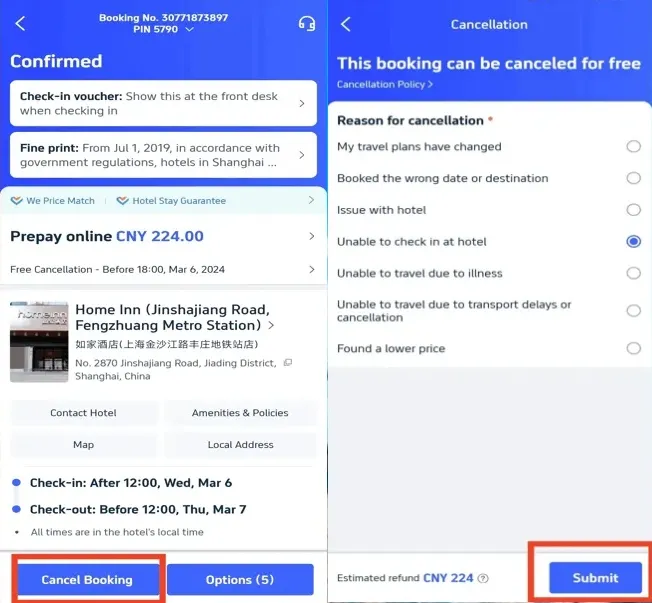
If you need to cancel your hotel, just follow these steps:
- Log in to your Trip.com account using the Trip.com app or Trip.com website.
- Go to “My Trips” and find your hotel booking.
- Click Cancel Booking.
- Choose the reason for cancellation such as changed plans or wrong dates.
- Submit your request and wait for confirmation.
You can also click View Cancellation Policy to check if your refund is full or partial before confirming.
How Long Does a Hotel Refund Take
Most refunds are returned to your original payment method within about 1 working day after approval. If you paid using a bank transfer or credit card, it may take another 1 to 3 days depending on your bank or card provider.
Trip.com Train Refund Policy and Cancellation Steps
Train refund rules depend on the country, railway provider, and ticket type. If you are taking a train in China or another country, always check the ticket conditions before cancelling.
Trip.com Train Refund Rules
Domestic Trains (e.g. China High Speed Rail)
You can usually cancel for free if you do it several days before departure. The exact deadline depends on the railway company. If you cancel closer to your travel time, fees may apply. For example, cancelling 24 to 48 hours before departure may deduct around 10 percent of the ticket price. The closer it is to departure, the higher the fee can be.
International Trains
Refund and change rules depend on the train operator. Some allow free changes or cancellations within a certain period. Others may charge fees or not allow changes at all. It is very important to check the policy shown in your booking details.
Refund Amount
If your ticket is eligible for refund, you will usually get back the ticket price minus any cancellation fee. Taxes and service fees are often fully refunded, but this can vary.
How to Cancel a Train Ticket and Request a Refund
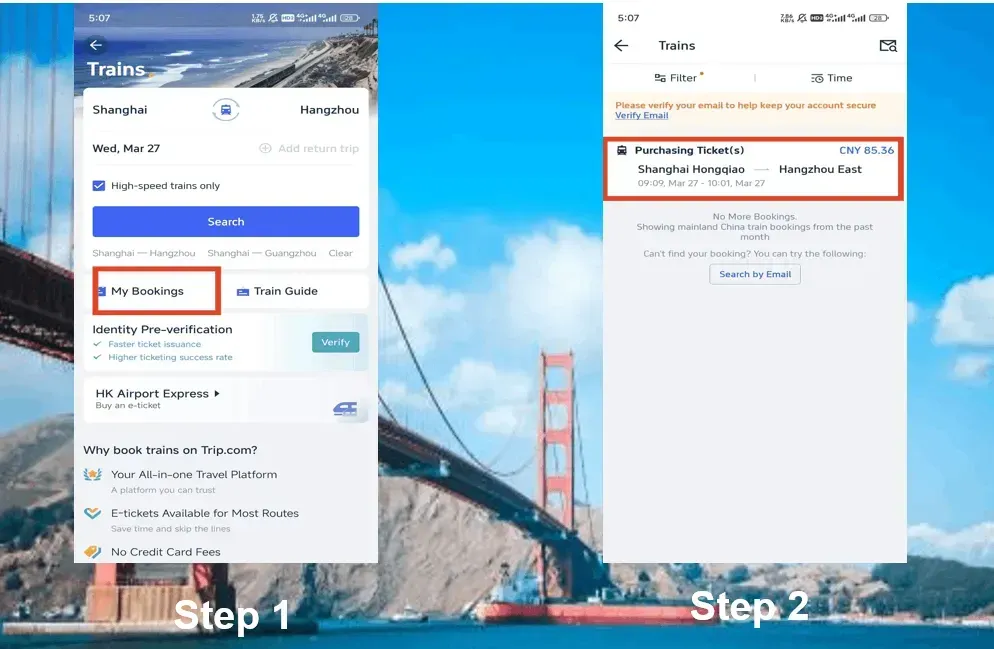
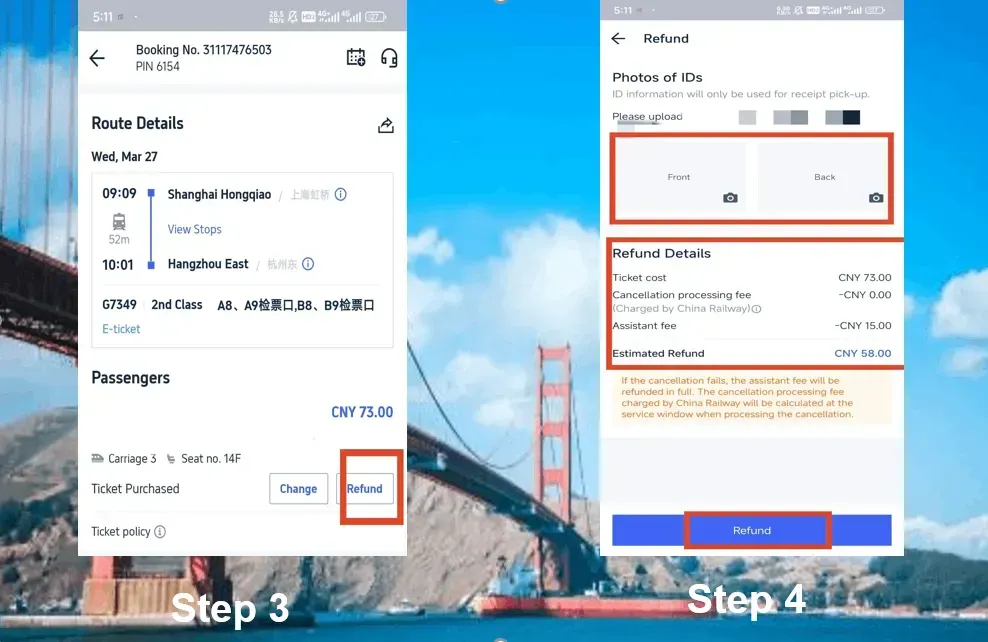
If your plans change, you can cancel your train ticket through Trip.com:
- Log in to your Trip.com account and go to the Train section.
- Open My Bookings and find your train ticket.
- Click Refund.
- For some domestic trains, you may need to upload or verify your ID details.
- Review the refund breakdown including any deducted fees, then confirm your refund request.
After submitting, wait for confirmation and monitor your refund status in your account.
Note: A small service or assistance fee may be deducted when you refund a train ticket. The amount depends on the railway provider, so always check the refund details before confirming.
Can I Get a 100% Refund When Canceling a Trip.com Booking
Flights: Full refund only if you booked a refundable ticket or cancel within 24 hours if the airline allows.
Hotels: Full refund if you booked a Free Cancellation room and cancel before the deadline, usually 24 to 48 hours before check in.
Trains: Full refund if you cancel within the railway’s free cancellation period, which depends on the provider.
How Long Does a Trip.com Refund Take
Flights
- 3 to 7 days for GCash or Maya.
- 7 to 15 days for credit or debit cards.
- Up to 30 days for bank transfers.
Hotels
Trip.com usually processes hotel refund requests within 1 to 3 working days after approval. Actual arrival time depends on your payment method.
- E-wallets may take around 3 to 7 business days.
- Credit or debit cards may take around 7 to 15 business days.
- Bank transfers can take up to 30 business days, depending on your bank.
Trains
- 3 to 7 days for e wallets or bank transfers.
- 7 to 14 days for credit cards.
Total processing time can reach up to 15 working days in some cases.
 NO.1
NO.1





























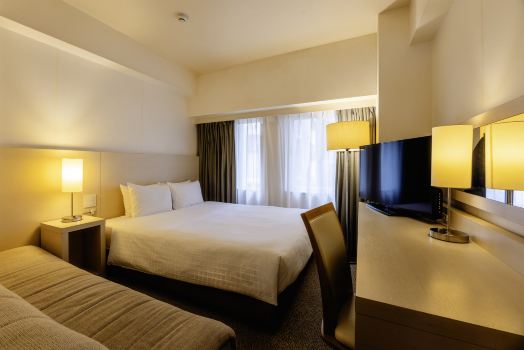

















How to Check Your Trip.com Refund Status
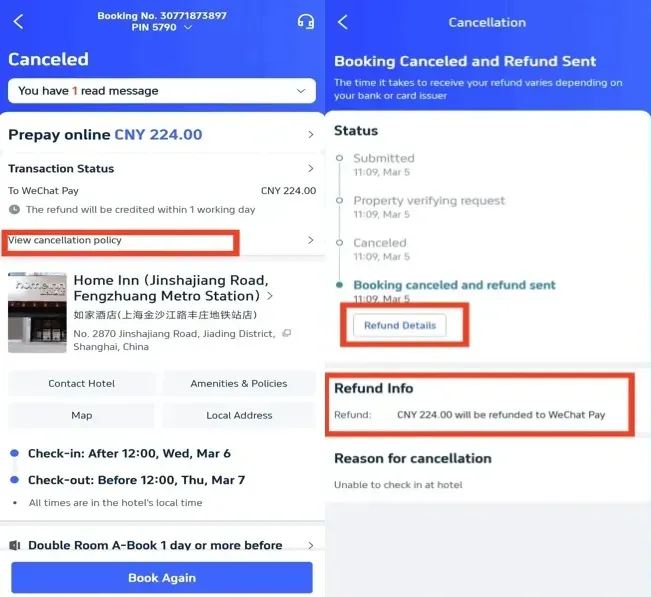
If you are waiting for your money to return, you can easily track the progress inside your account.
- Log in to your Trip.com account using the app or website.
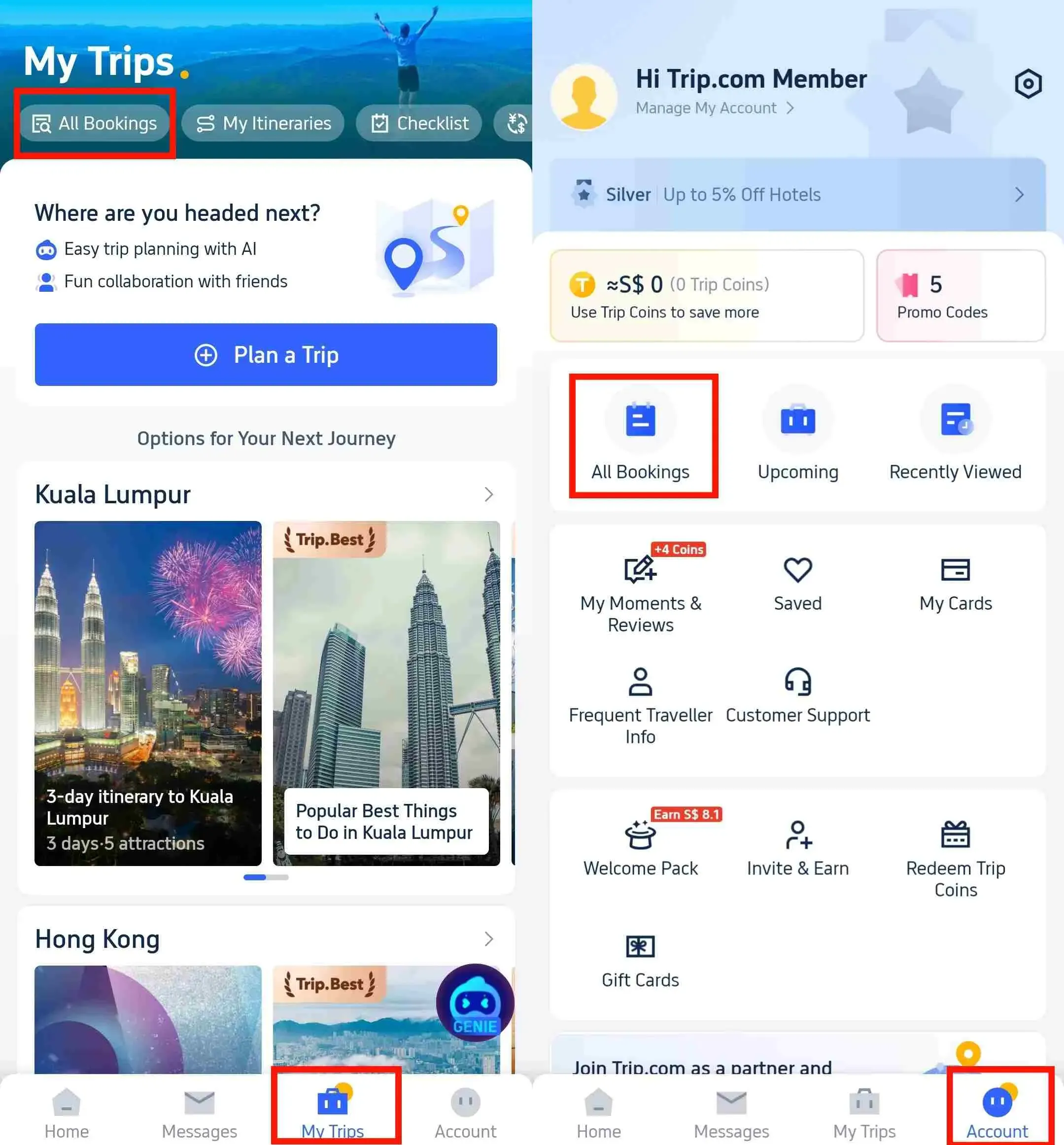
- Go to "My Trips" and open "All Bookings".
- Find your cancelled flight, hotel, or train booking.
- Click View Refund Status.
You may see these updates:
- Submitted means your refund request was received.
- Processing means Trip.com, the airline, hotel, or railway is reviewing it.
- Refund Sent means the money was already returned to your payment method.
- Completed means everything is fully processed.
If the status stays on Processing longer than the usual refund time, it is best to contact Trip.com customer service through the app for follow up.
Your Next Adventure Starts from Manila
- One way
- Round-trip
- direct cheapest
 MNL6:15 PM1h 25mNonstopTAC7:40 PMManila - Tacloban|Mon, Nov 2|Cebu PacificMYR 109MYR 28061% offSearch61% offMYR 280MYR 109
 - MNL7:50 AM1h 30mNonstopTAC9:20 AMManila - Tacloban|Sun, Nov 8|Cebu PacificMYR 164MYR 28041% offSearch41% offMYR 280MYR 164
- MNL7:50 AM1h 30mNonstopTAC9:20 AMManila - Tacloban|Wed, Nov 4|Cebu PacificMYR 221MYR 28021% offSearch21% offMYR 280MYR 221
 MNL13:001h 30mNonstopTAC14:00Manila - City|Mon, Sep 6|Normal AirlineFind more flightsFind more flights
Need Help?
📱 Enjoy app-only deals and a new user package with special offers on hotels, trains, attractions, and airport transfers.
FAQs About Trip.com Refunds
-
Can I cancel my booking anytime?<br>
-
How will I receive my refund?<br>
-
Will I get a full refund after cancellation?<br>
Trending Searches
-
Popular Content
-
Top Flight Links
-
Popular Hotels
-
Popular Things to Do
-
Featured guides
-
Trip.com links
- Trip.com E-Ticket
- Trip.com Payment Methods
- Trip.com Passport Change
- Trip.com Customer Service
- Trip.com Flight Cancellation
- Trip.com VIP Lounge Access
- Trip.com Phone Number
- Trip.com Check In
- Payment Sale
- Trip Coins
- Trip.com Hotel Refund
- Trip.com Cancellation Policy
- Trip.com Ticket Issued Status
- Trip.com Flight Ticket
- Trip.com Membership
- Trip.com E-Receipt
- Trip.com Seat Selection
- Trip.com Baggage Allowance
- Trip.com Flight Change
- Trip.com Reviews
- Plane tickets from Manila to Hong Kong
- Cheap flights from Manila to Tagbilaran
- Plane tickets from Manila to Cebu
- Plane tickets from Manila to Iloilo City
- Cheap flights from Manila to General Santos
- Cheap tickets from Cebu to Manila
- Cheap flights from Bacolod to Manila
- Cheap tickets from Manila to Tacloban
- CA986 Flight Status
- EK2521 Flight Status
- 5J187 Flight Status
- PR431 Flight Status
- PR741 Flight Status
- MH709 Flight Status
- 5J582 Flight Status
- Hotels near 72 wonder tower
- Hotels near Mactan–Cebu International Airport
- Hotels near Fenghuang Ancient Town
- Hotels near Greenland Xindu East Coast Times Square South Area
- Hotels near Changbai Mountain Beauty Pine International Sculpture Park
- Shiji Qingteng Capsule Hotel (T3 Terminal)
- Bangkok-Pratunam Hotel
- Shangri-La Resort
- De Mani Hotel
- Fan Yu Gaming Center
- Hotels in Fenghuang County
- Hotels in Davao City
- Hotels in North Jakarta
- Hotels in Moscow
- Hotels in Baguio
- Philippines 5G eSIM | Dual Network • All AI & TikTok | Day Pass/Total Data Package | 24-Hour Billing | 1-30 Days | QR Code
- Private Mutianyu Great Wall Trip With English-speaking Driver
- Chengdu Departure - Bipenggou Shuttle Bus
- Vietnam | 4G/5G eSIM | Daily/Data Plan | 24-hour Billing | 1-30 Days | QR code
- Vietnam Airport VIP Fast Track Service
- Bangladesh Dhaka DAC Hazrat Shahjalal International Airport T1 terminal international departure IBalaka Executive Lounge international departure lounge experience
- Huanglongjiuzhai Railway Station - Jiuzhaigou National Park shuttle bus · private charter optional
- Lantau Island Ngong Ping 360 round-trip cable car admission ticket with priority boarding + one-way urban area transfer
- The Freycinet Paddle Kayak Tour
- Lumbini Sightseeing Tour: the Birthplace of Lord Buddha
- Fuzhou Three Lanes And Seven Alleys & West Lake 1-day Tour
- Hangzhou One-Day Tour: Romance of the Song Dynasty & Xixi National Wetland Park
- Townsville Highlights Audio Tour: Historic Coastal Gems
- Zlín Highlights Audio Tour: Industrial Legacy and Modern Architecture
- Lisbon city card Lisboa Card
- Mothers Day Gifts
- eSIM
- Hong Kong International Airport
- International Driving Permit
- Toronto Pearson International Airport
- Universal Studios Singapore
- Great Wall of China
- UK ETA
- Narita International Airport
- China Currency
- Changi Airport
- Schengen Visa
- Singapore MRT Map
- France Visa
- Ninoy Aquino International Airport