

Trip.com Airport Transfer: Book Easy Airport Rides Worldwide

By Trip.com
July 3, 2026
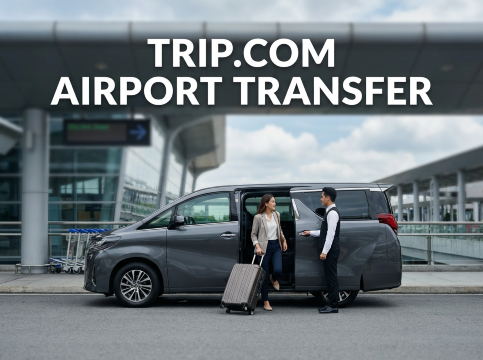
After a long flight and busy airport queues, the last thing you need is stress finding a ride to your hotel. With Trip.com Airport Transfer, Filipino travelers can pre-book a safe and reliable airport pick-up in over 600 airports worldwide, making arrival easier, cashless, and more comfortable whether you are travelling solo, with family, or for work.
Why Choose Trip.com Airport Transfer?
Trip.com Airport Transfer is a pre-booked ride that takes you straight from the airport to your hotel or city area without the hassle of finding a taxi. You can pick the vehicle that fits your budget, from simple economy cars to business or larger family vehicles. Once you land, a driver will be waiting at the arrival hall, the price is fixed, and everything is already paid online. For Filipino travelers arriving in places like Singapore, Tokyo, or London, it is a simple and reliable way to start the trip without stress.




How to Book Trip.com Airport Transfer on the App
You may also find airport transfer promo codes or app-only discounts on Trip.com. Offers can change, so check the latest promo in the app before booking and enter the code on the payment page if available.
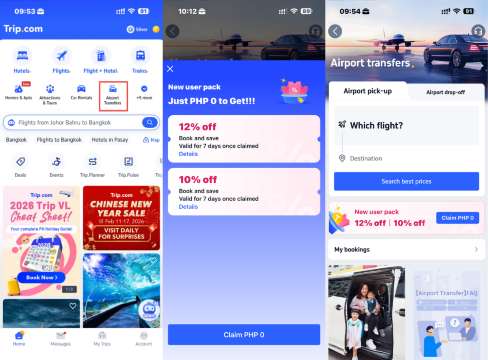
- Download the Trip.com app and tap “Airport Transfer” on the home screen.
- Claim any available Airport Transfer promo code before booking your ride.
- Choose the car that fits your needs, then enter the promo code on the payment page if the offer is available.
Once confirmed, your driver or pickup details will be ready before your pickup time, so you can follow the meeting point instructions and head to your hotel with less stress.
 NO.1
NO.1












































How to Book Trip.com Airport Transfer on the Website
Booking your airport ride on the Trip.com website is simple and helpful, especially if you want everything ready before landing.
Step 1: Go to Trip.com Homepage
- Open the Trip.com website and go to the left menu. Click "Cars", then choose "Airport Transfers".
- Select Airport Pick-up if you need a ride from the airport, or choose Airport Drop-off if you are going to the airport.
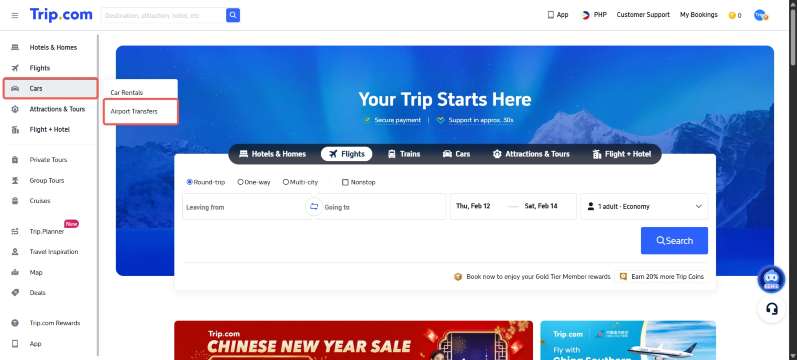
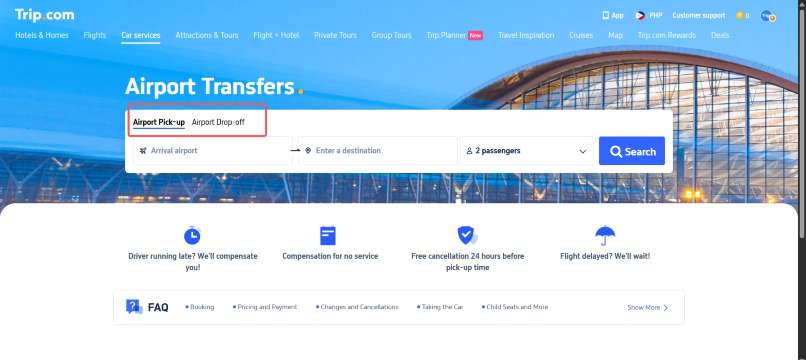
Step 2: Enter Your Flight Details
- If you are booking a pick-up, select your arrival airport first.
- You can enter your flight number for faster and more accurate results. You can also type the departure airport, arrival airport, and travel date manually.
- Click search and choose your flight from the list.
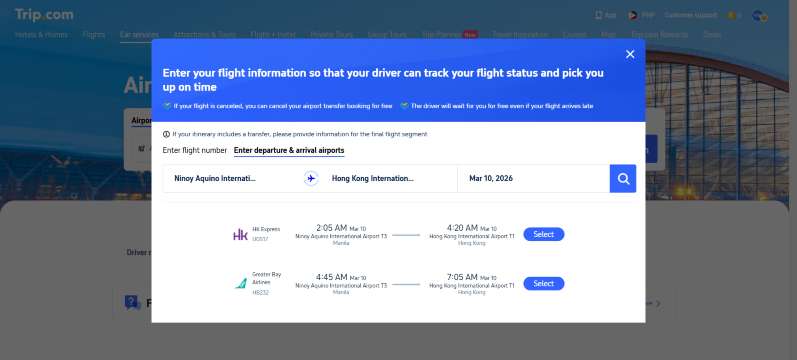
Step 3: Add Destination and Choose Your Car
- Enter your hotel name or full address in the arrival city.
- Click search to see available vehicles.
- Choose the car that fits your budget and group size, whether it is a standard car, SUV, or larger vehicle for family trips.
- Once you find the right option, click “Book.”
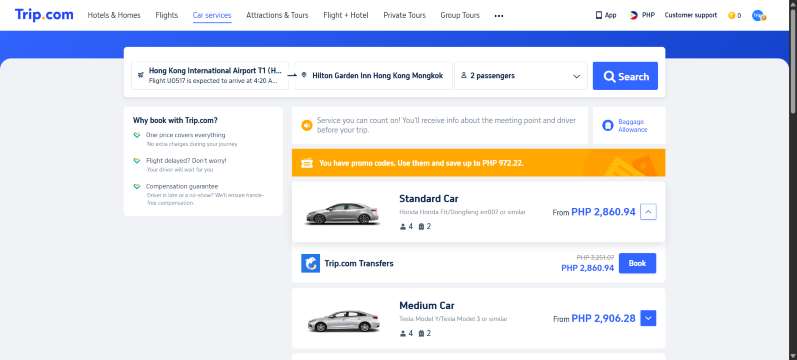
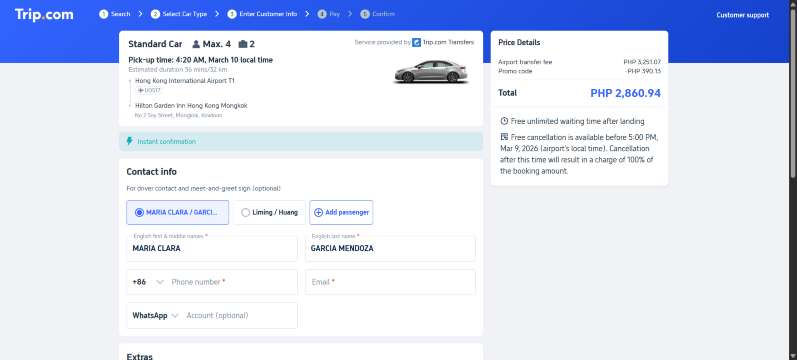
Step 4: Confirm and Pay
- Check all booking details before paying.
- Add your contact number so the driver can reach you easily.
- If you have a promo code, enter it on the payment page for extra savings.
- Click “Continue” and your airport transfer will be confirmed.
Your Next Adventure Starts from Manila
- One way
- Round-trip
- direct cheapest
 MNL4:25 AM1h 30mNonstopCEB5:55 AMManila - Cebu|Wed, Nov 11|Philippines AirAsiaTRY 1,841TRY 3,79051% offSearch51% offTRY 3,790TRY 1,841
  MNL7:50 AM1h 30mNonstopTAC9:20 AMManila - Tacloban|Sun, Nov 8|Cebu PacificTRY 1,908TRY 3,79050% offSearch50% offTRY 3,790TRY 1,908
- MNL7:50 AM1h 30mNonstopTAC9:20 AMManila - Tacloban|Wed, Nov 4|Cebu PacificTRY 2,653TRY 3,79030% offSearch30% offTRY 3,790TRY 2,653
 MNL13:001h 30mNonstopCEB14:00Manila - City|Mon, Sep 6|Normal AirlineFind more flightsFind more flights
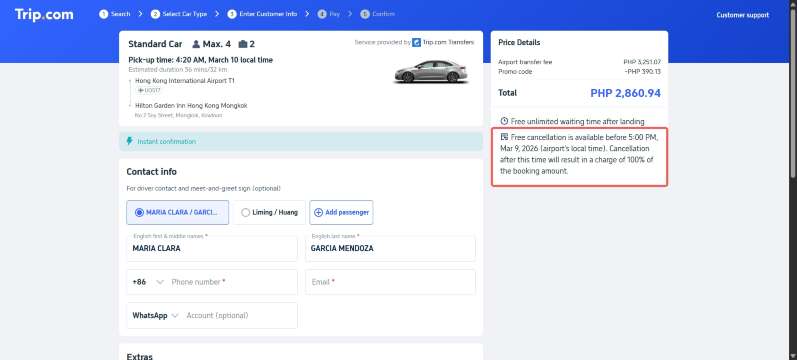
Trip.com Airport Transfer Cancellation Policy
You can cancel your airport transfer for free before the deadline shown in your booking confirmation, so always check the time carefully. If your flight is delayed, your pickup time will adjust automatically. If your flight is canceled, you can request a full refund and book again later. Free waiting time is usually 1 to 2 hours after landing, but late cancellations or extra waiting may have additional charges.
Trip.com Airport Transfer Baggage Rules
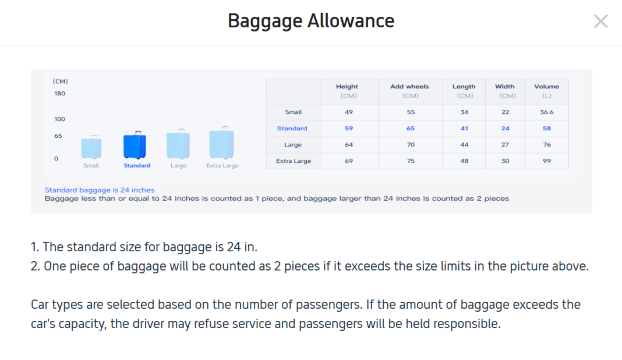
Each 24-inch luggage counts as one piece, while bigger suitcases count as two because they take more space in the car. Small bags like backpacks can go on seats, but suitcases must stay in the trunk. If you have many bags or are traveling with family, it is safer to book a bigger vehicle to avoid pickup issues or delays.
How to Track Your Trip.com Airport Transfer Driver

- Pre-Arrival: Receive your driver contact number and vehicle details by email or through the Trip.com app before your pickup time. Save the details once they are available.
- At the Airport:
- Open the Trip.com app → “My Orders” → check live driver GPS tracking, where available.
- No signal? Head to the designated meeting point (e.g., "Arrivals Level, Door 2").
- Cannot find driver? Contact Trip.com 24/7 support through the app for quick assistance.




Trip.com Airport Transfer vs Taxi vs Car Rental: Which Is Best?
Feature | Trip.com Airport Transfer | Taxi / Rideshare | Car Rental |
|---|---|---|---|
Price | Fixed price shown before booking. No surprise charges | Metered or surge pricing may apply | Rental fee plus fuel, tolls, insurance |
Convenience | Door to door pickup to your hotel | Easy to find at airport or via ride apps | You drive and navigate yourself |
Flight delays | Driver timing adjusts if your flight is late | No automatic updates | Not applicable |
Waiting time | Free waiting time usually included | Extra charges if driver waits too long | Not applicable |
Car choice | Choose car size based on group and luggage | Depends on available cars | Many options but may sell out |
Customer support | 24/7 support through the app | Limited local support | Rental counter support only |
Payment | Paid online already. No cash needed | Pay after ride by cash or card | Prepaid with card deposit |
Luggage space | Based on the vehicle size and luggage capacity you selected. | Not always enough space | Flexible trunk and seats |
Flexibility | Fixed route to hotel | Can add stops with extra fee | Go anywhere anytime |
Best for | Stress free arrival, families, late night flights | Short trips, solo travelers | Road trips, multi stop travel |
📱 Enjoy app-only deals and a new user package with special offers on flights, hotels, trains, attractions, and airport transfers.
Tips for a Smooth Trip.com Airport Transfer Experience

Book early
Reserve at least 48 hours before arrival to secure your ride.
Enter flight number
Add your flight number so the driver can track delays and adjust pickup time.
Check meeting point
Read your voucher for the exact pickup location at the airport.
Use app chat
Message your driver in the Trip.com app if needed. Auto-translation may be available where supported.
Flight delays
No need to update. Pickup time adjusts automatically.
Check luggage size
Make sure your bags match the car capacity you booked.
Start Your Travel with Trip.com
Trip.com is an international online travel platform that offers 24/7 customer support in multiple languages. You can easily book flights, hotels, airport transfers, tours, and activities in one place.
Platinum and Diamond members can enjoy extra perks such as free airport lounge access, more Trip Coins rewards, hotel discounts, and lower refund fees for selected bookings. It makes travel planning simpler and more rewarding from start to finish.
FAQs: Trip.com Airport Transfer
-
How early should I book an airport transfer?<br>
-
How do I choose the right pickup time?<br>
-
Why is my vehicle or driver not assigned yet?<br>
-
How do I find my driver at the airport?<br>
-
If my flight is delayed, do I need to cancel and rebook?<br>
Trending Searches
-
Popular Content
-
Top Flight Links
-
Popular Hotels
-
Popular Things to Do
-
Featured guides
-
Trip.com links
- Trip.com E-Ticket
- Trip.com Payment Methods
- Trip.com Passport Change
- Trip.com Customer Service
- Trip.com Flight Cancellation
- Trip.com VIP Lounge Access
- Trip.com Phone Number
- Trip.com Check In
- Payment Sale
- Trip Coins
- Trip.com Hotel Refund
- Trip.com Cancellation Policy
- Trip.com Ticket Issued Status
- Trip.com Flight Ticket
- Trip.com Membership
- Trip.com E-Receipt
- Trip.com Seat Selection
- Trip.com Baggage Allowance
- Trip.com Flight Change
- Trip.com Reviews
- Flights from Manila to Hong Kong
- Flights from Manila to Cebu
- Flights from Manila to Tagbilaran
- Flights from Manila to Iloilo City
- Flights from Manila to General Santos
- Flights from Cebu to Manila
- Flights from Bacolod to Manila
- Flights from Manila to Tacloban
- CA986 Flight Status
- EK2521 Flight Status
- 5J187 Flight Status
- PR431 Flight Status
- PR741 Flight Status
- MH709 Flight Status
- 5J582 Flight Status
- Hotels near 72 wonder tower
- Hotels near Mactan–Cebu International Airport
- Hotels near Fenghuang Ancient Town
- Hotels near Greenland Xindu East Coast Times Square South Area
- Hotels near Changbai Mountain Beauty Pine International Sculpture Park
- Shiji Qingteng Capsule Hotel (T3 Terminal)
- Bangkok-Pratunam Hotel
- Shangri-La Resort
- De Mani Hotel
- Alta Vista de Boracay
- Hotels in Fenghuang County
- Hotels in Davao City
- Hotels in North Jakarta
- Hotels in Moscow
- Hotels in Seoul
- Philippines 5G eSIM | Dual Network • All AI & TikTok | Day Pass/Total Data Package | 24-Hour Billing | 1-30 Days | QR Code
- Private Mutianyu Great Wall Trip With English-speaking Driver
- Vietnam Airport VIP Fast Track Service
- Bangladesh Dhaka DAC Hazrat Shahjalal International Airport T1 terminal international departure IBalaka Executive Lounge international departure lounge experience
- Vietnam | 4G/5G eSIM | Daily/Data Plan | 24-hour Billing | 1-30 Days | QR code
- Huanglongjiuzhai Railway Station - Jiuzhaigou National Park shuttle bus · private charter optional
- Lantau Island Ngong Ping 360 round-trip cable car admission ticket with priority boarding + one-way urban area transfer
- European universal 5G/4G eSIM | Multi-network support, supports All AI & TikTok | 500MB/day - 50GB total | 1-90 days | 24-hour billing | QR code
- Fort Worth: Stockyards History Tour Pub Crawl
- Dubrovnik: Skybike Ride
- Denver: Rocky Mountain National Park Tour with Picnic Lunch
- Yerevan Republic Square + Cascade Complex Day Tour
- Lanzhou Travel Photography
- Korea K-ETA | For Visa-Exempted Countries Only | Refundable
- Westfield Audio Tour: Whips, Wonders, and Riverfront Legends
- Mothers Day Gifts
- eSIM
- Hong Kong International Airport
- International Driving Permit
- Toronto Pearson International Airport
- Universal Studios Singapore
- Great Wall of China
- UK ETA
- Narita International Airport
- China Currency
- Changi Airport
- Schengen Visa
- Singapore MRT Map
- France Visa
- Ninoy Aquino International Airport