
KakaoMap Guide: How to Use KakaoMap in South Korea


Getting around South Korea is much easier when you have a local map app on your phone. KakaoMap helps you search places, plan subway and bus journeys, find walking routes and discover restaurants or attractions nearby. It also supports English, making it a useful navigation app for international travelers visiting Korea.
What Is KakaoMap?
KakaoMap is a map and navigation service developed by Kakao Corp. It is designed mainly for travel within South Korea and provides routes for public transportation, driving, walking and cycling. Kakao says its route information uses data updated within the previous 24 hours.
You can use KakaoMap to:
- Search for places and addresses
- Find subway and bus routes
- Check walking routes
- Find driving routes
- Search cycling routes
- Use built-in car navigation
- Search bus numbers and bus stops
- Find restaurants and attractions nearby
- Check popular places around your location
- Receive public transport boarding and alighting notifications
Kakao also provides location-based recommendations through features such as Nearby and Theme Map.


Can You Use KakaoMap in English?
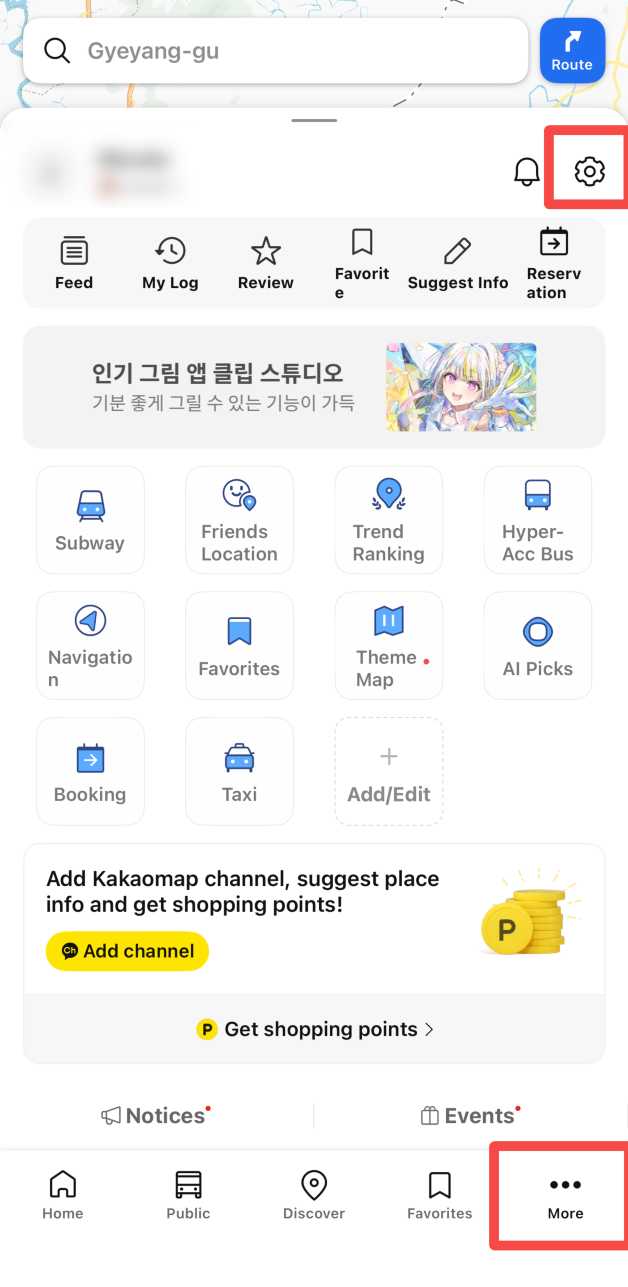
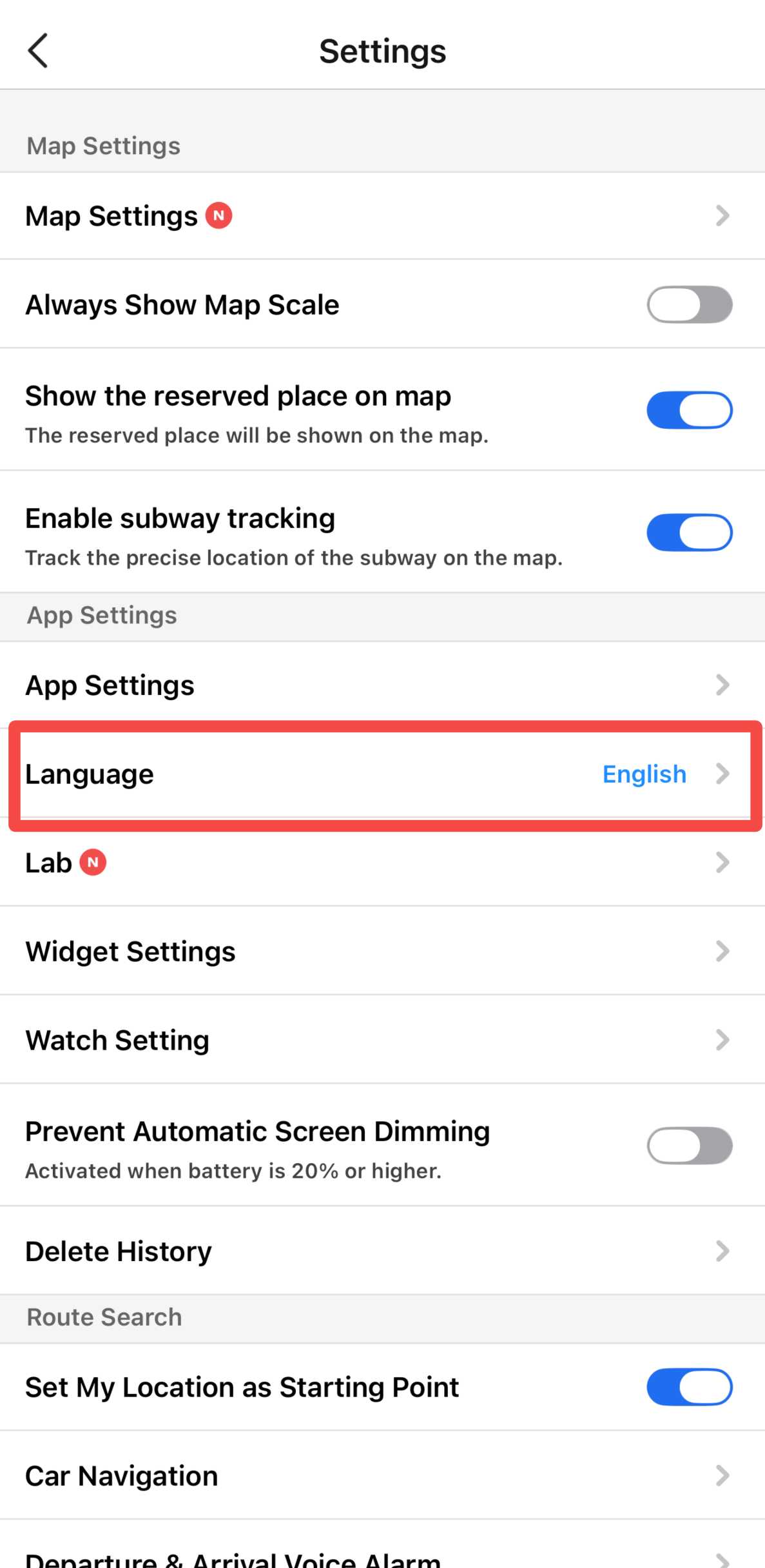
Yes. KakaoMap supports English on its mobile app.
The current Apple App Store listing shows English and Korean as supported languages, while the Korea Tourism Organization also lists the English version of KakaoMap as a route-search option for international visitors.
Kakao's official developer support has also confirmed that the mobile KakaoMap app can be switched to English. Depending on your current app version, you can generally look under:
Menu → Settings → App Settings → Language → English
The exact menu layout may change after app updates.
💡 Travel Tip: Some local business names or addresses may still be easier to find using their Korean names. If an English search does not show the place you want, copy the Korean name from your hotel booking, attraction page or restaurant listing and search again.
 2567 booked

![Busan 1-day tour [Haeundae Blueline Park/Gamcheon Culture Village/Cheongsapo/Yonggungsa Temple]](https://ak-d.tripcdn.com/images/0355412000u4wxa0v021A_C_568_320.jpg)







How to Use KakaoMap in South Korea
Step 1: Open KakaoMap and Allow Location Access
Open KakaoMap and allow location access if you want the app to identify your current position and show nearby places.
Location permission is optional, but it is useful for:
- Finding your current location
- Searching nearby restaurants
- Finding nearby attractions
- Starting directions from where you are
- Using navigation
The current Android listing confirms that location permission is used for current-location and nearby searches.
Step 2: Search for Your Destination
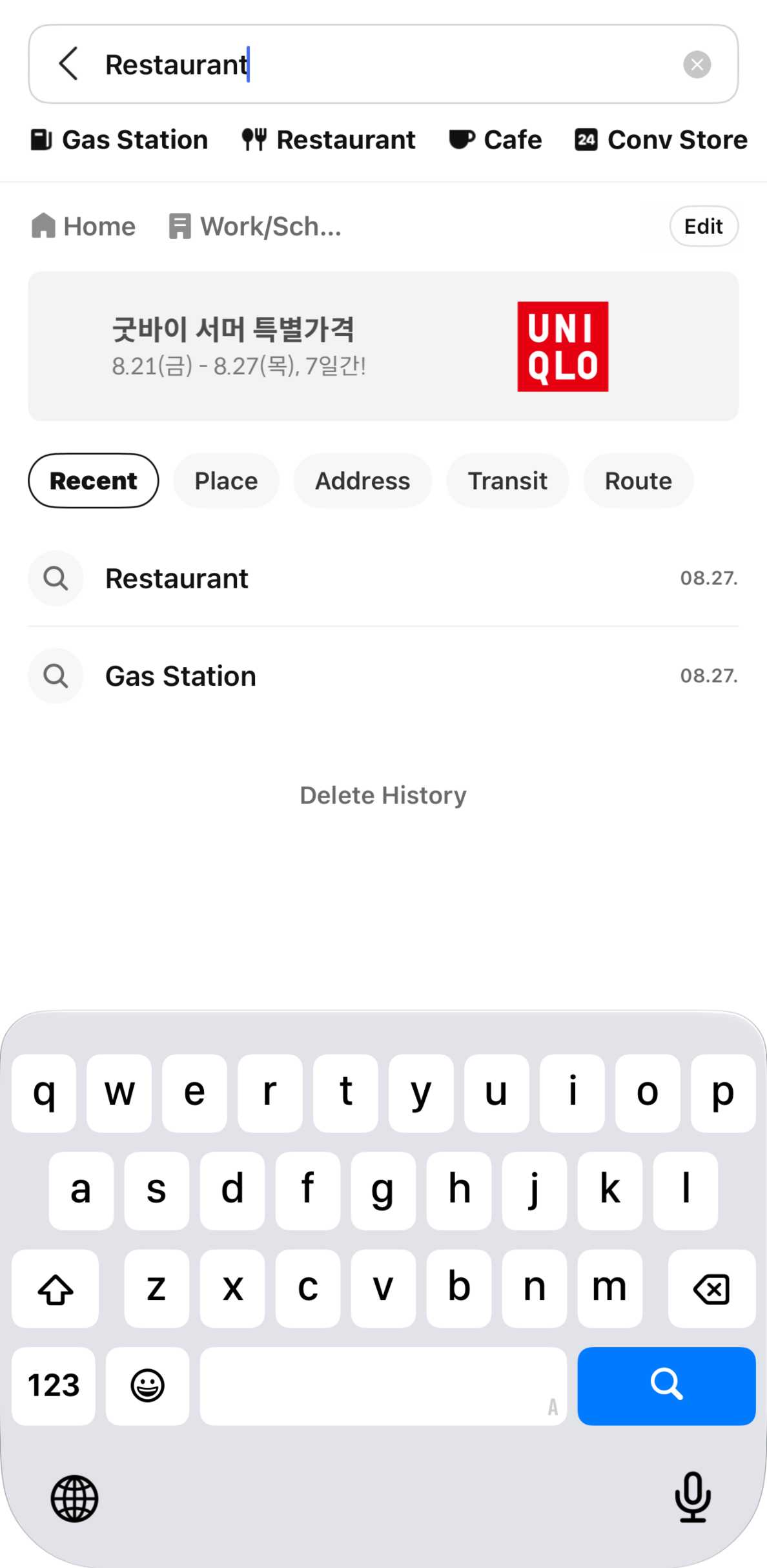
Use the search bar at the top of KakaoMap and enter the place you want to visit.
You can search for:
- Tourist attractions
- Restaurants
- Cafes
- Hotels
- Subway stations
- Bus stops
- Bus numbers
- Addresses
- Shopping areas
- Other local places
KakaoMap combines these searches into one search window, including places, bus stops and bus numbers.
If you cannot find the correct location in English, try searching the Korean name.
Step 3: Select Directions
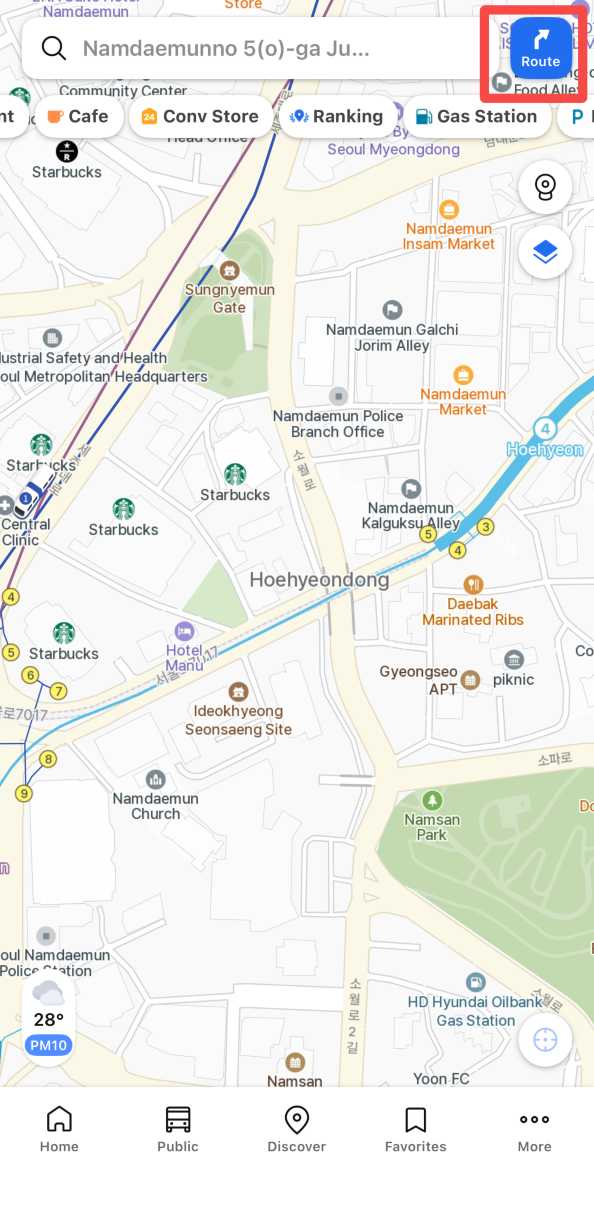
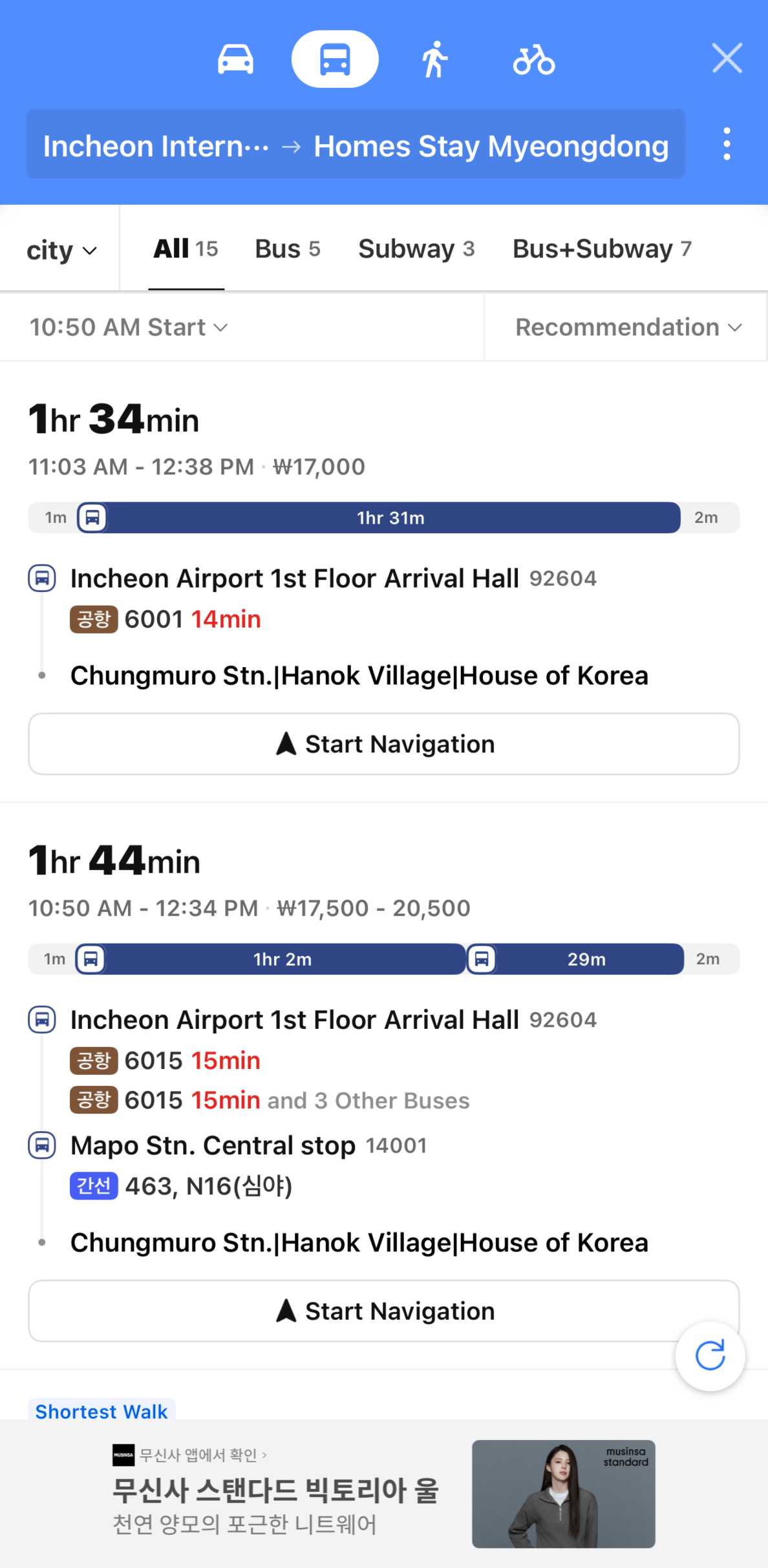
Once you find your destination, choose the route or directions option.
Set your:
- Starting point
- Destination
Your starting point can usually be your current location, hotel, station or another place you select on the map.
Step 4: Choose How You Want to Travel
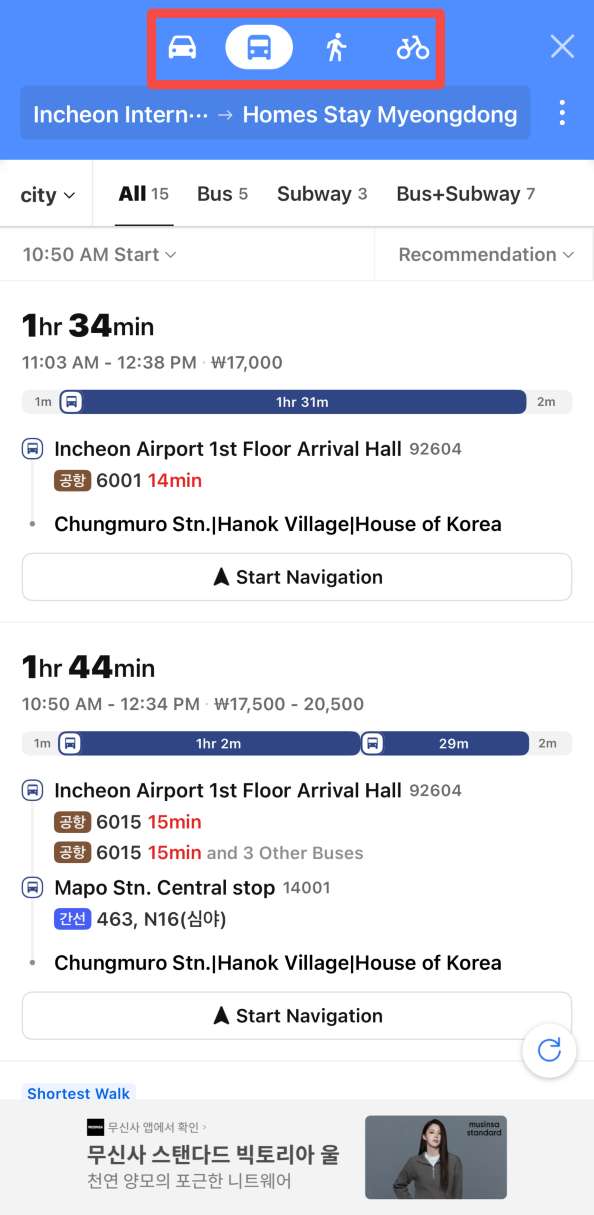
KakaoMap officially provides route searches for:
- Public Transport
- Car
- Walking
- Bicycle
Choose the option that matches your trip. KakaoMap will then suggest suitable routes using its latest available information.
Step 5: Check the Route Before Leaving
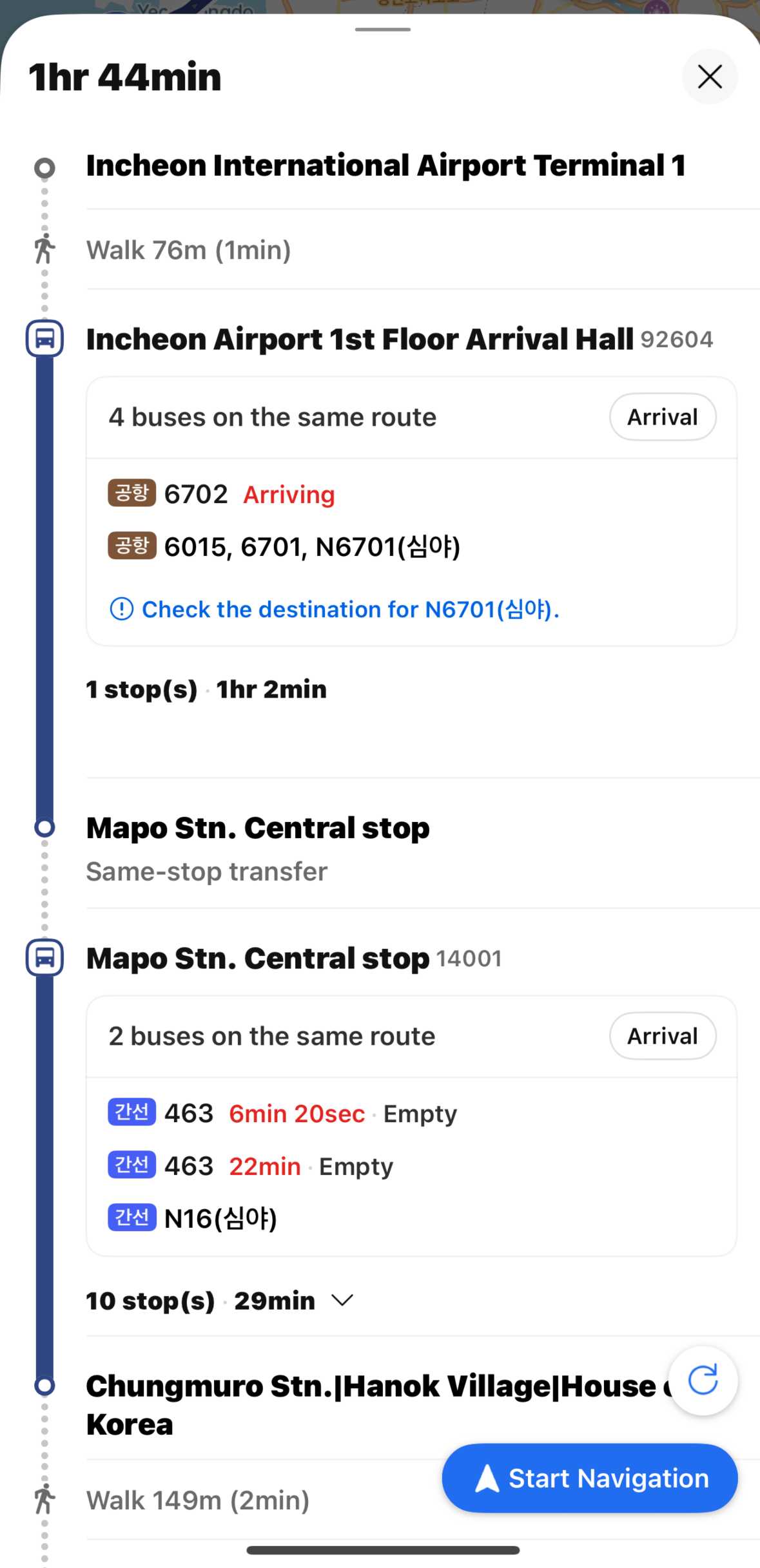
Before starting your journey, check the suggested route carefully.
For public transportation, pay attention to:
- Subway or bus you need
- Transfer points
- Station or stop names
- Walking sections
- Estimated journey time
For walking routes, zoom in around complicated intersections or station exits so you know which direction to take.
Step 6: Follow the Navigation
For driving, KakaoMap includes its own navigation system. Kakao says users can search for a route and begin navigation directly inside KakaoMap without installing a separate navigation app.
For public transportation, KakaoMap can also provide push notifications that remind you when to board or get off during your journey.















































How to Use KakaoMap for Subway and Bus Travel
Public transport is one of the most useful parts of KakaoMap for travelers.
The Korea Tourism Organization specifically lists KakaoMap as an English-language option for searching public transportation routes, while Kakao says the app can display subway and bus locations directly on the map.
Subway
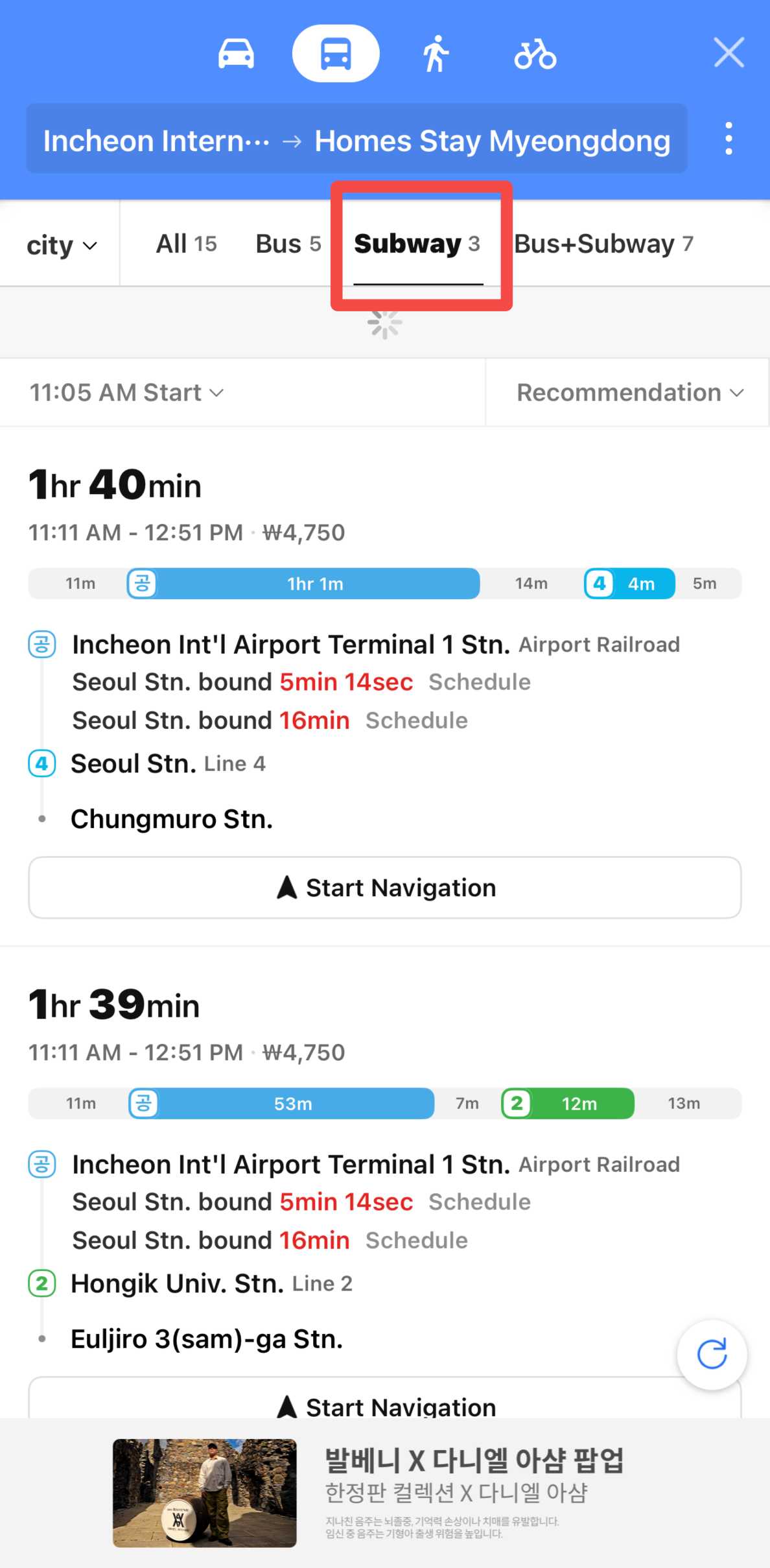
Search your destination and choose Public Transport.
KakaoMap can help you understand:
- Which subway line to take
- Where you need to transfer
- Which stations are included in your journey
- Walking sections between your starting point and station
- Your estimated journey time
This can be especially useful in cities with large subway systems, such as Seoul and Busan.
Bus
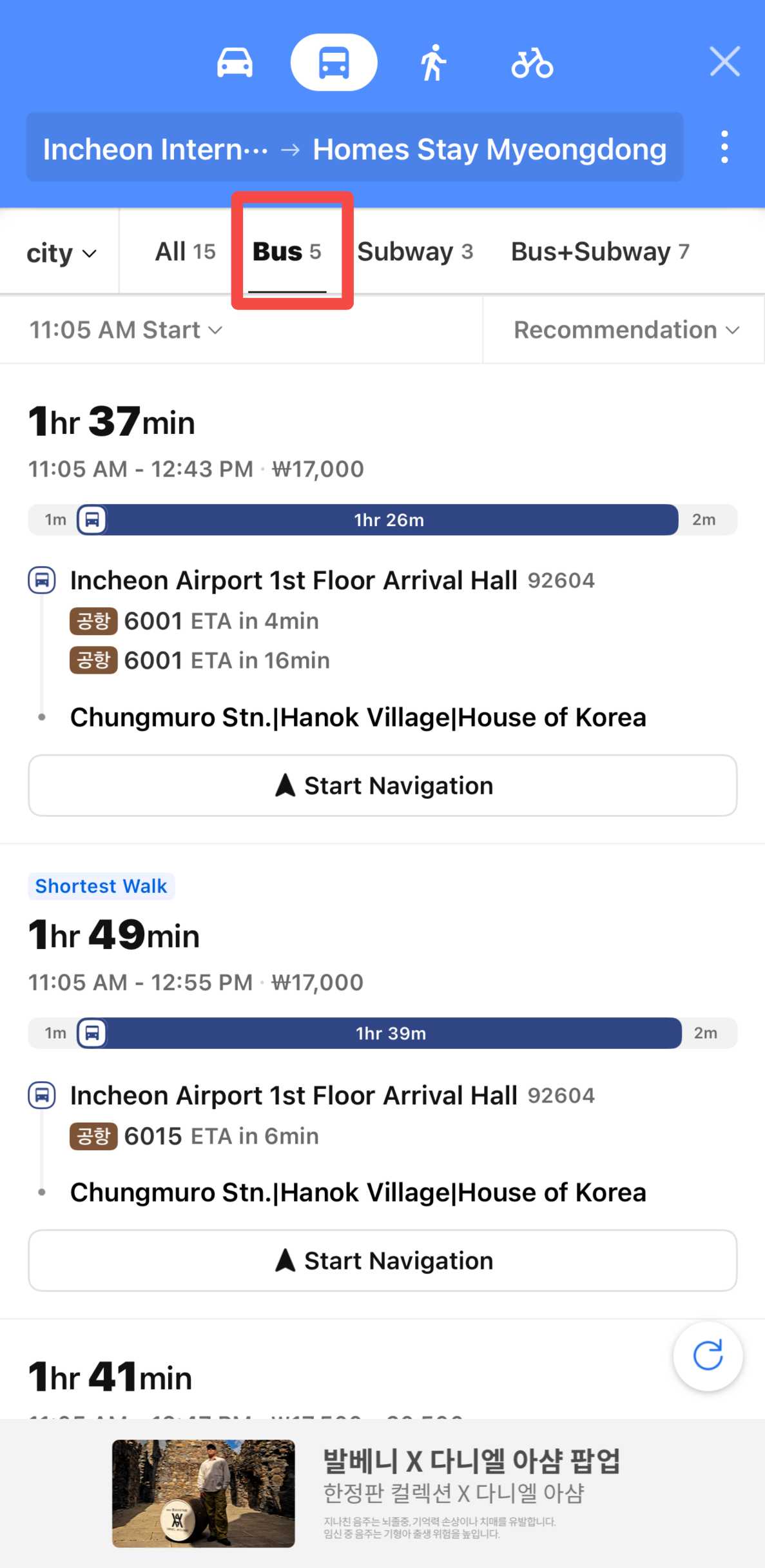
You can search directly for a:
- Bus number
- Bus stop
- Destination
- Nearby bus service
Kakao has also introduced features that allow users to see bus locations on the map, making it easier to follow public transport while travelling.
🚇 Transport Tip: Station layouts, exits and operating conditions can change. Always check the signs and information screens inside the station before boarding.
Use KakaoMap for Walking Directions
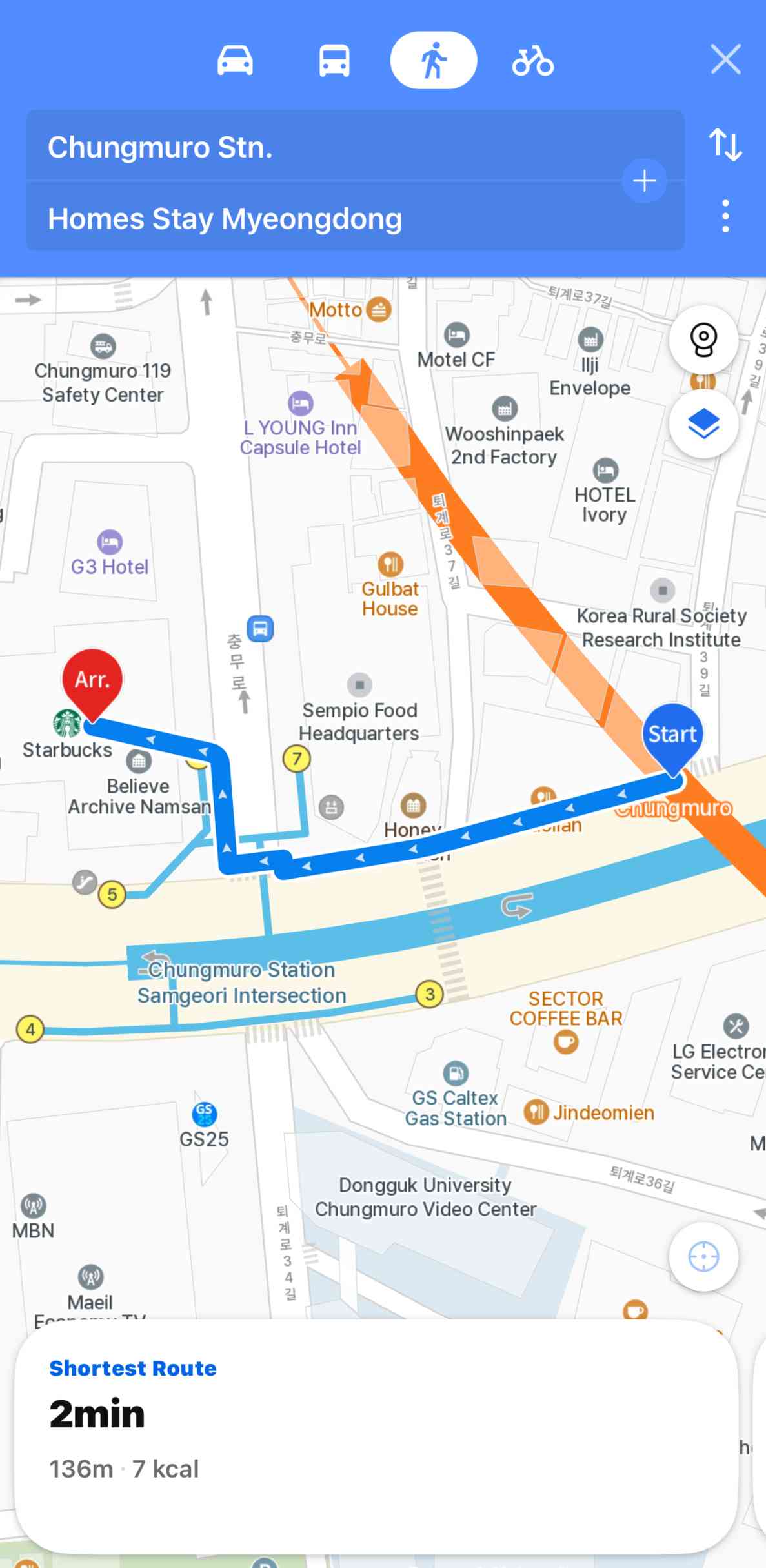
KakaoMap also provides dedicated walking routes.
This is useful when walking:
- From a subway station to your hotel
- Between attractions
- From a bus stop to a restaurant
- Around shopping districts
- Through unfamiliar neighbourhoods
In busy areas such as Myeongdong, Hongdae, Gangnam or central Busan, a place may look close on the map but be easier to reach through a particular crossing or street. Check the full walking route instead of relying only on straight-line distance.
Use KakaoMap for Driving
If you are renting a car in South Korea, KakaoMap includes built-in driving navigation.
After choosing your destination:
- Select the Car route.
- Compare the available route.
- Select your preferred option.
- Start navigation.
Kakao states that its car route information is updated using recent information and that navigation is available directly inside KakaoMap.
This can be particularly useful for road trips outside Seoul, including destinations around Jeju, Gangwon-do and other areas where travelling by car may be convenient.
- One way
- Round-trip
- Cheapest nonstop
 MNL12:10 AM4h 10mNonstopICN5:20 AMManila - Seoul|Wed, Nov 25|Cebu PacificINR 15,588INR 21,13826% offSearch26% offINR 21,138INR 15,588
 - MNL7:40 PM4h 5mNonstopICN12:45 AMManila - Seoul|Sun, Nov 8|Cebu PacificINR 16,207INR 21,13823% offSearch23% offINR 21,138INR 16,207
- MNL7:50 PM3h 55mNonstopICN12:45 AMManila - Seoul|Sat, Nov 21|Cebu PacificINR 18,812INR 21,13811% offSearch11% offINR 21,138INR 18,812
 MNL13:003h 55mNonstopICN14:00Manila - City|Mon, Sep 6|Normal AirlineFind more flightsFind more flights
Find Restaurants and Attractions With KakaoMap
KakaoMap is not only for directions.
Kakao says the app can recommend restaurants and popular places based on your current location. Its Nearby feature can show recommendations around you, while Theme Map groups places according to different themes.
You can use KakaoMap when looking for:
- Korean restaurants
- Cafes
- Shopping areas
- Tourist attractions
- Local hot spots
- Places near your hotel
- Things to do around your current location
Kakao also says travelers can check rankings for popular restaurants and places nearby.
Search Again in a Different Area
If you move the map to another neighbourhood, KakaoMap's Re-search this area function lets you update the results for the area currently shown on your screen.
This is useful when comparing where to eat or what to visit around different parts of a city.
KakaoMap Road View
KakaoMap also provides Road View, which can help you understand what an area looks like before you arrive.
The feature can be useful for checking:
- Hotel entrances
- Streets around an attraction
- Building surroundings
- Meeting points
- Nearby landmarks
A recent KakaoMap update also added the ability to open Road View from saved addresses and coordinates.
📍 Pro Tip: If you are meeting someone or looking for a small restaurant, checking the surrounding street before you leave can make the place easier to recognise when you arrive.
KakaoMap vs NAVER Map

Both KakaoMap and NAVER Map are major local map services for South Korea. Which one is better depends on how you prefer to travel.
KakaoMap | Feature | NAVER Map |
|---|---|---|
Yes | English Support | Yes |
Yes | Public Transport Routes | Yes |
Yes | Driving Navigation | Yes |
Yes | Walking Routes | Yes |
Yes | Nearby Place Discovery | Yes |
Yes | Public Transport Alerts | Yes |
Local routes, nearby rankings and Kakao services | Best For | Multilingual maps and broad travel features |
KakaoMap's current iOS listing identifies English and Korean as its supported languages. NAVER Map currently supports Korean, English, Japanese and Simplified Chinese, with English navigation also listed as available.
For English-speaking travelers, both apps are worth having. If one app does not find the exact restaurant, attraction or address you need, checking the same place in the other app can be helpful.




Pro Tips for Using KakaoMap in Korea
- Download KakaoMap before your trip: Install the app early and switch the language to English so you can get familiar with the map and search functions.
- Keep mobile data available: KakaoMap works best with an internet connection for live routes, location searches and transport information. A South Korea eSIM can help you stay connected.
- Save Korean place names: Keep the Korean names of your hotel, attractions, restaurants and stations. They can be useful if an English search does not show the correct place.
- Check the exact location: Some restaurants and cafes have several branches, so confirm the address, area and nearest station before starting your route.
- Check your last train or bus: Public transport times vary, so check your route back to your hotel before staying out late.
- Use Nearby for ideas: KakaoMap can help you find restaurants, cafes and popular places around your current location.
- Keep NAVER Map as a backup: If KakaoMap cannot find a place clearly in English, try searching for the same location on NAVER Map.
📍 Pro Tip: Save your hotel and important places in KakaoMap before heading out so you can find your way back more easily.
Is KakaoMap Worth Using in South Korea?
Yes. KakaoMap is a useful app to have when travelling in South Korea, especially if you plan to use buses, subways or walk around unfamiliar areas.
Its main advantages include:
- Local South Korea map information
- Public transport route planning
- Bus and subway information
- Walking and cycling routes
- Driving navigation
- English support
- Nearby restaurant and attraction recommendations
- Public transport boarding and alighting notifications
Korea Tourism Organization also includes the English KakaoMap service among its recommended route-search options for international visitors.
For a smoother trip, you can install both KakaoMap and NAVER Map before travelling and use whichever gives you the clearest route for each journey.
FAQs About KakaoMap
-
Is KakaoMap free?
-
Is KakaoMap available in English?
-
Is KakaoMap only for South Korea?
-
Do I need mobile data to use KakaoMap?
-
Is KakaoMap or NAVER Map better for tourists?

Trending Searches
-
Popular Content
-
Top Flight Links
-
Popular Hotels
-
Popular Things to Do
-
Featured guides
-
Trip.com links
- Trip.com E-Ticket
- Trip.com Payment Methods
- Trip.com Passport Change
- Trip.com Customer Service
- Trip.com Flight Cancellation
- Trip.com VIP Lounge Access
- Trip.com Phone Number
- Trip.com Check In
- Payment Sale
- Trip Coins
- Trip.com Hotel Refund
- Trip.com Cancellation Policy
- Trip.com Ticket Issued Status
- Trip.com Flight Ticket
- Trip.com Membership
- Trip.com E-Receipt
- Trip.com Seat Selection
- Trip.com Baggage Allowance
- Trip.com Flight Change
- Trip.com Reviews
- Flights from Manila to Hong Kong
- Flights from Manila to Iloilo City
- Flights from Manila to Tagbilaran
- Flights from Manila to Cebu
- Flights from Manila to Tokyo
- Flights from Manila to General Santos
- Flights from Cebu to Manila
- Flights from Bacolod to Manila
- EK2521 Flight Status
- 5J187 Flight Status
- PR431 Flight Status
- PR741 Flight Status
- MH709 Flight Status
- 5J582 Flight Status
- RX874 Flight Status
- Hotels near 72 wonder tower
- Hotels near Mactan–Cebu International Airport
- Hotels near Greenland Xindu East Coast Times Square South Area
- Hotels near Fenghuang Ancient Town
- Hotels near Taoyuan HSR Subway Station
- Shiji Qingteng Capsule Hotel (T3 Terminal)
- De Mani Hotel
- Alta Vista de Boracay
- Orange Hotel (Wangfujing, Wenhua Road, Baotou)
- Shangri-La Resort
- Hotels in Fenghuang County
- Hotels in Hong Kong
- Hotels in Davao City
- Hotels in North Jakarta
- Hotels in Moscow
- Philippines 5G eSIM | Dual Network • All AI & TikTok | Day Pass/Total Data Package | 24-Hour Billing | 1-30 Days | QR Code
- Private Mutianyu Great Wall Trip With English-speaking Driver
- Vietnam | 4G/5G eSIM | Daily/Data Plan | 24-hour Billing | 1-30 Days | QR code
- Taoyuan International Airport | Terminal 2 VIP Lounge Service | Oriental Club Lounge
- Sofitel Macau at Ponte 16 Buffet | Mistral Restaurant Lunch/Dinner Buffet
- Philippines 4G/5G eSIM | Daily/Total Data Package | 1–30 Days | 24-Hour Billing | QR Code
- Mainland China/Hong Kong/Macau 5G eSIM | 5 Carriers · All AI | Day Pass/Total Data Package | 24-Hour Billing | QR Code
- Huanglongjiuzhai Railway Station - Jiuzhaigou National Park shuttle bus · private charter optional
- Dijon Pinot Noir Masterclass: 4 Wines, Village to Grand Cru
- Prague: Communists and World War II Tour
- Oahu: Waikiki Parasailing
- National Aviary and Playa Blanca Plankton Full-Day Tour
- A banquet was held at the Chang'an palace · imperial dining show - Qin-Han-Tang grand feast in Xi'an, Shaanxi | panoramic immersive ancient culture dining show
- Esbjerg Audio Tour: Cultural Heritage
- Chiang Mai khantoke royal dinner nightlife
- Mothers Day Gifts
- eSIM
- Hong Kong International Airport
- International Driving Permit
- Toronto Pearson International Airport
- Universal Studios Singapore
- Great Wall of China
- UK ETA
- Narita International Airport
- China Currency
- Changi Airport
- Schengen Visa
- Singapore MRT Map
- France Visa
- Ninoy Aquino International Airport