
Naver Map Korea: How to Use It for Travel

Planning to explore South Korea on your own? Naver Map, officially called NAVER Map, is a useful navigation app for finding places, checking public transport and planning routes around Korea. You can use it for buses, subways, walking, cycling and driving, with English and other language options available for international travelers.
What Is Naver Map?
NAVER Map is a map and navigation service developed by NAVER Corporation. NAVER describes it as an all-in-one platform where users can discover places, save locations and find routes using different types of transportation.
For travelers in South Korea, NAVER Map can help with:
- Finding restaurants, cafés, hotels and attractions
- Searching for addresses and places
- Checking subway routes
- Checking bus routes and stops
- Viewing real-time public transport information
- Planning walking routes
- Planning cycling routes
- Getting driving directions
- Viewing Street View-style road images
- Saving places for later
- Checking train information and booking options available through the app
NAVER has also expanded its multilingual services for international visitors, including translated place information, reviews and public transport details.


Is Naver Map Available in English?
Yes. NAVER Map officially supports English.
The app currently supports four languages:
- Korean
- English
- Simplified Chinese
- Japanese
NAVER has provided multilingual versions of the map for international users since 2018 and continues to improve multilingual place search, reviews and transportation information.
How to Change Naver Map to English on Android
- Open NAVER Map
- Tap the MY profile icon
- Tap the Settings gear icon
- Select Language
- Choose English
How to Change Naver Map to English on iPhone
- Open NAVER Map
- Tap MY
- Tap the Settings icon
- Select Language
- Choose English from the preferred language settings
You can also go to:
iPhone Settings > NAVER Map > Preferred Language > English
NAVER officially confirms these language-setting options for Android and iOS.
💡 Naver Map Tip: Set the app to English before arriving in Korea. It will make searching stations, checking routes and understanding transport information easier from your first day.
 2562 booked

![Busan 1-day tour [Haeundae Blueline Park/Gamcheon Culture Village/Cheongsapo/Yonggungsa Temple]](https://ak-d.tripcdn.com/images/0355412000u4wxa0v021A_C_568_320.jpg)







How to Use Naver Map in Korea
Once you have changed the language, the basic functions are quite straightforward.
1. Search for a Place
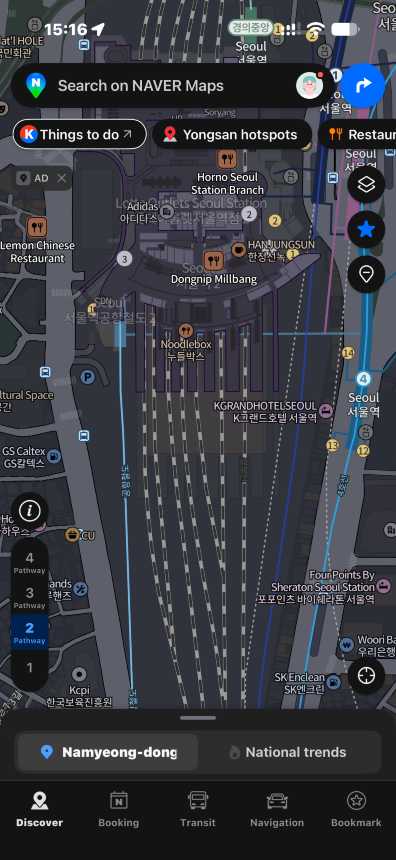
Open NAVER Map and use the search bar at the top of the screen.
You can search for:
- Attractions
- Restaurants
- Cafés
- Hotels
- Addresses
- Subway stations
- Bus stops
- Shopping malls
- Other places around Korea
NAVER Map officially supports searches for places, buses, subways and addresses.
For well-known attractions and major transport stations, try searching the English name first.
2. Select Your Destination
Tap the place you want to visit.
The place page may include useful information such as:
- Address
- Location
- Photos
- Visitor reviews
- Opening information
- Nearby places
- Route options
NAVER has expanded multilingual support for place pages and visitor reviews, although the amount of translated information can vary by location.
3. Tap Directions
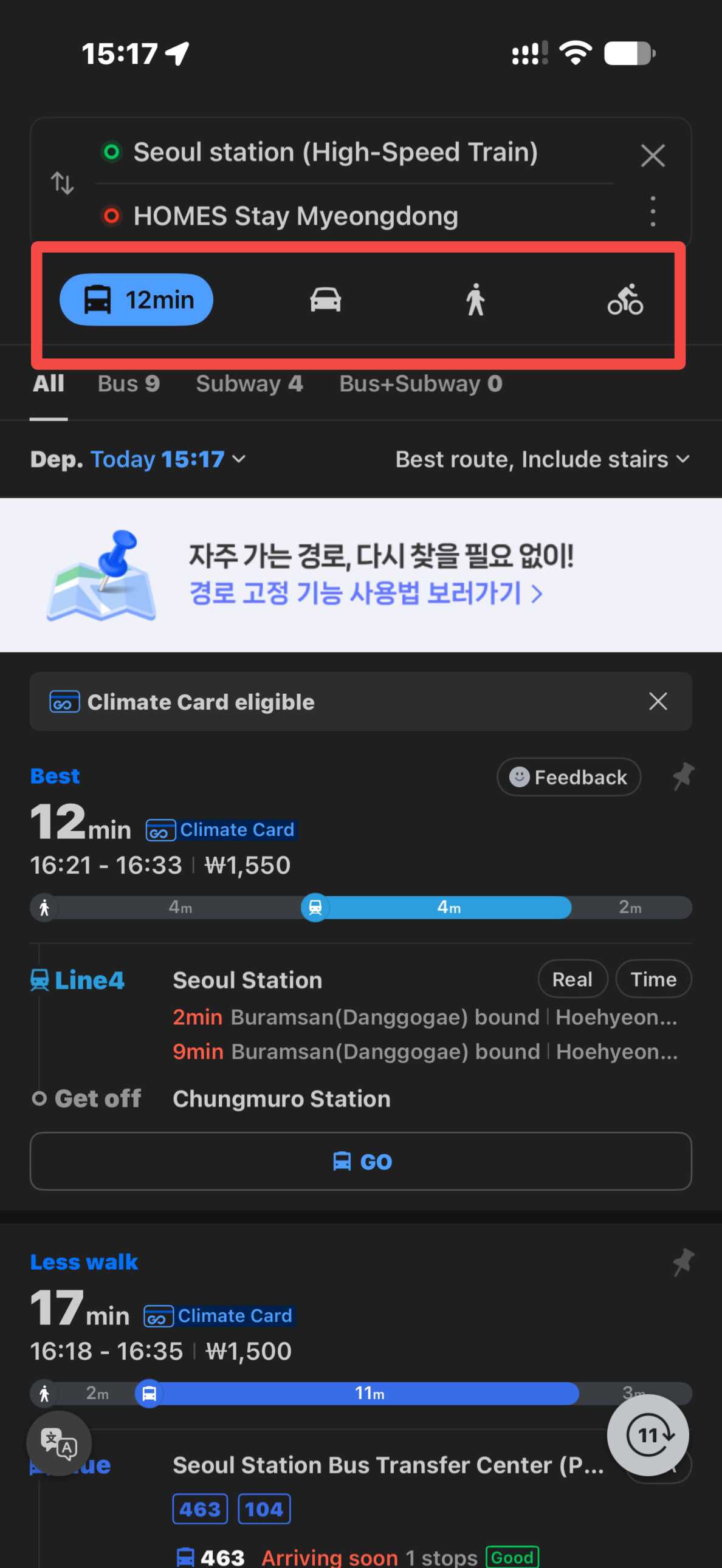
After selecting the destination, choose the directions option and enter your starting point.
You can normally choose between:
- 🚇 Public transport
- 🚶 Walking
- 🚲 Cycling
- 🚗 Driving
NAVER Map uses different route information depending on the selected mode.
4. Compare the Routes
For public transport, NAVER Map can show different combinations of subway and bus routes.
Check details such as:
- Departure point
- Bus or subway line
- Transfer points
- Estimated travel time
- Stops along the route
- Arrival information
NAVER also provides real-time bus and subway arrival information in supported areas.
5. Follow the Route
Choose the route that works best for you and follow the directions.
For public transport, NAVER has navigation features that can provide boarding and getting-off guidance. This can be useful when you are unfamiliar with Korea's bus and subway systems.















































Using Naver Map for Subway Travel
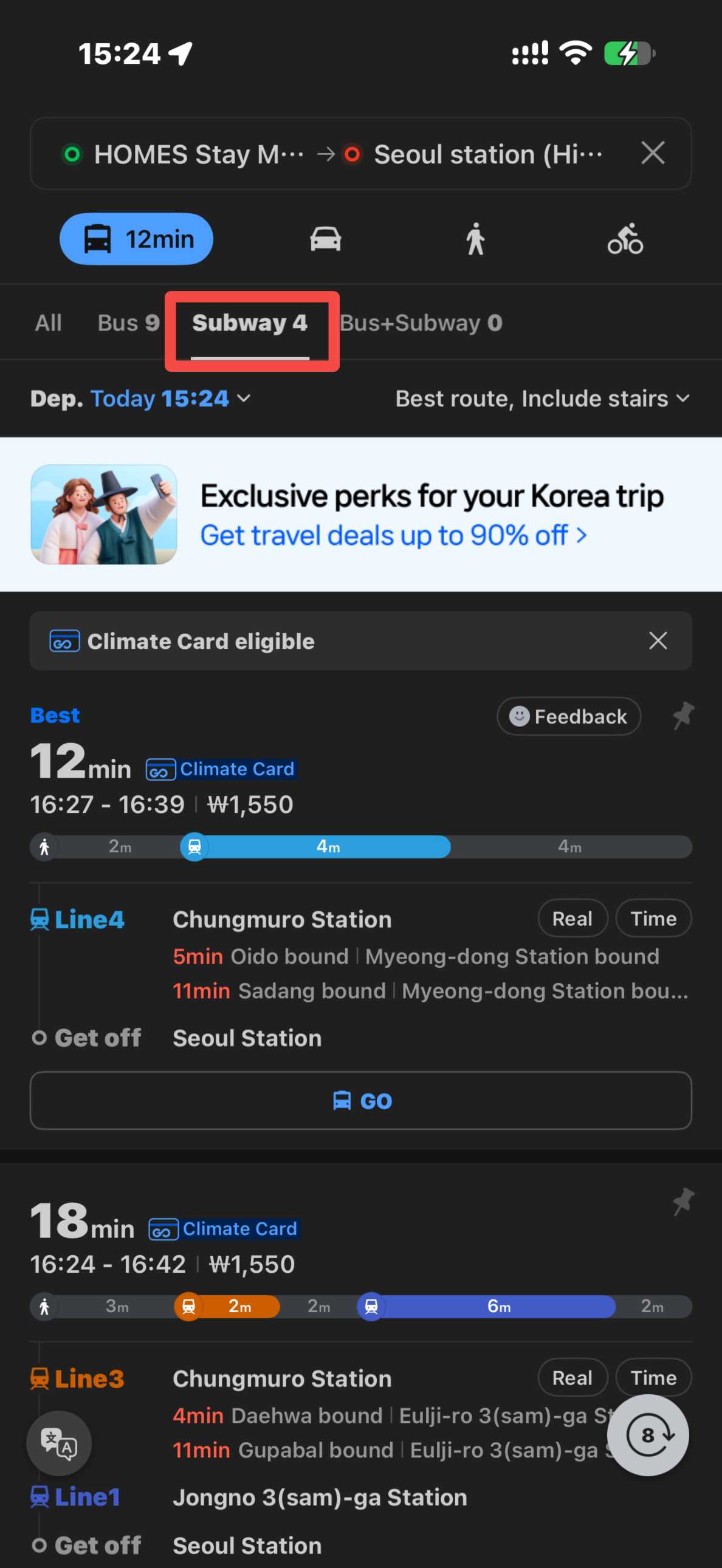
NAVER Map is especially useful when your trip involves Korea's subway networks.
You can search for a station or destination and use the Public Transport option to see suggested routes.
The app can help you check:
- Subway lines
- Transfer stations
- Estimated journey time
- Station information
- Real-time subway arrivals in supported areas
- Subway maps
NAVER Map's home features also include access to a dedicated subway map.
🚇 Transport Tip: Check the final destination shown on the subway platform before boarding. This helps confirm that you are traveling in the correct direction.
Using Naver Map for Buses
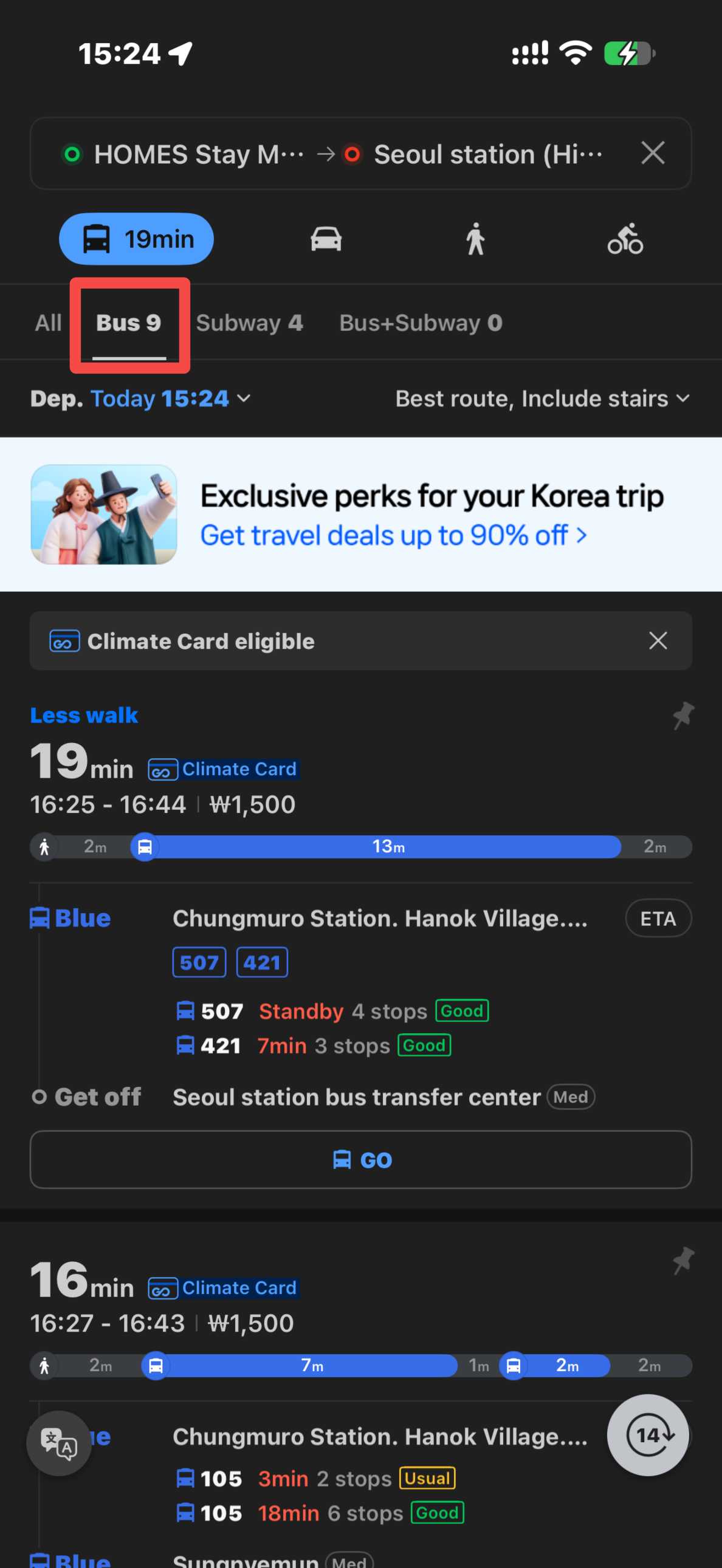
NAVER Map can also help you travel by local bus.
Search for your destination, choose Public Transport, and the app can suggest routes that use buses alone or a combination of buses and subway lines.
NAVER provides features for:
- Bus route searches
- Bus stop information
- Real-time bus arrivals in supported areas
- Saved bus routes and stops
- Public transport route guidance
When checking a bus, pay attention to the bus number and boarding stop, especially in areas where several bus stops are close together.
Using Naver Map for Walking
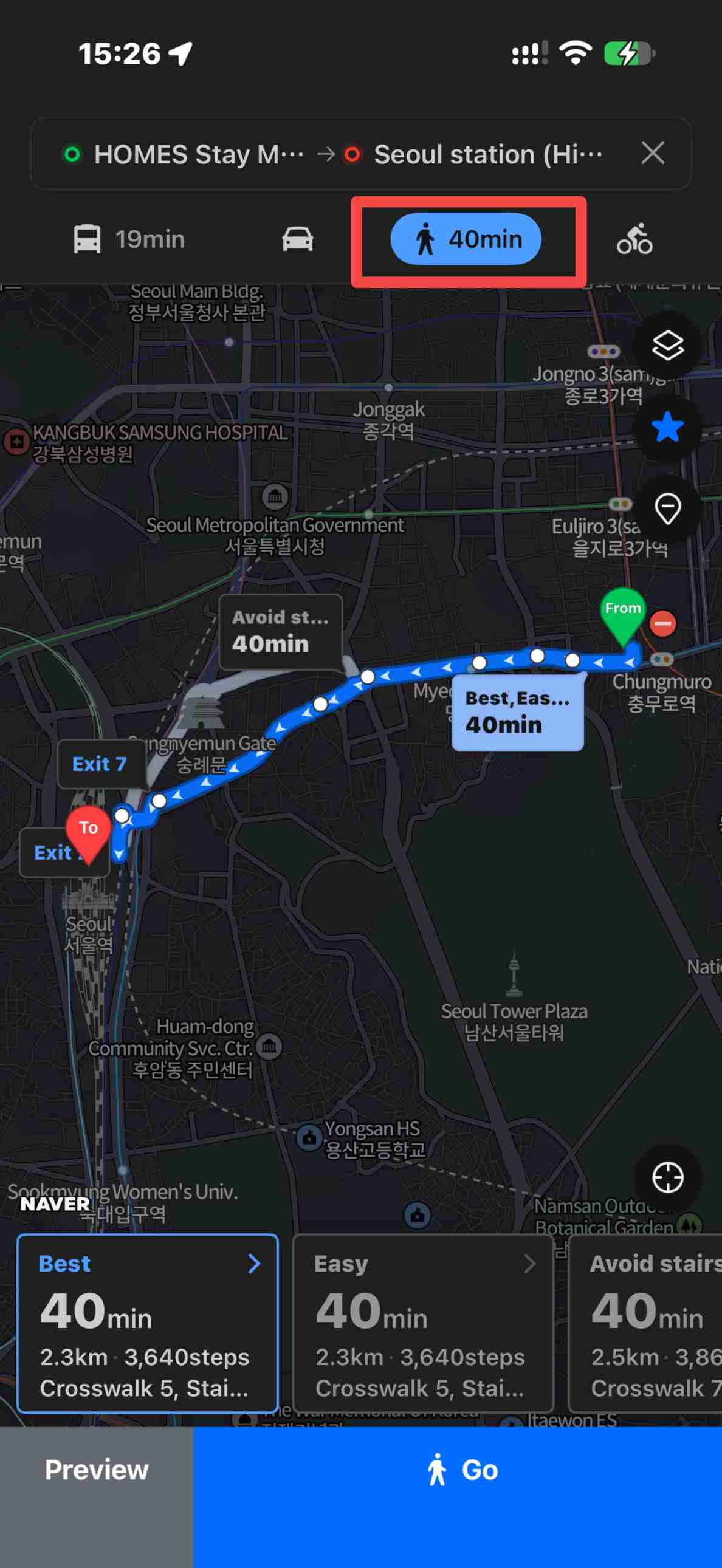
Select Walking when your destination is close enough to reach on foot.
NAVER officially provides three walking route options:
- Recommended
- Main Roads First
- Avoid Stairs
The Avoid Stairs option can be particularly useful when you are carrying luggage. Walking-route results are currently provided when the straight-line distance between the starting point and destination is within 50 km.
NAVER also offers real-time walking guidance on supported Android devices. Availability of individual navigation features can vary depending on your phone and app version.
Find Restaurants, Cafés and Attractions With Naver Map
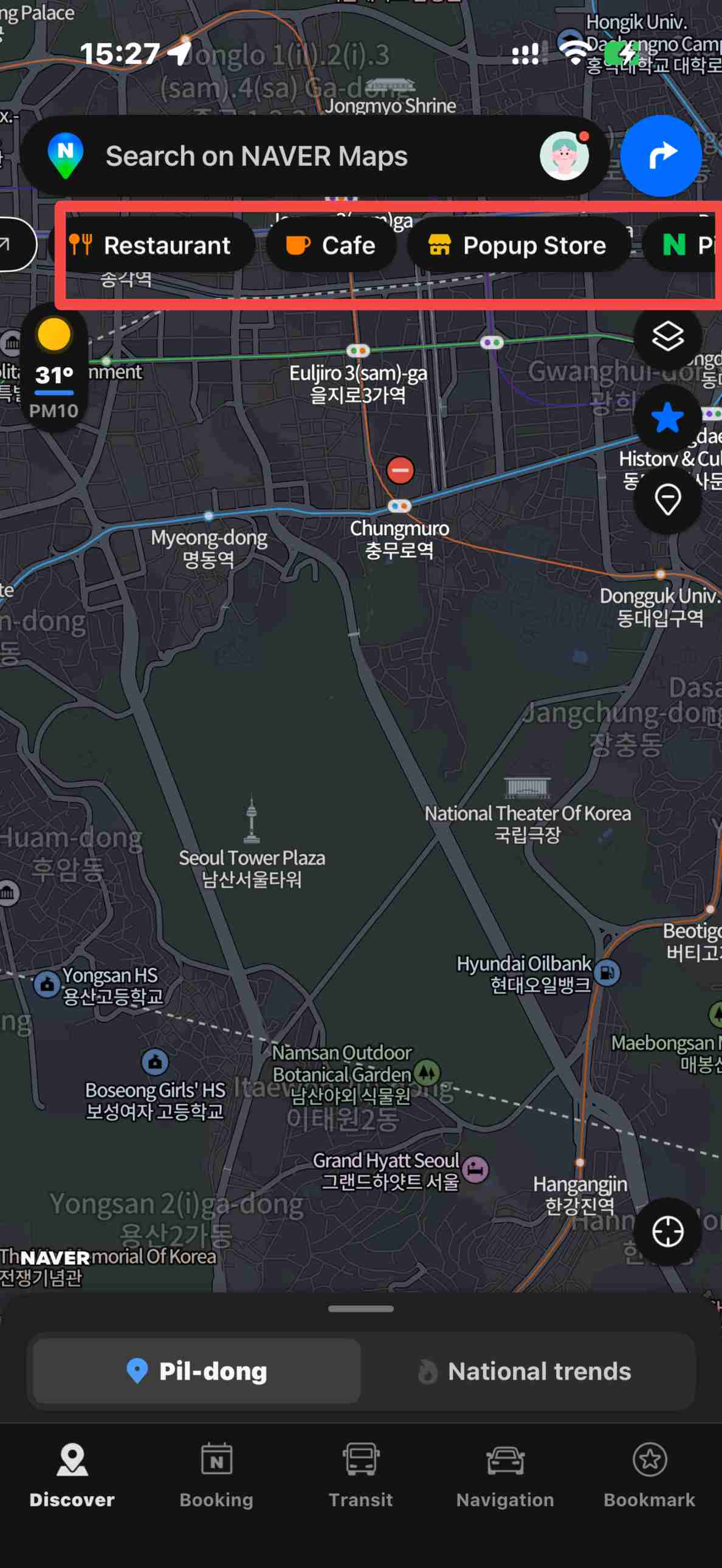
NAVER Map is not only for getting from one place to another.
NAVER describes its service as a platform for discovering places and personalized recommendations across Korea. Place pages can include photos, reviews and other local information that may help you decide where to go.
Try searching categories such as:
- Korean restaurants
- Cafés
- Shopping
- Attractions
- Convenience stores
- Hotels
- Museums
- Markets
If an English search does not find the place you want, copying the Korean place name into NAVER Map can help narrow down the result.
- One way
- Round-trip
- Cheapest nonstop
 MNL12:10 AM4h 10mNonstopICN5:20 AMManila - Seoul|Wed, Nov 25|Cebu Pacific€157€20323% offSearch23% off€203€157
 - MNL7:40 PM4h 5mNonstopICN12:45 AMManila - Seoul|Sun, Nov 8|Cebu Pacific€159€20322% offSearch22% off€203€159
- MNL7:50 PM3h 55mNonstopICN12:45 AMManila - Seoul|Sat, Nov 21|Cebu Pacific€180€20311% offSearch11% off€203€180
 MNL13:003h 55mNonstopICN14:00Manila - City|Mon, Sep 6|Normal AirlineFind more flightsFind more flights
Save Places on Naver Map
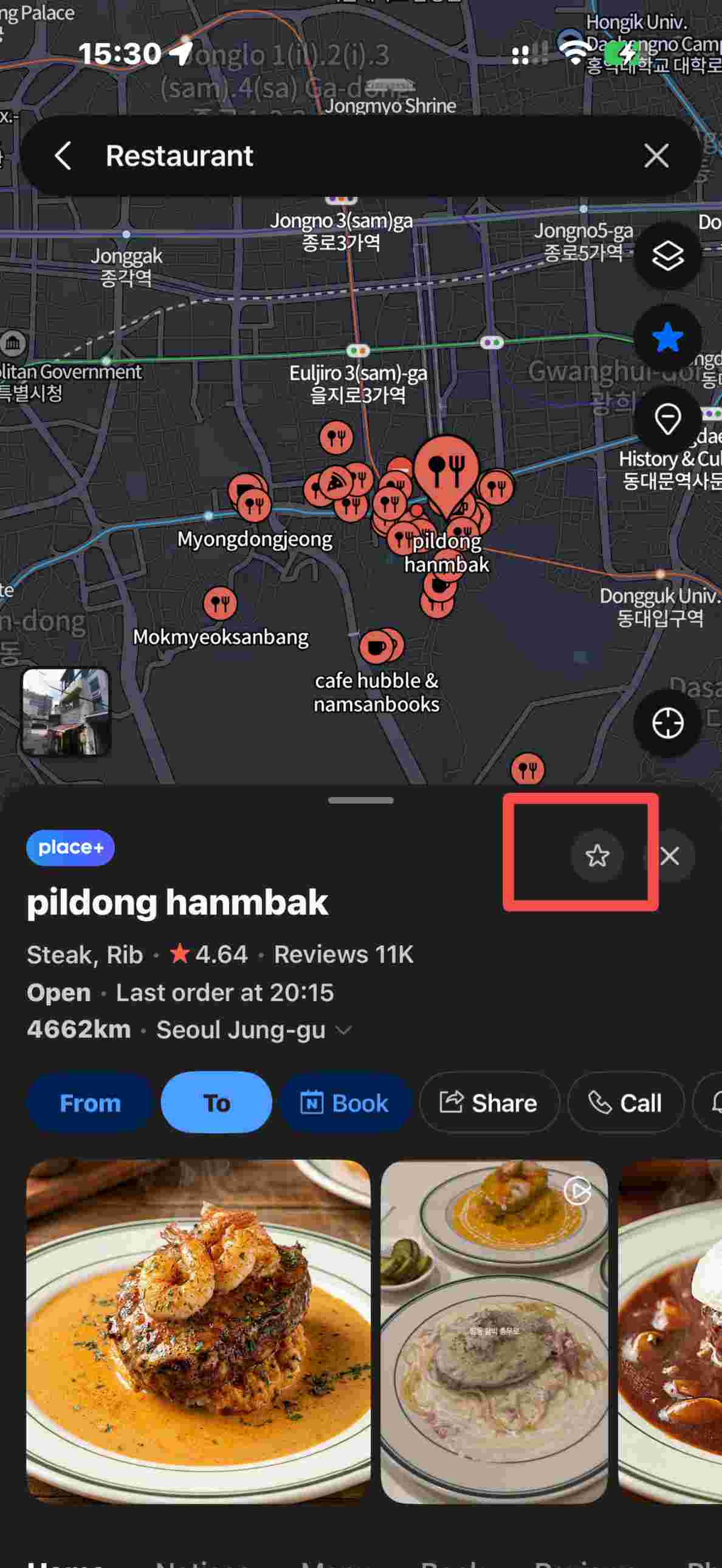
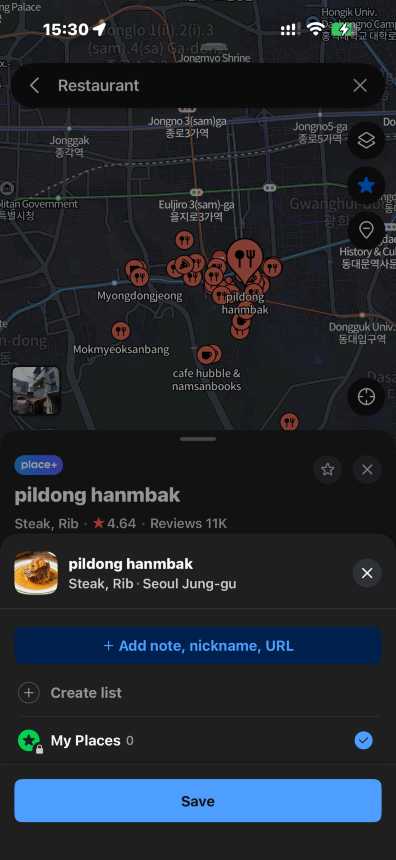
If you have several places you want to visit, you can save them in NAVER Map and organize them into lists.
For example, you could create separate lists for:
- Seoul restaurants
- Seoul attractions
- Busan cafés
- Shopping
- Hotels
- Places near your accommodation
NAVER allows users to save places, routes, subway lines, buses and bus stops. However, you need to sign in with a NAVER ID to use the saving feature.
You can also create different lists and add notes or nicknames to saved places.
⭐ Pro Tip: Save your hotel, airport or train station first. If you get lost later, you can quickly reopen the location instead of searching for it again.
Naver Map vs KakaoMap: Which Is Better for Travelers?
Both Naver Map and KakaoMap are popular navigation apps in South Korea. They can help you find places and check routes for public transport, walking, cycling and driving.
Naver Map | Feature | KakaoMap |
|---|---|---|
Yes | English support | Yes |
Yes | Subway routes | Yes |
Yes | Bus routes | Yes |
Yes | Walking routes | Yes |
Yes | Driving navigation | Yes |
Yes | Cycling routes | Yes |
Yes | Restaurant & attraction search | Yes |
Yes, with NAVER ID | Save places | Available |
International travelers and detailed local searches | Best for | Route planning and local navigation |
Naver Map may be easier for international travelers because it officially supports Korean, English, Simplified Chinese and Japanese. NAVER also provides multilingual place information, reviews, subway maps and real-time public transport details.
KakaoMap is another useful option for getting around Korea. It provides routes for cars, public transport, walking and bicycles, along with local restaurant, attraction and place searches.
💡 Travel Tip: If it is your first trip to South Korea, start with Naver Map because of its wider multilingual support. You can also keep KakaoMap as a backup and compare routes when needed.
Do You Need a Naver Account?
You do not need to treat account creation as your first step just to open the app and start exploring its map functions.
However, a NAVER ID is required for features that store information in your account, including saved places and saved routes. NAVER officially states that saved information can only be stored and used while logged in with a NAVER ID.
If you only need directions during a short trip, you can start by learning the basic map and route-search functions. If you want to create detailed travel lists, signing in is more useful.
Naver Map Tips for Travelers
- Change the language to English: Set NAVER Map to English before your trip so it is easier to search places and understand directions.
- Save Korean place names: Keep the Korean names of your hotel, attractions and transport stations in case English search results are limited.
- Check the exact branch: Restaurants, cafés and shops may have several branches, so confirm the address before going.
- Save your hotel location: If you have a NAVER account, save your hotel so you can quickly find your way back.
- Check transport information: Review bus and subway details before leaving, as schedules and operating conditions may change.
- Keep mobile data available: Internet access helps you check your location, routes and real-time public transport information while travelling.





Is Naver Map Good for Tourists?
Yes, particularly for travelers who plan to use Korean public transport or explore places independently.
NAVER has specifically expanded NAVER Map for international visitors, including support for English, Chinese and Japanese, multilingual place information, translated reviews and detailed public transport information.
It can be useful for:
- First-time visitors to South Korea
- Independent travelers
- Subway and bus users
- Travelers looking for restaurants and cafés
- People planning walking routes
- Travelers visiting several Korean cities
FQAs About Naver Map
-
Is Naver Map available in English?
-
Is Naver Map free?
-
Can I use Naver Map for the subway?
-
Can I use Naver Map for buses?
-
Do I need a Naver account to save places?

Trending Searches
-
Popular Content
-
Top Flight Links
-
Popular Hotels
-
Popular Things to Do
-
Featured guides
-
Trip.com links
- Trip.com E-Ticket
- Trip.com Payment Methods
- Trip.com Passport Change
- Trip.com Customer Service
- Trip.com Flight Cancellation
- Trip.com VIP Lounge Access
- Trip.com Phone Number
- Trip.com Check In
- Payment Sale
- Trip Coins
- Trip.com Hotel Refund
- Trip.com Cancellation Policy
- Trip.com Ticket Issued Status
- Trip.com Flight Ticket
- Trip.com Membership
- Trip.com E-Receipt
- Trip.com Seat Selection
- Trip.com Baggage Allowance
- Trip.com Flight Change
- Trip.com Reviews
- Flights from Manila to Hong Kong
- Flights from Manila to Iloilo City
- Flights from Manila to Tagbilaran
- Flights from Manila to Cebu
- Flights from Manila to Tokyo
- Flights from Manila to General Santos
- Flights from Cebu to Manila
- Flights from Bacolod to Manila
- EK2521 Flight Status
- 5J187 Flight Status
- PR431 Flight Status
- PR741 Flight Status
- MH709 Flight Status
- 5J582 Flight Status
- RX874 Flight Status
- Hotels near 72 wonder tower
- Hotels near Mactan–Cebu International Airport
- Hotels near Greenland Xindu East Coast Times Square South Area
- Hotels near Fenghuang Ancient Town
- Hotels near Taoyuan HSR Subway Station
- Shiji Qingteng Capsule Hotel (T3 Terminal)
- De Mani Hotel
- Alta Vista de Boracay
- Orange Hotel (Wangfujing, Wenhua Road, Baotou)
- Shangri-La Resort
- Hotels in Fenghuang County
- Hotels in Hong Kong
- Hotels in Davao City
- Hotels in North Jakarta
- Hotels in Moscow
- Philippines 5G eSIM | Dual Network • All AI & TikTok | Day Pass/Total Data Package | 24-Hour Billing | 1-30 Days | QR Code
- Private Mutianyu Great Wall Trip With English-speaking Driver
- Vietnam | 4G/5G eSIM | Daily/Data Plan | 24-hour Billing | 1-30 Days | QR code
- Taoyuan International Airport | Terminal 2 VIP Lounge Service | Oriental Club Lounge
- Sofitel Macau at Ponte 16 Buffet | Mistral Restaurant Lunch/Dinner Buffet
- Philippines 4G/5G eSIM | Daily/Total Data Package | 1–30 Days | 24-Hour Billing | QR Code
- Mainland China/Hong Kong/Macau 5G eSIM | 5 Carriers · All AI | Day Pass/Total Data Package | 24-Hour Billing | QR Code
- Huanglongjiuzhai Railway Station - Jiuzhaigou National Park shuttle bus · private charter optional
- Alanya: Jeep Safari
- From Toronto: Niagara Falls Full-Day Tour
- Vietnam Da Nang Nui Son Tra + The Marble Mountains + Hoi An Ancient Town half-day tour + dinner + transfer + guide
- Modena: A Full Meal Walking Food Tour with a Local
- English & Japanese multilingual guide from Taiwan, China · translation · guide · local guide · private charter customize
- Lijiang ethnic costume photography experience
- Australia Sydney Captain Cook cruise: optional lunch/dinner sightseeing cruise
- Mothers Day Gifts
- eSIM
- Hong Kong International Airport
- International Driving Permit
- Toronto Pearson International Airport
- Universal Studios Singapore
- Great Wall of China
- UK ETA
- Narita International Airport
- China Currency
- Changi Airport
- Schengen Visa
- Singapore MRT Map
- France Visa
- Ninoy Aquino International Airport