

Trip.com Baggage Add On: How to Add Extra Luggage to Your Flight

By Trip.com
June 26, 2026
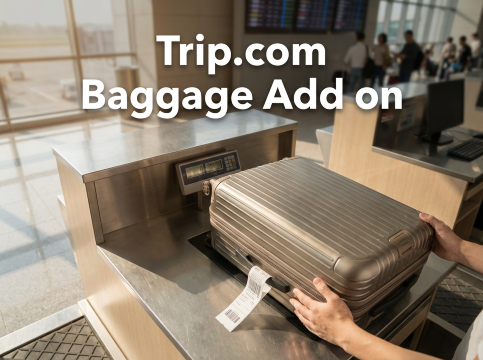
Booked a flight but realized your ticket has no checked baggage, or the allowance is too small? Don’t stress. You can easily add extra baggage through Trip.com before your trip. It’s quick, simple, and helps you avoid paying higher fees at the airport.
Can I Purchase Extra Baggage through Trip.com?
Yes, you can add extra baggage if you booked your flight on Trip.com. This is helpful for promo or budget tickets that do not include checked baggage. You can select the number of kilos you need, but the limit, baggage type, and rules depend on the airline. Some airlines do not allow changes or cancellations for added baggage, so always check the baggage policy carefully before confirming.
How Do I Purchase Extra Baggage on Trip.com?
First, remember that not all airlines allow extra baggage to be added. It always depends on the airline’s rules.
Step 1: Go to the Trip.com Flights page. Enter your departure city, destination, travel dates, and other details. Search for flights and choose the one that fits your schedule and budget.
Step 2: Select your flight option. If you think your plans might change, you can choose Trip Air Flexibility or AirFlex if it is available for your booking. This may allow free cancellation or one flight change, depending on the service terms shown before payment.
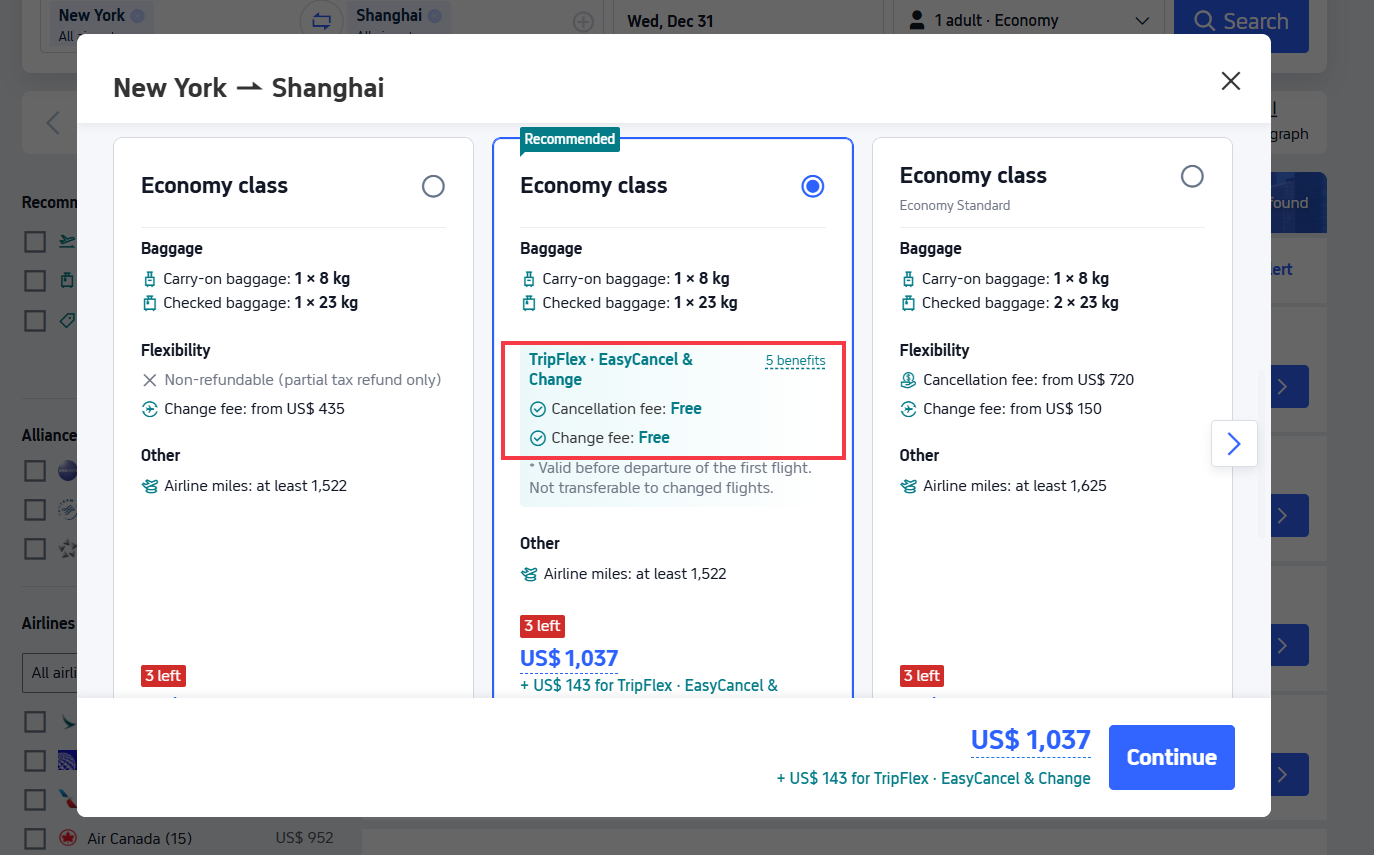
Step 3: Review your flight details and enter the passenger information. Before you continue, you will see the option to add extra baggage if the airline allows it. Choose the number of kilos you need, then click "continue".
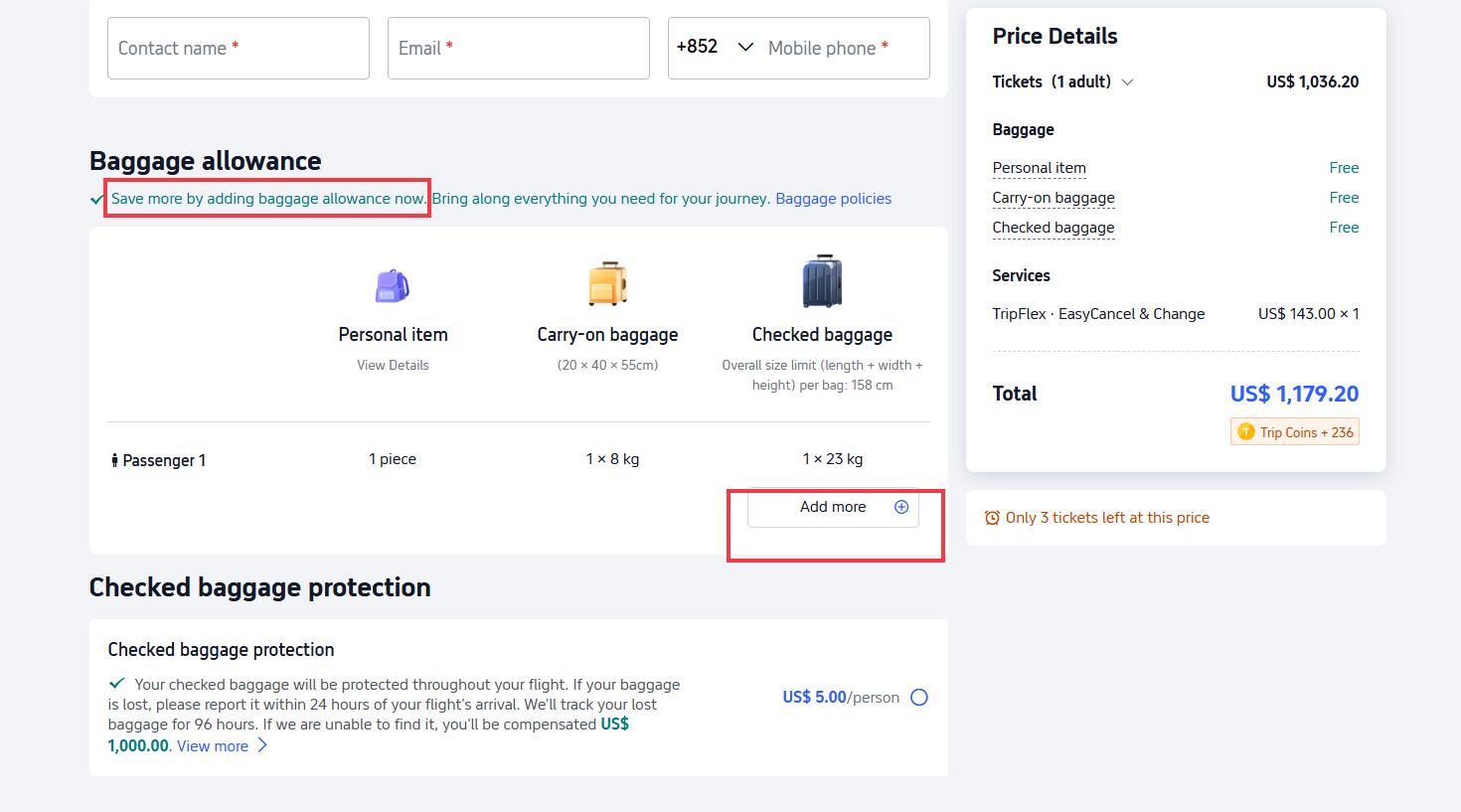
Step 4: You can also add other services like seat selection or meals if you want. After that, click "proceed to payment".
Step 5: Complete the payment within the given time. Once your ticket is issued, your baggage add on is confirmed together with your flight.
Aside from the weight limit, also check your luggage size. Many airlines follow the standard checked baggage size limit of 158 cm in total for length, width, and height combined. This usually includes wheels and handles, but always check your airline’s baggage rules before flying.


Can I Purchase Additional Baggage after Booking My Flight?
Yes, you can still add extra baggage even after your ticket has been issued, as long as the airline allows it. Some airlines do not permit baggage to be added after booking, so always check the rules shown on your ticket before proceeding.
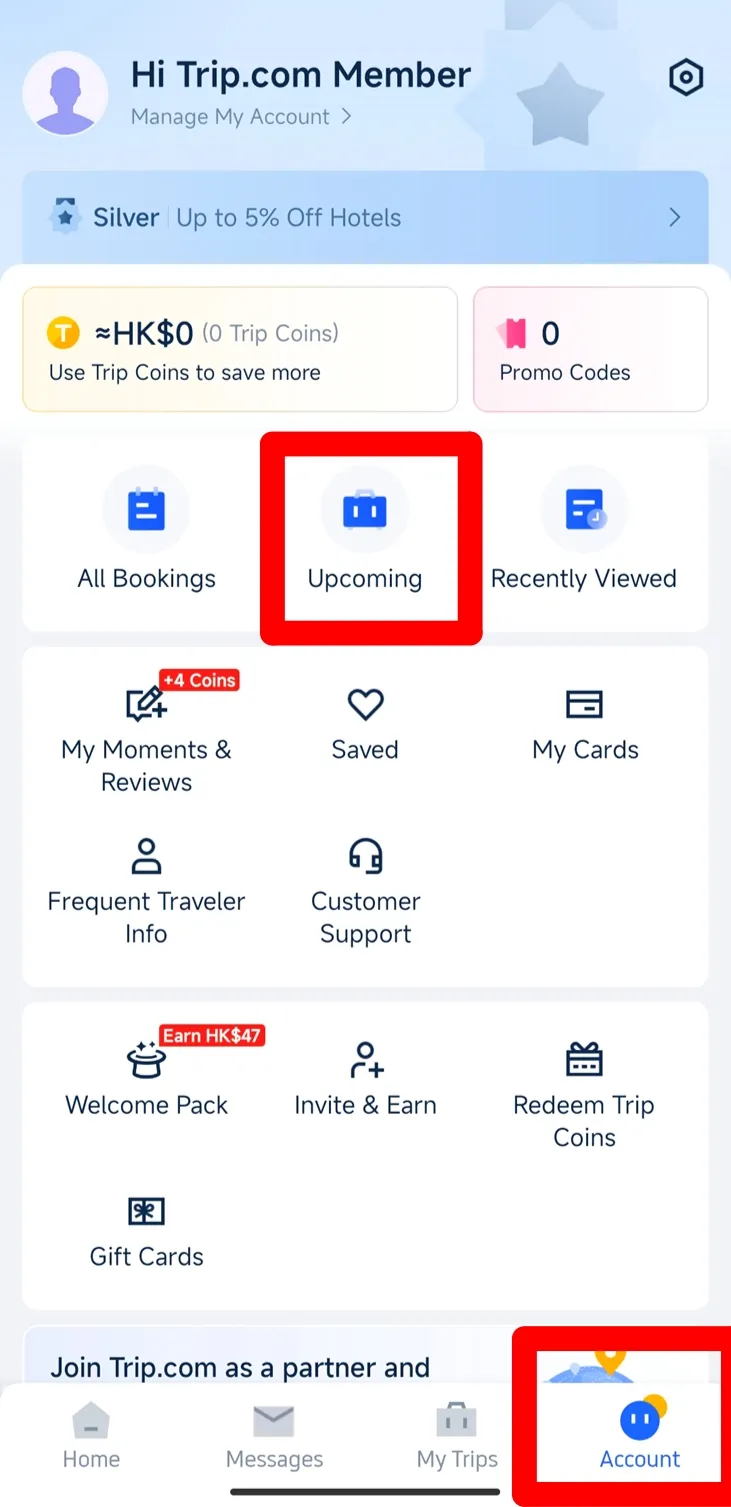
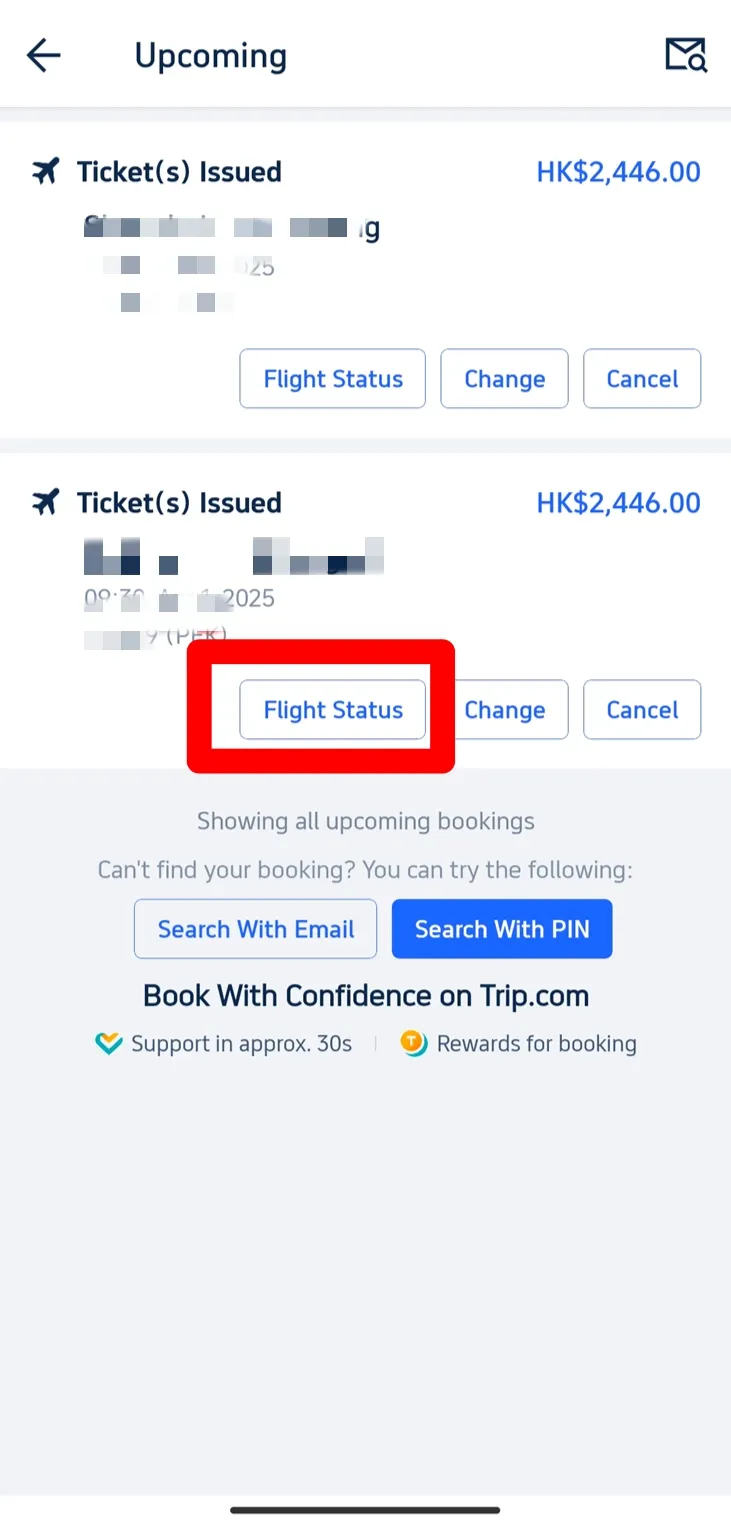
Step 1: Open the Trip.com app or Trip.com website and go to “Upcoming.” Choose the flight you want to update.
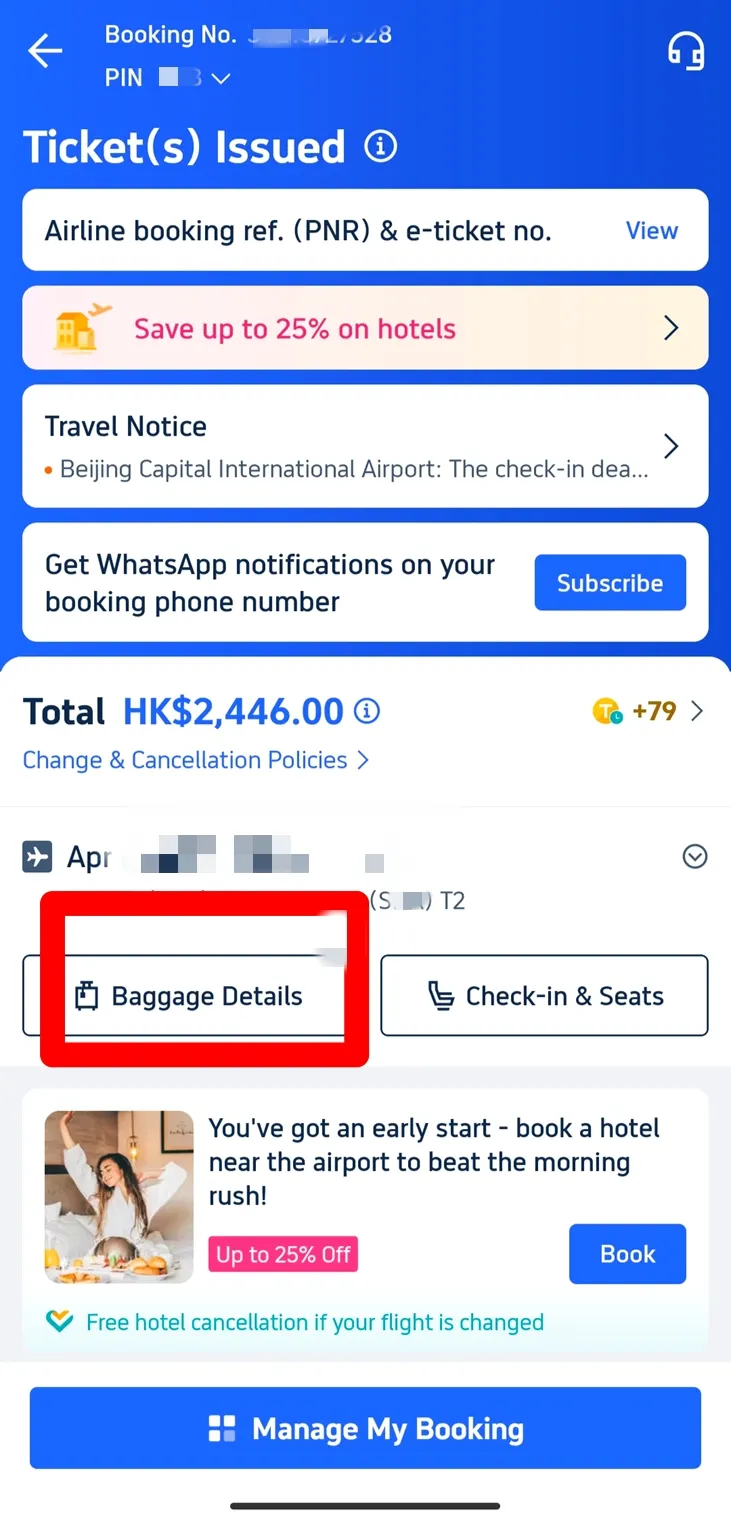
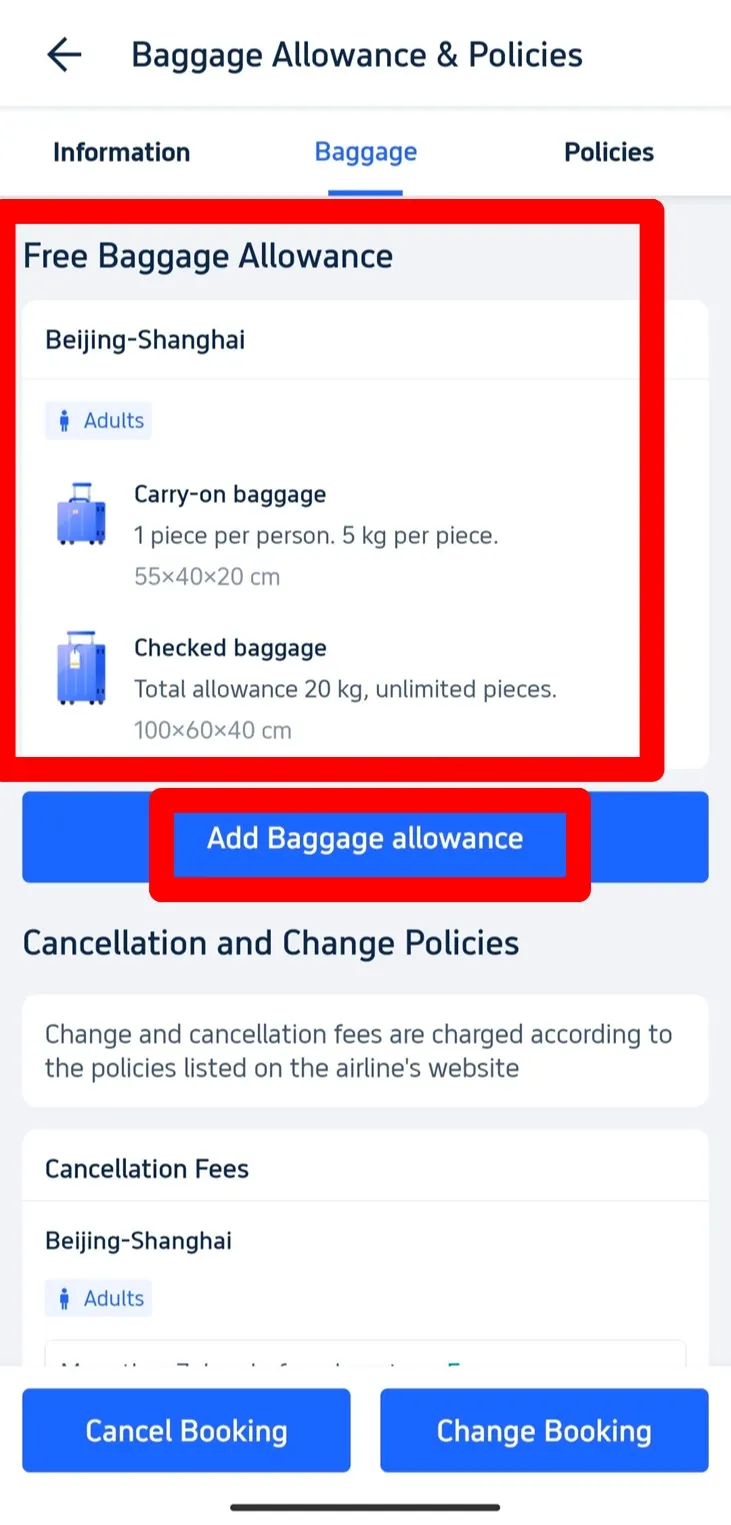
Step 2: On the booking details page, tap “Baggage Details” to see your current baggage allowance.
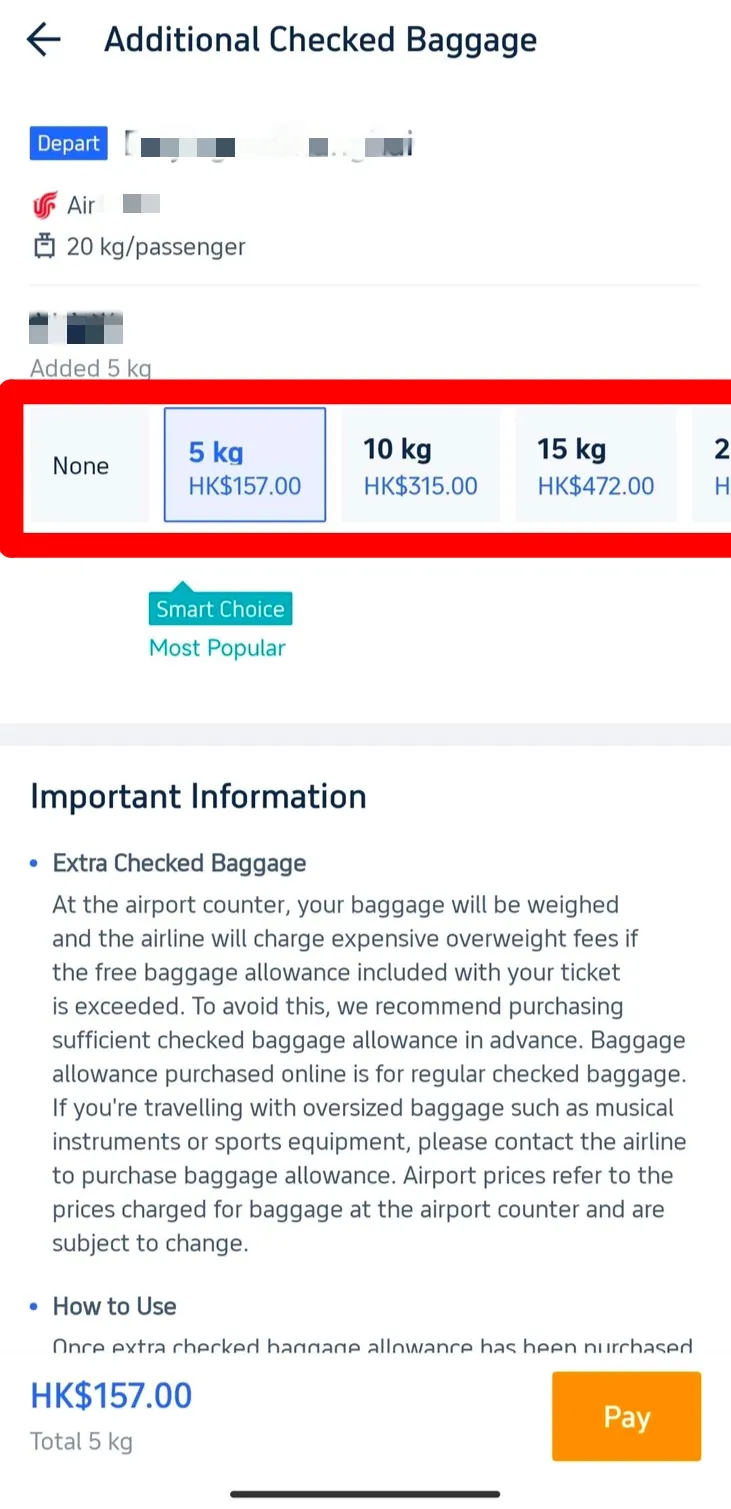
Step 3: If adding baggage is available, tap “Add,” select the number of kilos you need, then click “Pay Now.”
Step 4: Complete the payment within the given time. Once you receive the confirmation email, it means your extra baggage has been successfully added.
Your Next Adventure Starts from Manila
- One way
- Round-trip
- direct cheapest
 MNL7:50 AM1h 30mNonstopTAC9:20 AMManila - Tacloban|Sun, Nov 8|Cebu PacificPKR 10,877PKR 54,56280% offSearch80% offPKR 54,562PKR 10,877
 - MNL7:50 AM1h 30mNonstopTAC9:20 AMManila - Tacloban|Wed, Nov 4|Cebu PacificPKR 10,960PKR 54,56280% offSearch80% offPKR 54,562PKR 10,960
 MNL6:10 PM1h 20mNonstopTAC7:30 PMManila - Tacloban|Tue, Oct 20|Philippines AirAsiaPKR 45,832PKR 54,56216% offSearch16% offPKR 54,562PKR 45,832
 MNL13:001h 20mNonstopTAC14:00Manila - City|Mon, Sep 6|Normal AirlineFind more flightsFind more flights
Need Help?
📱 Enjoy app-only deals and a new user package with special offers on hotels, trains, attractions, and airport transfers.
FAQs: Trip.com Baggage Add on
-
Can I add baggage to any flight on Trip.com?
-
Is it cheaper to buy baggage online?
-
Can I add baggage after my ticket is issued?
-
Can I cancel or change my extra baggage?
-
How do I know if my baggage add on is confirmed?
Trending Searches
-
Popular Content
-
Top Flight Links
-
Popular Hotels
-
Popular Things to Do
-
Featured guides
-
Trip.com links
- Trip.com E-Ticket
- Trip.com Payment Methods
- Trip.com Passport Change
- Trip.com Customer Service
- Trip.com Flight Cancellation
- Trip.com VIP Lounge Access
- Trip.com Phone Number
- Trip.com Check In
- Payment Sale
- Trip Coins
- Trip.com Hotel Refund
- Trip.com Cancellation Policy
- Trip.com Ticket Issued Status
- Trip.com Flight Ticket
- Trip.com Membership
- Trip.com E-Receipt
- Trip.com Seat Selection
- Trip.com Baggage Allowance
- Trip.com Flight Change
- Trip.com Reviews
- Plane tickets from Manila to Hong Kong
- Cheap flights from Manila to Tagbilaran
- Plane tickets from Manila to Cebu
- Plane tickets from Manila to Iloilo City
- Cheap flights from Manila to General Santos
- Cheap tickets from Cebu to Manila
- Cheap flights from Bacolod to Manila
- Cheap tickets from Manila to Tacloban
- CA986 Flight Status
- EK2521 Flight Status
- 5J187 Flight Status
- PR431 Flight Status
- PR741 Flight Status
- MH709 Flight Status
- 5J582 Flight Status
- Hotels near 72 wonder tower
- Hotels near Mactan–Cebu International Airport
- Hotels near Fenghuang Ancient Town
- Hotels near Greenland Xindu East Coast Times Square South Area
- Hotels near Changbai Mountain Beauty Pine International Sculpture Park
- Shiji Qingteng Capsule Hotel (T3 Terminal)
- Bangkok-Pratunam Hotel
- Shangri-La Resort
- De Mani Hotel
- Fan Yu Gaming Center
- Hotels in Fenghuang County
- Hotels in Davao City
- Hotels in North Jakarta
- Hotels in Moscow
- Hotels in Baguio
- Philippines 5G eSIM | Dual Network • All AI & TikTok | Day Pass/Total Data Package | 24-Hour Billing | 1-30 Days | QR Code
- Private Mutianyu Great Wall Trip With English-speaking Driver
- Chengdu Departure - Bipenggou Shuttle Bus
- Vietnam | 4G/5G eSIM | Daily/Data Plan | 24-hour Billing | 1-30 Days | QR code
- Vietnam Airport VIP Fast Track Service
- Bangladesh Dhaka DAC Hazrat Shahjalal International Airport T1 terminal international departure IBalaka Executive Lounge international departure lounge experience
- Huanglongjiuzhai Railway Station - Jiuzhaigou National Park shuttle bus · private charter optional
- Lantau Island Ngong Ping 360 round-trip cable car admission ticket with priority boarding + one-way urban area transfer
- Cebu 1-day tour to Bohol Island: Chocolate Hills, Tarsier Sanctuary, Loboc River Cruise with Meal & Butterfly Garden
- Kazakhstan Almaty 1-day tour: Charyn Canyon + Kolsai Lake
- 1-day tour to Nanjing Tianluokeng Tulou, Yuchang Building and Taxia Village for 2-7 people
- Augustiner-Keller + Olympiapark München + Allianz Arena + BMW Museum Private Charter
- Mohe Trip Moments
- Big Bus tour of Paris
- Kazakhstan Transportation
- Mothers Day Gifts
- eSIM
- Hong Kong International Airport
- International Driving Permit
- Toronto Pearson International Airport
- Universal Studios Singapore
- Great Wall of China
- UK ETA
- Narita International Airport
- China Currency
- Changi Airport
- Schengen Visa
- Singapore MRT Map
- France Visa
- Ninoy Aquino International Airport