
Philippine Airlines Add Baggage: Fees, Weight & How to Add

Need more luggage space for your Philippine Airlines flight? You can add extra checked baggage when booking your ticket or after booking through PAL’s Prepaid Baggage service. Buying additional baggage before your flight can also help you avoid higher baggage charges at the airport. Here is how Philippine Airlines add baggage works.
🔥Philippine Airlines Seat Sale
Enjoy special fares on Philippine Airlines domestic and international flights. Grab your seat sale deal and plan your next trip for less with Trip.com.

📅Promotion period: Until Sept 2, 2026
What Is Philippine Airlines Prepaid Baggage?
Sources: Philippine Airlines
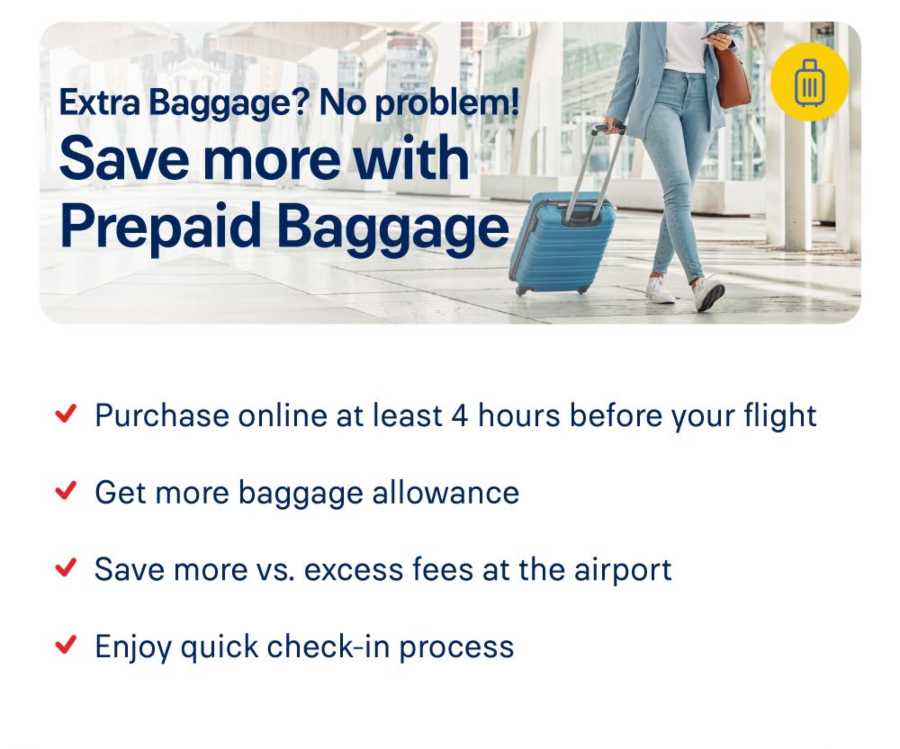
Prepaid Baggage is Philippine Airlines’ option for passengers who need more checked baggage than the Free Baggage Allowance included with their ticket.
PAL recommends purchasing additional baggage before your flight, as prepaid baggage offers savings compared with paying excess baggage charges at the airport. Rates are charged per flight sector and can vary depending on your destination.
You can buy Philippine Airlines prepaid baggage:
- When booking your flight on the PAL website
- Through the PAL mobile app
- After booking through Manage My Booking
- At a PAL Ticket Office
- Through the PAL Contact Center
- Through selected travel agencies
Prepaid baggage can generally be purchased until 4 hours before the scheduled departure time.
- One way
- Round-trip
- Cheapest nonstop
 MNL4:50 AM1h 5mNonstopRXS5:55 AMManila - Roxas City|Thu, Dec 3|Philippine AirlinesBRL 163BRL 73578% offSearch78% offBRL 735BRL 163
 - MNL4:50 AM1h 5mNonstopRXS5:55 AMManila - Roxas City|Sun, Dec 6|Philippine AirlinesBRL 199BRL 73573% offSearch73% offBRL 735BRL 199
- MNL4:50 AM1h 5mNonstopRXS5:55 AMManila - Roxas City|Sat, Nov 21|Philippine AirlinesBRL 206BRL 73572% offSearch72% offBRL 735BRL 206
 MNL13:001h 5mNonstopRXS14:00Manila - City|Mon, Sep 6|Normal AirlineFind more flightsFind more flights
How to Add Baggage on Philippine Airlines After Booking
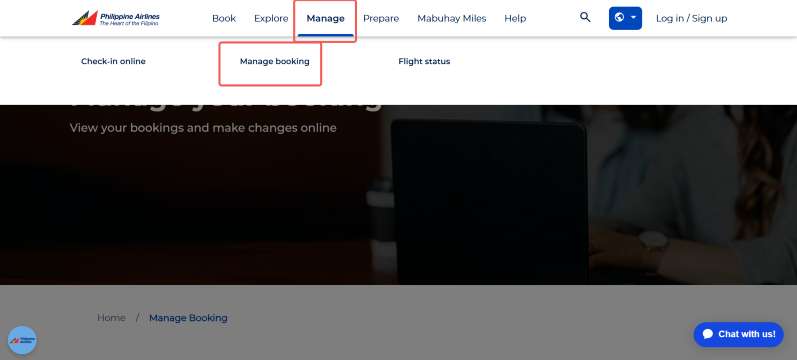
Already booked your flight? You do not normally need to make a new reservation just to add baggage.
Follow these steps:
- Go to the Philippine Airlines website.
- Select Manage Booking.
- Enter your PAL booking reference.
- Enter your last name or the last name of a passenger included in the booking.
- Open your booking.
- Look for the option to add Prepaid Baggage.
- Choose the additional baggage allowance you need.
- Check the baggage fee.
- Complete your payment.
- Keep your updated booking confirmation for your flight.
PAL requires the booking reference and passenger last name to access Manage My Booking. Prepaid baggage is confirmed after full payment.
📌 Important: Add your baggage at least 4 hours before departure if you want to use PAL’s prepaid baggage option online.
Philippine Airlines Add Baggage Price
The amount you pay depends on your route, baggage weight and whether you purchase baggage before your flight or at the airport.
For domestic flights, PAL currently lists the following prepaid baggage rates among its available baggage options:
Additional Baggage | Prepaid Baggage Rate |
|---|---|
15 kg | ₱825 |
20 kg | ₱1,100 |
25 kg | ₱1,375 |
30 kg | ₱1,650 |
40 kg | ₱2,200 |
50 kg | ₱2,750 |
These rates are based on PAL’s current official prepaid baggage information. Baggage rates and available weight options may differ by route, so check the amount shown for your booking before paying.
International Philippine Airlines Add Baggage Price
There is no single prepaid baggage price that applies to every Philippine Airlines international flight.
PAL states that prepaid baggage rates are per sector and vary by destination. Available baggage packages may also depend on whether the route follows a weight or piece system.
For example, the baggage price for a flight from Manila to Tokyo may be different from Manila to Bangkok, Seoul or Los Angeles.
The easiest way to check the exact price is to:
- Open Manage My Booking
- Enter your booking details
- Select Prepaid Baggage
- Check the baggage options and price available for your flight
How Much Extra Baggage Can You Add on Philippine Airlines?
For purely domestic Philippine Airlines routes, passengers can generally purchase up to 50 kg of prepaid baggage per person, per sector.
However, some destinations have special restrictions.
PAL currently states that:
- Flights to or from Busuanga have a prepaid baggage limitation of up to 15 kg
- PAL currently notes that Prepaid Baggage for flights to or from Basco is temporarily unavailable
Always check the latest baggage option shown for your particular flight because aircraft and route restrictions can affect how much baggage can be accepted.
Philippine Airlines Baggage Weight Limit Per Bag
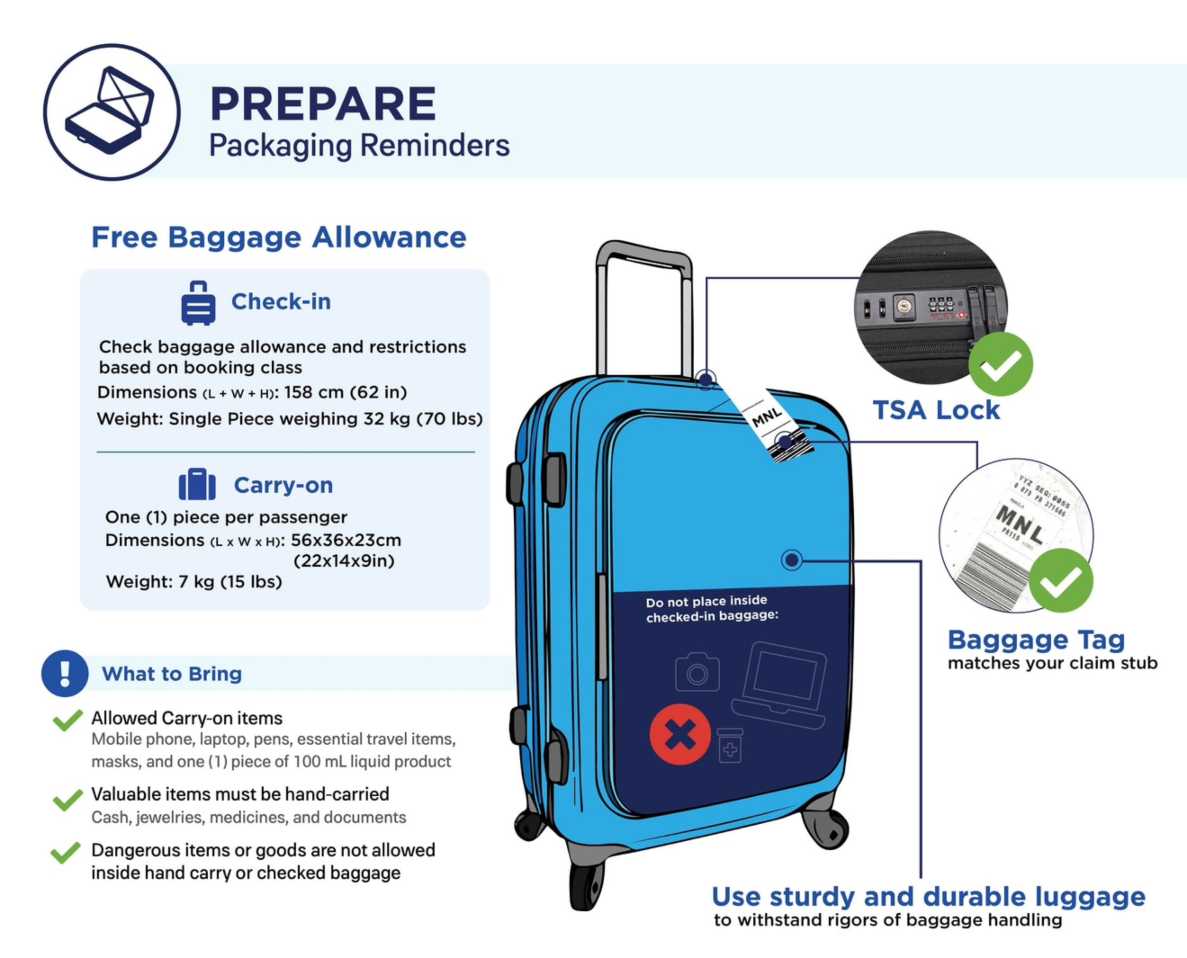
Buying 40 kg or 50 kg of baggage allowance does not mean you can place everything inside one suitcase.
PAL states that a single piece of checked baggage must not weigh more than 32 kg or 70 lb.
If one bag weighs more than 32 kg, you will need to repack your luggage into separate bags. A bag exceeding this limit may not be accepted for carriage.
Example
If your total baggage allowance is 40 kg, you could pack it as:
- Bag 1: 25 kg
- Bag 2: 15 kg
Instead of:
- Bag 1: 40 kg ❌
The total is still 40 kg, but each individual bag needs to stay within PAL’s maximum weight requirements.


Can You Add Philippine Airlines Baggage at the Airport?
Yes. Philippine Airlines also provides an Airport Baggage option for eligible domestic flights.
PAL currently lists 20 kg of Airport Baggage at ₱2,000 for domestic travel, and it can be purchased per sector up to 1 hour before the scheduled departure time.
This is different from Prepaid Baggage.
Option | When to Buy | Example Domestic Rate |
|---|---|---|
Prepaid Baggage | Up to 4 hours before departure | 20 kg: ₱1,100 |
Airport Baggage | At the airport, subject to conditions | 20 kg: ₱2,000 |
Based on PAL’s currently published domestic rates, purchasing baggage before arriving at the airport can therefore be cheaper.
What Happens If Your Baggage Is Still Overweight?
If your baggage exceeds the allowance you purchased, additional Excess Baggage Charges may apply at check-in.
PAL’s international baggage rules also state that passengers are responsible for excess baggage charges when their checked baggage exceeds the applicable allowance.
To avoid unexpected charges:
- Check your ticket’s Free Baggage Allowance
- Add prepaid baggage before departure if needed
- Weigh your bags before leaving for the airport
- Keep each checked bag below 32 kg
- Check your route-specific baggage rules
Can You Upgrade Prepaid Baggage After Buying It?
For purely domestic flights, PAL allows passengers who already purchased Prepaid Baggage to upgrade to a higher baggage allowance, subject to the maximum allowed weight.
The difference in the baggage rate will be collected. PAL states that domestic prepaid baggage upgrades must be arranged at least 4 hours before departure through a PAL Ticket Office or Contact Center.
What Happens to Prepaid Baggage If You Rebook Your Flight?
If you change your flight but do not change the route, PAL states that previously purchased Prepaid Baggage may be carried over to the new flight.
The change must be arranged at least 4 hours before the scheduled departure time through a PAL Ticket Office or Contact Center.
If you are marked as a no-show, your prepaid baggage will be forfeited.
Stay Updated Philippine Airlines Flight Status
| Flight No. | Aircraft Model | Departs | Arrives | Departure city | Arrival city | Flight status | |
|---|---|---|---|---|---|---|---|
| PR654 | 333 | 11:15 | 17:10 | Manila(MNL)Manila | Riyadh(RUH)Riyadh | Canceled | Book Now |
| PR341 | 321 | 01:40 | 05:30 | Shanghai(PVG)Shanghai | Manila(MNL)Manila | Canceled | Book Now |
| PR300 | JET | 07:50 | 10:05 | Manila(MNL)Manila | Hong Kong(HKG)Hong Kong | Canceled | Book Now |
Is Philippine Airlines Prepaid Baggage Refundable?
PAL states that the Prepaid Baggage fee is generally non-refundable.
There can be exceptions involving flight disruptions, cancellations or irregular operations when the passenger decides not to continue with the journey, subject to PAL’s applicable conditions.
Check the conditions of your booking before purchasing a large baggage allowance, especially if your travel plans may change.
Philippine Airlines Free Baggage Allowance
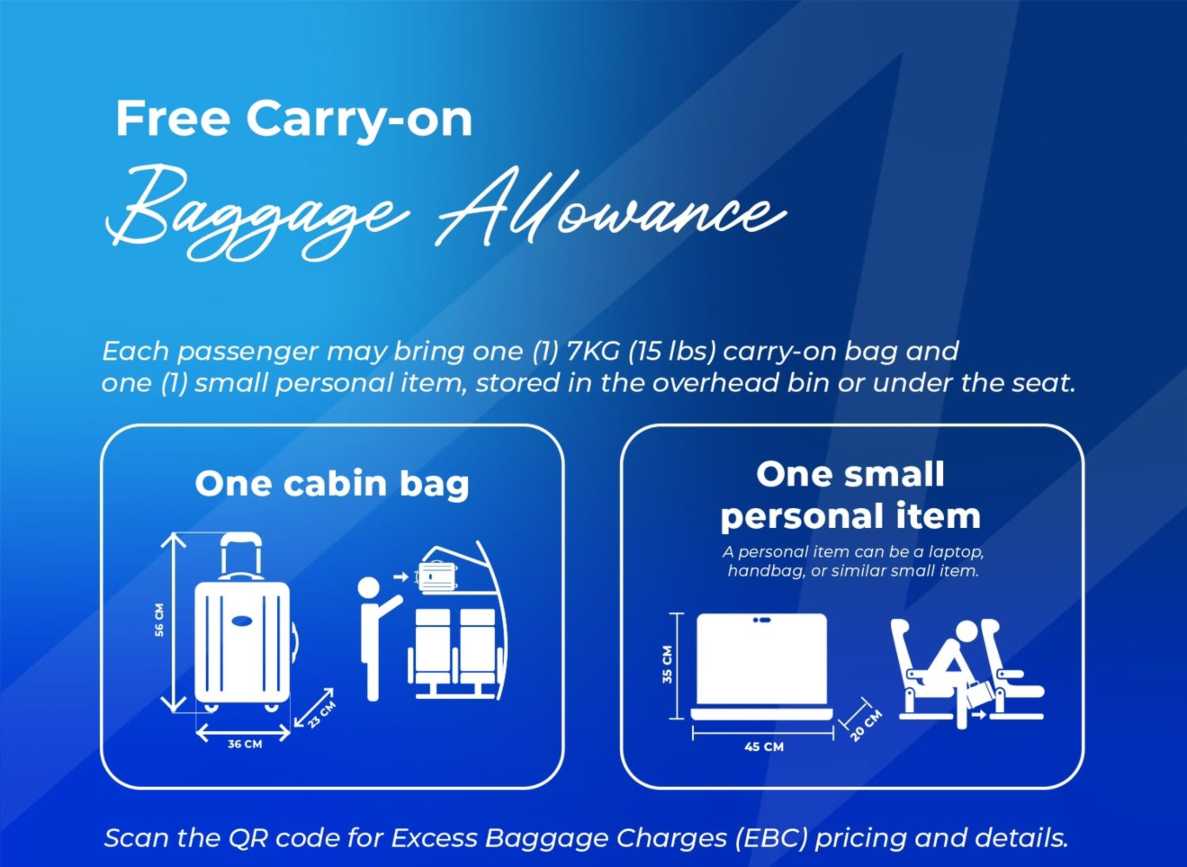
Sources: Philippine Airlines
Before paying for extra baggage, check how much checked baggage is already included with your ticket.
Philippine Airlines explains that the Free Baggage Allowance (FBA) depends on the ticket and route. The allowance shown on one flight may also not automatically apply to a separate connecting flight.
You can check your baggage allowance through:
- Your Philippine Airlines ticket
- Your booking confirmation
- Manage My Booking
- PAL's official baggage information
If your included allowance is already enough for your trip, there is no need to purchase additional baggage.
Tips Before Adding Philippine Airlines Baggage
- Check your free allowance first: Your ticket may already include checked baggage.
- Buy baggage early: PAL allows prepaid baggage purchases up to 4 hours before departure.
- Compare prepaid and airport baggage: Buying before arriving at the airport can cost less based on PAL's published domestic rates.
- Weigh your luggage at home: This can help you choose the right baggage package.
- Keep each bag under 32 kg: PAL will require an overweight individual bag to be repacked.
- Check special routes: Basco and Busuanga have additional baggage restrictions.
- Check international prices separately: Rates vary depending on your destination.
FAQs: Philippine Airlines Add Baggage
-
Can I add baggage after booking Philippine Airlines?
-
How do I add baggage to my Philippine Airlines booking?
-
How much is 20 kg extra baggage on Philippine Airlines?
-
What is the maximum baggage weight on Philippine Airlines?
-
Is it cheaper to add Philippine Airlines baggage before the airport?
Trending Searches
-
Popular Content
-
Top Flight Links
-
Popular Hotels
-
Popular Things to Do
-
Featured guides
-
Trip.com links
- Trip.com E-Ticket
- Trip.com Payment Methods
- Trip.com Passport Change
- Trip.com Customer Service
- Trip.com Flight Cancellation
- Trip.com VIP Lounge Access
- Trip.com Phone Number
- Trip.com Check In
- Payment Sale
- Trip Coins
- Trip.com Hotel Refund
- Trip.com Cancellation Policy
- Trip.com Ticket Issued Status
- Trip.com Flight Ticket
- Trip.com Membership
- Trip.com E-Receipt
- Trip.com Seat Selection
- Trip.com Baggage Allowance
- Trip.com Flight Change
- Trip.com Reviews
- Flights from Manila to Hong Kong
- Flights from Manila to Iloilo City
- Flights from Manila to Tagbilaran
- Flights from Manila to Cebu
- Flights from Bacolod to Manila
- Flights from Manila to General Santos
- Flights from Manila to Tokyo
- Flights from Cebu to Manila
- EK2521 Flight Status
- 5J187 Flight Status
- KN5896 Flight Status
- PR741 Flight Status
- MH709 Flight Status
- 5J582 Flight Status
- RX874 Flight Status
- Hotels near 72 wonder tower
- Hotels near Mactan–Cebu International Airport
- Hotels near Greenland Xindu East Coast Times Square South Area
- Hotels near Fenghuang Ancient Town
- Hotels near Taoyuan HSR Subway Station
- Shiji Qingteng Capsule Hotel (T3 Terminal)
- De Mani Hotel
- Alta Vista de Boracay
- Orange Hotel (Wangfujing, Wenhua Road, Baotou)
- Shangri-La Resort
- Hotels in Fenghuang County
- Hotels in Hong Kong
- Hotels in Davao City
- Hotels in North Jakarta
- Hotels in Moscow
- Philippines 5G eSIM | Dual Network • All AI & TikTok | Day Pass/Total Data Package | 24-Hour Billing | 1-30 Days | QR Code
- Private Mutianyu Great Wall Trip With English-speaking Driver
- Vietnam | 4G/5G eSIM | Daily/Data Plan | 24-hour Billing | 1-30 Days | QR code
- Taoyuan International Airport | Terminal 2 VIP Lounge Service | Oriental Club Lounge
- Philippines 4G/5G eSIM | Daily/Total Data Package | 1–30 Days | 24-Hour Billing | QR Code
- Sofitel Macau at Ponte 16 Buffet | Mistral Restaurant Lunch/Dinner Buffet
- Mainland China/Hong Kong/Macau 5G eSIM | 5 Carriers | Day Pass/Total Data Package | 24-Hour Billing | QR Code
- Huanglongjiuzhai Railway Station - Jiuzhaigou National Park shuttle bus · private charter optional
- Belgrade Big Tour: Top Attractions and Belgrade Neighborhoods
- Philadelphia: East Passyunk Food Tour
- 5 Course Gourmet Food and History Walking Tour of Old Quebec
- Hisor Fortress, Half-day Tour
- Furong Town & Fenghuang Ancient Town Day Tour: Private Car+Ticket
- Salou: Inflatable Water Park Experience
- 1 Meter Meat Platter at Fork Kuta Beach for 4 Pax
- Mothers Day Gifts
- eSIM
- Hong Kong International Airport
- International Driving Permit
- Toronto Pearson International Airport
- Universal Studios Singapore
- Great Wall of China
- UK ETA
- Narita International Airport
- China Currency
- Changi Airport
- Schengen Visa
- Singapore MRT Map
- France Visa
- Ninoy Aquino International Airport