How to Enter Passenger Names for Flight Bookings Without Mistakes


Entering a passenger name may look simple, but even a small mistake can cause problems during check-in. The name on your flight booking should match the valid ID you will use for a domestic flight or the passport you will use for an international flight. Here is how to enter it correctly.
How to Enter Your Name Using Your Passport or ID
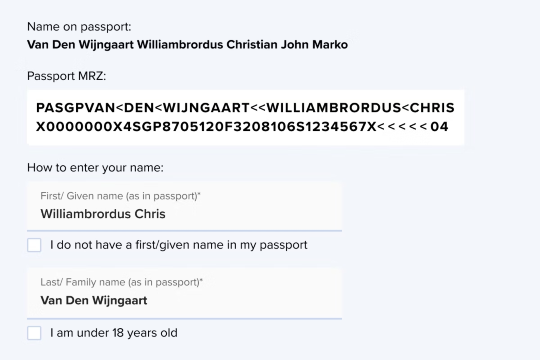
Sources: www.singaporeair.com
Before entering the passenger details, prepare the travel document you will use for your trip.
For domestic flights, enter your name exactly as shown on the valid government-issued ID you plan to present at the airport. For international flights, follow the name printed on your passport.
Open the information page of your passport and look for these sections:
- Surname: Your last or family name
- Given Names: Your first name and any additional given names
- Middle Name: Your middle name, if listed separately
You can also check the Machine Readable Zone or MRZ at the bottom of the passport information page. In most passports, the surname appears before the double symbols (<<), while the given names appear after them.
For example, if a passport shows:
Surname: SANTOS
Given Names: MARIA ANGELA
Middle Name: CRUZ
Enter the passenger information like this:
First Name or Given Name: MARIA ANGELA
Middle Name: CRUZ
Last Name or Surname: SANTOS
If the booking form does not have a separate middle name field, follow the instructions provided by the airline or booking platform. Some airlines ask passengers to include the middle name in the given name field, while others only require the first and last names.
Do not use:
- Nicknames
- Shortened names
- Unofficial English names
- Married names that are not shown on your passport
- Another person’s passenger information


How to Enter a Passenger Name on Trip.com
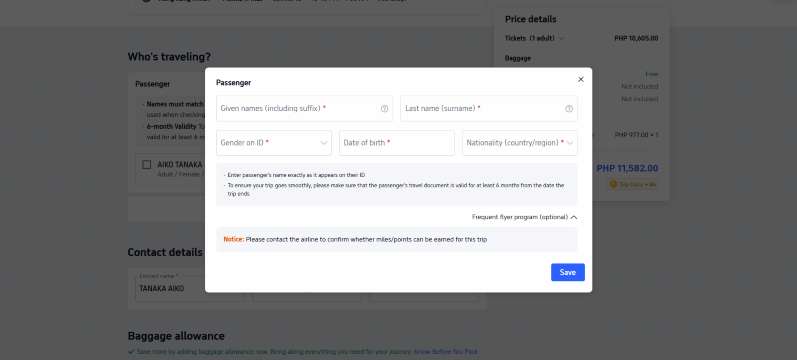
Follow these steps when booking a flight on Trip.com:
- Open the Trip.com app or website and select Flights.
- Enter your departure city, destination and travel dates.
- Choose your preferred flight.
- Go to the passenger information section.
- Select Add Passenger if the passenger has not been saved.
- Enter the first or given name and surname using the passport or valid ID.
- Add the date of birth, gender, nationality and travel document details if requested.
- Review all passenger details before making payment.
The required information may differ depending on the airline, route and destination. Always read the passenger name guidelines shown on the booking page.
Pro Tip: Keep your passport or ID beside you while booking. Do not enter the name from memory, especially when booking for another person.
How to Enter Different Types of Passenger Names
Name Type | Passport or ID Example | First or Given Name | Last Name or Surname | Important Note |
|---|---|---|---|---|
Two first names | JOHN PAUL REYES | JOHN PAUL | REYES | Include both first names exactly as shown. |
Compound surname | ANA MARIE DELA CRUZ | ANA MARIE | DELA CRUZ | Keep the complete surname together. |
Hyphenated surname | MARIA GARCIA-SANTOS | MARIA | GARCIA-SANTOS | Keep the hyphen if accepted. It may appear as GARCIASANTOS if the system removes special characters. |
Name with a suffix | JUAN DELA CRUZ JR. | JUAN JR | DELA CRUZ | This is Cebu Pacific’s format. Other airlines may provide a suffix field or use another format. |
Only one legal name | SURYADI | Depends on the airline | Depends on the airline | Singapore Airlines places it in the Last Name field using the no-given-name option. AirAsia may require SURYADI in both fields. |
Long passenger name | JOSE MIGUEL ANGELO SANTOS REYES | Enter all given names that fit | Enter the complete surname | Do not create initials or shorten the name without checking with the airline. |
Married passenger | Passport shows MARIA REYES | MARIA | REYES | Use the surname shown on the passport you will present, even if you normally use your married surname. |
Important: Name formats may differ between airlines. Follow the instructions shown on the booking page or contact the airline or Trip.com before payment.
 NO.1
NO.1




















































































Passenger Name Rules for Popular Airlines

Passenger name formats may differ between airlines, especially for middle names, suffixes and single-name passengers. Check the rules of the airline operating the flight before completing the booking.
Airline | Current Passenger Name Guidance |
|---|---|
Philippine Airlines | The name on the ticket must match the passenger’s passport or valid government-issued ID. Contact Philippine Airlines as soon as possible if a correction is needed. |
Cebu Pacific | Enter the first and last names exactly as shown on the valid ID. The Cebu Pacific booking form does not have a separate middle name field, so the middle name may be left out. The current Help Center instructs passengers to enter Jr., Sr. and III in the First Name field. |
AirAsia | Enter the passenger’s name exactly as printed on the passport. A confirmed booking generally cannot be transferred to another passenger. Single-name passengers should follow AirAsia’s specific name-field instructions. |
Singapore Airlines | Follow the name shown in the passport’s MRZ. If the middle name appears in the MRZ, include it in the First or Given Name field. A suffix should also be entered in this field. Single-name passengers should use the no-given-name option. |
Pro Tip: If your Trip.com itinerary includes more than one airline, check the passenger name rules for every operating airline. Contact Trip.com before payment if the instructions are unclear or different between airlines.
What to Check After Booking
Check your booking confirmation as soon as the payment is completed. Make sure the name is spelled correctly and that the first and last names are in the correct order.
Airline reservation systems sometimes combine the passenger’s first name, middle name, surname and title. For example, MARIA ANGELA SANTOS may appear as:
SANTOS/MARIAANGELAMS
This is usually normal and does not automatically mean the name is incorrect. Check that all the required parts of the name are present and correctly spelled.
If you find a spelling mistake, swapped name or missing information:
- Contact Trip.com or the airline immediately.
- Prepare your booking reference and correct passport or ID.
- Ask whether the issue can be processed as a name correction.
- Do not wait until the day of departure.
- Do not create another booking unless customer service advises you to do so.
Name correction rules and fees depend on the airline, fare type and booking channel. Most airlines allow corrections only for the same passenger. They generally do not allow a ticket to be transferred to another person.








Final Checklist Before Payment
- Check the complete name against the passport or valid ID.
- Make sure the first and last names are in the correct fields.
- Include all given names required by the booking form.
- Check how the airline handles middle names.
- Confirm the spelling of compound and hyphenated surnames.
- Follow the airline’s current instructions for suffixes.
- Contact the airline for help with single or unusually long names.
- Check the passenger’s date of birth, gender and nationality.
- Review all passenger details before selecting Pay.
FAQs About Entering a Passenger Name When Booking a Flight
-
Does my flight ticket name need to match my passport exactly?
-
Is a middle name required when booking a flight?
-
Can I use a nickname when booking a flight?
-
How should I book a flight if I only have one legal name?
-
What happens if I switch my first and last names?
Trending Searches
-
Featured guides
-
Trip.com links
- Mothers Day Gifts
- eSIM
- Hong Kong International Airport
- International Driving Permit
- Toronto Pearson International Airport
- Universal Studios Singapore
- Great Wall of China
- UK ETA
- Narita International Airport
- China Currency
- Changi Airport
- Schengen Visa
- Singapore MRT Map
- France Visa
- Ninoy Aquino International Airport