

Trip.com Visa Card Promos: How to Use & Claim Discounts

By Trip.com
November 17, 2026

Trip.com offers exclusive flight and hotel discounts for eligible Visa cardholders, including Filipino travelers. With selected promotions and promo codes, you can enjoy extra savings on your bookings. This guide covers the latest Trip.com Visa card offers, how to use them, and what you need to know before booking.
What Is a Trip.com Visa Card?
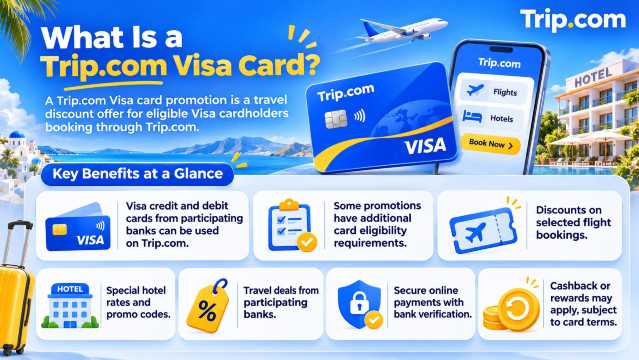
A Trip.com Visa card promotion is a travel discount offer available to eligible Visa cardholders booking through Trip.com. It is not necessarily a separate credit card issued by Trip.com.
Visa credit and debit cards from participating banks can be used to pay for travel bookings on Trip.com. However, special promotions may have additional card eligibility requirements.
Depending on the offer, eligible Visa cardholders may enjoy:
- Discounts on selected flight bookings.
- Special hotel rates and promotional codes.
- Travel deals from participating banks.
- Secure online payments with additional bank verification.
- Cashback or rewards offered by their card issuer, subject to card terms.

Trip.com Visa Card Promos for Filipino Travelers
Trip.com works with Visa and participating financial institutions to offer travel discounts. Available promotions depend on the issuing bank, card type, booking period, and offer conditions.
Trip.com x Visa Philippines Promotion

The official Trip.com x Visa promotion offers discounts on eligible flight and hotel bookings when customers pay using qualifying Visa cards issued in the Asia-Pacific region.
| Booking Type | Visa Discount | Promo Code |
|---|---|---|
Flight tickets | 3% off eligible flights | APACVISAFLT |
Hotel bookings | 8% off eligible hotels | APACVISAHTL |
Promotion period: May 1, 2025 to December 31, 2026.
Important conditions:
- A valid Visa card issued in the Asia-Pacific region is required.
- Customers must have a Trip.com membership account.
- Bookings must be made through the designated promotion page.
- Payment must be completed in the applicable local currency.
- Promo codes are limited and subject to availability.
- Each eligible Trip.com member can use the promotion up to five times during the promotion period.
- Discounts cannot be combined with other offers.
- The hotel promotion does not apply to Pay at Hotel bookings.
Availability and eligibility are confirmed during checkout.
Metrobank Visa Card Promos on Trip.com

Filipino travelers holding eligible Metrobank Visa credit cards may also qualify for separate Trip.com travel promotions.
According to Trip.com Metrobank's promotion, eligible Metrobank credit cardholders, including qualifying Visa cardholders, can receive the following discounts:
| Booking Type | Discount | Minimum Spend | Promo Code |
|---|---|---|---|
Flights | ₱2,500 off | ₱15,000 | MBTRIPFLYQ4 |
Hotels | ₱2,500 off | ₱15,000 | MBTRIPHTLQ4 |
Booking period: October 1 to December 31, 2026.
Travel period: October 1, 2026 to December 31, 2027.
Both codes are limited to 262 redemptions each. Each code can be used once per Trip.com account during the promotion period, subject to eligibility and availability.
The offer applies to selected Metrobank credit cards, including eligible Visa and Mastercard products. Metrobank debit and prepaid cards are excluded.
Note: The Metrobank and Visa Asia-Pacific promotions are separate offers. Their codes cannot be combined on the same booking.
How to Use a Visa Card Promo Code on Trip.com
Using a Visa discount on Trip.com is straightforward, but you must follow the conditions of your chosen promotion.
- Visit the promotion page. Open the Trip.com Visa offer or your participating bank's official promotional page.
- Sign in to Trip.com. Create an account if you are a new customer.
- Choose your booking. Search for eligible flights or hotels and select your preferred option.
- Review the booking details. Check the traveler information, travel dates, and payment amount.
- Enter the promo code. Add the applicable Visa or bank promotion code in the coupon field.
- Select an eligible card. Enter your Visa card information and complete any required bank verification.
- Confirm the discount. Make sure the discounted total appears before submitting payment.
After successful payment and confirmation, you can check your reservation under your Trip.com account.
Who Can Use Trip.com Visa Card Discounts?
Not every Visa card automatically qualifies for every promotion. Eligibility depends on the specific offer.
| Requirement | What Filipino Travelers Should Check |
|---|---|
Card type | Whether Visa credit, debit, or supplementary cards qualify |
Issuing bank | Whether the bank is included in the promotion |
Card status | Whether the card is active and eligible for online transactions |
Booking channel | Whether the offer requires a designated promotion page |
Payment currency | Whether payment must be made in Philippine pesos |
Minimum spend | Whether the booking meets the required amount |
Promo availability | Whether redemption limits have been reached |
Travel dates | Whether the planned trip falls within the eligible travel period |
For bank-specific promotions, check the issuing bank's official website before completing payment.
Can You Use a Philippine Visa Debit Card on Trip.com?
Yes. Trip.com accepts Visa debit cards as a payment method, provided the card is enabled for the transaction and payment is approved by the issuing bank.
However, being able to pay with a Visa debit card does not automatically make it eligible for every Visa promotion.
For example, some bank-specific discounts are limited to eligible credit cards, while other Visa offers may have different requirements.
To avoid payment issues, check that your card has sufficient available funds and supports online transactions.
How to Pay on Trip.com Using a Visa Card
You can use an eligible Visa card to pay for bookings on the Trip.com website or mobile app.
Step-by-Step Payment Guide
- Visit Trip.com Philippines.
- Select your flight, hotel, or other travel product.
- Continue to the payment page.
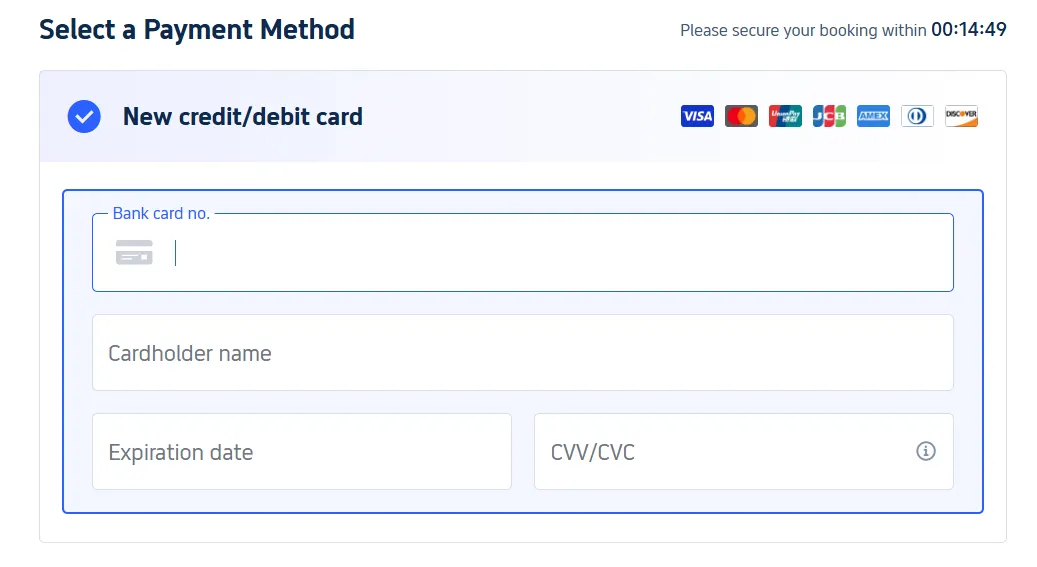
- Choose Credit/Debit Card.
- Enter your cardholder name, card number, expiration date, and security code.
- Apply an eligible promo code if available.
- Review the total amount and confirm your payment.
- Complete any additional verification requested by your bank.
Your bank may use Visa Secure to authenticate the transaction through a one-time passcode, biometric verification, or another approved method.
Is It Safe to Use a Visa Card on Trip.com?
Trip.com supports card payments, and participating Visa issuers may use Visa Secure to provide an additional layer of authentication.
According to Visa Philippines, this process helps confirm that online payments are being made by the authorized cardholder.
For safer transactions:
- Use the official Trip.com website or app.
- Never share your card PIN or one-time password.
- Check the payment amount before confirming.
- Avoid entering payment information through suspicious links.
- Review your bank transactions after making a booking.
 NO.1







































































Why Is My Trip.com Visa Promo Code Not Working?
If your Visa discount is not applying, there may be an issue with your booking or card eligibility.
| Possible Reason | What You Can Do |
|---|---|
Promo code expired | Check the official promotion dates |
Redemption limit reached | Confirm whether the offer is still available |
Card not eligible | Review the participating bank and card requirements |
Wrong booking channel | Return to the required promotion page |
Minimum spend not met | Check the qualifying booking amount |
Unsupported booking | Verify whether the flight or hotel is included |
Incorrect payment currency | Select the required currency |
Another promotion applied | Remove incompatible coupons |
If the payment is unsuccessful, check the booking status before attempting another transaction to avoid duplicate charges.
For additional assistance, visit Trip.com Customer Support.
Tips to Save More with Trip.com Visa Card Promos
Compare Visa Discounts Before Booking
Not all Visa promotions offer the same savings. A percentage-based discount may work better for a smaller purchase, while a fixed-value promotion may offer greater savings on an eligible higher-value booking.
Always compare the final payable amount.
Check the Promo Validity
Some promotions require customers to book during a specific period, while others also restrict travel or hotel stay dates.
Review both periods before applying the coupon.
Read the Cancellation Policy
Discounted flights and hotel bookings may have different cancellation or refund conditions.
A Visa promotion does not automatically make a nonrefundable booking refundable.
Check Currency and Bank Fees
Some card issuers may charge international transaction or currency conversion fees.
Before paying, review the displayed booking currency and your issuing bank's applicable charges.
FAQs About Trip.com Visa Card
-
Can I use a Philippine Visa card on Trip.com?
-
Can I combine Trip.com Visa discounts with other coupons?
-
Can I get a refund if I book with a Visa card?
-
Are Trip.com Visa promotions available for all hotels?
-
Do Trip.com Visa card promotions have an expiration date?