

How to Cancel Train Tickets on Trip.com: Refund Guide

By Trip.com
November 23, 2026

Need to cancel a train ticket booked on Trip.com? Whether you're traveling around China, Hong Kong, South Korea, or Japan, you can manage eligible train bookings through the Trip.com app or website. However, cancellation fees and refund conditions depend on the railway operator, ticket type, and departure time.
This guide explains how to cancel train tickets on Trip.com, check refund fees, change your booking, and track your refund.
What Train Tickets Can You Book on Trip.com?
Trip.com allows travelers to search, book, and manage train tickets from several railway operators, including China Railway, Hong Kong's MTR, South Korea's Korail, and selected railway services in Japan.
Trip.com acts as a booking platform, while the railway operators determine the applicable cancellation rules, refund fees, and deadlines.
Here are the main railway services covered in this guide:
| Railway Operator | Destination | Train Services |
|---|---|---|
Mainland China | High-speed G, D, and C trains and other rail services | |
Hong Kong and Mainland China | Cross-border high-speed trains | |
South Korea | KTX and other Korail trains | |
Japan | Shinkansen and selected JR services |
Cancellation conditions vary between operators. Always review the refund policy shown in your booking before submitting a request.
How Much Does It Cost to Cancel a Train Ticket on Trip.com?
Train ticket cancellation fees on Trip.com depend on the railway operator, ticket type, and how early you request a refund. China, Hong Kong, and South Korea have different cancellation policies.
China High-Speed Train Cancellation Fees
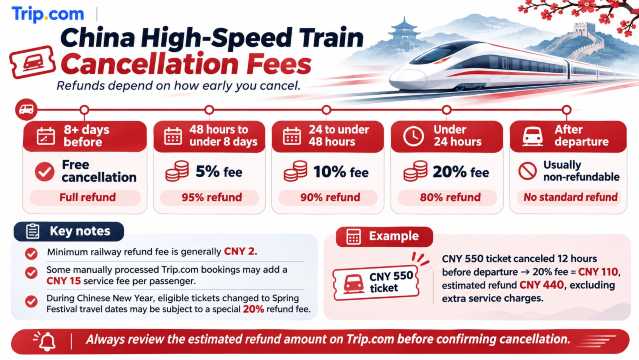
China Railway charges cancellation fees based on the time remaining before departure.
| Time Before Departure | Cancellation Fee | Refund Amount |
|---|---|---|
8 days or more | Free | 100% |
48 hours to less than 8 days | 5% | 95% |
24 to less than 48 hours | 10% | 90% |
Less than 24 hours | 20% | 80% |
After departure | Generally non-refundable | No standard refund |
Important Rules:
- The minimum railway refund fee is generally CNY 2.
- Some manually processed Trip.com bookings may incur an additional CNY 15 service fee per passenger.
- During Chinese New Year, a special 20% refund fee may apply to eligible tickets changed to trains departing within the Spring Festival travel period.
Example: If your ticket costs CNY 550 and you cancel 12 hours before departure, the 20% cancellation fee is CNY 110. You will receive CNY 440, excluding additional service charges.
Hong Kong High-Speed Train Cancellation Fees
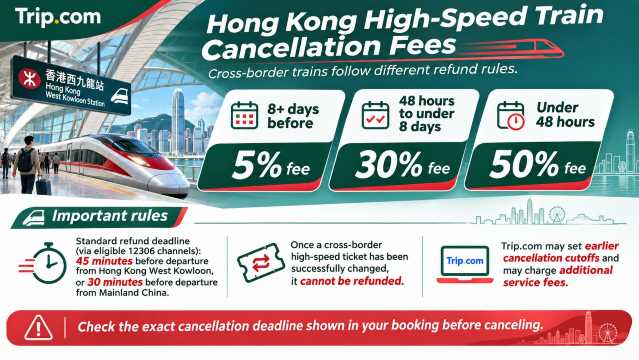
Hong Kong cross-border high-speed trains follow different cancellation rules.
| Time Before Departure | Cancellation Fee |
|---|---|
8 days or more | 5% |
48 hours to less than 8 days | 30% |
Less than 48 hours | 50% |
Important Rules:
- The standard refund deadline through eligible 12306 channels is 45 minutes before departure from Hong Kong West Kowloon or 30 minutes before departure from Mainland China.
- Successfully changed cross-border train tickets are non-refundable.
- Trip.com may have earlier cancellation deadlines and additional service fees.
South Korea KTX Train Cancellation Fees
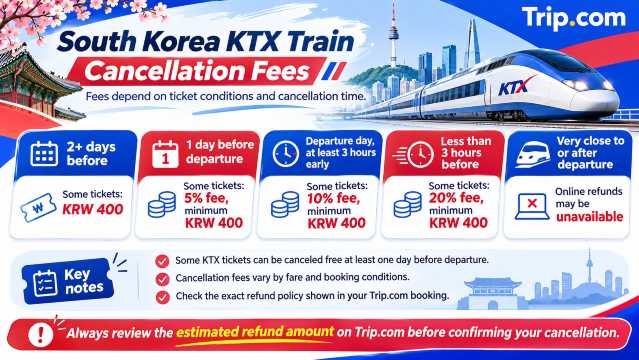
South Korea's KTX cancellation fees depend on the ticket conditions and departure time.
| Time Before Departure | Cancellation Fee |
|---|---|
2 days or more | Some tickets: KRW 400 |
1 day before departure | Some tickets: 5%, minimum KRW 400 |
Departure day, at least 3 hours before | Some tickets: 10%, minimum KRW 400 |
Less than 3 hours before departure | Some tickets: 20%, minimum KRW 400 |
Very close to or after departure | Online refunds may be unavailable |
Important Rules:
- Some KTX tickets allow free cancellation at least one day before departure.
- Cancellation fees vary depending on the ticket and booking conditions.
- Check the exact refund policy in your Trip.com booking before canceling.
⚠️ Important: Cancellation fees and deadlines vary by railway operator. Always review the estimated refund amount on Trip.com before confirming your cancellation.
What About Japan and Other Train Destinations?
For train tickets in Japan, the UK, Europe, and other destinations, cancellation conditions depend on the railway operator and fare type.
Some tickets allow refunds before departure, while others have restrictions or are non-refundable. Discounted fares may also have stricter conditions.
Rather than applying the China or South Korea fee tables to these routes, check the cancellation policy shown in your individual Trip.com booking.
How to Cancel Train Tickets on Trip.com
You can request a train ticket cancellation through the Trip.com app or website. The process is similar for most eligible bookings.
Cancel Train Tickets Through the Trip.com App
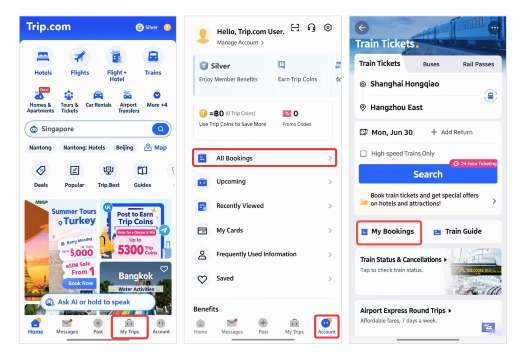
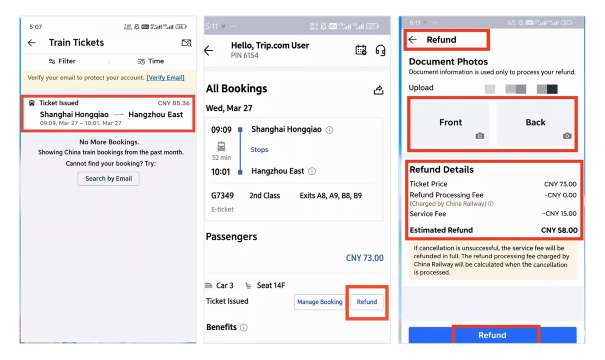
Follow these steps to cancel your train ticket:
- Open the Trip.com app and sign in to your account.
- Go to My Bookings or All Bookings.
- Select Trains to view your train reservations.
- Choose the train ticket you want to cancel.
- Tap Cancel Booking, Refund, or Request a Refund, depending on the available option.
- Review the cancellation conditions, refund amount, and applicable fees.
- Follow the instructions and confirm your cancellation request.
- Check your booking status to see whether the cancellation has been completed.
For some bookings, you may need to provide additional passenger information or identification documents.
💡 Pro Tip: Check your refund amount before confirming. If you're only changing your travel date, compare the cost of changing your ticket with canceling and booking a new one.
Cancel Train Tickets Through the Trip.com Website
You can also manage your train booking using the Trip.com website.
- Visit Trip.com and sign in.
- Open My Bookings.
- Find your train reservation.
- Select the booking to view its details.
- Click the available cancellation or refund option.
- Review the refund conditions and confirm your request.
- Return to your booking details to check the cancellation status.
Some tickets may not support online cancellation, particularly when a cancellation deadline has passed or additional station procedures are required.

How to Cancel a China Train Ticket After Collecting a Paper Receipt
If you have already collected a physical railway reimbursement receipt, you may need to complete additional steps to cancel your ticket.
For eligible China Railway tickets:
- Submit a refund request through Trip.com or the railway booking system.
- Visit an eligible China Railway ticket counter if station processing is required.
- Bring your original passport and printed reimbursement receipt.
- Complete the verification process and return the receipt.
- If applicable, complete the station procedure within 180 days after your successful online refund application.
Station-handled refunds may take around 7–20 working days, depending on your payment method and booking conditions.
⚠️ Important: Mainland China now generally uses electronic invoices for domestic railway tickets. These procedures mainly apply if you have already collected a physical reimbursement receipt or are traveling on certain cross-border trains.
Important China Train Online Cancellation Restrictions
China Railway has specific processing hours and cancellation deadlines.
Online Cancellation Hours: 8:00 AM to 8:00 PM (GMT+8)
For certain Trip.com China train booking services, online refund requests are generally processed between 8:00 AM and 8:00 PM China Standard Time (GMT+8).
However, the available processing hours can vary by booking channel and railway system.
If online cancellation is unavailable, travelers may need to visit a railway station before the applicable refund deadline.
The 25-Minute Online Cancellation Rule
Trip.com advises that some China train tickets cannot be canceled online when less than 25 minutes remain before departure.
If the online refund option is unavailable, you may need to request assistance at the station.
| Situation | Cancellation Option |
|---|---|
More than 25 minutes before departure, within supported online hours | Trip.com app or website |
More than 25 minutes before departure, outside supported online hours | Check available online options or visit the station |
Less than 25 minutes before departure | Station counter may be required |
After departure | Generally non-refundable, except applicable special cases |
What If Your Train Departs in Less Than 25 Minutes?
If your train is about to depart and you cannot cancel online:
- Go to the railway station's ticket refund counter immediately.
- Bring your original Philippine passport used for booking.
- Provide your train details and booking confirmation.
- Ask whether a refund can still be processed before departure.
- Review the cancellation fee before confirming.
For standard China Railway tickets canceled less than 24 hours before departure, the usual railway refund fee is 20%.
How to Change a China Train Ticket on Trip.com
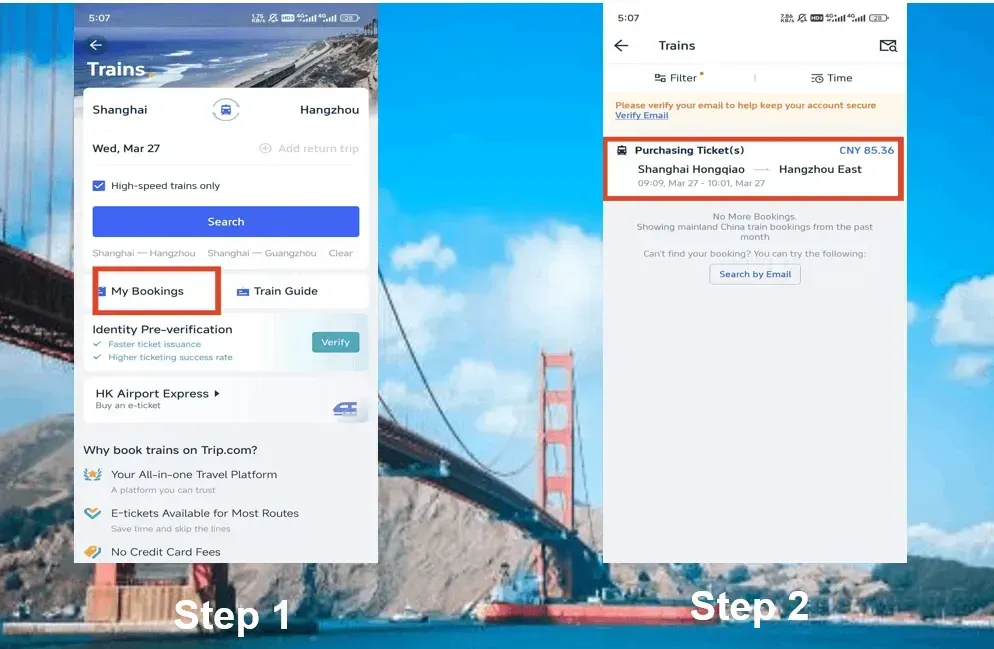
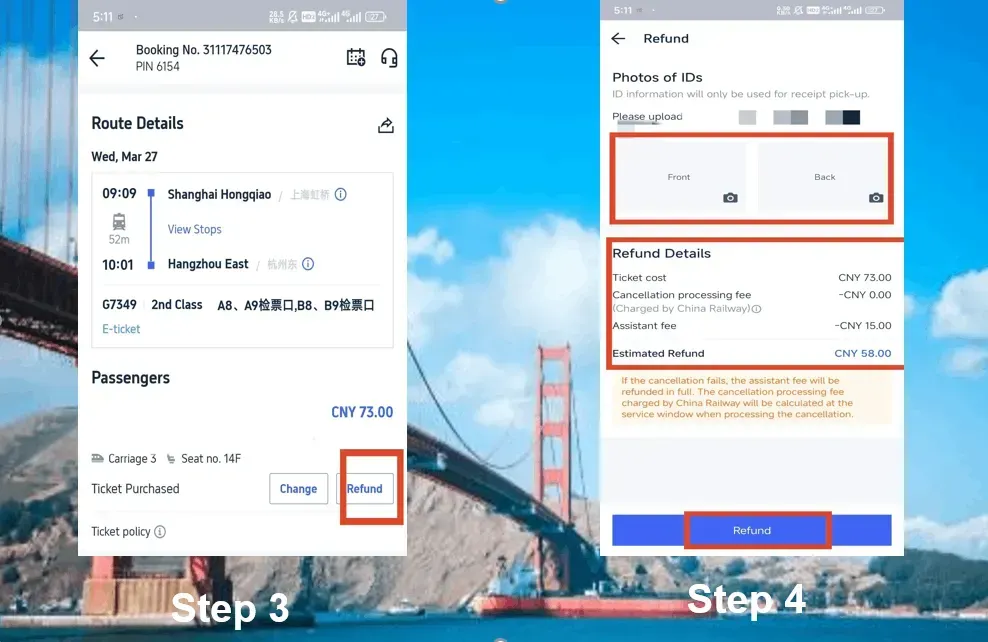
If you no longer want to travel on your original train, changing your ticket may be another option.
China Railway allows eligible tickets to be changed, subject to seat availability and the applicable rules.
What Can You Change on a China Train Ticket?
Depending on your ticket and the available services, you may be able to change:
- Departure date
- Train number
- Seat or service class
- Arrival station, if the request is made at least 48 hours before departure and the ticket meets the railway conditions
Important China Train Ticket Change Rules
- China Railway normally allows only one change per ticket.
- Online changes through Trip.com are generally available during designated processing hours, often 8:00 AM to 10:00 PM (GMT+8).
- A ticket cannot normally be changed again after the first successful change.
- Certain changes after the original train's departure may be allowed under railway rules.
- Tickets changed after the original train departs cannot subsequently be refunded.
- Passenger names and passport numbers generally cannot be changed through the standard ticket-change function.
China Train Ticket Change Fee Table
| Time of Change Request | New Train Departure | Change Fee |
|---|---|---|
48 hours or more before departure | Within the permitted advance booking period | Free |
Less than 48 hours before departure | Original departure date or earlier | Free |
24 to less than 48 hours before departure | A later travel date | 5% |
Less than 24 hours before departure | A later travel date | 15% |
Departure day, within the applicable change deadline | Another train on the original departure date | Free |
Departure day, within the applicable change deadline | A train on a later date | 40% |
After the final railway change deadline | Not permitted | N/A |
Percentage-based railway change fees are generally calculated using the lower fare of the original and replacement tickets.
Trip.com may apply separate service fees, and online change deadlines may be earlier than the railway's final deadline.
Can You Cancel a China Train Ticket After Changing It?
Yes, in some cases.
China Railway generally allows eligible tickets changed before the original train's departure to be refunded under the applicable cancellation rules.
However:
- A ticket can normally be changed only once.
- Tickets changed after the original train departs are non-refundable.
- Special refund fees may apply if the changed ticket falls within the Spring Festival travel period.
- Hong Kong cross-border trains have stricter rules, and successfully changed tickets are generally non-refundable.
💡 Pro Tip: If you're unsure whether you'll travel, compare the cost of canceling and booking a new ticket with the cost of changing your existing ticket.
How Long Does a Trip.com Train Ticket Refund Take?
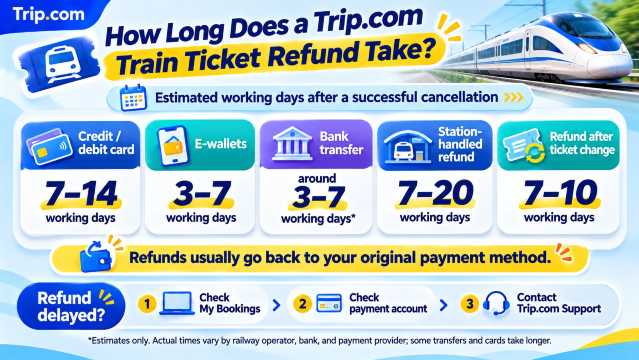
After a successful cancellation, refunds are generally returned to the original payment method.
The processing time depends on the railway operator, payment provider, and bank.
Estimated Train Ticket Refund Processing Times
| Payment Method | Estimated Refund Time |
|---|---|
Credit or debit card | Around 7–14 working days |
E-wallets, including supported PayPal, Alipay, or WeChat Pay payments | Around 3–7 working days |
Bank transfer | Around 3–7 working days |
Station-handled refunds | Around 7–20 working days |
Refunds resulting from online ticket changes | Around 7–10 working days |
These are estimates rather than guaranteed processing times. Your actual refund may take longer depending on the payment provider and railway operator.
Important Things to Know About Train Ticket Refunds
- Refunds generally return to the payment method used for the original purchase.
- The time needed for the money to appear depends on the bank or payment provider.
- Some banks may take additional time to process refunds.
- Trip.com may send an email or notification once your refund has been processed.
- You can check your refund status in My Bookings.
What Should You Do If Your Refund Has Not Arrived?
If your refund has not been credited within the expected timeframe:
- Check the refund status in your Trip.com account.
- Review your credit card, debit card, or e-wallet transaction history.
- Prepare your Trip.com booking number, passenger name, payment method, and cancellation date.
- Contact Trip.com Customer Support for assistance.
- If Trip.com confirms the refund has been issued, contact your bank or payment provider for further details.
 NO.1


















































































Special Circumstances for Train Ticket Cancellations
Certain situations, such as railway service cancellations or severe weather, may qualify for different refund arrangements.
What If the Railway Operator Cancels Your Train?
If China Railway or another railway operator cancels your scheduled train, you may qualify for a full ticket-fare refund without the standard cancellation fee.
For China Railway cancellations:
- Eligible electronic tickets can usually be refunded through the applicable online booking channel.
- Tickets requiring station processing must be handled through an eligible railway ticket counter.
- Refund requests for operator-canceled China Railway trains can generally be made within 30 days of the scheduled departure date.
- Alternative train arrangements may also be available under the operator's rules.
How Do You Know If Your Train Has Been Canceled?
You can check for cancellation updates through:
- Email or SMS notifications from Trip.com
- Your booking status in the Trip.com app
- Official railway operator announcements
- Railway station information screens or staff
If your train has been officially canceled, review the available refund or rebooking options before submitting a request.
⚠️ Important: A full refund of the railway ticket fare does not necessarily mean every third-party service fee or optional add-on will be refunded. Check the applicable booking terms.
What Happens If Your Train Is Affected by Bad Weather?
Severe weather or natural disasters can disrupt railway services.
Possible disruptions include:
- Typhoons
- Flooding
- Earthquakes
- Heavy snowfall
- Other emergencies affecting railway operations
If the railway operator cancels the train, passengers may qualify for a refund without the normal railway cancellation charge.
However, if the train continues operating and you decide not to travel, the standard cancellation rules may still apply.
Before canceling:
- Check official railway service announcements.
- Review your train's operating status on Trip.com.
- Check whether the operator has announced special refund arrangements.
- Contact Trip.com customer support if you need assistance.
💡 Pro Tip: If severe weather affects your trip, check the latest railway announcements before canceling your ticket yourself. Operator-initiated cancellations may have different refund conditions from voluntary cancellations.







Do You Need Your Passport to Cancel a Train Ticket on Trip.com?
You can usually cancel an eligible train ticket through Trip.com without submitting your passport again. However, some railway operators may require identity verification, especially for tickets booked using a passport.
For Filipino travelers, the requirements depend on the destination, railway operator, and ticket type.
Important Passport Verification Rules
- Passenger information must match the identification details used during booking.
- Some railway operators require a passport number or other identification when booking train tickets.
- Online cancellations usually do not require a passport upload unless additional verification is requested.
- If cancellation must be completed at a railway station, bring the original passport or identification document used for booking.
- Train tickets are generally non-transferable when issued under a passenger's name, although rules vary by operator.
- Passport checks may also be required when boarding international or cross-border trains.
⚠️ Important: If your name or passport number is incorrect, contact Trip.com customer support. Some railway operators may require you to cancel your existing ticket and book a new one, subject to the applicable refund policy.
Important Tips Before Canceling Train Tickets on Trip.com
Before canceling your train ticket, check the railway operator's refund policy to avoid unnecessary fees or losing your refund eligibility.
- Cancel as early as possible: Cancellation fees may increase as your departure time approaches.
- Check the refund policy: Different railway operators have different cancellation fees, deadlines, and conditions.
- Review your refund amount: Check the cancellation charges and estimated refund before confirming your request.
- Consider changing your ticket: If your travel plans have changed, rescheduling may be cheaper than canceling and booking again.
- Check for train cancellations: If the railway operator cancels your train, you may qualify for a full ticket-fare refund.
- Keep your booking details: Save your booking confirmation, ticket number, and payment information for refund tracking.
- Allow time for processing: Refunds usually return to your original payment method, but processing times vary by bank and payment provider.
- Contact customer support: If you cannot cancel online or your refund is delayed, visit Trip.com Customer Support for assistance.
FAQs About Canceling Train Tickets on Trip.com
-
Does Trip.com charge a fee for canceling train tickets?<br>
-
Can I get a full refund for my train ticket?
-
Can I change my train ticket instead of canceling it?<br><br>
-
What happens if the railway operator cancels my train?
-
Can I cancel a Hong Kong or South Korea train ticket on Trip.com?