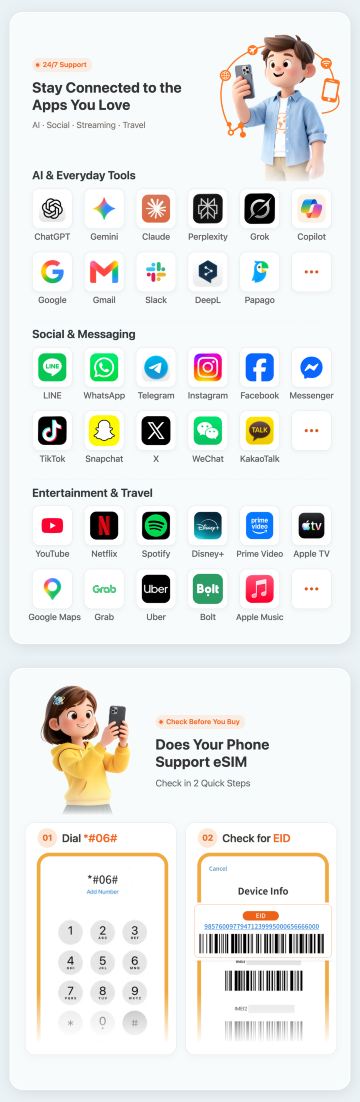
Jordan eSIM | All AI & TikTok | 1–30 Days | QR Code

Jordan eSIM | All AI & TikTok | 1–30 Days | QR Code

4.2/5
Average
(72 reviews)
2K+ booked
Use anytime during validity
Book now for today
Booking confirmation
Free cancellation by 12:00 AM, 1 day before the expiration date
From
MXN29.66
Limited-time sale
5% off
Device info

• Coverage: Jordan

• Carrier: Umniah

• Network Type: 4G

Product details
Show less
Validity period
Valid for 90 days from the booking date, Valid for 1 use(s) only
What's included
eSIM + Mobile Data
Personal Hotspot
Voice & SMS
How to use
■ Before You Fly
Use One-Tap Installation from your Trip.com order page for the fastest setup.
If unavailable, scan the QR Code in your voucher.
 
• iPhone: Settings > Cellular > Add eSIM
• Android: Settings > Network & Internet > SIMs > Add eSIM
 
■ Upon Arrival
• Turn ON the eSIM
• Select the eSIM for Mobile Data
• Turn ON Data Roaming
 
The eSIM will connect automatically once a supported network is detected.
 
■ Quick Troubleshooting
• Ensure the eSIM is turned ON
• Ensure Data Roaming is turned ON
• Select the eSIM for Mobile Data
• Toggle Airplane Mode ON/OFF or restart your device
• Set the APN to "bicsapn" if needed
• Turn OFF VPN services if connection issues persist
 
■ Check eSIM Status & Usage
https://search.t-sim.hk/d/trip/en
 
Need help? Contact the Activity Provider for 24/7 support.
Change & cancellation policies
If a cancellation request is submitted before 12:00 AM, 1 day(s) prior to the expiration date, no cancellation fee will be charged.
If a cancellation request is submitted after 12:00 AM 1 day(s) before the expiration date, a fee of 100% will be charged.
This product cannot be canceled after activation.
If a discount is applied, the cancellation fee will be calculated based on the original price before the discount and will not exceed the amount paid.
Partial refund is not available.
Important note

■ Installation Notes

• Ensure your device is connected to a stable internet connection before installing the eSIM.

• If any error appears during installation, the eSIM may have already been added. Please check Settings > Mobile Services / Cellular. If a new plan is listed, the installation was successful.

• The eSIM can be reinstalled up to 5 times on the same device. Please remove the existing eSIM before scanning again.

• Once installed, the eSIM is bound to the device and cannot be transferred to another phone.


■ Activation & Usage

• For multi-country plans, install and activate the eSIM only when you are ready to use it at your destination. Connecting to a supported network within the coverage area may start the plan earlier than expected.

• You can check your remaining data via your booking confirmation page.


■ Connectivity Tips

• Network performance may vary depending on local coverage, congestion, and user traffic conditions.

• If the connection is unstable, please toggle Airplane Mode or restart your device. If the issue persists, please contact customer support.

• Some banking, payment, or streaming apps may apply regional restrictions or additional security checks when used abroad. Please check with the service provider before travel.

FAQ