Philippines 5G eSIM | Supports Google Maps/Chat GPT | Daily package/Data package | 24-hour billing | 1-30 days | QR code

Philippines 5G eSIM | Supports Google Maps/Chat GPT | Daily package/Data package | 24-hour billing | 1-30 days | QR code

4.4/5
Average
(1,480 reviews)
31K+ booked
Use anytime during validity
Book now for today
Booking confirmation
Renewable
Free cancellation by 12:00 AM, 1 day before the expiration date
From
€0.10
Limited-time sale
50% off
Device info

Product Description

Compatible Models

Supported Installations: This product supports up to 10 installations on the same device, including the initial installation, with the option to uninstall and reinstall.

Signal Coverage

Philippines: Smart (Preferred Network) 5G /Globe 5G

Product details

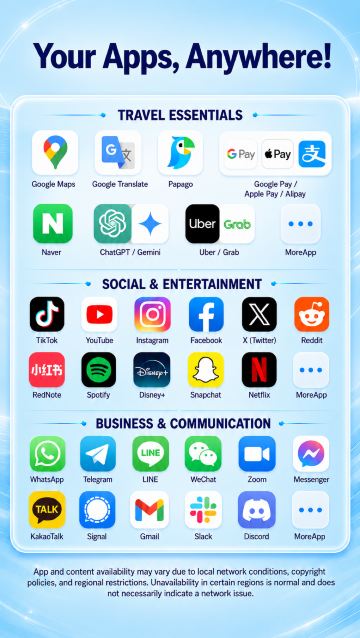
[About TikTok Network Compatibility Issues]

The network operator has optimized the service's network compatibility with TikTok, but does not guarantee availability on all devices. It is recommended to use devices that support the new technology. Refund requests due to device compatibility issues may not be accepted.

iOS device troubleshooting: If you encounter TikTok login issues, please try: updating the system and reinstalling the app. Log in to the official website through a browser, then return to the app and try again.

Android devices: Currently, TikTok can only be used through a browser (web version); the TikTok app is temporarily unavailable.

For a better experience, we recommend using the web version.

:

Show less
Validity period
Valid for 60 days from the booking date, Valid for 1 use(s) only
What's included
eSIM+Data Plan
Supports Hotspot Sharing
Renew/Recharge
Calls + SMS
How to use
[Installing eSIM]
Please confirm before installation:
1. Your device supports eSIM and the phone is not carrier-locked.
2. The device is connected to a stable mobile network or WiFi.
3. Before the initial installation, please confirm the device you plan to use. eSIM can only be reinstalled on the device on which it was initially installed after deletion. If you reinstall without deleting it first or reinstall on a different device, the code will show as invalid.
Method 1: One-click installation
Complete quick installation by clicking the "Install" button in the Trip. com APP or clicking the "One-click installation" link in the voucher (iOS devices require version 17. 4 or above).
Method 2: Scan the QR code/manual input installation (general)
1. Open the QR code attachment in the Trip. com App order and print it in advance or save it to another electronic device. (iOS 17 or above and some Android phones can save the QR code image directly to the phone. )
2. Go to "Cellular/Mobile Network" (iOS) or "SIM Card Management" (Android) in "Settings".
3. With the phone connected to the internet, tap "Add eSIM/Add Cellular Plan" (iOS) or "Add SIM Card" (Android), then scan the QR code to complete installation.
4. If scanning is not possible, you can also manually enter the "SM-DP+ address" and "activation code" provided in the order to complete installation.
5. If step 3 or step 4 is unsuccessful, it may be because the device is carrier-locked by the local carrier (restricting use of other networks). Please contact your carrier to unlock it before installing the eSIM.
[Enabling eSIM]
Please perform the following settings only after arriving at the destination to avoid the eSIM becoming invalid due to premature activation of the plan while passing through other covered countries/regions:
1. Turn off the primary SIM (or turn off the primary SIM's "Mobile Data") and turn on the eSIM network switch.
2. Enable the eSIM:
iOS: Select and enable the eSIM in "Cellular/Mobile Data".
Android: Enable the eSIM in "SIM Card Manager/SIM Card" and set "Mobile Data" to the eSIM.
3. Turn on "Data Roaming".
4. If you still cannot access the internet after the above settings, please set the APN and restart the phone. See the instructions below for details.
[About APN]
1. Settings path:
iOS: "Settings"> "Cellular"> "Cellular Data Network"
Android: "Settings"> "Mobile Network/Cellular Network"> "Access Point Names (APN)"
2. Enter APN: cmhk
3. Restart the phone.
[How to use renewed plans]
After the current plan expires, the renewed plan will be activated automatically. Do not scan the QR code again.
1. For "high-speed first, then low-speed" plans: low-speed data will continue to be used until the original plan expires. Restart the phone to start using the renewed plan. (If you need to end it early, please contact customer service. )
2. For "high-speed data only (until used up)" plans: after the high-speed data is used up, restart the phone to start using the renewed plan.
If you need to use the eSIM on another device, please choose "Book Again" instead of "Request Renewal". Renewed plans cannot be transferred to another device.
Change & cancellation policies
If a cancellation request is submitted before 12:00 AM, 1 day(s) prior to the expiration date, no cancellation fee will be charged.
If a cancellation request is submitted after 12:00 AM 1 day(s) before the expiration date, a fee of 100% will be charged.
This product cannot be canceled after activation.
If a discount is applied, the cancellation fee will be calculated based on the original price before the discount and will not exceed the amount paid.
Partial refund is not available.
Important note

[eSIM Usage Conditions]

1. The device supports eSIM functionality.

How to check: On the phone dialer screen, dial *#06#. Generally, if there is an EID, it means eSIM is supported. Without an EID, eSIM cannot be used.


2. The phone is not network-locked.

How to check: Confirm with your carrier whether your device is network-locked.

*Please check before purchase whether the above conditions are met. eSIM can only be used normally when all are satisfied.


[Setting Up eSIM]

eSIM can only be installed under a stable network connection, so before departure, please according to theplan validity periodreasonably arrange the eSIM installation time (it is recommended to install within 6 hours before departure), to avoid installing too early and causing the plan to expire early, which may affect use.


[Enable Data Roaming]

Please ensure that the "Data Roaming" option for the eSIM is enabled.


[Turn Off Domestic SIM Card Roaming]

Before using the eSIM, please ensure that the data roaming function of your domestic SIM card is turned off, to avoid incurring high international roaming charges and data conflicts.


[Maintaining the Principle of Fair Internet Use]

In order to maintain the quality of internet connections and the Fair Usage Policy (FUP), telecom companies around the world sometimes impose traffic restrictions on customers who use a large amount of internet data in a short period of time, which may result in failed internet access or slower network speeds. To ensure that you can connect to the internet normally, please try to avoid watching/downloading videos for long periods, updating software, sharing the internet (hotspot) with others, or other usage behaviors that consume large amounts of data.

FAQ