Korea | PAYCO Lite Card | One Card for Transit & Payment, No Sign-In Needed
View all 5 photos

Korea | PAYCO Lite Card | One Card for Transit & Payment, No Sign-In Needed

5.0/5
Excellent
(11 reviews)
25 booked
Depart from Busan
E-voucher
Use anytime during validity
Book now for today
Booking confirmation
Non-refundable
From
KRW 5,000

Highlights

No registration, no transaction fees — tap your card to ride the subway or bus, insert your card to pay.
No passport show your Trip.com voucher to pick up your card.
Launch bonus: up to ₩5,000 off, applied automatically app.
Product details

PAYCO Lite Card (PAYCO light card)

No passport needed – get your PAYCO lite card in Korea, easily top up, ride and pay.
Show less
Validity period
Valid for 90 days from the booking date, Valid for 1 use(s) only
What's included
Prepaid/Transportation Services
All personal expenses and any costs not mentioned in the inclusions.
How to use
Step 1
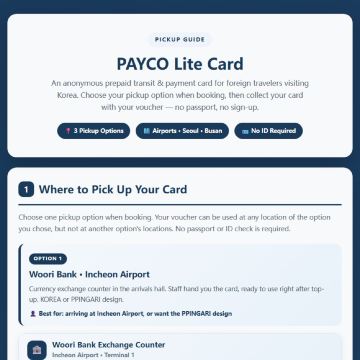
Go to a location of the pickup option you booked: Woori Bank Exchange Counter, CU Convenience Store, or MoneyBox Kiosk. Your voucher cannot be used at another option's locations. See the pickup guide image for addresses and opening hours.
 
Step 2
Woori Bank Exchange Counter / CU: show your Trip.com voucher to the staff – no passport or identity verification required. MoneyBox Kiosk: select [Prepaid Card] > [PAYCO Lite Card Pickup] on the kiosk screen.
 
Step 3
Woori Bank Exchange Counter / CU: staff scan the barcode on the voucher. MoneyBox Kiosk: scan the barcode on the voucher yourself (or tap [Enter manually] and enter the 13-digit voucher number).
 
Step 4
Claim your card. MoneyBox Kiosk: select [Pick Up Card Only] or [Pick Up & Top Up], then take the card from the card slot.
 
Step 5
Collect at a Woori Bank Exchange Counter or MoneyBox Kiosk: Available immediately (MoneyBox: if the screen says the card is not activated, scan the QR code on the back of the card and register it in the PAYCO app). Collect at CU: Requires installation of the PAYCO App and card registration (NFC card tap; if your phone does not have NFC, enter the card number).
 
Step 6
Top up your card (cash only) – Payment balances can be topped up at Woori Bank ATMs, any CU branch, or MoneyBox kiosks. If you pick up your card at a Woori Bank Exchange Counter at Incheon Airport, you can also top up on the spot with the staff at the counter. At a MoneyBox Kiosk, you can pick up your card, exchange foreign currency, and top up all at one kiosk. Transportation balances can be topped up at subway station self-service machines or convenience stores (not at MoneyBox kiosks). These two balances are independent of each other.
 
Step 7.
Insert your card to pay at stores, or tap your card to ride the subway and bus.
 
Step 8.
Card setup complete! You can check your balance and usage history anytime in the PAYCO App.
— Important Information —
Official website: https://litecard.payco.com/
Frequently Asked Questions: https://litecard.payco.com/support/faq
Change & cancellation policies
Please note that the booking cannot be canceled once it is confirmed
The selected date and time cannot be modified after booking.
Important note

- Kind tips -

• Lost cards cannot be replaced – please keep them safe. You can report a lost card in the PAYCO App under "Card Management > Report Loss/Deactivate". After reporting a lost card, it will be frozen to prevent misuse.

• The maximum card balance is ₩500,000.

• You can withdraw your card balance via the PAYCO App (you need to complete email verification and password setting first) – withdraw cash at Woori Bank ATMs (₩500 per transaction), withdraw cash at convenience store ATMs (₩1,100 per transaction), or generate a withdrawal barcode in the App and collect cash at a CU store (₩500 per transaction).

• Launch Bonus (up to ₩5,000 off) requires downloading the PAYCO App separately to claim – After claiming, you will automatically receive ₩1,000 off a single purchase of ₩10,000 or more, up to 5 times. Applicable to CU, GS25, 7-Eleven, EMART24, MUSINSA, MEGA COFFEE, and GONG CHA. This promotion is subject to change or termination at any time without notice.

• It does not support direct top-up of the card using other cards (credit cards or debit cards).

• Woori Bank Exchange Rate Discount – Lite Card users can receive a discounted exchange rate at Woori Bank branches: 70% for USD, EUR, JPY and CNY, and 50% for other currencies. Download the PAYCO App to view the voucher and check the details, then present it to the teller at the counter. Not available at ATMs or at any Woori Bank airport branch or exchange counter. This benefit is subject to change or termination at any time without notice.

• MoneyBox kiosks – Payment balance top-up is available at all 8 MoneyBox kiosks, whichever pickup option you chose. 15 currencies can be inserted, including USD, EUR, JPY and CNY; an ID such as a passport is required when topping up in a foreign currency. No change is given. A card cannot be picked up at a kiosk that is out of card stock.

Some information on this page is provided by AI translation

FAQ